

March 2026 meted out a sizeable set of Linux software releases, including updates to FOSS stalwarts GIMP, digiKam, Krita and Blender.
Major new releases were covered with dedicated articles, including Firefox 149 with free built-in VPN, the ‘biggest ever release’ of OpenShot video editor, the new GIMP 3.2.0 release, a bump to terminal tool Ghostty 1.3 and the Opera GX for Linux launch.
A busy month, but those weren’t the only app updates of note.
Below, I run through other releases made in March. While these didn’t get dedicated articles at the time, they offer new features, fixes or changes that are worth knowing about.
FreeCAD fleshed out its features
FreeCAD, the free and open-source 3D modeller, saw its first major update arrive in late March, roughly a year and a half after version 1.0.
The FreeCAD 1.1 release brings a “significant amount of improvements and new features”, according to the release notes, including a new CAM tool library system, transparent Part Design previews and a new 3 point lighting system.
Interactive draggers were added to Part Design features, letting you adjust values by directly dragging in the 3D view. Three-point lighting improves how models look in the viewport, with main light, back light and fill light used.
If you’ve ever struggled to click the right face on a complex 3D model, the new Clarify Selection tool will help. Activate it by pressing G and G again and FreeCAD temporarily makes a model transparent and shows a list of all nearby geometrical entities (object, face, edge, vertex).
FreeCAD’s Assembly workbench sees two additions: a new Create Simulation tool can add motion to joints and produce animations of assemblies; an improved Transform tool supports precise numeric inputs and the ability to align its dragger to any element in the document.
Elsewhere, a search bar got added to the Preferences Editor (always handy), a new Theme Editor introduced to let you customise the interface’s stylesheet (if you want to), and Wayland improvements to resolve blank or missing 3D viewports, particularly on Nvidia GPUs.
The full release notes, and the official YouTube embed above, render (heh) those and other changes in more detail.
Install the official FreeCAD Snap, grab the Flatpak on Flathub or download from the project site.
Blender saw a speed boost
A new version of free and open-source 3D creation suite Blender arrive in March. Blender 5.1 is more of a refinement and polish release to the major 5.0 update last November.
Much of the stability work in this update stems from the Winter of Quality initiative, a coordinated push between December and January to resolve a variety of reported issues.
Animation playback is faster in Blender 5.1, most noticeably in complex scenes with lots of keyframed bones or high-poly meshes; while shading picks up a new Raycast node to allow casting rays against scene geometry (available for both Cycles and EEVEE).
Elsewhere, Grease Pencils fills have been revamped; the Graph Editor adds a non-destructive Gaussian smoothing modifier for F-curves; and the Compositor gains a Sequencer Strip Info node for node-based transition effects.
Full details on the changes can be found in the official Blender 5.1 release notes.
Blender is free, open-source software for Windows, macOS and Linux. Ubuntu users can install the Blender Snap or download an installer on the official website.
Rnote improved its PDF handling
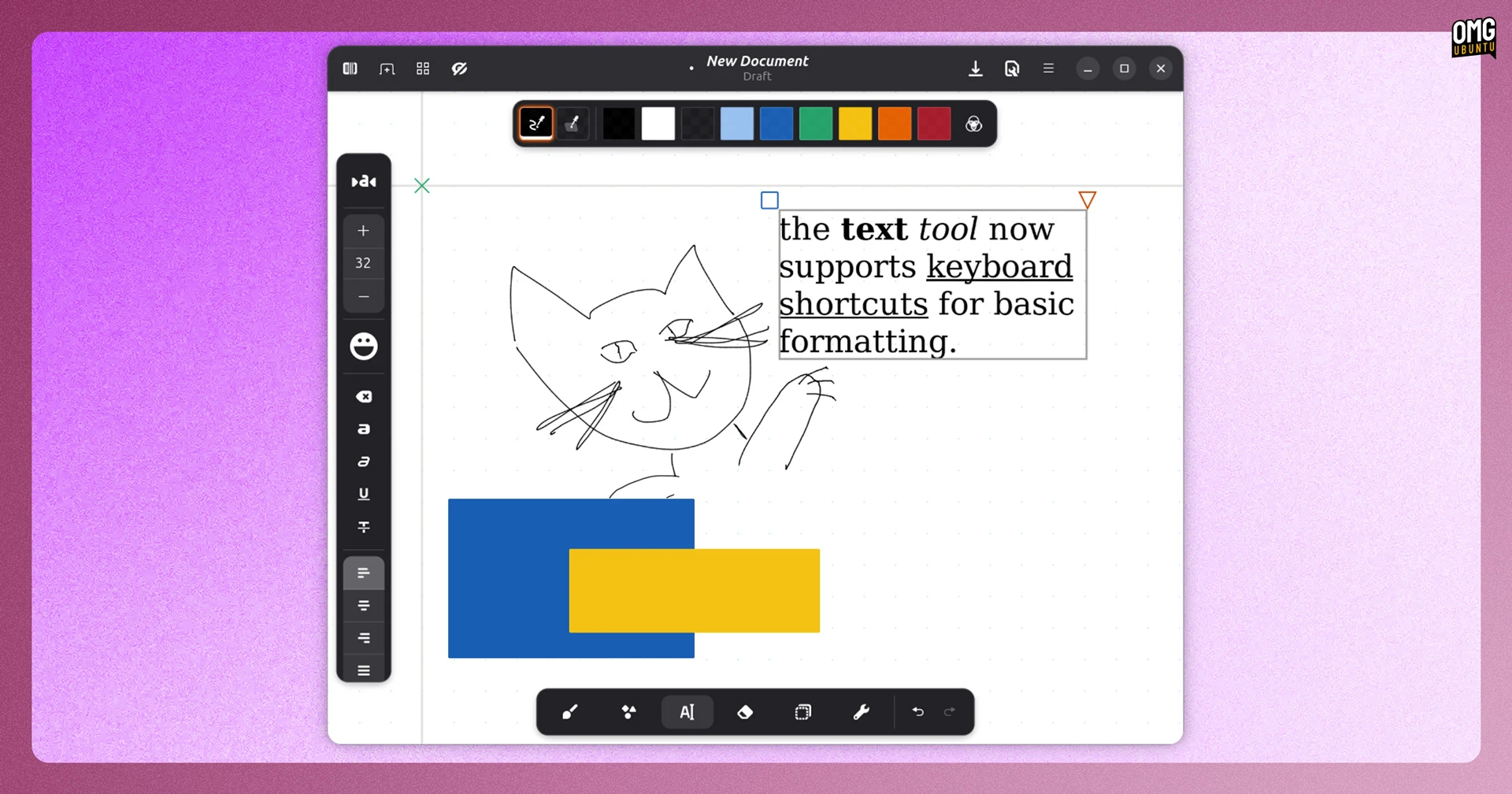
Rnote is a terrific handwritten notes app for Linux, ideal if you own a Linux tablet or a 2-in-1 device with stylus input and regularly like to jot down ideas, doodle diagrams or markup documents.
The Rnote 0.14.0 update released in March adds Xournal++ text importing, atomic file saving, and a small increase in available command-line options, and (long requested) text formatting keyboard shortcuts, albeit only to bold, italicise and underline selected text at present.
You’re also able to ‘apply’ changes to workspace dialogs (e.g., giving a workspace a name) by pressing the enter key rather than having to manually click ‘apply’. The app has also switched its PDF import rendering library from the C++ poppler to the Rust-only hayro.
You can install the latest stable release of Rnote on Ubuntu on Flathub.
DeaDBeeF (finally) defaulted to GTK3
Lightweight music player DeaDBeeF slipped out its first update since last year’s 1.10 release. That shipped with an optional GTK3 UI plugin and here, in DeaDBeeF 1.10.1, it’s now the default. The GTK2 UI remains available for those who want it.
A new lyrics plugin is included, there’s FLAC network streaming support and a new ‘Stop After Queue’ mode if you’d rather playback to cease when your queue is out of tracks. The player can now show album artwork embedded in Opus files.
Download the new DeaDBeeF 1.10.1 on the project website, where official DEB installers are available for Ubuntu users alongside the latest source code and builds for other platforms.
digiKam added a survey tool
digiKam, the open-source photo management application, released v9.0 in March, the first big version in nearly 3 years.
It includes a new Survey tool for quickly reviewing and rating images. This opens in a separate window, which is useful on a second monitor, and acts as a synchronised preview of the main icon view with various tools and access to rating, labels and tags.
digiKam 9.0 uses Qt 6.10.1, improving its Wayland stability, and has revamped assorted elements of its UI including a native Qt Welcome page and rewritten File Copy and File Transfer dialogs. The album view now supports orientation, GPS location and file format sorting.
RAW camera support has been expanded, looping in some of the latest models from Canon, Nikon, Fujifilm, Sony, Panasonic, Hasselblad and Leica.
Get the latest release on the project website, where official AppImage bundles are available, alongside the Flathub and Snap Store versions for Ubuntu users.
Euphonica got an async rewrite
The epically flashy MPD front-end Euphonica saw a “major architectural overhaul and rewrite of the codebase into async Rust”, per the release notes for its latest beta (the app is yet to hit a 1.0 stable release).
Developer Huỳnh Thiện Khiêm also says the codebase has been “vastly simplified” and made easier to contribute to.
Album art now use fade transitions when loading, which should result in a smoother and less abrupt impression during initial library loading from remote MPD servers. Main screens also make use of ‘overall loading spinners as they populate’.
Metadata fetch errors are now communicated via in-app toasts rather than silently failing, and the app will automatically retry to fetch data again; and a “pending tasks” popover shows in the top-left of the window if 3 or more background operations are running.
You can install Euphonica on Linux on Flathub, or grab the source code on GitHub.
Krita saw a dual release
Krita, the free and open-source digital painting application, announced the release of 5.3.0 (stable) and 6.0.0 (experimental Qt 6 port) in March,
The headline addition is sure to be the ground-up rewrite of the text tool.
You can now edit text on-canvas, place text along paths or inside shapes, and enjoy full support for OpenType features, with support for alternates, ligatures and stylistic variants accessible through a new Glyph Palette.
A new dedicated Text Properties docker offers type settings and supports text style presets to save specific settings too, to quickly apply again. Krita is also equipped to import and export text objects from PSD files, should you have need to.
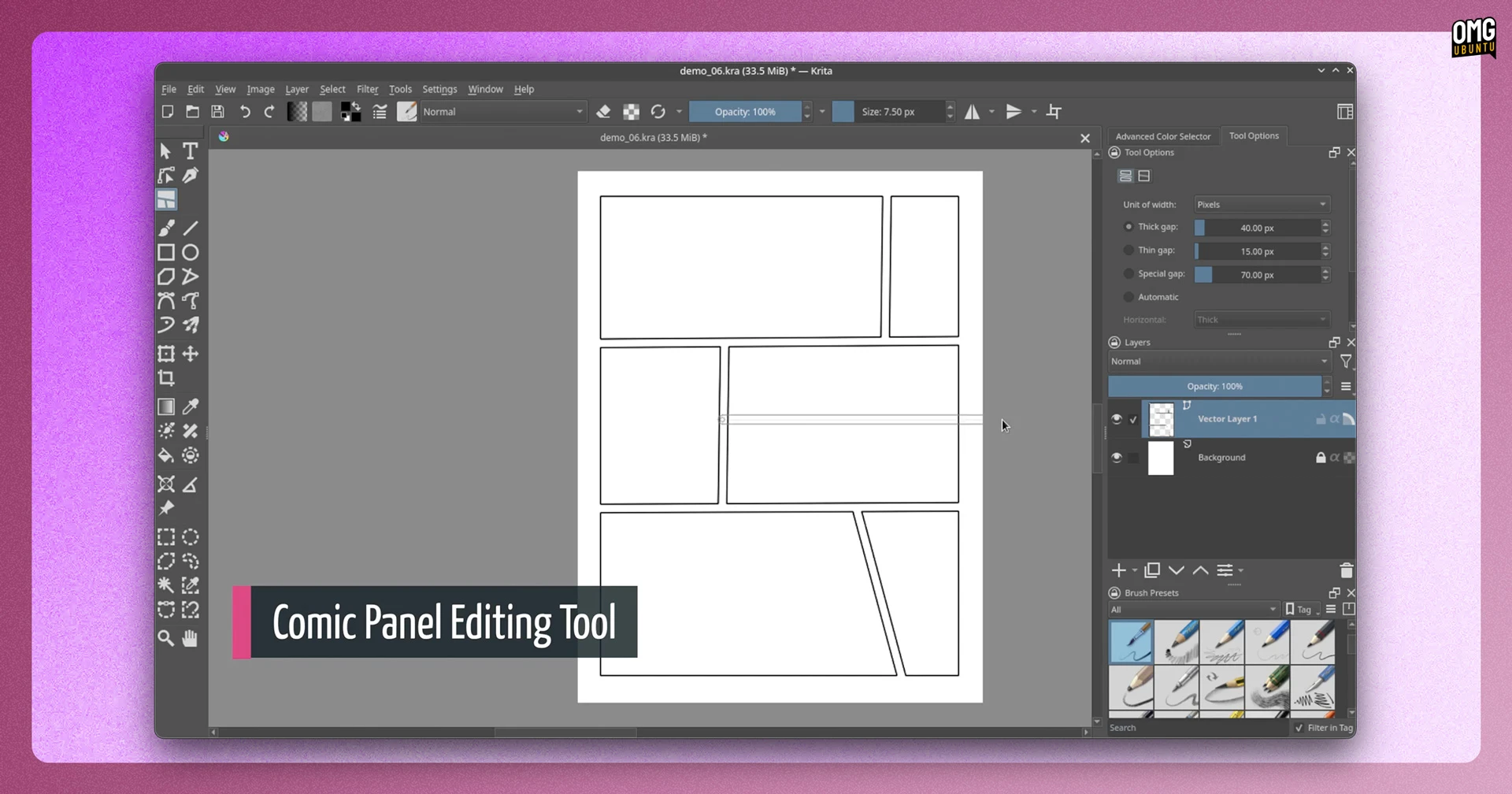
For comic artists, a new Comic Panel Editing tool lets you split and merge vector objects quickly, so you can create custom comic panel layouts; while the fill tool can close gaps so that if the lines of your ink work don’t quite meet, it won’t flood everything with colour.
Other changes include a faster Transform > Liquify tool; the Recorder Docker can now work in real time; and a pair of new filters, er, filter in: Propagate Colours (expands colour into nearby transparent areas) and Reset Transparent (strips colour values from fully transparent pixels).
Krita 6.0.0 is (mostly) functionally identical, but is the first release built on Qt 6. It’s still considered experimental, so for day-to-day work, use 5.3.0. But if you need Wayland colour management or want to benefit from HDR, perhaps give it a go.
See the Krita 5.3 release notes for more details, screenshots and Waifu art (:P).
You can download Krita as an AppImage for Linux, or get it on Flathub. Windows and macOS versions are available on the official website, as well as on their respective app stores.
Vivaldi intro’d follower tabs
Vivaldi 7.9 arrived mid-March, adding a couple of new features to the customisable Chromium-based browser that’s already crammed with them.
First is UI Auto-hide, which you can enable by pressing ctrl + f11. This hides the tab bar, address bar, panel and status bar out of view, leaving the website you’re reading or content you’re watching to span the entire window viewport.
Move your cursor to any edge of the screen when this mode is active and the hidden UI elements slide back in view. Move away again and they retreat.
If you’ve tried Zen browser, or the public beta of Kagi’s Orion web browser, a ‘focus mode’ will be familiar, but as this is Vivaldi, you get a slew of controls which elements auto-hide. Go to Settings > Appearance > UI Auto-hide to play around.
The second new feature is Follower Tab, a feature nodding to Vivaldi’s roots with the original Opera development team:
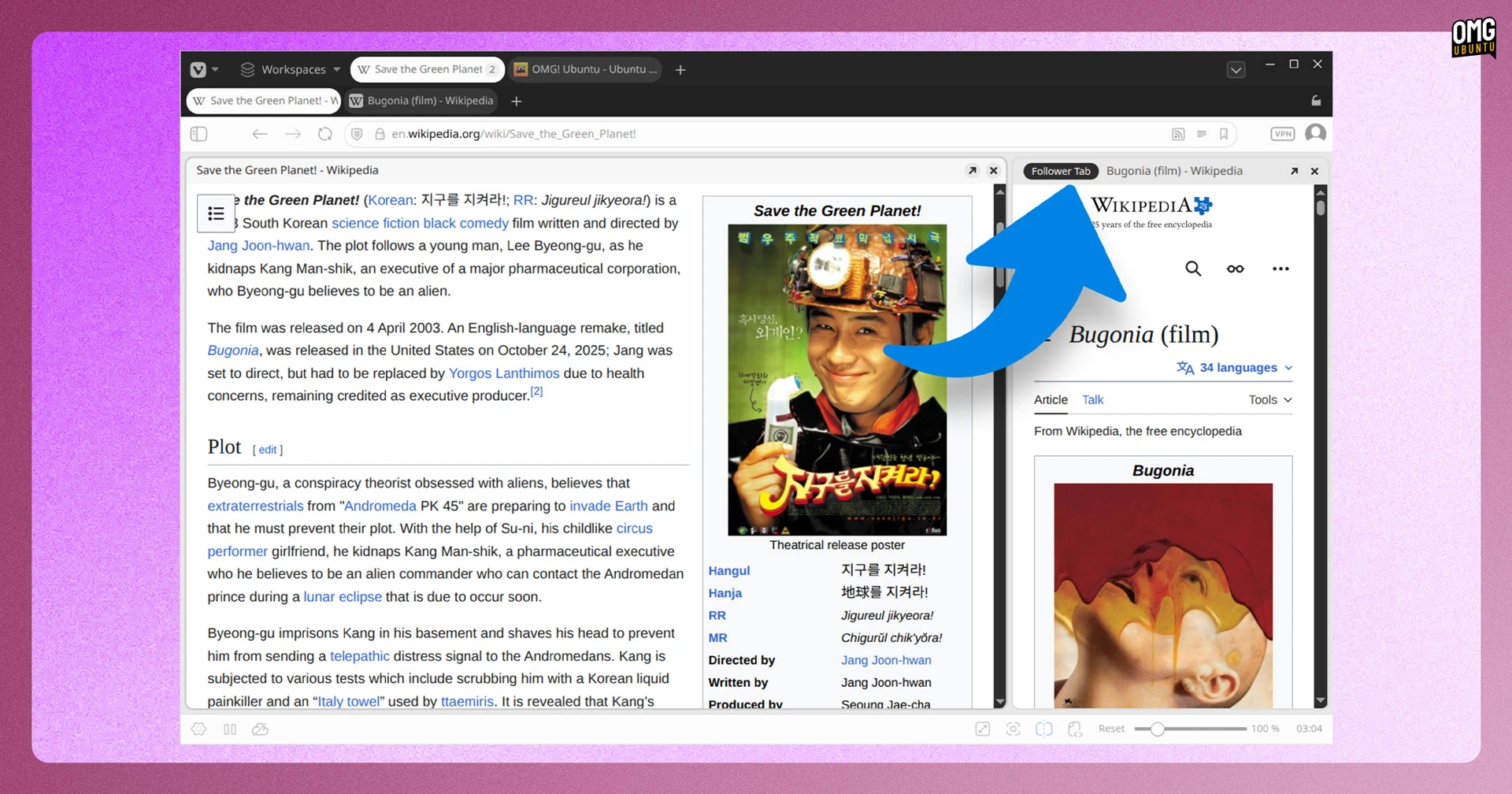
To use it, right-click any link and choose Open Link as Tiled Follower Tab. The new page opens in a side-by-side tiled view. Unlike a standard split-view, the original tab stays put; further links you click automatically load in the follower tab. Your original tab stays anchored.
This feature will be particularly useful if you’re doing research or “rabbit hole” browsing, as it means you to explore a series of links from one page, next to it, without ever losing sight of the origin source.
Besides those, Vivaldi 7.9 brings various improvements to its built-in Mail app: the composer can now open in a separate window, switching between rich text and plain text is done via a toggle and memory usage has been reduced.
Vivaldi is free, but not open source, software. Download on the official website or install the Vivaldi snap the Snap store (sudo snap install vivaldi).
GIMP squashed some bugs

GIMP 3.2.2 sneaked out at the end of March, serving as the first bug-fix release in the new stable 3.2.x series, and arriving a mere two weeks after 3.2.0 – to think we used to go months between updates!
The reason for the quick turnaround was an annoying layer group rendering bug which made layers with some filters applied, like Drop Shadow, to stop rendering once added to a layer group. While the data was never affected, it was annoying – and promptly fixed.
A number of issues with vector layers were also resolved, SVG path importing made to scale correctly, and the PSD plug-in has improved how it handles channel and layers, making it easier to work with Adobe Photoshop files.
GIMP 3.2.2 is available to from the official download page for all major OSes, with an AppImage and Flatpak build provided for Linux.
You can also install GIMP on Ubuntu from the Snap Store (sudo snap install gimp). The GIMP Snap is an official package maintained by the project directly.
A bumper month of updates (again)
Other musical updates of note: command-line Spotify Player can now show a neat audio visualiser in your terminal; MPD client Plattenalbum’s latest update reworks the seek bar and improves the server info dialog; while Tidal-HiFi adapted to the streaming service’s new look.
That’s a wrap on March’s lot, but, as ever, if you know of a software update you think others should know about, get in touch via the contact form – article tips, typo flubs and content suggestions always welcome.