

Ubuntu 18.04 adds a new data collection tool to the default install, but what sort of data does it collect?
Canonical is being upfront and open about the new Ubuntu data collection policy
Thanks to the doors-wide-open nature of open-source, it’s easy for us to find out.
Okay, and yes: it also helps that Canonical is being (unusually) upfront and open about the new Ubuntu data collection policy, which I will remind you is opt-out for new Ubuntu 18.04 installs, and opt-in on upgrades.
Whether you plan on making the upgrade to 18.04, or you already have (but whizzed through the Ubuntu Welcome screens without paying attention), read on to learn what data Ubuntu collects, collates and couriers back to Canonical.
Ubuntu Data Collection in 18.04+

Sorry, what?!
We were the first to report on Ubuntu’s plans to gather system metrics in new installs of 18.04 LTS onwards.
And I’ll be honest: when I first stumbled across it (surreptitiously via a code commit, in case you’re curious) I was worried.
Memories of the Ubuntu ‘Spyware’ debacle still linger in people’s minds
Worried not for Canonical and its aims in doing this, but for the reaction its plans would generate among its (seemingly growing) critics in the open-source world.
And sure enough, when Canonical confirmed its wont to collect system data on new and existing Ubuntu installs there was fair bit of… Let’s say ‘consternation’ to keep things polite!
It sees memories of the “Ubuntu Spyware” debacle forever linger in people’s minds.
The comparison is not fair. The anodyne Ubuntu Report tool in Ubuntu 18.04 is as far removed from the aforementioned metadata mining mis-step as possible.
Unlike the Unity Dash, the Ubuntu Report tool isn’t a privacy-invading tentacle groping at system search habits for the purpose of serving up random shopping suggestions.
The reality of what it collects is honestly boring.
Thankfully for my nerves (and no doubt the bods at Canonical HQ) it seems most actual Ubuntu users are find with the aims. A bit of anonymous system stat profiling isn’t a major cause for concern as we’re told the metrics help to improve Ubuntu.
Even better: Canonical will publish the results of its findings online for anyone to see.
Update 2020: you can now view the stats online.
Ubuntu Report: What Data Does It Collect?
Back to Ubuntu Report.
A check box to opt-out of sending info about your system to Canonical is part of the new first-run tool.
This tool, “Ubuntu Welcome”, greets all Ubuntu users – fresh installs and upgrad-ees alike, the first time they login in to Ubuntu 18.04 LTS:

This “Help Improve Ubuntu” page reads:
“Ubuntu can report information that helps improve it. This includes things like the computer model, what software is installed, and the approximate location you choose.”
By default the box to opt-in is selected (“Yes, send system info to Canonical”), but one can easily opt-out (“No, don’t send system info”) to compute in private.
Asking for consent post-install via Ubuntu Welcome is, to my mind, the right approach.
Firstly, I’m impatient when I install Ubuntu. I speed-run through any screens put before me in a mad dash to get to “now installing” as soon as possible. T’were this toggle in the OS installer (as initially planned) I’d have zapped past it.
Secondly, not everyone who uses Ubuntu installs Ubuntu. You can buy laptops pre-loaded with Ubuntu, pre-prepared devices are loaned to siblings, and so on.
Allowing the user (not the person installing) to decide if system data is transmitted across the digital ether is wise.
Example Data Report
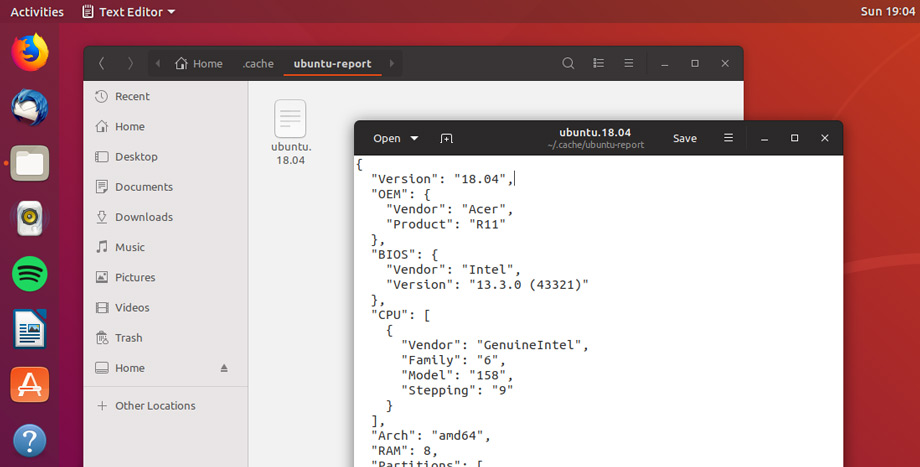
“All well and good”, you’re thinking. “but show me the data already”.
It’s important to stress that, no user-identifiable data is collected or sent to Canonical. No account user names, no Ubuntu Single Sign-on details, no IP addresses—nothing icky.
The report collected on my system queried the following areas:
- Ubuntu version
- OEM/Manufacturer
- Device model number
- BIOS info
- CPU details
- GPU details
- Installed RAM
- Partition Info
- Display(s) details
- Auto-login status
- Live Patching status
- Desktop environment
- Display server
- Timezone
Again; no user name, no IP address, no locale, no list of software or drivers I enabled. It’s the same sort of stats I willingly share in screenshots showing system info tool Neofetch.
Keeping the remit on what it collects minimal means no-one can attribute a system report to any person in particular.
With personal data outside the scope of the tool there’s no real reason why you wouldn’t want to take part, outside of an abundance of caution.
After all, by learning more about the hardware and systems we all Ubuntu developers can, in theory, prioritise fixes, support and development accordingly.
Ubuntu learning from its user base… What strange times we live in ;)
Will you take part in this Ubuntu system diagnostic reporting? Do you have concerns over the data being collected? Let us (and other readers) know in the comments below.