

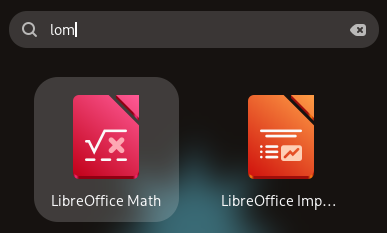
I am what I choose to call an ‘inattentive typist’, and the GNOME Shell launch is a strict tutor, making correct every fudged keystroke.
If I don’t, it won’t return any results.
App launchers on other desktop environments and operating systems? They’re more chill. They use “fuzzy matching” to guess what you intended to type, and return results according to that.
GNOME Shell does not. If I futz “frfiox”, or attempt to locate LibreOffice by entering “liberoffice”, I get nothing but the requirement to hit Backspace and repeat until correct.
I have a workaround.
I tap super and type as few character as possible, e.g., f if I want Firefox, and then use arrow keys to highlight the right result and press enter to launch. Alas, this is not foolproof. The order of results sometimes shifts just as I hit enter, and the wrong app opens.
Which brings me to point of this post. One of the first things I do after installing Ubuntu is to add a fuzzy search GNOME Shell extension. I was using same one I wrote about in 2020, since it is punctually updated to work with each new GNOME release.
However, the developer of that extension says they have received reports on it ‘silently ceasing to work’ in newer GNOME releases. It doesn’t happen to everyone, nor consistently, but debugging intermittent issues is difficult.
Until GNOME Shell adds fuzzy matching support—upstream discussions have been underway since 2016—anyone experiencing issues can try a new fuzzy search extension, which was recently uploaded to the GNOME Extensions hub.
It’s called Fuzzy Application Search, works with GNOME 48 and the GNOME 49 release (which ships in Ubuntu 25.10), and uses “a ranking similar to TextMate/Sublime Text”.
Most major desktop and mobile operating systems support some sort of “fuzzy” matching algorithm, but GNOME doesn’t.
As I said in my 2020 post, such a feature benefits more than ‘inattentive typists’. Those with dyslexia or dyspraxia, or who work with apps listed in a different language (third-party branded apps often are not translated from English in OSes) could find it useful too.
Might you? Go try it out and sea.
Get Fuzzy Application Search on GNOME Extensions