

Ubuntu Pro is an optional security feature that Ubuntu LTS users can enable to receive critical updates for an extra 25,000 packages which would otherwise sit unpatched.
If you use Ubuntu 24.04 LTS you will have seen Ubuntu Pro security updates in Software Updater (or when running apt commands). And you will have noticed you can’t install those updates without having an Ubuntu Pro subscription.
Ubuntu Pro is free for all users on up to 5 machines, meaning the only ‘cost’ involved is the time it takes to register and setup Ubuntu Pro. Businesses (or home users) with fleets of machines to manage are expected to pay for an Ubuntu Pro/ESM plan.
Enabling Ubuntu Pro a bit of a no-brainer for most users, but what if you don’t want to use Ubuntu Pro?
What if you don’t want Software Updater to keep opening to bug you about Ubuntu Pro security updates available to install which you explicitly don’t want to install?
In this case, you can disable Ubuntu Pro — it’s not a one-click-switch affair, but it’s easy enough.
What Are Ubuntu Pro Updates?
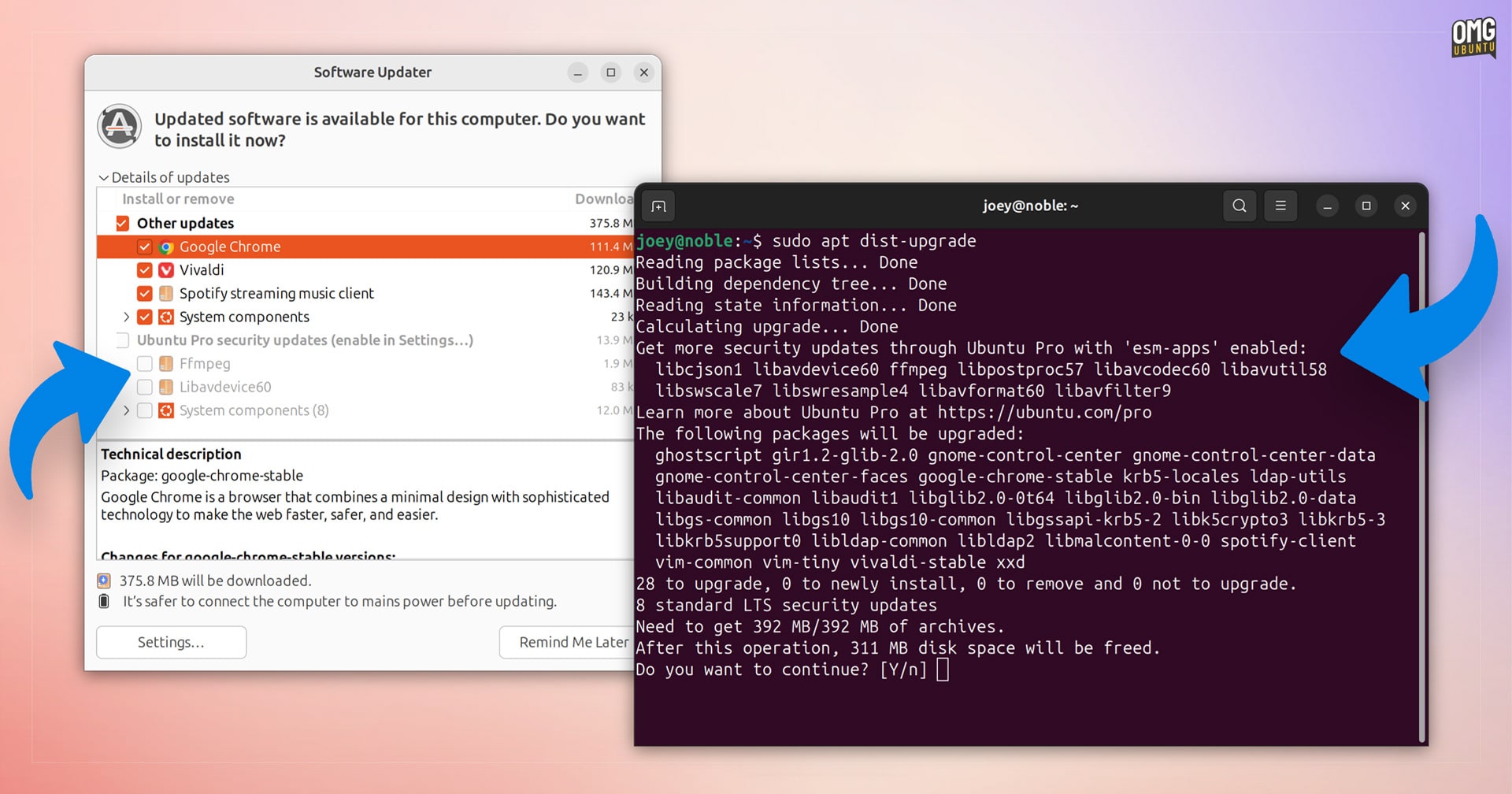
To recap, Ubuntu 24.04 is the latest long-term support (LTS) release of Ubuntu. Everyone who uses it will get security updates and critical fixes for packages in the main and restricted repositories direct from Canonical for 5 years – no hoops, no hurdles.
But users won’t automatically get critical updates for apps, libraries, and packages which come from the universe repository, things like VLC, mariadb, ffmpeg, and so on – none of which are installed by default FWIW.
Prior to Ubuntu Pro, packages in the universe repository had no guarantee of security updates at all. Critical fixes can/are provided by the community irregularly. Ubuntu Pro resolves it; all 25,000 packages will get critical, timely security updates if needed.
Why aren’t Ubuntu Pro security updates available to everyone? Isn’t the purpose of an LTS distro to provide ongoing support? Doesn’t leaving scores of users vulnerable to potential security issues run counter to that, creating a two-tier LTS system?
It’s about cost, mainly.
Canonical choosing to track, patch, package, and push out critical updates for an additional 25,000 packages costs money. Ubuntu Pro subscriptions from business customers subsidises the engineers and infrastructure needed to additional updates.
Which is why Ubuntu Pro is opt-in; if these updates were available to everyone out-of-the-box there’d be no incentive for enterprises who can afford to pay to receive them, to do so – ergo no money to pay for the Canonical engineers to adapt, package and test the fixes.
And what would stop people using other Linux distros based on Ubuntu (which cost Canonical money from increased demand on its repos/servers but make it no money from support contracts) to benefit from expanded security coverage?
As mentioned, it is quick, easy, and free to sign up for and enable Ubuntu Pro in Ubuntu 24.04 LTS. Once done, all greyed-out updates can actually be installed.
But not everyone wants, needs, or cares to do that.
Some find the constant reminders that package updates they can’t install without signing up for an Ubuntu Pro subscription, which they don’t want to install anyway, is annoying — a nag, effectively.
Disabling Ubuntu Pro Updates
You cannot simply remove the ubuntu-pro-client to ‘disable’ Ubuntu Pro as that package is a critical dependency of Ubuntu desktop components.
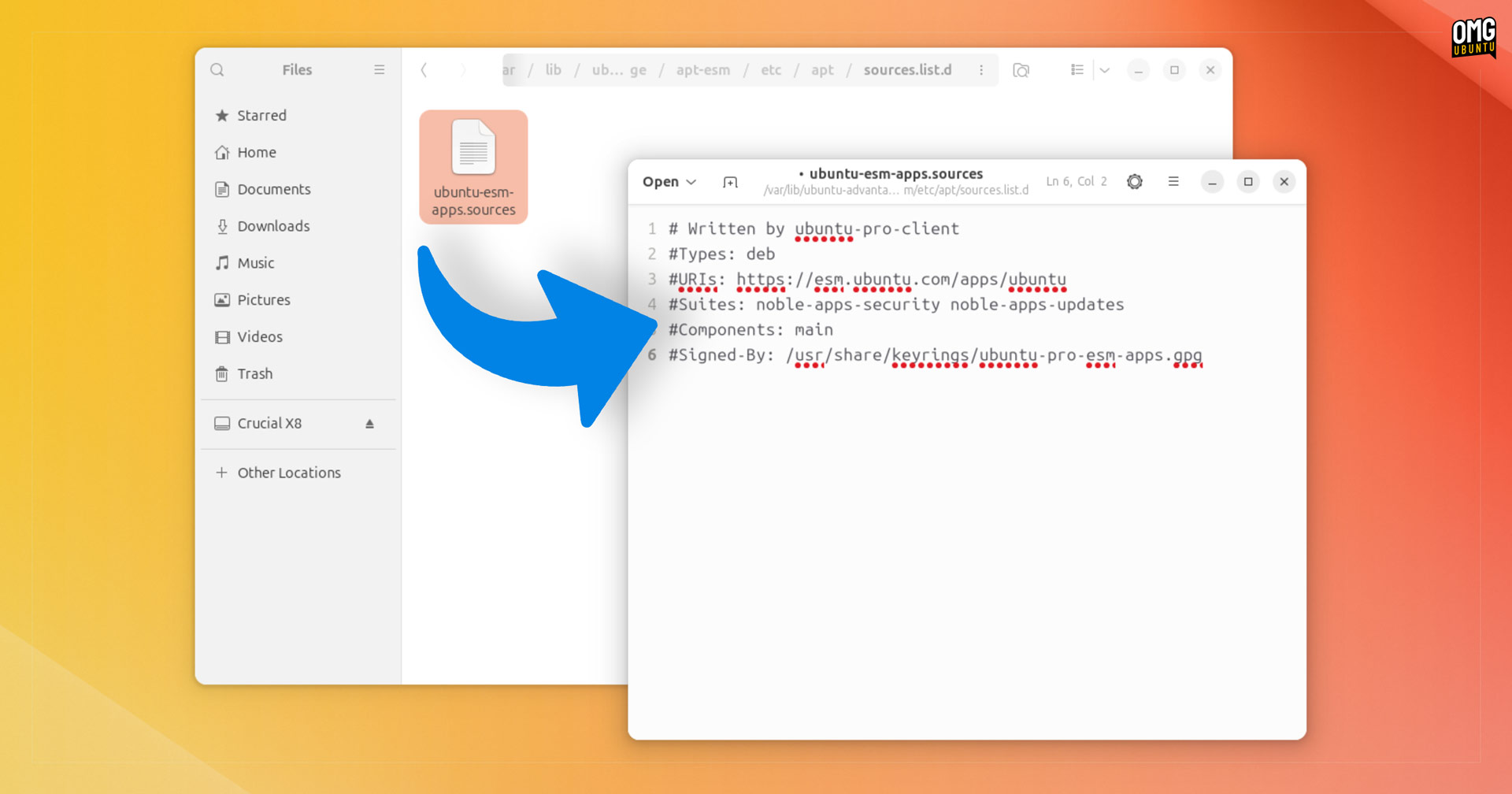
Instead, to turn off Ubuntu Pro notifications and update checking in Ubuntu 24.04 LTS you’ll want to edit the text file that probes the Ubuntu Pro update repo.
- Open Nautilus file manager
- Choose ‘Other Locations’ from the sidebar
- Go to
/var/lib/ubuntu-advantage/apt-esm/etc/apt/sources.list.d - Double-click on the text file inside (to open in text editor)
- Add
#to the beginning of all lines within - Hit ctrl + s to save your changes
- Enter your password as prompted
And that is all you need to do!
You can do the same thing using command-line text editors like nano or vim, should you find that easier. The important thing is to comment out the lines to disable them, then save your changes (and in the case of vim, figure out how to exit).
Whichever method you take, the next time your system checks for updates – whether via unattended-upgrades or by you manually opening the Software Updater, no Ubuntu Pro updates will be fetched.
How can I re-enable Ubuntu Pro?
Should you later realise that receiving more security updates is in-fact worth the minor hassle of signing up and enrolling, you can reenable Ubuntu Pro updates by following the steps above. This time, remove the # from the start of each line, and then save your changes.
Then go to Software & Update > Ubuntu Pro, signup/enrol, and next Ubuntu checks for updates it will scan the Ubuntu Pro channel for any available gated updates.
If that doesn’t work, run sudo apt --reinstall ubuntu-pro-client and try again.