

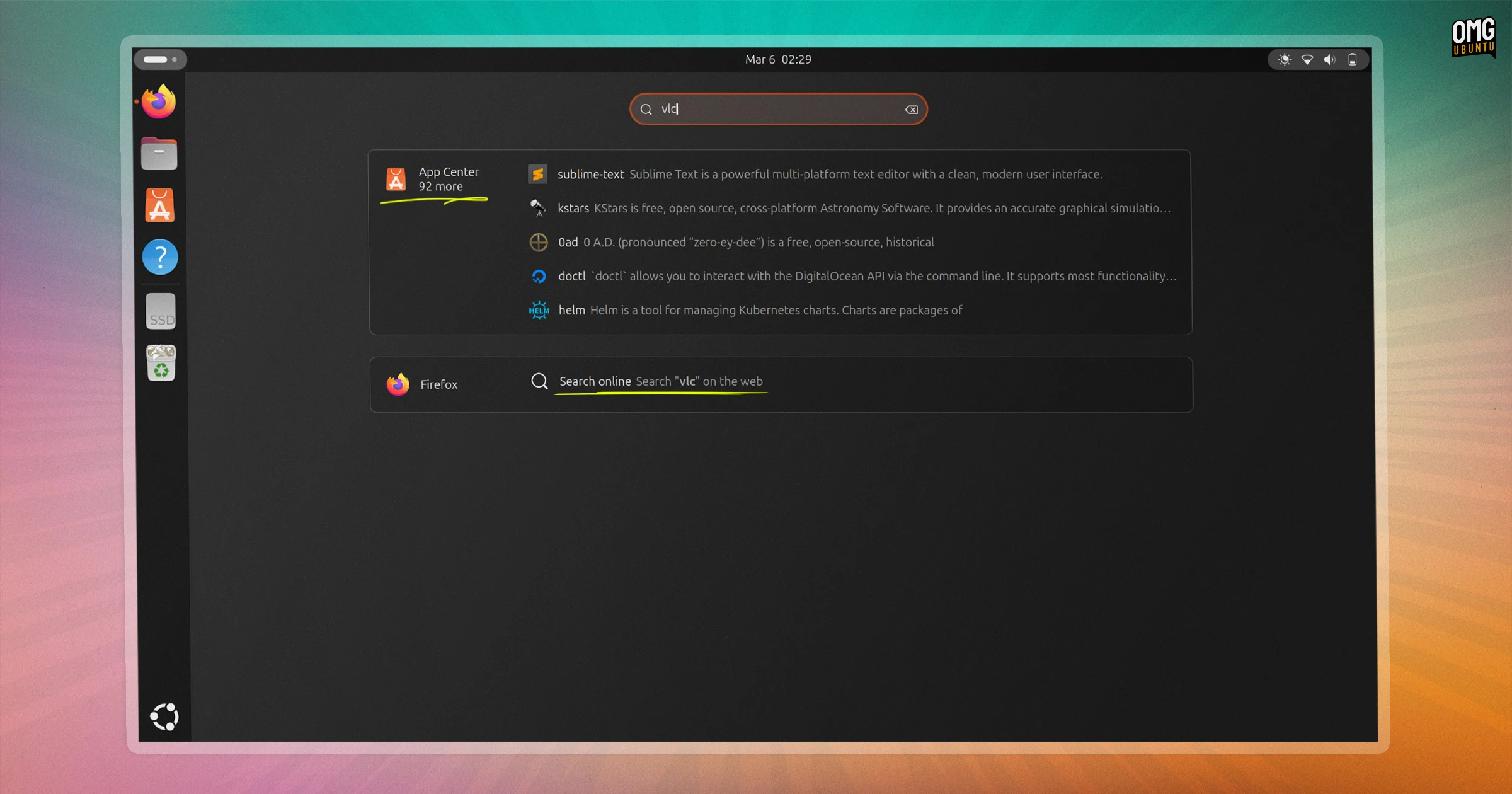
Ubuntu 26.04 LTS ships with two new extensions installed and active by default, both adding new search capabilities to the GNOME Shell Overview.
The first new extension is Web Search Provider. This lets you initiate a web search on Google straight from the GNOME Shell Overview. ‘Initiate’ is the important term here as search terms made in GNOME Shell are not sent anywhere directly.
Before you raise an eyebrow: this is not a revival of the Shopping Lens furore. That saw local file and app searches typed in Ubuntu’s then-Unity desktop piped off to third parties (anonymised, but still dodgy enough to earn Canonical a ‘Big Brother’ award).
It’s basically just a shortcut that, when clicked, opens Firefox and runs a pre-filled search string on Google (with Ubuntu’s referral parameters attached) in a new tab. If a different browser is your default, it can open in that instead.
GNOME Web (aka Epiphany) has offered its own search provider for years, so this concept isn’t new to GNOME. But this extension makes it available as part of Ubuntu’s default setup for the first time. It may prove useful, but it is also easily ignored – like timezones, emoji, etc.

The new Snap Search Provider extension is about app discovery. It matches the words you enter in the overview to find software on the Canonical Snap Store that you don’t have installed. Results appear as a list with icons and short descriptions.
For example: press super, type VLC and alongside your installed apps, you’ll see Snap Store results that match – or rather, apparently match (more on that in a sec). Click a result and App Center ( aka snap-store) opens straight to that listing where you can instal it.
It all works via snapd, the daemon that powers the Snap package format. When you type a search term in the Overview, the Snap Search Provider passes it to the snapd daemon, rather than firing it off to a remote server directly.
As Snapd mediates queries, it’s effectively no different to opening App Center and searching manually, it’s just a faster and less context-switch-y way to do it.
Snap provider snags
I found the Snap Search Provider match hit rate a little loose. A search for VLC surfaced plenty of tangential results, but not the obvious one (see the screenshot). That could prove annoying since what you type in the Overview seems to return a list of snap store results.
From looking at the source code, the extension won’t initiate a search if it is enabled whilst you are on a metered connection, which is something.
The source code includes reference to a web-based fallback. This would (presumably) send Overview search queries directly to the Snap Store online. It’s commented out with the note “let’s not do it for now”. Not doing it ever might prove a less contentious option.
Didn’t Ubuntu already have this?
If you install GNOME Software on Ubuntu or you still use an older version of Ubuntu that include the Software Center fork, then app suggestions already show in the Overview. This new Snap Search Provider works via snapd, and opens the newer, Flutter-based App Center.
Further back, if you used Ubuntu during Unity era, the Snap Search Provider may also remind you of the “Available Apps” suggestions that used to appear in the launcher. That was more capable, as you could right-click a result to see details and install it:
Both extensions may also revive memories of the Amazon Shopping Lens. That well-intended feature was intended to raise Canonical a bit of extra revenue, but ended costing the distro its reputation among privacy-minded proponents.
Unity would send all local searches – terms you typed to find files on your own machine – to a Canonical server that would anonymise the query before sending it to Amazon to match against product results, and feed those back to the user.
Thankfully, that isn’t what’s happening here, with Ubuntu’s new search provider extensions. Search terms entered in the Overview are handled via snapd for app matches, while the web search extension only queries the web after you explicitly click not it.
Already available to try in daily builds
Both of the se news extensions are present and enabled by default in the latest Ubuntu 26.04 LTS daily builds, although neither should be assumed finished.
You can disable both of these extensions if you’d rather not use ’em. At worst, they’re two more toggles in your extensions list to turn off.
At best, they could save you a click or two now and then.