

Gedit text editor? Pretty popular. Markdown? Also pretty popular — and Gedit Markdown Preview is a plugin that brings the two together.
It’s like the climax of a FOSS rom-com 😌.
You might be thinking: “Gedit? Forgedit!” – Ubuntu 22.10 swapped Gedit for GNOME’s (very capable) Text Editor. However, Gedit is available in the Ubuntu repos, and continues to serve as the default text editor in long-term support releases of Ubuntu (which are what the vast majority of Ubuntu users are on).
But while Gedit supports a lot of different programming, code, languages, and text markup formats, it doesn’t support Markdown natively.
Gedit Markdown Preview Plugin
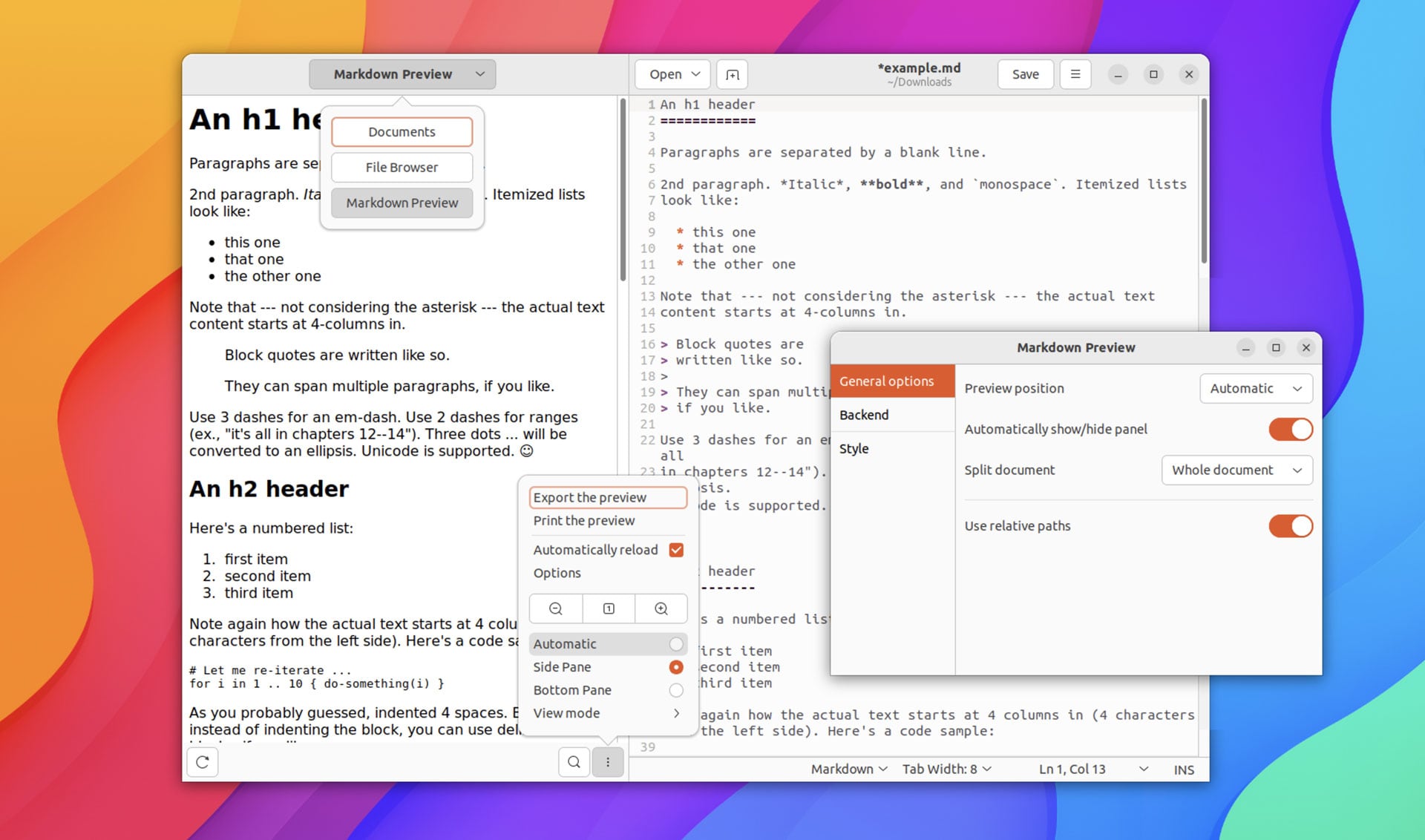
The Gedit Markdown Preview plugin — faux shock — adds Markdown support to Gedit 3.22 and above.
As well as letting you open .md files in Gedit (time saver) the plugin adds a preview panel to the text editor so you can preview your Markdown in real-time. The preview panel can be toggled on/off, appearing in a sidebar on the left-hand side of the app or at the bottom of the window. Up to you.
The preview features:
- Shows dynamically updated Markdown preview
- Zoom in/out on preview
- Search in preview
- Open links/images
Notable, the preview also works for HTML, and SVG files too, so if you edit those in addition or instead of Markdown, the plugin can help there too. You can also apply a custom stylesheet (.css), and make use of python3-markdown extensions to support/add additional features and functionality.
Additionally, the Gedit Markdown Preview plugin allows you to print from the preview, or export it to HTML using python3-markdown or, if pandoc is installed, to file formats supported by that.
To install it, just download the latest release from the GitHub release page as a .zip , extract the archive, then run the ./install.sh file inside (you don’t have to be root, fyi). Once the plugin is installed go to Gedit > Preferences > Plugins, and then enable the Markdown Preview plugin.
If you encounter errors double-check you have all the correct dependencies installed, including python3-markdown, gir1.2-webkit2-4.0, and, if you plan on using it, pandoc.
I will mention that this plugin is not 100% stable so do use it with some degree of caution. Gedit crashed the first time I enabled the plugin but opened normally after that. Since then, I’ve not encountered any issues while using it.
The first time you hit F9 to show the sidebar you may be wondering where your preview is. You need to click the toggle at the top of the sidebar and select “Markdown Preview”. It should then pop into life.