

Looking for an easy way to see an overview of your laptop battery health on Ubuntu? If so, check out Battery Status by Spanish blog Atareao.
Their new GNOME extension reminds me of fancy menu bar apps available for macOS. Y’know, the ones that convey laptop battery health through a slick panel applet replete with colourful graphs and reams of info.
Battery Status brings similar to the Ubuntu desktop.
It’s not as detailed as something like Coconut Battery for macOS, but it’s still a solid start (especially as it’s a GNOME extension and not a full-blown desktop app).
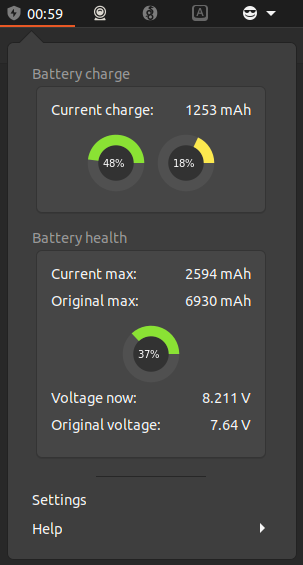
Current battery charge is shown as a percentage and in milliamp hours. The ring charts in the first section are not labelled so I assume the left one is current current charge.
Battery health is the other section. This shows current maximum charge capacity of your battery, and its original max charge capacity, plus a percentage of of the difference.
Live voltage details and original voltage stats are also shown, but a bit over my head to explain the usefulness of (do fill me in down in the comments).
Configuration wise, this applet lets set the colour of the ring graphs, specify a power path manually (if your have more than one battery), and adjust the interval for fetching current charge status.
I don’t think Battery Status is an extension I’d keep enabled all the time. I can see myself using it more as a periodic check on my laptop’s battery health. It’d be a great utility to quickly toggle on/off during troubleshooting to rule out a failing battery.
I’d love to see this applet be made even geekier with further info. After all, if someone is going out of their way to install a battery health tool chances are they’re okay with being told as much as possible.
Add in cycle count, battery age, maybe real-time power consumption in watts, and battery temperature if possible.
Install Battery Status GNOME Extension
Battery Status is available to install from the GNOME extensions website. It supports GNOME 3.38 through GNOME 42.
Source code is on GitHub, which is the ideal place to get involved in development to bring it to newer versions of GNOME Shell, report bugs, and suggest other improvements.