

Although Rhythmbox, the default music player in Ubuntu, comes with a last.fm plug-in to scrobble your track plays to the Last.fm service, it does lack a few of the features found in the dedicated last.fm player app — which is available for Linux.
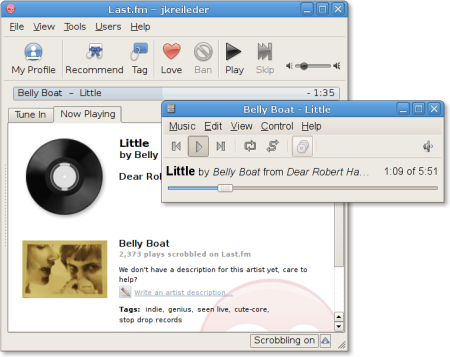
While the official Last.fm client doesn’t ‘detect’ playing tracks in Rhythmbox (nor any major Linux media player – out of scope for this post) it is possible to do it.
Juergen Kreileder‘s written a new last.fm plug-in for Rhythmbox.
Unlike the Rhythmbox’s native last.fm plugin, which scrobbles to last.fm directly, this one submits tracks via the last.fm client application.
And because this plug-in makes use of the official desktop client you are able to love and tag the song playing, and view more information and related recommendations based on it.
Download Last.FM Client
If you don’t already have the last.fm desktop client for Linux you can download it from last.fm/download as a DEB package you can install.
Download This Plugin
To make use of Juergen Kreileder’s nifty plugin you’ll need to add a repo. This allows you to install the plugin and remain up-to-date with future changes as/when released.
Sadly, it is a bit of a fuss because Juergen doesn’t use Launchpad, so there’s no PPA.
Instead, open Software Sources (System > Administration > Software Sources) then click Third Party Sources > Add, and enter the following two lines on Ubuntu 10.04 LTS:
- deb http://blog.blackdown.de/static/debian/rhythmbox/ lucid main
- deb-src http://blog.blackdown.de/static/debian/rhythmbox/ lucid main
If you’re still on Ubuntu 9.10 replace ‘lucid’ with ‘karmic’ in the above lines.
Then run these commands:
sudo aptitude updatesudo aptitude install rhythmbox– if not already installedwget http://blog.blackdown.de/static/gpg.asc -O - | \sudo apt-key add -
And… you’re done.
Well, almost.
You need to enable the new plug-in in Rhythmbox via Edit > Plugins > New Style Last.fm scrobbler and disable the default one.
Feedback
Like the plugin? Found a bug? Be sure to let the developer know what you think over on his blog.