

Ubuntu 9.10 (Karmic Koala) will see not one but TWO official netbook editions: Ubuntu Netbook Remix and Kubuntu Netbook Remix.
With the recent Ubuntu 9.10 Alpha 5 out, I decided to take a look at the state of both of the small-computing systems to see how they’re shaping up.
Ubuntu 9.10 Netbook Remix
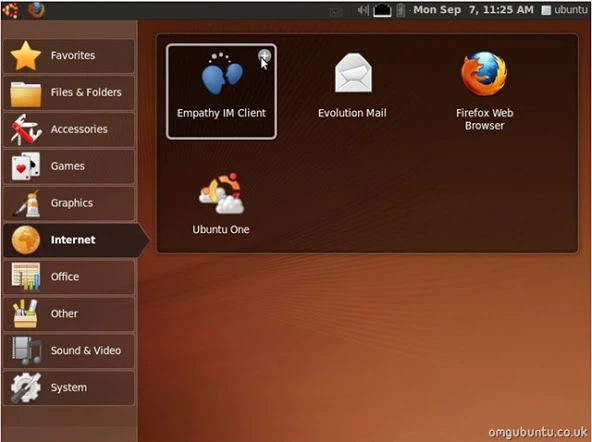
Refined, Stylish and, most importantly, far more usable.
Ubuntu Netbook Remix is the official ‘Netbook’ version of Ubuntu, release by Canonical. It comes with many of the same applications you’ll find in the regular desktop version of Ubuntu, but surfaced through a custom interface: GNOME 2 this isn’t.
The main interface
The netbook launcher has undergone a slight overhaul since the Ubuntu 9.04 release, and is looking much better for it!

Developers have consolidated the UI. The dual pane found in the first netbook launcher is now condensed into a single sidebar. This frees up valuable space on smaller screens.
Sidebar labels are now bigger and clearer to read (even on smaller screens) and thus easier to navigate to; no more clicking the wrong category by mistake.
Menu’s now dynamically resize to fit all available options, rather than being cut off too – that’s a real boon.
The Ubuntu Netbook Remix UI also has a new theme, albeit the same as Ubuntu’s Human theme but opting for a dark grey colour. There’s also a new icon set, Humanity.

What apps are preinstalled?
App wise UNR comes with most of the same applications it’s predecessor did along with the “new” features that Karmic itself brings – such as Ubuntu One integration and XSplash.
Evolution, Firefox and Empathy are the default e-mail, web browsing and messaging clients respectively.
Curiously, the UNR opts to install Rhythmbox as default music player (on the regular desktop edition, the idea is to replace it with Mono-based Banshee instead). Either Banshee is not considered best suited for netbooks, or Ubuntu won’t replace Rhythmbox at all this release.
Bugs and issues (aka frell-ups, and ohnoes!)
If there’s one thing you will notice using the current alpha of the UNR is the endless crashes.
During my time using it, the Window Picker Applet crashed about once every 5 minutes – even when nothing was using it. I’m not sure if it was UNR + my netbook, but the entire system felt sluggish and tired and not as snappy as either UNR Ibex or Kubuntu NBR (Below).
The new ‘Selection’ effect is really nice, but does take a while to show… and to fade, which makes even momentary mouse travel feel slower, as it passes over and activates the effect inadvertently. XSplash displays a bizarre boot “effect” in which the “throbber” goes upwards instead of along.
As this is an alpha release (albeit a late-stage one), issues are to be expected. Heck, if I used an alpha without bugs I’d been seeking a refund!
Kubuntu 9.10 Netbook Remix
Kubuntu Netbook Remix is the first official small-computer variant of Ubuntu’s (most famous) flavour to be released. It puts a greater emphasis on the social and online activities that netbooks are commonly used for (ain’t no-one writing a dissertation on m&m-sized keys).
The main interface
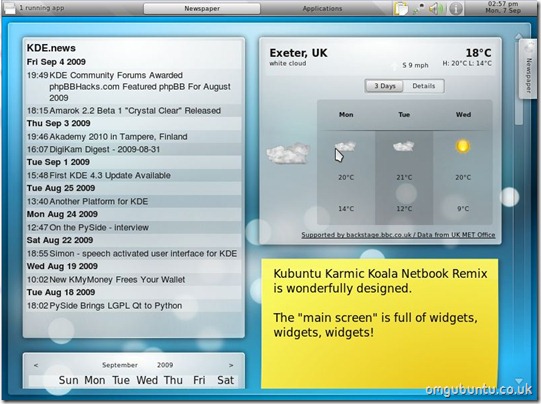
Like UNR, the Kubuntu netbook spin sports a custom UI. It’s comprised of a widget-laden home screen called ‘Newspaper’ with a separate ‘Applications’ screen grouping app launchers and shortcuts.
The default set of widgets are an odd mix. There’s a comic book reader, an RSS feed reader (set to KDE.News) and an un-configured weather widget.
A smarter set would’ve been to have put the microblogging widget there by default, as well as perhaps the Facebook or Google Calendar widget – a sign that the UI is there to be social and productive from the get-go.
Hey, ho.
The KDE ‘Air’ interface used in the most recent desktop release is worked to full effect throughout the whole of the netbook UI.
Better yet, this spin feels snappy and fast on my EeePC 701. If you’re running a newer and more powerful netbook, I imagine you’ll get an even smoother experience.
What apps are preinstalled?

Kubuntu Netbook Edition preinstalled OpenOffice rather than the less-familiar KOffice. The rest of the default set of applications is, like the default configured widgets in the Newspaper screen, a somewhat eclectic choice.
KMail, Konquerer and Kopete are the Evolution, Firefox and Empathy stand-ins respectably – all do a fine job. But there’s little netbook fare, the kind of applications often bundled to suit the device’s nature. No webcam tool, no cloud storage and…
No games pre-installed.
Of course, it is Kubuntu underneath. You can install more/other apps yourself.
Bugs and issues (aka weird-outs and Frakk ups)
Although this is an alpha, Kubuntu NBR felt very, very stable in my test. Unlike the frequent crashes I got on UNR, Kubuntu’s analog feels like like finely tuned release already.
That said, there are quirks that annoyed or confused me.
Sometimes the entire screen would go black with no discernable way to navigate your way home to the ‘Newspaper’ or ‘Application’ screens, like so:

New widgets don’t always display correctly, instead looking squashed (perhaps that’s why they aren’t enabled by default?):

Navigating between open applications is virtually impossible until you add the ‘Task Manager’ widget.
Which is best, then?
Alpha releases are alpha release and rough edges (and crashes) are to be expected.
Both systems impressed me.
The regular Ubuntu Netbook Remix UI is designed for netbooks, and the user experience reflects that. It feels cohesive and logical, if a little different to what I’m used to. It’s not a different paradigm retrofitted to work on constrained screen sizes – and works better because of it.
But it the performance of the Kubuntu iteration was noteworthy. Netbooks are low-power processors with minimal memory. Every drop of performance matters. Kubuntu 9.10 NBR looks flashy and feels fast – in an alpha, no less – which is encouraging ahead of the final release.
Come October, I may well be opting for a Kool netbook experience.