
[How to] Make Ubuntu 11.10 Look and Feel Like GNOME 2

Longing for the look and feel of the classic GNOME desktop in Ubuntu 11.10? Well it’s easier to achieve than you might think.

Although Ubuntu 11.10 ships with the Unity desktop, and GNOME 3 in its repositories, aping the looking of the ‘old’ GNOME desktop is easy. All that’s requires is installing a few extra packages and performing a tweak here and there.

The end result is a desktop like this: -

GNOME 2 style desktop in Ubuntu 11.10

How to

The first step is to install the ‘gnome-fallback-session’ from the Ubuntu Software Centre. Click the button below to do this.

Click to install

Next, log into the ‘GNOME Classic (No Effects)’ session from the Ubuntu login screen.
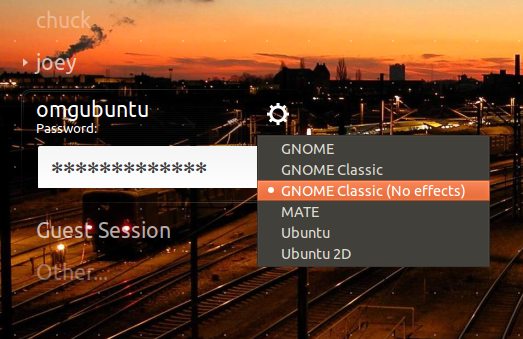
classic gnome no effects

This will present you with a desktop that looks something like this: -

It’s GNOME 2-ish, but with a few tweaks we can make the Classic Session look like this:

GNOME 2 style desktop in Ubuntu 11.10

Tweaks

Change the panel background

  • Alt+Right click on the top panel
  • Choose ‘Properties’
  • Select the ‘background’ tab
  • Select background image and click the button
  • Navigate/select ‘usr/share/themes/Ambiance/gtk-2.0/apps/img/panel.png’

Install Ubuntu indicators

  • Add ‘ppa:jconti/gnome3‘ to your Software Sources
  • Update, then install ‘Indicator-applet-complete’.
  • Alt+Right click on the top panel
  • Choose ‘Add Applets’
  • Add ‘Indicator Applet Complete’
Add the Ubuntu Logo to ‘App Menu’
  • Open a new Terminal
  • Run: gksu gedit /usr/share/themes/Ambiance/gtk-3.0/apps/gnome-panel.css
  • Add ‘-PanelMenuBar-icon-visible: true;’ (sans quote marks) to the bottom of the ‘PanelMenuBar.menubar.menuitem’ item (see image)
  • Save
  • Logout and back in to see change take effect
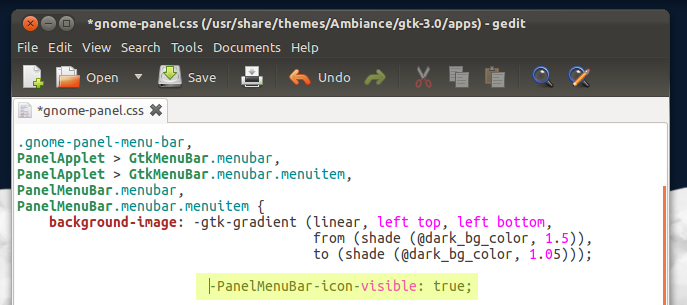
To move/rearrange panels/item

  • ALT+Right click on a panel or item to add, move or edit it

Compiz

The GNOME Classic Session doesn’t play too nice with Compiz in Ubuntu 11.10. But we can fix that.

  • Open a Terminal
  • Enter: gksu gedit /usr/share/gnome-session/sessions/gnome-classic.session
  • Change the line:

RequiredProviders=windowmanager;notifications;

  • to:

RequiredProviders=windowmanager;

With this fixed you can login to your GNOME 2.x style session using ‘GNOME Classic’ instead of the ‘GNOME Classic (No effects)’.

Edit: The wallpaper used in the above screenshots can be downloaded @ d0od.deviantart.com/#/d4iz6e4.

Source

Related posts:

  1. Make the GNOME panel font bold, italic, bigger, smaller etc
  2. Restore default Gnome settings in Ubuntu (quick tip)
  3. Make Gnome Panels Hide Fully & Pop Up Quicker
Trackbacks are closed, but you can post a comment.
  • Tornike Khomeriki

    Bit of an off-topic, but where can I find the wallpaper on the first screenshot? Or similar graphic works?

  • http://www.benspictureoftheday.com Ben

    I don’t mind GNOME 3 or Unity, but this is good to know.

    One question: where can I get the awesome wallpaper?

    • http://omgubuntu.co.uk/ Joey-Elijah Sneddon
      • Samuel Orr

        Where can I get the wallpaper? /troll ;D

      • http://www.benspictureoftheday.com Ben

        Thanks!

      • マ ウ ロ セルジオ

        Joey could delete the images of the three comments,
        posting just wrong and then this comment also thanks…

  • http://twitter.com/batopa bato

    OT: Ehi what is that wallpaper?

  • Anonymous

    oh, please give me a link to your desktop wallpaper :)

  • http://twitter.com/mordalo Mordalo

    Thank you for sharing this. Awesome.

    • http://omgubuntu.co.uk/ Joey-Elijah Sneddon

      No problem :)

  • Anonymous

    I still prefer MATE Desktop on Oneiric, im using it know, and looks much better than default Gnome Classic. I feel like using Maverick…XD

    • http://omgubuntu.co.uk/ Joey-Elijah Sneddon

      I did start writing a guide to installing MATE but couldn’t get it to work properly. Did you use the PPA or do it the hard way?

      • Anonymous

        I used PPA followed this guide: http://shuffleos.com/3896/how-to-install-gnome-2-fork-mate-desktop-for-linux-mint-12-in-ubuntu-11-10/

    • Anonymous

      I still am! (using Maverick). Not going to change till sure I can get my workflow back in a Kernel 3 distro.

  • Anonymous

    Why don’t you just make a bash scripts to do those tweaks?

    • http://omgubuntu.co.uk/ Joey-Elijah Sneddon

      Because that would assume that every user wants all of those tweaks. Some might only want to perform one or two. This way people can choose.

      It also shows users precisely what they’re changing

      • Anonymous

        Scripts can be interactive. And it won’t prevent anyone from explaining what the script does or examining the commands in the script. Only those who care would look into it anyway.

    • Dmitry Shachnev

      Most of these are just temporary workarounds, the goal is to get most of things fixed out-of-the-box (open the link in the end of the post and note links to Launchpad tracker).

  • http://twitter.com/Zta77 Stephan Henningsen

    The wall paper is nice.  Quite Little Big Planetish.

    • http://omgubuntu.co.uk/ Joey-Elijah Sneddon

      Thanks. I wish I could say it took me ages but it didn’t ;)

  • Augusto Martins

    But there are 2 bars (top and bottom). How can I use in my Ubuntu 11.10 Gnome 2 look with ONE bar (like XFCE)?

    Space on the screen is the most important thing.

    • http://twitter.com/geiroffenberg Geir Offenberg

      thats not a problem, you can either autohide the bars, or just remove the bar you dont use. I have a top bar and a bottom bar, and both autohide, to me its the perfect desktop, all space is available.

      • Augusto Martins

        I use Xubuntu too (and I have KDE too) but I want the Gnome classic with one bar, not two.

        There aren’t any website on Internet that have something like this. I can’t believe nobody knows about it.Or… In Unity, I would like the top bar shows the programs opened is same (and not just on Unity side bar), like the Xubuntu bar shows.Man, I can’t understand why programmers can make better about the space of the top bar (just have system tray and the clock!).

        Augusto

        • Augusto Martins

          Ok, I solved. I’m using Gnome 3 classic and clicked to ‘properties’ of panel (the bar), removed one bar and clicked to ‘add panel’ to add ‘Gnome menu’ for applications. All in the same bar (just one).
          Thanks!
          :))

    • Gabriel Rousseau

      You can remove one panel… Just hold ALT and press the right button of the mouse to see the options

    • Anonymous

      Great post, thanks. However, I put both my bars at the bottom. I need both. Can you do that? 

    • Ernest Johansmeier
  • http://www.saktidwicahyono.name Sakti Dwi Cahyono

    link for mountains wallpaper please

    • http://omgubuntu.co.uk/ Joey-Elijah Sneddon
      • Anonymous

        I am wondering if you would make a phone one?? I _love_ this wallpaper, but when it is cropped to fit the phone screen (960x3something) only one mountain and one star is showing… Pretty please? :)

        • http://mark-y-a.myopenid.com/ Marky

          . …and add santa claus on his sleigh somewhere in front of the moon and the closest cloud to make it more Christmassy!? :P

  • Károly Papp

    And once again: where is the wallpaper (no… I could find it in the previous comments… :))

  • Georgi Ignatov

    The wallpaper is nice :) But will we have gnome fallback in gnome 3.4? I will try it but can i get dockbarx in it :D

    • seamus williams

      fedora 17 will have a gnome shell that works without 3D hardware so im guessing not, 

      I read somewhere that 12.04 will still ship with 3.2. Which makes sense as it keeps the fall back. 

      • http://jeremy.bicha.net/ Jeremy Bicha

        Whether Fedora 17 or 18 ships gnome-panel on their CD doesn’t really affect whether gnome-panel will still be available…

        • http://twitter.com/MotionShot Heimen Stoffels

          Yes it does. GNOME-team said that gnome-panel will be maintained and made available as long as there is no Shell without 3D yet. If it will run without 3D in the next Fedora, that means that after 3.4 gnome-panel will be unmaintained.

          • Anonymous

            And that’s the point where MATE-like projects should start…

    • https://login.ubuntu.com/+id/R4szkb7 Jo-Erlend Schinstad

      I see no reason why it shouldn’t be available, as long as there are people to support it. It is likely that we won’t see Gnome change like this for a rather long time, which means that the panels will still work. I don’t think it’ll be a requirement of Gnome Shell, though, since it’ll be usable with non-accelerated graphics. But that’s fine. Gnome Panel is its own product.

    • http://jeremy.bicha.net/ Jeremy Bicha

      gnome-panel will still have a 3.4 release. Here’s the latest unstable build, 3.3.1: http://ftp.gnome.org/pub/GNOME/sources/gnome-panel/3.3/ gnome-panel doesn’t necessarily need a lot of developer effort to keep it working, but on the other hand most of the GNOME developers are using GNOME Shell (or perhaps Unity).

  • Glenn Chugg

    He he he, so where’s that wallpaper again?

    • http://omgubuntu.co.uk/ Joey-Elijah Sneddon

      OHnoes. A new meme xD

      • Glenn Chugg

        LOL! Love the edit you’ve done… do you really think it will help :D meme for life.

      • Satchit Bhogle

        A wild meme appears!
        Fight?
        Bag?
        Pokemon?
        Flee?

        • Akshat Jain

          *Run

          • Satchit Bhogle

            It varies from game to game.

  • http://www.heldaction.com Tyler

    What about the former System menu? Has anyone recreated that yet?

    • Anonymous

      It would be weird since the Gnome 3 tools don’t relate to what that menu was about. You get them merged into the new off/settings button on the top right. Yes, it doesn’t fit that well, but that’s what happens when you merge past and present, I guess.

  • Adriaan Goossens

    Why does anyone want to do this, other than because we can?

    • https://login.ubuntu.com/+id/R4szkb7 Jo-Erlend Schinstad

      A lot of people are extremely angry that new software is being developed, and they want to keep using the old ones forever. A lot of the anger is based on the misconception that you no longer have the option. You do.

      • http://twitter.com/explodingwalrus Carl Draper

        Well some people prefer the way Gnome2 worked, and don’t want the silly Activities thing, and want to open two separate terminals and other apps with out going to File -> New. I however have switched to Xubuntu :D

        • http://twitter.com/Sephiroth_VII NCLI

          Middle-click.

          • Anonymous

            But it’s so much easier to install an entirely different DE or distro than to click an *entirely different* mouse button!

            Also, Carl, get yer butt to extensions.gnome.org, there’s one to change that behaviour.  (Clicking opens a new window instead of focusing the existing one) …  which I don’t get, but I know that’s what some people like.

      • Anonymous

        Some people prefer usability on a desktop? Unity was made with tablets in mind and this is blatantly evident after a few minutes of usage. There’s a decent article on the topic of Unity’s UI flaws (from 11.04) here http://www.flynsarmy.com/2011/04/why-i-hate-unity/. Much of it still applies to 11.10

        Gnome Shell was significantly better, however i also had a few gripes with it – notably alt+f2 didn’t work the way I wanted. Ended up configuring gnome-fallback so I essentially have 10.10 but with newer apps. Bliss

        • Anonymous

          For some reason alt-f2 doesn’t work properly until you set it up.  System Settings > Keyboard > System > Run Dialog, set it as alt-f2.  We shouldn’t need to do that, but meh.

          • http://jeremy.bicha.net/ Jeremy Bicha

            See http://pad.lv/856884 for the keyboard shortcut bug.

          • Dmitry Shachnev

            Thanks, I’ve added this link to my (original) post as well.

            BTW, I already mentioned there how to fix Alt+F2.

        • Anonymous

          What a great article you linked to.

          I wish there was a proper reply from the Unity developers explaining the foundations for their peculiar ideas and how they think this guy is wrong and they’re right.

          I’m absolutely with him.

    • Chad Germann

      Because people like being productive on there computer

  • Anonymous

    Why would anyone do this, other than because we can?

  • Nick Jones

    Are you still able to load Panel widgets in this conversion?

    Thanks

    • https://login.ubuntu.com/+id/R4szkb7 Jo-Erlend Schinstad

      Yes. The applets need to be ported to GTK3 though. Of course, all indicators work equally well.

  • Anonymous

    Why would anyone do this, other than because you can?

    • Gabriel Rousseau

      Because you want

    • Anonymous

      Because some people are just plan and boring.

      • Anonymous

        Because alot of people don’t like using a crippled tablet UI on a desktop

        • Anonymous

          That’s good!  They have Unity and Gnome-Shell, and KDE, and XFCE, and…

          (In case it’s not clear, I’m saying that UNITY != TABLET UI except in the very narrow minds of the elitist twits that should have already moved on to Arch by now, or stuck with Slackware, and may your upgrade breakage serve you well.)

  • http://shiba89.wordpress.com/ Shiba

    Please change this blog name to OMG! Wallpaper!

    • Anonymous

      no IMO it should be OMG Green Bird :)

  • Zombifier

    And if anyone ports Windows Buttons applet to Gnome Panel 3, then I may abandon Unity for good.

    • Gabriel Rousseau

      Gnome Fallback will be abandoned

      • https://login.ubuntu.com/+id/R4szkb7 Jo-Erlend Schinstad

        When did I give you permission to speak on my behalf? This is free software. Anyone can take over. Neither you nor anyone else is allowed to make those kinds of choices for other people.

        • http://twitter.com/MotionShot Heimen Stoffels

          It will be abandoned by the GNOME-team in the very near future (likely after 3.4). That doesn’t mean it won’t be forked, but it won’t be updated by the GNOME-team anymore.

        • Gabriel Rousseau

          You need some vacations…

  • http://twitter.com/gustavokrm Gustavo K. Rodrigues

    I, for one, see no reason for using these Gnome 2 sessions ever again. I think they belong in Lucid… I spent a couple of days using Gnome 2 and I thought: woah, this is surely outdated.
    A friend of mine who works with Marketing and Media said that he thinks desktop paradigms need change, and that the future of computing is mobility. If Unity can create something similar, then I stick with it.
    However, it is good for those who got used to it to have the ability to switch back, though I think it would be better if they went back to Lucid..

    • https://login.ubuntu.com/+id/R4szkb7 Jo-Erlend Schinstad

      This article is not about Gnome 2. It is about using Gnome Panel in Gnome 3. You should be able to use the old-style panels without having to stick with old browsers, music players, movie players, etc. Gnome is a huge collection of software. The panels are highly visible, but a very small part of Gnome.

    • Chad Germann

      A friend of mine who works with Marketing and Media

      Translation he does not use the computer for real work.

      • http://pulse.yahoo.com/_GE4EYP3QOQ246PLG2Y2DOD2NIQ Dr. Fly

        Which can only mean he is an average user, which is what Ubuntu is trying to target.

      • http://twitter.com/thisweb thisweb

        A 24″ or 22″ monitor will NEVER be portable.  Desktop PC monitors without touchscreen will be around till the end of time (only the PC part will shrink).  Gnome3 will die.

      • http://twitter.com/SarcasticSloth Steven Garza

        So allowing improvement in workflow automatically implies that he’s not doing “real work”.

        Besides Awesome is already for “real work”, MATE and KDE are just superfluous as they neither allow for “real work” nor are paradigm shifting.

    • Anonymous

      I, for one, see no reason for using a mobility interface in my 30″ monitor.

  • Head Phone

    I found another Unity and Gnome 3 alternative in the repositories:

    sudo apt-get install kde-full (note to n00bs: don’t execute that command unless you actually want KDE).

    Well developed, stable and consistent going forward :)

    • https://wiki.ubuntu.com/ActionParsnip ActionParsnip

      Or XFCE if you like the Gnome2 smell

  • http://alaukik.myopenid.com/ Alaukik

    is the password ohmygodubuntu ? you need to make it a bit more unpredictable !

  • Glennz NL

    How to make 11.10 look like Gnome2:

    sudo apt-get install xfce4

    • https://wiki.ubuntu.com/ActionParsnip ActionParsnip

      I’ve been saying this for months :)

    • Anonymous

      Thanks you’ve saved me a lot of time :P

      • Anthony Venable

        Yes, I really liked classic Ubuntu as I put so much effort to get used to it in the 1st place so this is great!

    • Anonymous

      I was gonna suggest using XFCE for that classic Ubuntu gnome 2 look as well!

      Also! if you want XFCE to look “just like” classic Ubuntu
      try this XFCE & LXDE theme: http://xfce-look.org/content/show.php/Ambiance+%26+Radiance+Themes+for+Xfce%2BLXDE?content=146674

      It’s a complete “port” of the Ambiance&Radiance (Ubuntu) Themes to XFCE,LXDE and Openbox with native XFCE window borders and a complete GTK 2&3 theme compatible with XFCE. It’s also based on the actual Ambiance/Radiance themes trying to be as compatible as possible.

    • http://twitter.com/geiroffenberg Geir Offenberg

      tried both, ended up using gnome3 fallback -tweaked right , it’s really perfect – but more importantly; for some reason it was quite a bit less cpu heavy than the xfce desktop. Dont know why.

    • Bertie Wilson

      sorry, i am new to linux… where do you type that??

      • Glennz NL

        No problem. Go to the terminal (search terminal in the dash) and open it. You could also install Xubuntu, Ubuntu with the XFCE desktop.

  • Anonymous

    Nooooes! Why so much hassle? Is Gnome 2 “classic” not pre-installed? It really sucks :(

    • http://twitter.com/Sephiroth_VII NCLI

      It can’t be, it would break Unity and Shell.

      • Anonymous

        Pff, i think this is where I’ll have to draw the line and consider other distro’s. It sucks Ubuntu’s imposing this unity / gnome 3 on my face, which i really really dislike :(

        • http://pulse.yahoo.com/_GE4EYP3QOQ246PLG2Y2DOD2NIQ Dr. Fly

          The real reason is GNOME 2 is no longer officially supported by upstream GNOME. Blame GNOME, not Ubuntu.

          If you really need GNOME 2, you can try considering Mint with the MATE desktop environment, which is a fork of GNOME 2. Be aware of bugs though.

  • Anonymous

    just wanted to share this new extension for gnome shell.
    icon window list. great extension i ran through now in the extension site.

    one click to maximise, and another click to minimize… and it is minimalistic and beautiful. the only thing i would like to see is to pin the app.

    with the app menu, and files menu, and this, gnome shell is irresistible..!

    • Anonymous

      better screenshots.

    • AJ

      Thankyou. Thankyou very much. I like the philosophy of the new design in Shell, but it isn’t for me. This makes it appeal to me a lot more. Getting added to my shell tonight =]

    • http://eduardor.myopenid.com/ EduardoR

      Same as discontinued EasyPeasy (Ubuntu 9.04/9.10) Network Edition.

  • https://launchpad.net/~k1l k1l

    You just ruined LinuxMint’s game

    • Anonymous

      2 things - 
      1) Gnome Classic is a temporary fallback for unsupported or outdated graphics cards which will only exist as long as Gnome Shell requires 3D acceleration. It’s really not worth wasting time in it – use MATE or Xfce if you want something close to a Gnome 2 experience.2) Why did Mint grow rapidly in popularity back when all Gnome distros used gnome-panel in Gnome 2 if looking like classic Gnome is “Mint’s game”?

      • Anonymous

        1. If there are any brains behind MATE or Xfce they will move to GTK+3 or simply die. I understand MATE’s intention is to preserve the user experience, not just Gnome 2, which would be pretty stupid since all apps will be using GTK+3 soon enough.

        2. “Popularity” is a meaningless measure. If users could be counted, I bet Mint would be in the lower numbers, with Ubuntu and Fedora in the higher numbers. A company behind a development is very important to any non-geek user.

        • Anonymous

          Got absolutely nothing to do with what I wrote, but it’s nice talking I guess – how’s the weather where you are?

          • Anonymous

            OK try this:

            1. It’s not wasting time at all.

            2. There’s no popularity grow whatsoever in Mint, just bloggers too excited.

          • Anonymous

            You forgot to tell him how the weather was!

            “cloudy with a chance of meatballs”

            LOL ,Just joking, You made interesting suggestions in you first post.

          • Anonymous

            Stormy, windy, rainy. Northwest Spain is just terrible at this time of the year.

            :-)

        • Anonymous

          I believe XFCE will try to move to GTK3 at some point. They are just a somewhat small development team. So go help them out! :)

          Also MATE last time I checked was being actively developed by 1 person hopefully that number has grown but porting a GTK2 desktop environment(MATE or Gnome2) to a GTK3 one is a lot easier said then done. So I’m not expecting that to happen with MATE, unless the lead developer really want to do it! and if he does help him out!

          Perhaps we can work on getting XFCE more comparable to Gnome2 and possibly porting it to GTK3. Who knows that might entitle a rewrite though.  I’m not sure whats the best idea at this point but I kinda feel it makes scene to take a still actively developed desktop (XFCE) and make it awesome. Since many of the XFCE developers are there and know  how the desktop code works still.

          Rather then try to understand code others wrote, and port it to gtk3, MATES case.

          Either way I think they are all great choices.
          Unity, Gnome3 are good too if you can get used to them. without getting angry. I can use any of them but prefer Unity and XFCE.

          • Glennz NL

            Xfce is moving to GTK3 after 4.10, which releases in February, I believe. 4.10 will bring some awesomeness like Thunar managing the desktop, simplified settings and optimizations/clean-ups. :)

          • Anonymous

            Nice! can’t wait to try it out!  :D

          • Anonymous

            Sweet!

          • Anonymous

            I mostly agree with you. I personally think MATE is not a very clever idea. I honestly can’t undertsand the motivation. Gnome 2.32 works fine and will do for as long as GTK+2 apps will last (my personal guess is there will be no significant app left on that platform by the end of next year). Since most apps are moving to GTK+3, understandably, what needs work and support is Gnome 3 Panel. Focusing on it is what the MATE guy might want to do.

            I definitely wish Xfce gets improved. Again, my personal bet is that it will and much faster than before. Gnome has pissed off just too many people and for good reasons. Each developer who moves to Xfce is a boost for the project.

      • Dmitry Shachnev

        As Jeremy already noted, gnome-panel is easy to maintain and I hope there will be enthusiasts who’ll continue its development.

      • https://launchpad.net/~k1l k1l

        1. MATE is a sinking ship “developed” by one person which is actually just changing all gnome in the code with some other word. So no updates, no fixes. Your choice?

        2. Yes i Know, Mint overtook Windows in Marketshare because its that awsome  m(

  • Anonymous

    I thought the point of linux was that you didn’t need to hack it to change it? I’m thinking of window-blinds on windows.

    Unity is a great step forward – but why can’t Ubuntu at least have an implementation of Gnome 2, or Mate in the Software Centre??

    • http://twitter.com/MotionShot Heimen Stoffels

      Because GNOME 2 is unsupported now and Canonical has to hire a lot of people to have that maintained and Mate is not stable enough, so I can understand that they didn’t put that in the SC yet. Same for Trinity.

      • Anonymous

        I still don’t understand that.  Inherit stable codebase.  Can’t put out stable release.  Something does not add up.

    • http://ustoqus.com Arash Badie Modiri

      “I thought the point of linux was that you didn’t need to hack it to change it”

      What?!

  • Mohan

    I rather keep the way it is! :)

  • Anonymous

    Why gnome 2.Installing Kde is much more better option for sure.

    [url=http://www.flickr.com/photos/54865769@N04/6506276677/][img]http://farm8.staticflickr.com/7174/6506276677_aa0d0d10a9.jpg[/img][/url][url=http://www.flickr.com/photos/54865769@N04/6506276677/]snapshot1[/url] by [url=http://www.flickr.com/people/54865769@N04/]vishal8492[/url], on Flickr

  • Anonymous

    nice wallpaper can you share it… troll lol olo

    ps. I stick to 10.10 for now, and hope for better days… (days=desktop shell)

    I can always hope…

  • http://twitter.com/MisterFiber Oliver

    Perhaps you should’ve written an article on how to install that MATE you have there. Or just told everyone to download Linux Mint…

  • Anonymous

    How did you get MATE running on ubuntu?

  • Anonymous

    Although I’m perfectly fine with any of you fine folks caring at all about this, I think I should make it obvious that I don’t, and that there are many people like me who could care less about GNOME 2, as was the case with KDE 3. Even if you DO care about GNOME 2, I think it would be a much more reasonable approach to simply use XFCE.

    If there is anything missing in XFCE that you had in GNOME 2, I’m sure the developers wouldn’t mind adding it.

    That said, the GNOME folks put a lot of work into bringing gnome-panel up to date with GTK 3 and fixing some long-standing issues with speed and efficiency, as well as design, so if you love gnome-panel you should definitely give version 3 a try. (In case you think I might mean gnome-shell when I say gnome-panel version 3, I will clarify- I’m not talking about the shell at all).

  • Helcio Alves Barbosa Junior

    what, no green bird icon?

  • Jorge Lopez

    thats why i dont change my ubuntu 10.04 lucid …

  • http://twitter.com/Null_0 Null

    Use Cairo-Dock instead…much nicer look and feel.

  • http://fenryxo.cz Fenryxo

    I think Mate developers should focus on improving GNOME 3 Fallback mode instead of maintaining GNOME 2. They could port applets to GNOME Panel 3 and maintain/fork the panel when it will be abandoned by GNOME team.

  • Dmitry Shachnev

    Thanks for the post (I’m author of that guide)!
    // Why did you swap Trash and Show-Desktop applets on the bottom panel? =)

    • chmod777

      No, your’e not :P

  • マ ウ ロ セルジオ

    Finally a solution,gnome 2 forever :)
    Xfce 4.8 is my second choice…
    Unity and gnome shell was not a good choice for desktop Linux.
    My opinion…

  • マ ウ ロ セルジオ

    Finally a solution,gnome 2 forever :)
    Xfce 4.8 is my second choice…
    Unity and gnome shell was not a good choice for desktop Linux.
    my opinion…

  • マ ウ ロ セルジオ

    Finally a solution,gnome 2 forever :)
    Xfce 4.8 is my second choice…
    Unity and gnome shell was not a good choice for desktop Linux.
    My opinion…

  • https://sites.google.com/site/officialcLine/home Cody M Gee

    xD I’m gonna be like everybody else here and say, AMAZING wallpaper for sure, it is my background at school and on my iPad

  • マ ウ ロ セルジオ

    moderator could delete the images of the three comments,
    posting just wrong and then this comment also thanks…

  • マ ウ ロ セルジオ

    Moderator could delete the images of the three comments,
    posting just wrong and then this comment also thanks…

  • vilson jacinto

    so much work!
    Mint does that with 1 click…lol

  • http://twitter.com/crackers8199 matt greco

    how did you get the shutdown menu to the right of the username/user switcher button?  i want shutdown all the way in the upper right corner like it was in older versions of ubuntu, but i can’t figure out how to move it there…right now i’ve got the user switcher in the upper right, followed by the shutdown menu immediately to the left of that.

  • http://twitter.com/shishimaru1000 Salvatore Cresce

    Every time I try to enable compiz my Bluetooth indicator disappears on Gnome Fallback. In the meanwhile on Unity, the clock disappears as well.

  • Anonymous

    Does it support Emerald?