
Five sexy screenlets for Ubuntu: Gmail, Clock and more

Screenlets, the desktop widget framework for Linux, was once the apple of eye-candy fans everywhere. Sadly over the last few years a lack of development and direction has lead to the project falling out of favour with users.

But thanks to the work of a reinvigorated Screenlets Development Team new life has been breathed into the stagnant project, resulting in some fantastic new screenlets and changes for us to enjoy on our desktops.

So, in honour of screenlets getting a bit of go again here are five widgets and/or themes I think are pretty neat.

Gmail

The default Gmail widget shipped with Screenlets is horribly dated and horrendously large in size. That’s why I’ve swapped it out for this sophisticated, and much smaller, version by ~luisperu9.

gmail screenlet

Download

Android clock theme

Clocks, clocks, clocks. For reasons unknown we seem to forever been in need of knowing the time and whilst the clock applet that ships that is sat on the desktop panel is nice, it isn’t bling-y enough!

The default Clock widget that ships with screenlets it comes with a multitude of themes. Most, like the stock Gmail theme mentioned above, suffer from looking out-dated and poorly designed.

If you’re an Android fan – or just like the look of this ‘stock android clock skin’ – add it to your clock’s ‘themery’ and make reading the time less offensive on the eyes.
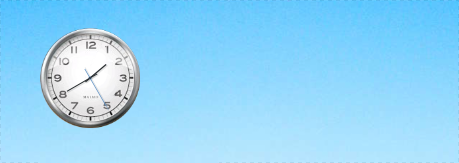
android screenlet theme

Download

Furious Moon

I’ll confess: this Moon phase screenlet isn’t exactly ‘new’ but it does look pretty swish when placed on the right kind of wallpaper (i.e. one with sky in).
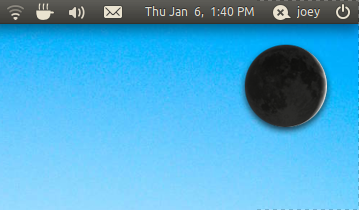
moon screenlet ubuntu

Better still it is now included by default in the newly updated Screenlets package – so it’s painless to give it a try.

Wide Weather

Another ‘default’ choice now: meet WideWeather Screenlet. Yeah – it doesn’t look glossy or fancy and nor does it spin, speak or run a set command when it starts raining. But what it does do is tell you the weather without looking garish.

Launch it from the screenlets manager.

Circle Theme for Impulse Screenlet

The author of this theme calls it ‘one of the most amazing pieces of eye candy’. And, to give credit, it is very neat and very bling-y.

The theme works with the ‘Impulse ‘PulseAudio’ Visualisation Screenlet’ (Download here) and adds a cool circular, spinning and audio-reactive visualizer to your desktop.
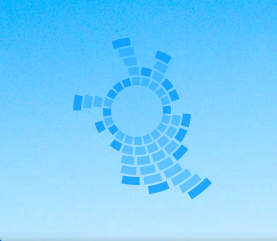
Download

Installing Screenlets

The best, and recommended, way of installing the newly updated version of Screenlets is to add the official development PPA. Whilst this may contain bugs it will also contain fixes, features and new screenlets sooner than anywhere else.

To make use in Ubuntu 9.10 through to Ubuntu 11.04 add ‘ppa:screenlets-dev/ppa’ to your software sources (Ubuntu Software Centre > Edit > Software Sources> Add New) or open a Terminal (Applications > Accessories > Terminal) and enter the following two lines separately, entering your user password when prompted:

sudo apt-add-repository ppa:screenlets-dev/ppa
sudo apt-get update && sudo apt-get install screenlets python-rsvg

Launch the ‘Screenlets Manager’ from ‘Applications > Accessories > Screenlets Manager’.

Related posts:

  1. ‘Flip style’ theme for Screenlets clock widget
  2. Android Clock screenlet theme
  3. Android Clock Screenlet Theme
Post a comment or leave a trackback: Trackback URL.
  • http://twitter.com/ArtemMostovoy Artem

    really sexy ;)

    • http://pulse.yahoo.com/_3WB7KLM5PIZ5KDIIAVW5Q2LTG4 Michael De

      I think you’ve been using gnome for too long…

  • Anonymous

    sweet :) gnome really need some quallity screenlets :D

  • Atermoon

    Last time the Android clock looked like that was about a century ago.

  • Anonymous

    People still use screenlets? I thought it dead 2 years ago…

    The last time I tried it, it was a big annoyance, slow and buggy (it made me have bad impression with python) =)

    Make be I’ll give it a shot not, wonder if it is any better…

    • Anonymous

      its back alive … and I think I heard that the codebase had been rewritten

  • http://pulse.yahoo.com/_3WB7KLM5PIZ5KDIIAVW5Q2LTG4 Michael De

    I always found screenlets for compiz a joke compared to KDE’s plasma widgets. I don’t think the EXTREMELY lame widgets you’ve advertised here are going to get anyone to start using screenlets, I’m afraid.

  • Anonymous

    Have tried screenlets before but im using conky and i think its much better once you get the hang of it

  • Giant Speck

    Screenlets ought to be scrapped completely and redone to be more like Rainmeter. Rainmeter is leaps and bounds better than Screenlets.

    • http://pulse.yahoo.com/_LLFBBO3CDQUMGQXOQNGXDDDBPM Ladymecha

      Well Screenlets never had that much interest, but comparing it to a proprietary app for a crappy OS that is windows 7 is unfair.

      • Giant Speck

        Rainmeter is an open-source application. Just because it’s developed solely for Windows does not mean that it is proprietary, nor is comparing a proprietary application to an open-source application “unfair”.

        • Anonymous

          http://rainmeter.net/RainCMS/?q=Development
          “Rainmeter is an open-source, non-profit project built by independent contributors. The materials are freely available from the project’s home on Google Code. The program, skins and plugins are being constantly expanded and improved in the time between major releases, and we invite you to help.”

        • http://www.redtube.com ActionParsnip

          I’ve seen so many people say this dude. “It’s for windows only so it must be proprietary”, then they read and slink away. Comedy gold every time. Why don’t people read????

  • Anonymous

    It’s nice to see the project alive. I am giving it a try (for… well, I don’t really no, which time…). Maybe, just maybe, this time I can live with it more than a quarter.

  • http://twitter.com/mlux82 marian lux

    NICE

  • Anonymous

    I use screenlets :)
    They aren’t brilliant but I like to have Impulse and a handful of clocks (different timezones) on my desktop. (I did have them before this post, although the new impulse one looks interesting :))

  • lunamystry

    doesn’t sound like much has changed to me. Conky sounds like a better suit for my needs.

  • Anonymous

    Yep….as expected…rubbish and old fashioned.. keeping with the Ubuntu tradition though…

    • http://pulse.yahoo.com/_LOR655GR4ZFHCMSV7FW5ROPSAA Cliff W

      A self-referential comment?

      • Anonymous

        Funny enough No! and also not referencing anyone else totally aimed at Ubuntu Which needs an up to date face lift(also not referencing me lol) KDE still my No1 desktop….PCLinuxOS but Ubuntu on my laptop and Win 7 on main PC…very reliable…..Linux got a way to go..

  • http://www.facebook.com/people/Tomasz-Slominski/1644176403 Tomasz Slominski

    I think all desktop shortcuts should look like the gmail applet- an icon with information, like the number of new e-mails.

    • http://cldx.blogspot.com/ Joern Konopka

      That would actually be a case for Nautilus, if i remember correctly there are even some Docs out there that would give Applications the possibility of superimposing text (or Numbers) onto the Application Icon or Folder but i really don’t know how far that Idea ever got, it was connected to Nautilus Labels, gotta see if i can find that read again, maybe someone else remembers this and has a link handy…

      Since it never made it to an actual Desktop i assume the Idea ran into some trouble though ^^

  • http://www.facebook.com/people/Tomasz-Slominski/1644176403 Tomasz Slominski

    I think all desktop shortcuts should look like the gmail applet- an icon with information, like the number of new e-mails.

  • https://launchpad.net/~boamaod Tabbernuk

    I’m developing the Screenlets.

    I ensure to you, that nothing has been rewritten from scratch. The aim of development is to make the oldfashioned Screenlets work fine on present Debian/Ubuntu systems. That’s all. Nothing fancy. There are no plans to take Screenlets further to be equivalent to Plasmoids or Google Desktop Gadgets.

    I believe this minimalistic goal is achieved and Screenlets works fine on Lucid, Maverick etc. If you do not agree, I’d like to see bug reports on https://bugs.launchpad.net/screenlets and https://bugs.launchpad.net/indiv-screenlets. Besides that there is now possibility to translate individual widgets on Launchpad and install them from PPA. It’s just some unsexy reorganization, no new fancy features.

    But still, if some of you smart guys critisizing the project and making stupid comments would like to join the project and implement Plasmoids API for GTK under the Screenlets project, you are most welcome. Any other initiatives are welcome too, because project is truly outdated. There are lot of ideas waiting to be realized though.

    To bad, that presently there is not enough manpower to make any bigger plans. I think people around GNOME and Ubuntu just don’t care about desktop widgets enough to join in development. You can tell from the entry in Ubuntu Brainstorm http://brainstorm.ubuntu.com/idea/19443/.

    There are more details about Screenlets on the home page http://www.screenlets.org/index.php/Screenlets_0.1.3_cooking.

    • Anonymous

      “But still, if some of you smart guys critisizing the project and making stupid comments would like to join us and implement Plasmoids API for GTK under the Screenlets brand, you are most welcome”

      you have no idea how much i want this to happen.
      im currently daydreaming of the magic folder sitting on my gnome desktop

  • Anonymous

    Never liked these screenlets since they are hidden as all other windows as you press the show desktop button. Have I missed something? How should I suppose to handle screenlets?

    • https://launchpad.net/~boamaod Tabbernuk

      This is not correct. Screenlets do not hide when you press the “Show Desktop”. At least when you have normal Ubuntu (read: Compiz). There is a workarund to make it work even without compositing at https://answers.launchpad.net/screenlets/+question/33930.

      • Anonymous

        Strange, I have Ubuntu 10.10, desktop edition, 64bit with compiz enabled and my screenlets gets hidden when I press “Show desktop”-button.

        • https://launchpad.net/~boamaod Tabbernuk

          And you use the Screenlets from PPA? If so, I’m really surprised. I use 10.10 too. Screenlets .deb installation sets gconf setting “/apps/compiz/general/allscreens/options/hide_skip_taskbar_windows” to “false”, and this should ensure, that Screenlets are not hidden on “Show Desktop”. You can see the Compiz setting in CompizConfig Settings Manager under General Options (should be on the third row there).

          • Anonymous

            Now it magically seems to work!
            Yes I used the PPA from this post. Do you have to restart your computer for the settings to take effect in compiz or is it just timerelated when the config gets updated in compiz?

          • https://launchpad.net/~boamaod Tabbernuk

            Compiz settings should change in real time and no restart should be needed. Don’t know about buffers or refresh times in Compiz though.

          • http://twitter.com/connorabruce Connor

            That’s good news, I used to use Screenlets all the time, loved them but to view them I had to either keep everything minimised and maximise as needed, or switch to another desktop, just to see them.

            I switched to Conky as it is still visible after a CTRL + ALT + D, but I might give Screenlets another try, however the other thing that I found is that with Screenlets my CPU was rarely below 30%, with Conky it is usually < 10%.

            But I am a sucker for eye candy.

      • http://cldx.blogspot.com/ Joern Konopka

        Sorry to disappoint but it has shown the same behaviour for me the last time i used Screenlets, thats quite some time ago though.

        On the other Hand i don’t know if that behaviour is fundamentally wrong anyways, i click “Show Desktop” and it shows the Desktop, everything else is a workaround or hack and not really desired behaviour. So it’s not really behaving wrong i think.

        I always kept my Screenlets on the Compiz Widget Layer and used a hot-corner for it so usually they wouldn’t sit on my Desktop anyways…

        • https://launchpad.net/~boamaod Tabbernuk

          Long time ago doesn’t count. You can get decent version only from PPA.

          For my mind the toggleable widget layer (at least the Compiz implementation) misses the point of desktop widgets. Widgets should be visible by default and all the time. Hiding them is a nice option of course, but last time I checked it wasn’t possible to make Compiz to show the widget layer on start up by default and keep it so.

  • http://www.fspressonline.org Trinae Ross

    It’s really simple. If you don’t like it don’t use it. I am curious to find out how many of the whining complainers out here could do better? And if you can do better, than why haven’t you? I don’t use screenlets or anything on my desktop. Give me a wallpaper and I am happy. However, I am not going to critcize someone’s work because it doesn’t copy the functionality of a particular product. If you fee a product is superior, then USE it. But don’t around judging folks who break their asses bringing SOMETHING to the table. Especially when you sit on the sidelines being the hecklers you are.

    // end rant.

  • Holger Seelig

    Circle Theme for Impulse Screenlet is really nice. I changed the colour to red so it fits to my background image.
    Thanks.

  • https://launchpad.net/~boamaod Tabbernuk

    Gmail theme above is now implemented in MailCheck screenlet v0.3.2 available in Screenlets PPA. The theme is called “Air Mail”.

    See: https://launchpad.net/~screenlets-dev/+archive/ppa

  • http://pulse.yahoo.com/_RAVTVAWXQY5JTTAEI2AF4THWWU saad i

    It doesn’t seem to be available for download…

  • http://www.facebook.com/profile.php?id=1419124168 Xavier Tartaglia

     how do you install the lcd new circle theme?