

Ubuntu users frustrated by the inability to connect to a new password-protected Wi-Fi network at the login screen will be pleased to know a fix is rolling out. This particular bug affects users of both […]

Do you like the idea of using the same profile picture in GNOME Shell on Ubuntu as your Gravatar? If you do, there’s a GNOME Shell extension to do it. It automatically makes your Gravatar […]

Ubuntu, like other Linux distributions uses the GNOME Display Manager (GDM) as its, well, display manager, though most of us tend to think of or refer to it as the login screen. To customise the […]

GDM Settings is a new GTK app for configuring the GNOME login screen from a simple GUI, with options to change background, font, top bar items, and more.

Want to change Ubuntu's login screen background? I walk through the steps for changing GDM background to a solid colour, gradient, or custom image.

As releases go, Ubuntu 17.10 is going be defined by the huge number of changes it makes — and that includes changes to the default login screen. Making a wholesale switch to GNOME for Ubuntu 17.10 […]
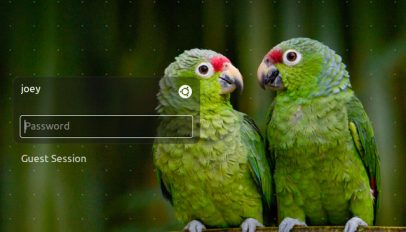
Ubuntu is switching to GDM as the default display manager for both Ubuntu 17.10 and Ubuntu 18.04 LTS. GDM will replace LightDM and the Unity Greeter.

'LightDM' will replace the standard 'GDM' login experience for Ubuntu 11.10, based on a decision taken today at the Ubuntu Developer Summit.
Do you use a 'picture' for your user account? Most don't, but I find that it makes using Ubuntu a weeny bit more personable at log-in time. Ubuntu ships with a healthy heap of choices, but if they don't do it for you the following avatars, bound for Chrome OS and uncovered by the folks over at Chrome OS Story, just might.
Easily configure the GDM - 'login manager' to the rest of us - with this a simple tool.
Facial recognition software may be nothing new but did you know you can use your webcam to log in to your Ubuntu desktop? Logging in to Ubuntu with nothing more than a smile is possible using the pam-face-authentication utility which was specifically designed for regular everyday users to use.
One complaint many users had when upgrading to Karmic was the loss of a GDM (login screen) setup tool to easily tweak the appearance of the login screen. Versions prior to Karmic allowed you to […]
Karmic’s GDM received some small updates today that brought with them a new HumanLoginIcon set full of beautiful glowing icons – much more akin to the mock-up than the previous humanity icons used in it’s […]
Karmic’s new GDM isn’t as customizable as the previous version due to a complete re-write from the ground up. Just take a look at the login preferences screen from Jaunty: – and this is the […]
The login window that will be greeting all users of Karmic Koala has finally been revealed! The GDM design as a whole, like with the XSplash, sticks very closely to the mock-ups the Ubuntu Design […]
The GDM/Login Screen proposal for Karmic Koala has received a slight update since my last post. At first glance it appears nothing major has been changed. Looking a bit closer you can see more subtle […]
The boot screen design proposal has undergone a minor revision since this post was written. Check out the revised boot screen/GDM screen by clicking your way over to this post. The Ubuntu design team […]
A not-entirely-major revision to the Jaunty Jackalope login screen was released today. Have a peek: – Doesn’t look any different to you? Here’s the original Jaunty GDM: – It’s a subtle change, but a good […]