

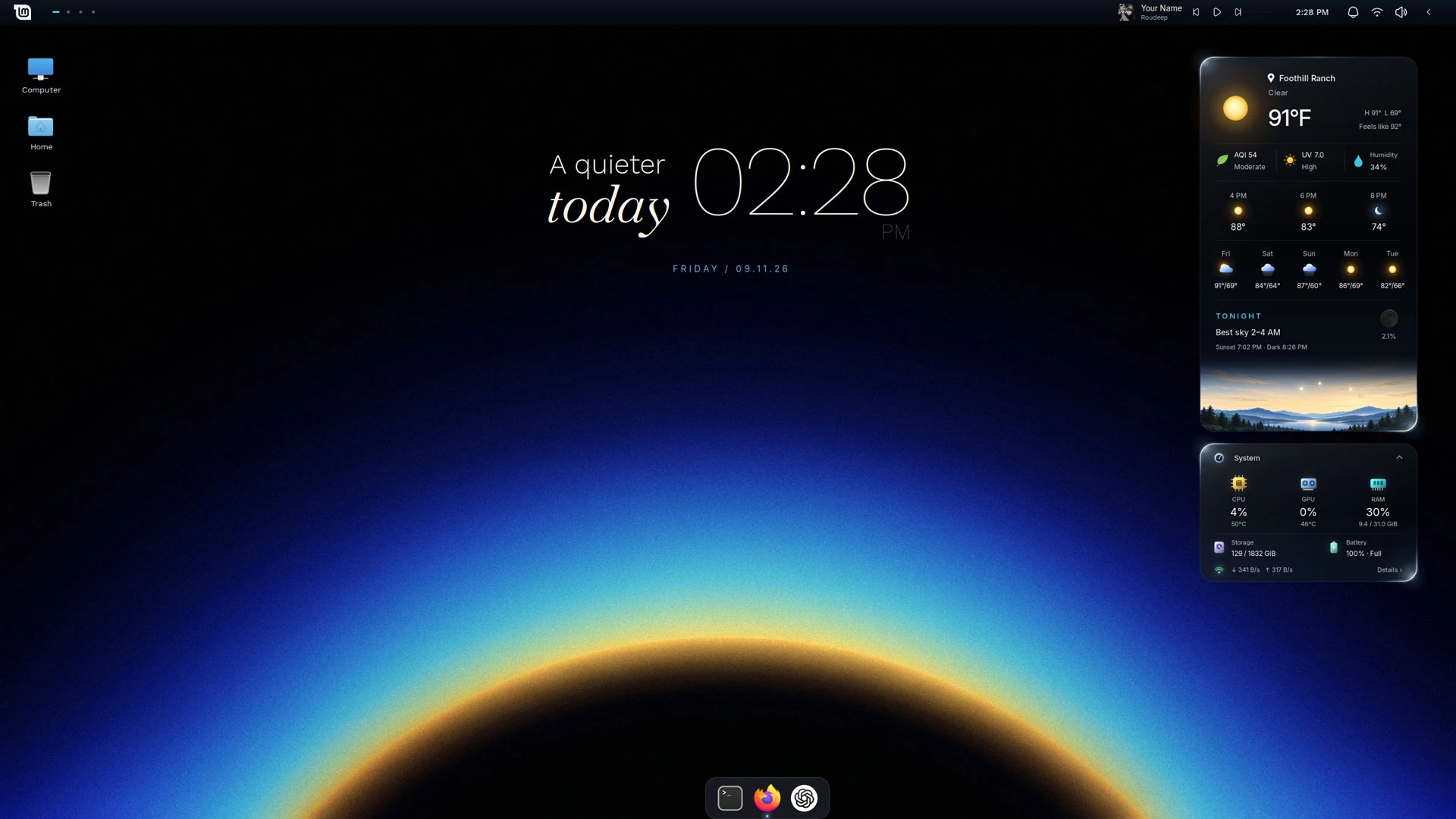
People often say Linux Mint looks dated, but the Cinnamon desktop is highly customisable – something a new transformation pack shows to eye-catching effect.
Silent Horizon is a Linux Mint makeover pack made up of desklets, panel applets, wallpaper, Plank dock theme and minor Cinnamon layout tweaks. The work of ~PersianVibeCoder, it aims to create a “calm, minimal desktop with little details that make it feel alive”.
It has little “details” that do add to the dynamism – albeit at the cost of performance on lower spec devices (as I’ll come to in a moment).
Take the weather and system monitor desklets. They have a running rim light that circles the card.
The illustrated horizon card in the weather desklet is more than it first looks: it’s a live horizon view that changes over the course of the day, showing the position of the sun, moon and major planets when they are visible above the horizon in your actual location.
Alongside the striking weather and system monitor cards (which can be expanded or collapsed) is a configurable desktop clock widget.
Pulling it together is a Quiet Line set of panel applets along a single desktop panel, including a GNOME Shell-style workspace and a Now Playing controller that works with MPRIS players, shows album art and has a Cava-powered sound meter embedded.
Plank dock is used with a custom theme that mirrors the ‘glassy’ desklet cards.
It’s fairly transformative set of changes, and easily undone. The downside is performance. On low-powered devices, the CPU usage is high. My Chuwi laptop – which runs full-fat Ubuntu without a sneeze on a modest 8GB RAM and Intel m3-8100y – crawled with this.
Make Linux Mint look like this
First things first: Linux Mint includes a backup tool. Before you install this transformation pack, use it: if this goes wrong or you decide you don’t like it, you’ve got an easy “undo” – alongside the script’s own “uninstaller”.
Silent Horizon only supports Cinnamon desktop, and has only been tested on Cinnamon 22.3 (used in Linux Mint 22.3). It’s also, clearly, been aided by AI.
Download the latest version from the project GitHub releases’ page, then extract the ZIP.
Inside are folders, files and an executable install script. Read it (well, the python script it points to) carefully in a text editor before you run it. Running scripts from the web is a security no-no, so make sure you’re happy with the contents.
Then open the folder in a terminal (right-click inside of it and choose ‘open in terminal) and run:
./install.sh
Allow the installation to complete (it fetches packages you may not have, like Plank and Cava), then log out and back in. The last step is important as Silent Horizon’s changes and configurations all need to click together and a logout does that.
All being well, you’ll be be greeted by something that looks like this the screenshot – but maybe not optimised for your screen resolution.
You can right-click on the desklet’s to access configuration panels where you can enter your location, change the scale and dial in other preferences.