

The most important thing in amateur astronomy is being able to see the sky – knowing that some rare celestial event is taking place is cool, but being able to see it yourself through a telescope or wit the naked eye is way cooler.
To help you plan your stargazing activities from specific locations a touch easier, a new Unity lens has been created by Ubuntu developer David Turner.
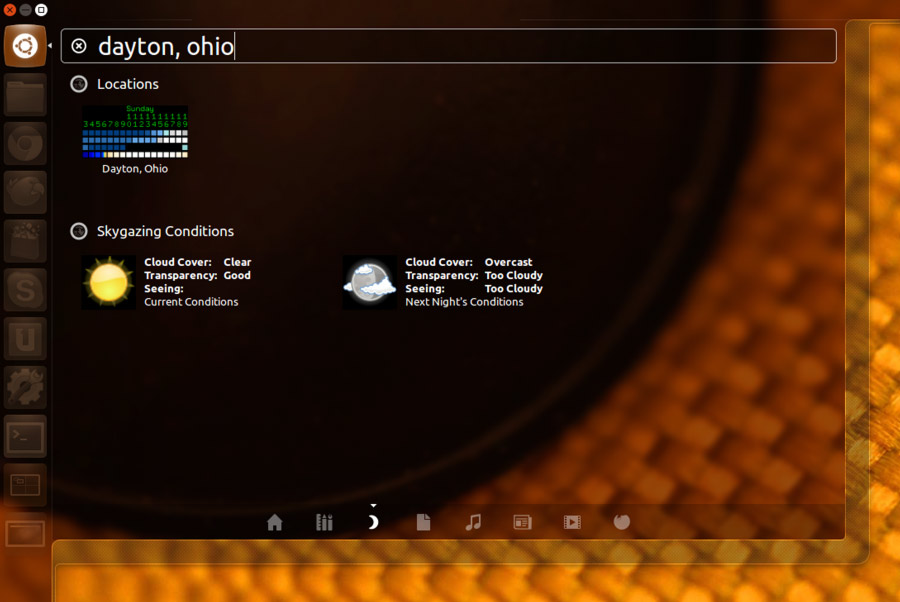
His Clear Dark Sky Unity Lens makes it easy to get a heads on sky visibility for a given location in the USA based on data from the Clear Dark Sky website. You won’t need to open your browser and head to the website, just search here to find out:
Clear Dark Sky claim to offer ‘the most accurate and most usable forecasters of astronomical observing conditions’ in North America.
What Can it Do
Getting sky visibility information — cloud cover, transparency and conditions — is straightforward with this installed: open the Unity Dash, select the Clear Dark Sky lens, and enter a location in the search bar.
If weather charts are supported in the region you entered you will see two sets of results appear:
- ‘Clear Sky Chart’ tiles
- Current and next day night-time weather conditions
Click on either of these results to open your default browser on the relevant cleardarksky.com page, where you can learn a bit more detail (or scope out the likely conditions for the coming days).
Does that sound useful to you?
The Clear Dark Sky lens is currently provided as a DEB installer you need to download from the project’s Launchpad page (launchpad.net/
Download, install and then try it out — but be sure to let me know if you think this could be useful to you by leaving a comment below!