


System76 has officially released the first public beta of Pop!_OS 24.04 LTS, which features the company’s new, Rust-based COSMIC desktop environment by default (which is also in beta).
System76 say COSMIC will ‘propel the Linux desktop to new heights of user empowerment’
Pop!_OS 24.04 is based on Ubuntu 24.04 LTS but with Linux kernel 6.16, Mesa 25.1.5 and NVIDIA 580 drivers. The desktop changes from GNOME Shell to COSMIC, and many preinstalled apps switch to new COSMIC counterparts.
And COSMIC is sure to the main draw here. System76, COSMIC is now considered ‘largely complete’ for its initial version, with current development efforts now focused on bug fixes for the final release.
Originally announced in 2021, COSMIC is a new desktop environment developed and engineered from the ground up. It is written in Rust, a memory-safe programming language that has gain a lot of traction within the Linux community in recent years.
COSMIC is also Wayland native (it handles X11 apps via Xwayland), and uses a custom GUI/app toolkit framework based on Iced and Elm called libcosmic (you can run GTK, Qt and other toolkits side-by-side with COSMIC apps).

Users of Pop!_OS 22.04 (with GNOME Shell and a bunch of extensions) will find things familiar in COSMIC as the default layout is much the same: panel, dock, workspaces, launcher, app library, and (of course) lots of window tiling options.
There are applets for network connections, sound, bluetooth, power/battery, and notifications. A simple date applet with calendar, and a power menu with key actions. A fully-stocked Settings app provides GUI controls for core and critical features.
tl;dr, COSMIC is a desktop environment.
COSMIC and the multiverse of setups
Configurability, theming and flexibility are core features of COSMIC, which System76 say is designed to “propel the Linux desktop to new heights of user empowerment”.
The desktop’s elements (panels, docks, applets) are designed to be repositioned, combined, tweaked, or hidden so that users can create custom layouts that work for them.
Similarly, colour scheme, icons, fonts, spacing/density, border radius and other GUI elements can be fine-tuned, adjusted and restyled to suit your own needs.
There is no “one-size fits all” with COSMIC desktop. Elements can be moved around, combined, hidden to suit your tastes. Configurability is the point — you can make COSMIC look like Ubuntu, GNOME Shell, macOS, a uni-panel Windows 11 — up to you!
There’s also the beginnings of a brand new COSMIC icon set (though many icons are still those from the Pop icon set), but when it comes to “theme” – it’s up to you; how things look OOTB aren’t how things have to look.
Software Available
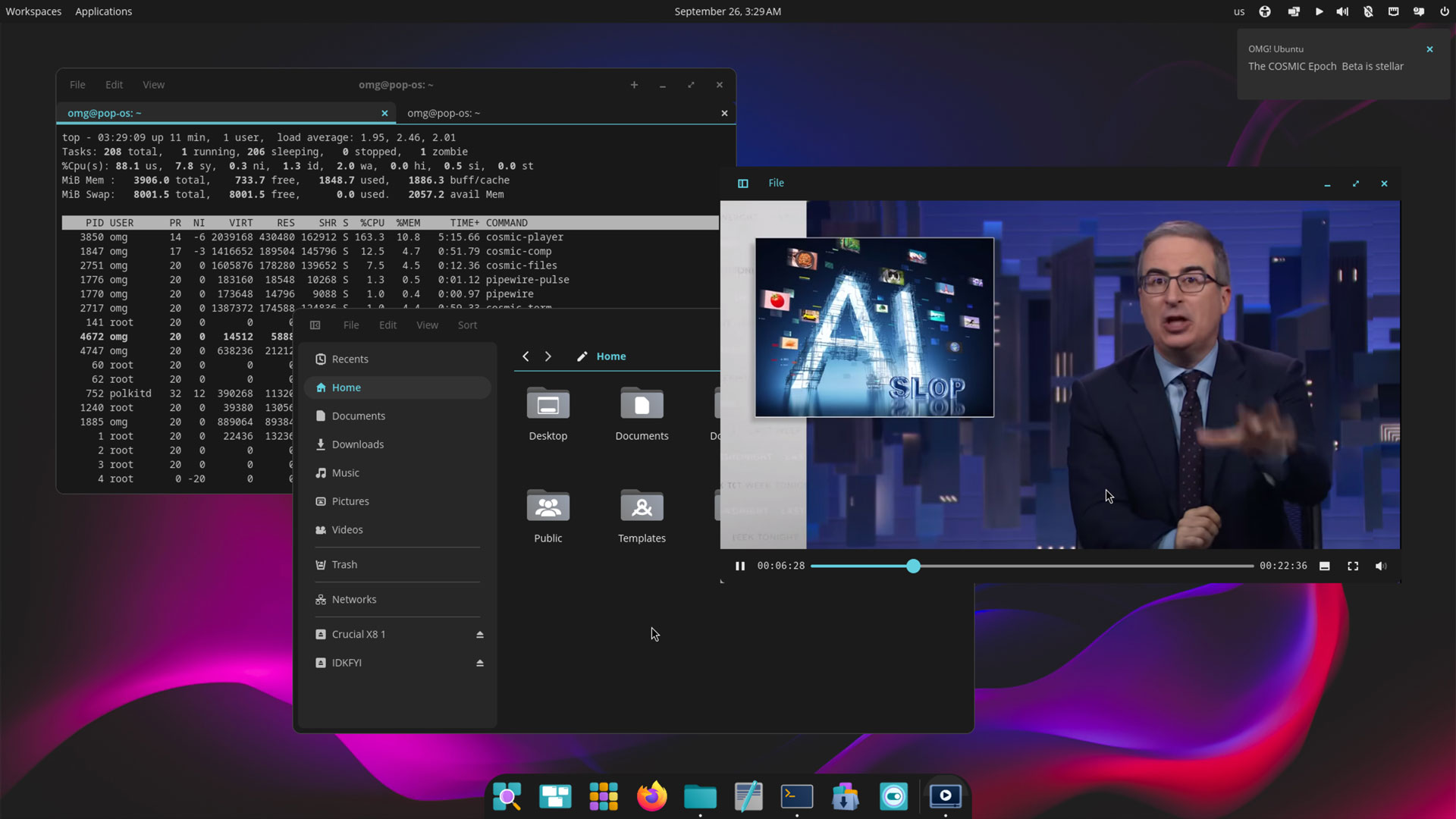
The beta includes a suite of first-party applications built with the native COSMIC toolkit. These include:
- COSMIC Files, a file manager with row/list and grid views, network mount support, path auto-completion, file previewing (with ctrl + space), archive handling, and more.
- COSMIC Terminal, a GPU-rendered terminal with per-profile colour schemes, vertical and horizontal splits, containers, and ligatures support.
- COSMIC Player, a media player with VAAPI decoding and Vulkan rendering, support for audio file album art, subtitles in video, and a tree view for browsing folders.
- COSMIC Edit, a text editor with git integration (viewing git status and tracking changes), a ‘revert all changes’ feature, Vim keybindings, tree view, themes, and indentation options.
Software is managed via the COSMIC Store, a one-stop-shop with access to the Ubuntu 24.04 LTS and Pop!_OS APT repositories, applications from Flathub and through a dedicated COSMIC Flatpak remote.
Beta considerations
Despite the space-faring name, it helps to keep expectations rooted to terra-firma as building a desktop environment from the ground-up in technologies no desktop has been made in before has been a huge undertaking — as well as an opportunity.
System76’s engineers have needed to create many critical components taken for granted, like text rendering, compositing, and input handling alongside the rest. It’d be unfair to expect it to rival Linux DEs that have undergone decades of development.
Progress is a process (ask those who used the first version of Ubuntu’s Unity desktop). There’s a lot of to be said for diversity and choice in technology, and a lot to lose by sticking to status quo and homogeny and technical monocultures. Doing things differently is reason enough.
It is a beta, and there are known limitations and ‘things to fix’ — dragging files from Wayland apps to X11 apps isn’t supported, some games may launch partially off-screen, and display toggle hotkeys are not yet supported.
Download Pop!_OS 24.04 Beta
You can download the Pop!_OS 24.04 beta ISO from the System76 website. Flash it to a USB, boot it on your device, and try the changes. If everything works well, you can run the installer to install it to disk — but it is a beta, so things could screw up.
Existing Pop!_OS users can upgrade to 24.04 LTS from 22.04 without having to perform a fresh install, from the command line. As this is a beta where bugs and quirks are present, it is not something they should do idly.
Finally, those who installed one of the Pop!_OS 24.04 COSMIC Alpha releases can update to this new beta by installing all pending software updates.
The COSMIC Beta is also available for testing on other Linux distributions, including Fedora, CachyOS and (btw) Arch Linux among others. More details on the COSMIC download page.
A release candidate will follow a bout of beta testing, with a final, stable release after that.
Have you tested the Pop!_OS 24.04 beta? Share your experiences and thoughts on the new COSMIC desktop in the comments below.