

Popular open-source Fediverse client Tuba just got a massive update with a redesigned post composer, the ability to watch YouTube videos directly in your timeline, and read links without opening your web browser.
The new Tuba 0.10.0 release builds on the 0.9.x series release that debuted in December last year with changes that improve or tweak nearly every aspect of how you interact with Mastodon and other decentralised networks from your Linux desktop.
Below are some of the standout changes this release brings.
What’s New in Tuba 0.10?
Redesigned post composer

The biggest change is Tuba’s overhauled post composer, which lead developer Evan Paterakis says was “the result of a multi-year effort.” Given that posting to social networks is a key part of their appeal, it’s great to see Tuba’s contributors focus on this.
When you’re replying to or about to quote-post someone, Tuba’s new composer shows a preview of the original post for context. This way you can be sure you’re replying to what you think you’re replying to. Plus, there are now input hints for spellcheck and completion.
You can also drag and drop media directly into the post composer or paste content straight from your clipboard. A progress bar relays the status of uploads, and you can now reorder media uploads in the composer using drag and drop.
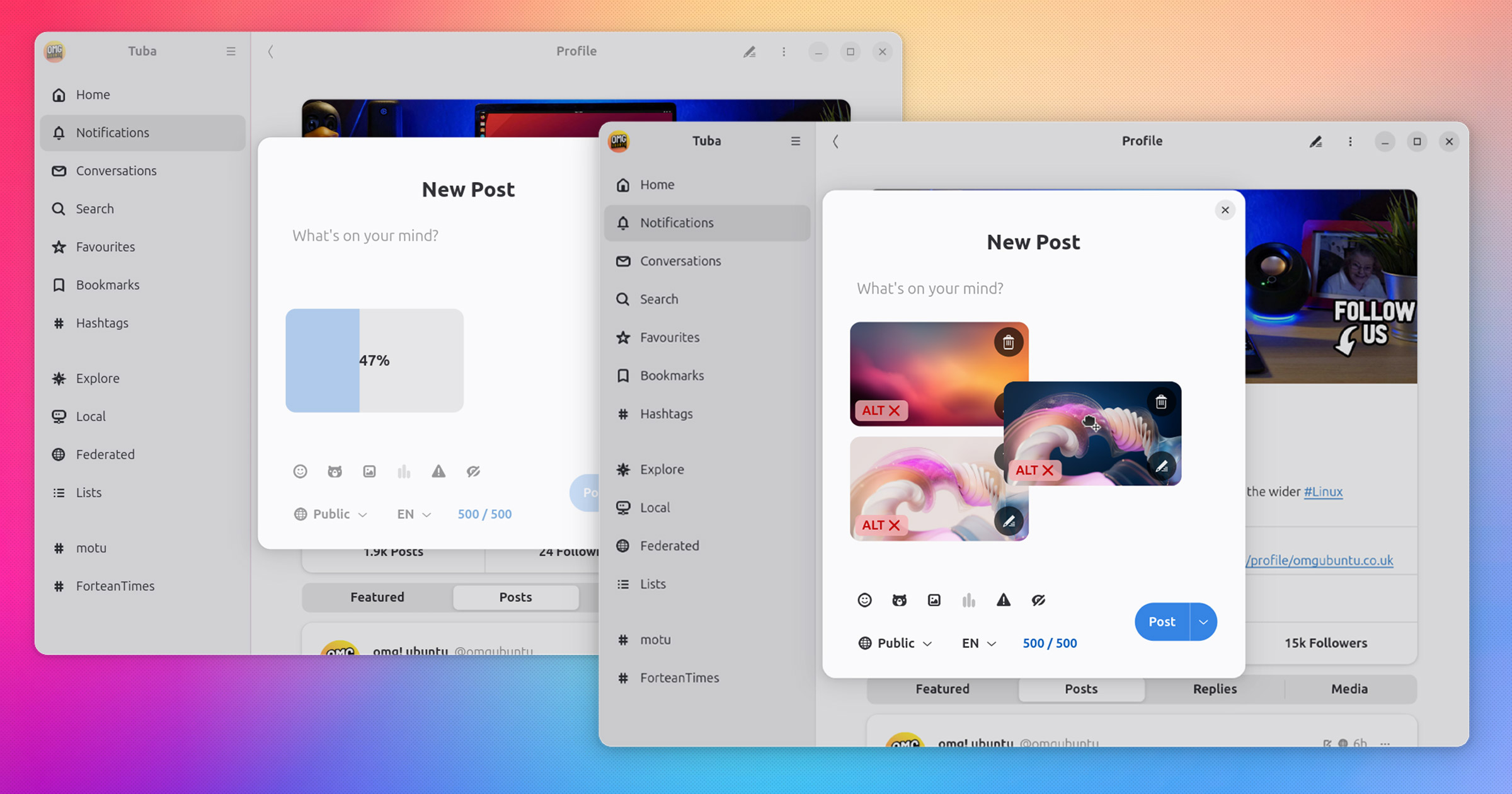
Plus improved poll creation, a video thumbnailer (useful when sharing videos so you can see what you’ve attached), new animations and some other tweaks to deliver a polished post creation experience.
When sharing images on social media alt text is help in keeping social media accessible (and often, a handy way to understand what an image is supposed to show if you can’t quite work it out from gawking at it.)
Tuba 0.10 comes with an improved alt text editor (combined with focus picker) and is able to automatically extract alt text from image metadata during uploads.
New editing and posting options

Tuba 0.10 adds a “Delete and Redraft” option for fixing posts after you’ve published them. If your instance supports it, you can also make local-only posts that don’t federate to other servers.
Also included are “more reactive scheduled and draft posts views updates”, making it easier to pre-empty posts for later posting, and viewing and editing half-finished thoughts stashed as drafts.
This version also improves compatibility with Fediverse platforms beyond Mastodon, adding new features for Pleroma and support for the Iceshrimp Drive timeline.
Play YouTube videos in your timeline
One of the coolest additions is built-in media playback for third-party services.
Using Clapper media enhancers, you can now watch YouTube, Twitch, and PeerTube videos in your timeline in Tuba, without needing to open a web browser. No more tab punting just to watch a quick video everyone’s crowing about.
On a related note, the audio visualiser that plays if listening to an audio file gains better styled controls.
Browse links without leaving the app
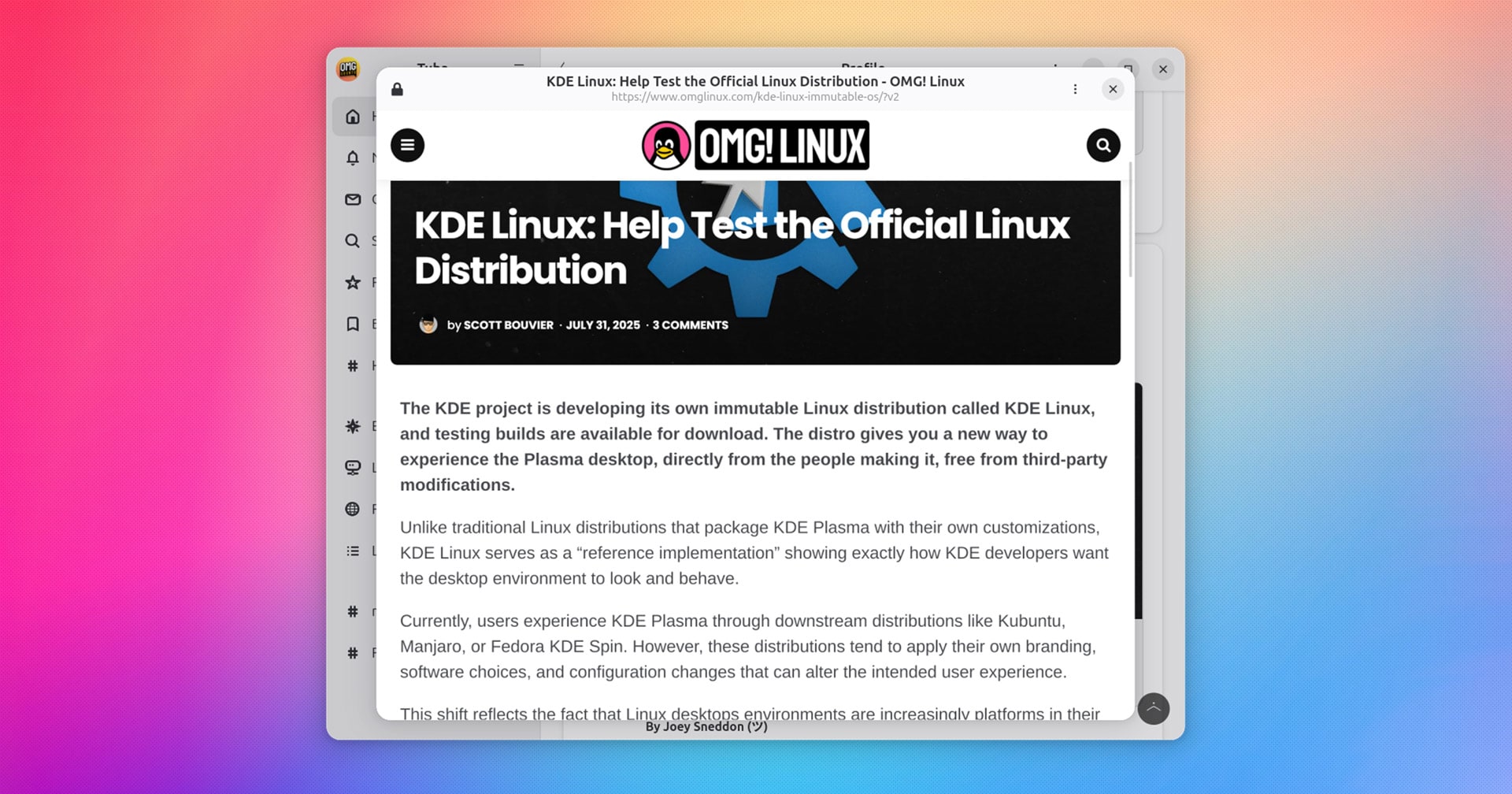
Tuba 0.10 also includes a new in-app web browser that lets you preview links without leaving the app. It’s enabled by default, but you can turn it off in the app’s Settings if you prefer viewing things in your main browser (to add to your tab hoard.)
Alternatively, you can keep it enabled but bypass it on demand by middle-clicking links.
Better notifications and timelines
Notifications are now grouped together rather than showing as individual event. You should be able to spot replies more easily amongst other kinds of notifications, without needing to turn them off wholesale.
Long posts in the timeline can be collapsed to save space, you can choose to hide interaction counters (replies, favourites, boosts) if you find them distracting, and Tuba handles long usernames better by shortening them with ellipses.
Since Tuba 0.10 adds support for quote-posting to Mastodon, it also adds support for displaying Mastodon quote-posts in the timeline.
Search history & hashtag pinning

Tuba 0.10 lets you pin your favourite saved hashtags to the sidebar for faster access, and the search tab now shows a list of your recent searches to avoid having to type them out again. Just click to re-search for research (sorry/not sorry).
A new keyboard shortcut ctrl + L to access search has been added (in addition to the existing ctrl + F), and you may (or may not) notice the use of a rounded search-bar style.
Featured features on profiles
When viewing account profiles (including your own) you’ll notice a ‘Featured’ tab. This is where any ‘endorsements‘ (a new Mastodon feature that lets accounts er, feature other accounts) and hashtags they want to be associated with are housed.
It’s also possible to add ‘featured’ hashtags to your own profile. When browsing a hashtag, click the ‘heart’ icon in the toolbar to add it on your profile’s Featured tab. While I couldn’t figure out how to ‘endorse’ an account, that’s listed in the release notes.
Talking of which…
Other changes
Beyond the changes mentioned above, Tuba 0.10.0 also includes:
- Option to reveal sensitive media by default
- New tab switching shortcuts
- Quit menu entry added
- More settings use dconf
- Proxy settings save instantly when changed
- ‘Fluid layout’ for horizontal lists (e.g., hashtag bars)
- Account switcher can show up to two lines of username
Plus a fair number of bug fixes, some of which you may have encountered, some of which you may not have – now fixed all the same. Check out the full changelog on the project GitHub for a lot more detail, with link to commits for further info.
Getting Tuba
Tuba is free, open-source software for Linux and Windows (yes, news to me too). You can get the code on GitHub, or you can get the latest version of Tuba on Flathub or the Snap Store, with the latter just open a Terminal and run:
sudo snap install tuba
If you don’t want the latest changes – and if you don’t, did you even read above?! – you can install an older version of Tuba from the the Ubuntu repos using sudo apt install tuba, though it’s only in the repos of Ubuntu 24.10 and up.