


JetBrains has released IntelliJ IDEA 2025.2, adding offline AI-powered code completion for Java and support for Java 25, the next long-term support (LTS) release.
There are also enhanced Spring debugging tools, Maven 4 support, and the usual glut of features to help make day-to-day Java development less of a chore.
For those unfamiliar (myself included, to a degree), IntelliJ IDEA is the most popular integrated development environment (IDE) used by Java developers. It offers code completion, debugging, project management and other tools for working with complex code bases.
Java remains one of the most popular programming languages (albeit falling), and IntelliJ IDEA is the go-to for Java developers, so every new release is a big deal. Which I guess is why I’m writing about it?
AI features that stay local
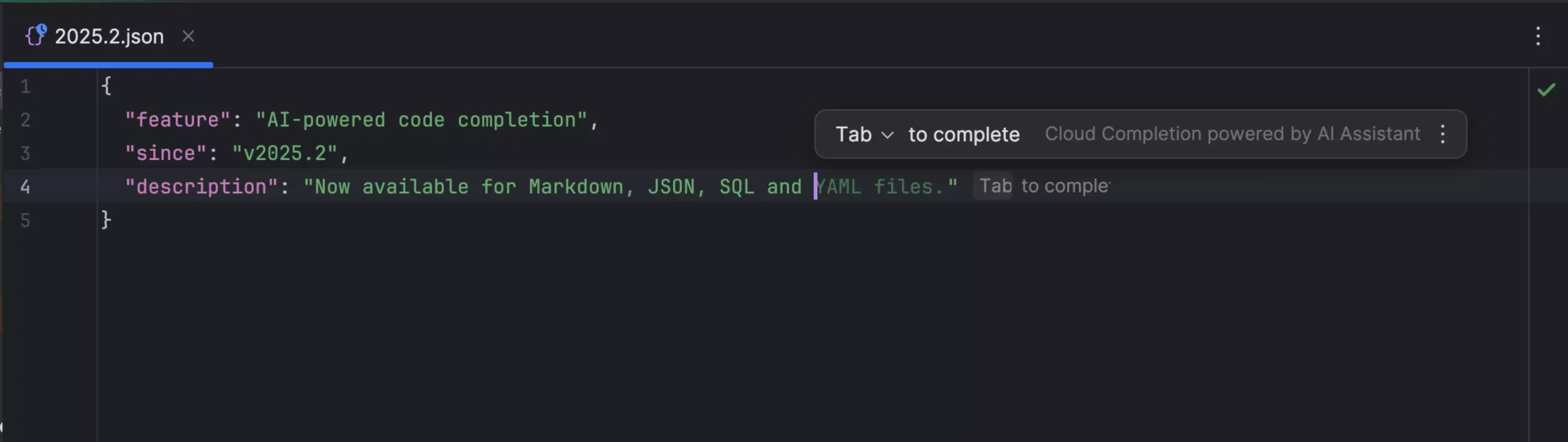
The headline improvement in IntelliJ IDEA 2025.2 is offline code completion for Java that JetBrains says “suggests code blocks for Java in offline mode and lets you choose your preferred local code completion model”.
Adding offline-enabled, local AI-powered code completion for Java is a big boon in an era when anything infused with AI relies on pricey APIs and subscriptions or privacy tradeoffs involved in ferrying input to/from American data centres.
The Junie coding agent is up to 30% faster, and gains support for the Model Context Protocol
If you work with proprietary code – no hissing, FOSS fans; developers have jobs y’know – or you’re working on something sensitive, being able to benefit from AI assistance whilst keeping everything local is a win.
All of that is available for free1 since, y’know, it’s using an LLM that’s running on your device — assuming your device has the compute power to handle it, of course!
The AI Assistant expands into SQL, YAML, JSON, and Markdown, while the “Junie” coding agent is said to be up to 30% faster and gains support for the Model Context Protocol (MCP) for “deeper awareness” when connected to external tools.
Finally, the AI features add Project Rules – files that let you define “project-specific instructions, for example regarding coding style or framework constraints”.
You can also attach images in AI chat (error screenshots, not what you had for lunch), as well as tables or views, and folders folders for multi-file context, with the ability to use @or # to refer to contents during your conversations.
Other Changes
Given that it’s the next LTS, and many developers are keen to migrate away from older (crusty) codebases, having Java 25 support for both final and preview features, with the ability to “download Java 25 Early Access builds directly from the IDE”, is huge.
Maven 4 support arrives as the build tool approaches general availability, promising “reliable project sync” and other improvements that may or may not fix Maven’s oft-critiqued complexity.
Virtual thread debugging lets you “collect and inspect virtual threads in thread dumps” with automatic grouping to avoid interface flooding, and the IDE loads thread dumps from jstack and jcmd for those wanting to do performance analysis.
JetBrains’ Dmitriy Smirnov gives a full rundown of fixes in IDEA 2025.2 in a standalone post.
Paid Feature Changes
For those paying for or have access to IntelliJ IDEA Ultimate, the Spring Debugger gains real-time runtime insights, Spring Modulith support with dependency management tools, and better database editing.
JetBrains has updated its subscription policy so that “core Java and Kotlin features remain accessible” even if your renewal is delayed. Refreshing!
The company also changes on its present updates, saying it’ll only highlight “the most impactful new features” rather than list every minor change.
As someone who blogs about software (albeit not JetBrains’ warez that often) that move… Annoys me, but they note that “users rarely scroll past the third screen” of release notes, so… I guess no-one cares anyway.
Install IntelliJ IDEA on Ubuntu
If you’re a Java developer keen to see if the mix of genuine improvements and features which may or may not solve problems you may or may not have present here live up to the hype, you can download IntelliJ IDEA 2025.2 from JetBrains’ website to find out.
Alternatively, you can install IntelliJ IDEA on Ubuntu as a Snap. JetBrains maintain the Snap packages directly, and updated punctually (though 2025.2 builds are yet to hit the stable channel, but will be there in a few days).
To install IntelliJ IDEA Community Edition (free and open source, but lacking some of the features mentioned above) run:
sudo snap install intellij-idea-community --classic
To install IntelliJ IDEA Ultimate (full-fat experience with all the bells and whistles but requiring a paid plan) run:
sudo snap install intellij-idea-ultimate --classic
Although free tiers do include access to cloud-powered AI features, it comes with limits. If you find yourself bumping into limits often you may need to start thinking about buying a license (or fast-tracking your skills so you don’t need AI assistance).
- Apart from the electricity. But since you’re not piping code through someone else’s LLM where it’s being used to WHOKNOWSWHAT, y’know, small wins. ↩︎