


Mozilla Firefox 134 has landed, making the browser’s first release of the new year.
It’s been a month since Firefox 133 delivered time-saving tab overview access, beefed up bounce tracking protection, finessed flaws with Flatpak file opening, and smoothed out issues causing slow DNS lookup/connection timings on 64-bit Linux distributions.
Do the changes in Firefox 134 best those?
Let’s take a look!
Firefox 134: New Features
Touch hold gestures on Linux
On Linux, Firefox 134 supports touchpad hold gestures. This allows kinetic scrolling to be stopped simply by placing two fingers on the touchpad. If you ever scroll down a lengthy article with enough momentum you’ll appreciate there’s now a way to interrupt it before it reaches the bottom!
A bug requesting support for touchpad hold gestures on Linux was opened in 2019. Delivering the feature wasn’t trivial, requiring other parts of the desktop stack, like libinput, wayland, and GTK, to support it – now it’s here!
Refreshed New Tab layout (US & Canada)

A ‘refreshed New Tab page layout is said to be available to Firefox 134 users in the USA and Canada. As it’s part of a progressive rollout not everyone who upgrades to the new release will see it right away.
The improved New Tab layout in Firefox 134 swaps the position of the Firefox logo and the weather widget in an effort to, Mozilla say, “prioritize Web Search, Shortcuts, and Recommended Stories at the top.”
Recommended and sponsored stories on the Firefox new page switch to a ‘card UI’, letting users running the browser on big displays see content in up to 4 columns. The change is about ‘making better use of space’, Mozilla say.
I’ve lost track of which features the new tab page in Firefox has. Backgrounds never got a big release notes moment (but work out-of-the-box in stable builds I try), while the weather widget is disabled yet the mention here suggests it should be showing.
Pop-up blocking precision
As of Firefox 134, the browser now “follows the model HTML specification for transient user activation more closely”. Mozilla say this change means popup blocking isn’t as overly aggressive now, and will lessen the change of blocking prompts a user may want.
Tree Hugging Ecosia
Last month, Mozilla announced an expansion of its search engine partnership with Ecosia, a search engine underpinned by Google and Bing that promises1 to use 100 percent of its profits “for climate action”, with the bulk of money going towards tree-planting projects.
Ecosia in Firefox 134 now supports all languages in the German region (not just German), along with Austria, Belgium, Italy, Netherlands, Spain, Sweden and Switzerland.
Bug fixes – and beyond
HEVC hardware support is now implemented for Windows users, while macOS users benefit from a flurry of fixes focusing on the macOS emoji picker, like an errant ‘e’ being entered in a text field when the system emoji picker was opened in Sonoma.
Make use of Firefox View? The sidebar for tabs synced between devices can now show up to 5000 as of this release, an increase from the previous limit of 500.
A reported issue affecting the drag and drop of files on to Gmail in KDE was resolved, as was a similar bug breaking drag and drop from the desktop and on to a web page broken in X sessions on Linux.
Debugging in Firefox gets easier: web extension source code refreshes if an extension is reloaded; log-point values will auto convert to profiler markers; an an indicator for 103 HTTP status codes shows in the Network panel.
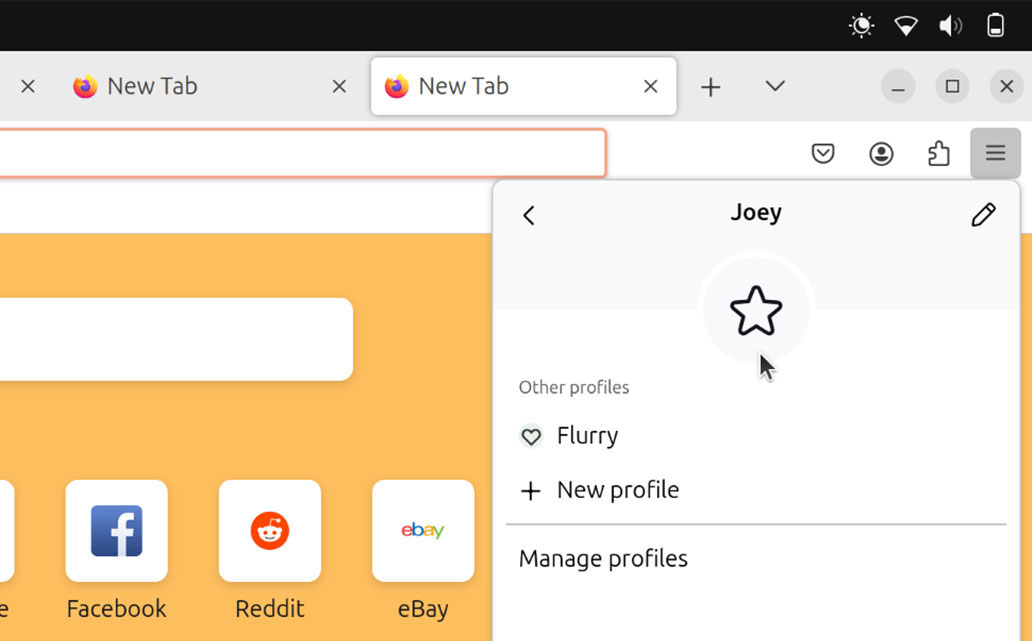
Finally, those who like to tinker with what’s next™ may want to take Firefox’s upcoming profile manager for a spin via about:config, as it’s progressing at a fair rate.
In a new tab, go to about:config, accept the warning, search browser.profiles.enabled, and click the button at the end of the row to set to true – change takes effect immediately.
Firefox’s profile manager is (currently) accessed through the hamburger menu. Adding, switching, or managing profiles opens a secondary window. There you choose a different profile, or edit the name, icon, and accent colour of one.
Reliability with this feature shouldn’t be assumed. Your user data could be affected by testing it (almost certainly if you later turn it off). But it’s a promising start for this long-requested feature – one of many new features coming to Firefox.
Get Firefox 134
I’m not a betting man, but I’d wager almost everyone reading this article on Ubuntu has Firefox installed already.
In which case, upgrading to Firefox 134 is easy: the snap and binary builds will update in the background, and DEB and Flatpak versions can be installed by running an update check.
But if you don’t Firefox installer, there are plenty of ways to fetch it.
The Firefox Snap work on most major distro, as does the official Flatpak of Firefox on Flathub. There’s an official Mozilla APT repo with DEB builds, and distro-agnostic Linux binary on the Mozilla website (a simple download, unpack, and double-click to run affair).
Users on macOS and Windows who have Firefox installed already will receive this update in-app (go to the Firefox About dialog to check for an update if you don’t see a notification soon), while those who don’t have it can download it from Mozilla.
Whatever method you get it, Firefox 134 starts rolling out today, January 7, 2025.
- Ecosia publishes financial reports each month to let people verify it does what it claims. ↩︎