


If you’re an avid user of the Discord Linux app and been annoyed that screen share audio doesn’t work, there’s good news: it now does!
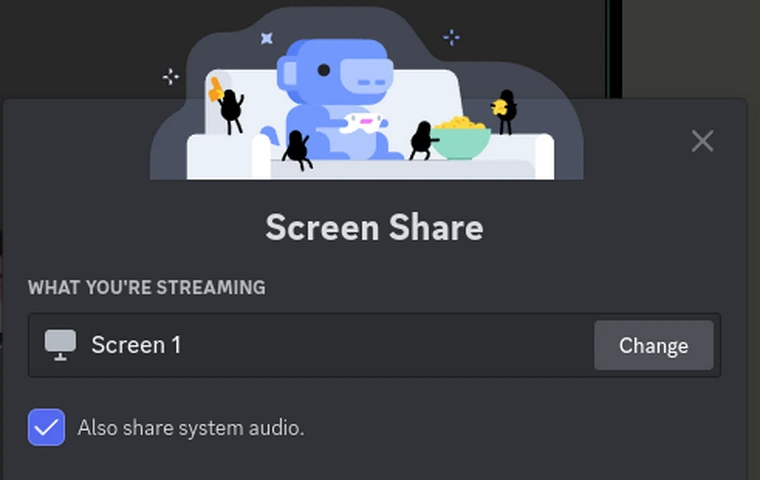
The latest version of Discord for Linux at long last includes the option to ‘share system audio’ when setting up a screen share to stream in chats or server channels.
Though it works on Windows and macOS, Discord has been silent on when it plans to support screen audio sharing on Linux – so much so it’s been the top feature request on the Discord feedback tracker for years.
But this week Linux user Aden — thanks for the tip! — noticed a toggle to share system audio is present in the screen share ‘what you’re streaming dialog’.
Note: that screen is only shown after you’ve selected the screen or application you wish to share, as the Wayland portal picker asks you to select the app/screen first.
As Discord has not (yet) mentioned this change in any official changelog or blog post Aden decided to test it first to make sure it works.
And sure enough: it does!
When screen-sharing a game in Discord to friend they were finally able to hear the in-game audio.
Aden told me that “[this is] basically the biggest missing feature of Discord on Linux, and if it’s actually fixed for good that will be huge for Linux as a gaming platform.”
Not being a big Discord user, and even less of a gamer, so I wasn’t aware audio wasn’t working for screen shares in Discord on Linux until today — but even I appreciate that being able to hear the audio from a screen share is rather important!
So to learn the official Discord Linux client finally support this is great to hear.
Literally, in this case!
Cheers Aden!