

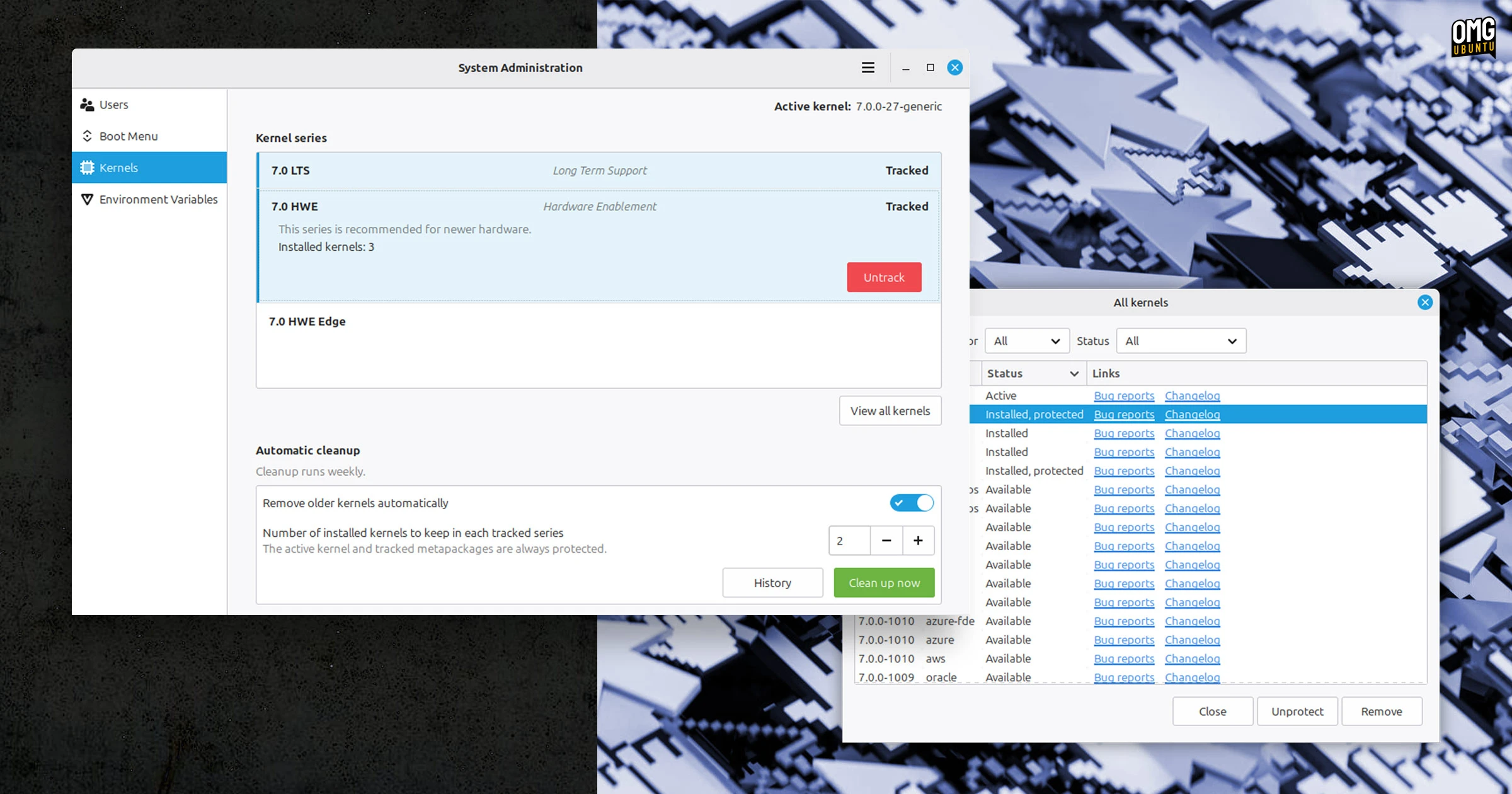
Linux Mint has announced an overhaul in its kernel management features, and will automatically delete old kernels once a week to free up space.
In current versions of the distro, kernel package tools are included in the Update Manager, but are being moved into the System Administration tool on both standard and LMDE versions.
The distro will also now track kernels by series, rather than individual releases. You’ll get to choose which kernel series are tracked and how many older kernels within each series the system should keep (in addition to the one you’re booted on; it doesn’t yank out the rug under its own feet).
Updates for tracked series kernels will continue to be shown in Update Manager as before, but in a marked change, older, unused kernel versions will be removed automatically, once a week.
A manual ‘Clean up’ button allows you to ‘free up space immediately’, according to Mint project leader Clement Lefebvre. While a History button means you can easily see a list of which kernels were removed and when.
Expanded kernel management options

If the idea of older kernels being deleted in the background appeal, don’t worry: you get controls.
Individual kernels can be marked as ‘Protected’. This exempts them from being deleted, irrespective of any other settings or conditions. Plainly: to prevent a specific kernel from being deleted, regardless of whether it’s tracked, you must mark it as protected in the ‘View all kernels’ dialog.
Installing a kernel from another series, e.g., OEM, Azure, IBM, Real Time, will prompt the tool to list the full series and provide you the option of tracking it. Tracking automatically installs any related meta-packages and future updates, so it is worth doing.
While custom kernels you might install – from a random PPA or a .deb for example – can’t be “tracked” properly, you can mark them as such to prevent them being removed in a clean-up process. However, Linux Mint’s tool will warn you of your responsibility to actually update them.
Removing unused kernels frees up space

If you don’t pay much attention to updates, you might not be aware of just how many kernel updates are released and installed – and stay installed, side-by-side. Select the ‘advanced options’ for your distro in the GRUB boot loader to see a list of all those installed and bootable.
On one of my Linux Mint 22.3 installs, I have 4 different kernels listed (see photo above) along with their respective recovery modes. Useful to keep, but not strictly needed – especially multiple in-series revisions.
All of those old kernels take up space and if you never use or need them (because the active one works fine) then removing them is an easy way to claw back several hundred megabytes of space. However, I would suggest you keep one known backup kernel, just in case.
It’s not clear from Mint’s blog post if these changes will come to existing Linux Mint 22.3 and LMDE users as a software update, or if it’s a change arriving in Linux Mint 23 ‘Alfa’ (codename temporary), which is due for release at the end of the year.