


Firefox 33 is now rolling out to users on Ubuntu, bringing a clutch of new feature with it.
If you run a supported Ubuntu release, you can install this update, the newest version of Mozilla’s widely popular open-source web browser, via the Software Updater tool.
Firefox 33: What’s New?
The response times of searches made in the ‘Awesome Bar’ (the URL/address bar) have been improved in Firefox 33.
According to Mozilla Software Engineer Jared Wein, M.Sc., “most people will see search results on average 5 seconds quicker!”.
That’s not nothing when you’re in a mad-rush to find something out!
You’ll also see search suggestions in the search boxes present on the New Tab and the Firefox Home (about:home) pages:

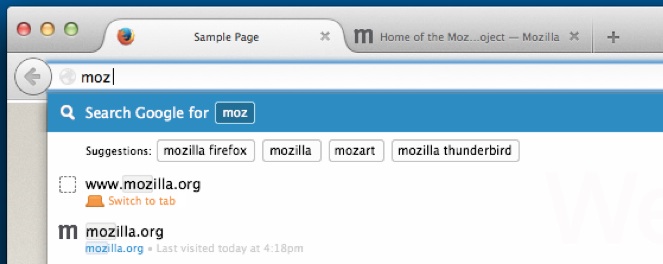
Want to see see search suggestions in Firefox’s Awesome Bar dropdown? You’ll be pleased to know that it is in development. Suggestions appear as small, boxed chips in a row based on current development builds:
Firefox 33 also delivers other changes too, including:
- OpenH264 sandboxed support
- WebRTC improvements
- Support for connecting to HTTP proxy over HTTPS
- Session restoration improvements
- Faster JavaScript strings
- Bug fixes
Enhanced Tiles Held Back
“Enhanced Tiles” was a feature present in early beta builds of v33. It didn’t make it into the final release here, but you can expect to see it in a future build.
What is it?
Enhanced Tiles allow select partner sites that already in your browsing history and listed on the New Tab page to forgo showing an auto-generated thumbnail, and instead use one supplied by the partner.
What makes them enhanced is that that the image changes when you hover over the tile. Depending on the source, this can be used to show additional information, like the latest headline on a news site or featured content on a blog.
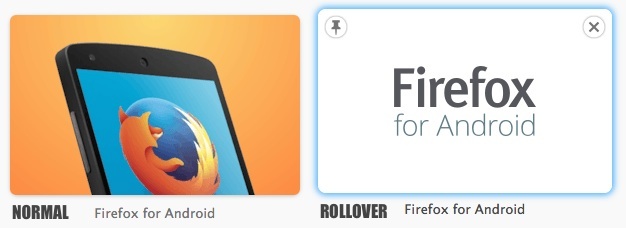
However, the feature will rely on partners, well, partnering up to do this.
Where to get Firefox 33
The Firefox 33 update is rolling out across Ubuntu 12.04 LTS, 14.04 LTS and 14.10 now. You can run an update check using Software Updater to get it, or run sudo apt-get update in a terminal.
If you use a different desktop distro (or you still use an older version of Ubuntu) you can download Linux binaries from Mozilla directly.