

Heard of Cuttlefish? It’s is a small utility for Ubuntu that lets you set-up ‘rules’ to be followed when certain actions or states occurs.
For example, you could set up a rule so that when you unplug the power cord from your laptop Cuttlefish switches off your Bluetooth and mutes your speakers.
It’s very clever and very handy.
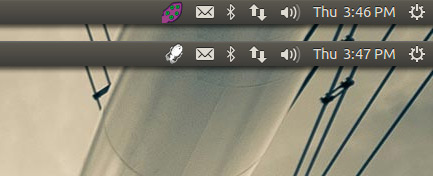
Only, its indicator icon is a bit of an eyesore when sat in the panel.
Cuttlefish, my aquatically-themed pal, there’s a time and place for waving a garish purple tentacle around—oi, oi—but the Ubuntu indicator area is not it!
The good news is Cuttlefish includes an Ubuntu-friendly mono-version of its tray icon.
It just doesn’t use it by default.
So, to tickle Cuttlefish into replacing its full-colour tentacle with flat ‘mono’ squid, run the following three commands in the Terminal:
- cd /opt/extras.ubuntu.com/cuttlefish/share/cuttlefish/media
- sudo cp tentacle_indicator.png tentacle_indicator.png.old
- sudo cp cuttlefish_indicator.png tentacle_indicator.png
That’s all.
If you have Cuttlefish running when running those commands you may need to quit and re-open it before the visual change takes effect.
Source: gastarbeiten