

When you run a command with sudo on Ubuntu, the terminal asks you to enter your user password, but it doesn’t show visual feedback as you type in your password.
Needing to type your root password is not an issue (it’s good security), but the lack of feedback often confuses and confounds new users, uncertain as to whether they’ve typed anything at all.
To illustrate the point, here’s an animated GIF of me typing my sudo password on Ubuntu:

Zero feedback, as you can see.
Is this a major issue? It depends. Once you know that sudo’s lack of typed feedback is intentional …you move on with your life and accept it for what it is.
But you don’t have to. You can make sudo shows asterisks when typing your password in the terminal – here’s how.
Show Password Asterisks in Terminal
You don’t need to have read this blog for too long to know that I am incredibly typo prone. I type faster than my ability allows so I often enter my password, smack enter and get told it’s wrong because I’ve likely smudged too many keys. Feedback helps.
To turn on password feedback for sudo:
- Type this command in a your terminal:
sudo visudo
- Enter your password and hit enter
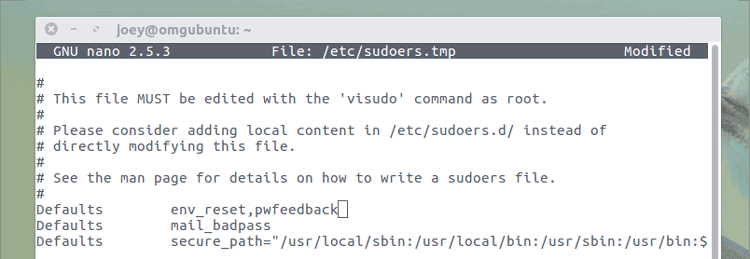
- In the text editor that appears, use keyboard arrow keys to go to this line:
Defaults env_reset
- Move the square box to the end of the line and type
,pwfeedback - Ensure there is no space; the line must read:
Defaults env_reset,pwfeedback
- Press ctrl + x, then y and enter to save your changes.
That’s all there is to it. The next time you use sudo you’ll see pretty little asterisks appear as you enter your password.

Ground-breaking, life-changing, experience-altering? Not quite.
But if you’re not worried about would-be shoulder-snoops trying to guess your password based on how many stars they see the few times you run sudo – a password you enter in other dialogs that show feedback – it’s more consistent.