
What’s wrong with Unity & how we can fix it

Unity is Ubuntu’s innovative new user interface, designed to catapult Ubuntu into the revolution of contextual search, launchers and social integration. The unique design provides an enticing alternative to the likes of Microsoft Windows and Apple’s Mac OS X.

But could Unity be better?
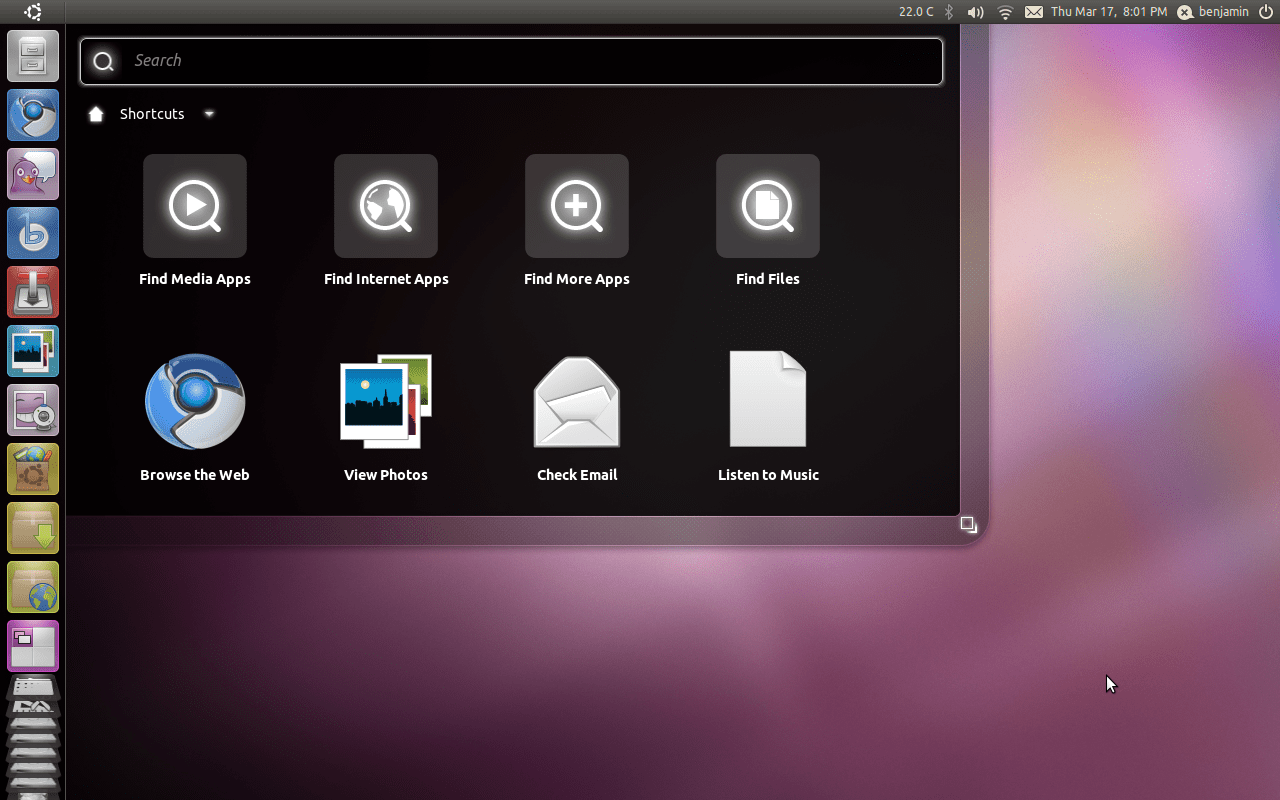
Unity in Ubuntu 11.04

One problem when designing user interfaces is maintaining a concise control of UI complexity. As the designers themselves work on the design, they become accustomed to their work and lose sight of how the interface fares when it’s seen by fresh eyes for the first time.

This problem is magnified by the fact designers are surrounded by developers and enthusiasts who easily handle the complexity and generally don’t kick up a fuss. The first time user interfaces are seen by those outside “the inner circle” – during user testing – it’s often too late for changes to be made or usability issues that crop up to be fixed.

User interface complexity doesn’t just decrease learnability but it also decreases enjoyability. To enjoy something completely, we must be able to focus 100% on what we want to enjoy – usually the task at hand. I’m sure we’ve all tried to watch our favourite movie, only to have that person continue talking when we really want them to be quiet. When the UI obstructs or irritates, enjoyabilty goes down.

While learnability can be overcome as time passes and the user becomes familiar with the system, if the UI is badly designed and cannot easily be changed, enjoyability cannot be improved as long as the UI continues being that person.

An example of a device that possesses both low learnability and high enjoyability is Apple’s iPad. The user interface is simple, consistent and there are little unexpected behaviours. The learning curve is small, hence why it has had excellent success with the mainstream, and it’s a joy to use with a very task-centered UI.

But the iPad isn’t without its faults. The notification system is one such example of the UI that constantly irritates me by popping up a dialog and rudely interrupting my work, and this is an example of very poor design. Android’s system is much better: it notifies but does not intrude.

While I can’t improve Apple’s notification system, as an open source community we should be able to improve the UI in our open source products.

The iPad isn't without its faults

So what’s wrong with Unity?

Unity has a very large surface area. With much of the development done only in the short 6 month development cycle for Natty, including the original Mutter work for the netbook edition being rewritten entirely for Compiz, the interface has become cluttered and inconsistent.

The term surface area in user interface design is basically a measure of how complicated the interface is. An interface with more dials, buttons, and objects has a greater surface area. For a deeper explanation, see the Surface Area paragraph in this article.

Rather than one central location for access to everything (like Windows’ Start Menu), Unity spreads access to your computer across a complicated Dash with a few different modes: the ‘Ubuntu Button’ dash, the Applications dash, and the Places dash. The latter two barely visible and squashed to the bottom of the screen in a badly executed, icon-distorting concertina effect.

In the rush to get Unity ready for Natty, many important design details are being missed. Some examples:

A lot of the behaviours for the launcher are completely counter-intuitive. For example, when the launcher is hidden and an application requests attention, it pops out briefly and then slides back to the left. Naturally, one would move their cursor to the space where it last disappeared, but it does not reappear. Much like a search and rescue man hunt, the rescuers begin searching from a “last known position.” So do people using a computer.

Another counter-intuitive behaviour characteristic of Unity’s Launcher is how you rearrange items. Rather than simply dragging the item from A to B, you must first drag it right off the dock and then back on.

Also, the items apparently are not equal – some can be moved anywhere but not below the last application shortcut, some (like Places) cannot be moved anywhere above the last application shortcut, and the Trash icon cannot be moved at all.

For consistency’s sake, if some icons move, all of them should, or all of them shouldn’t. Otherwise, there should be a clear indicator as to why the ones that cannot move, can’t. Currently, this indicator is that they’re “gray.” Perhaps a divider would work better?

Recently, the hot topic has been Canonical designer Matthew Paul Thomas’ email to the Ayatana mailing list questioning the invisible application menus in the panel.

Contrary to popular opinion, applications aren’t actually moving away from menus – at least not yet. The Elementary Project, Google Chrome and Firefox have made inroads with their menus, hiding them away in a collapsible button. But the majority of applications currently shipping with Ubuntu still rely on a menu of some shape and form, and hiding it from the user to encourage application developers to build menu-less apps isn’t a solution to the problem and strips users of easy access to a number of application features.

If the menu was hidden but there were some visual cues to the fact it was hidden, then at least a few people would recognize its existence. But currently the only way a user will discover these hidden menus is simply by accidentally mousing over the area where they are hidden, or by asking a friend. A completely non-elegant solution to a non-existent problem.

If Ubuntu is still targeting the Windows market share, Windows converts will initially look for extra application functions in a menu located at the top of the window. Failing that, they will attempt to find it somewhere else within the application window because naturally one expects application menus to be related to the application itself. The last place they will look is hidden behind the application name in the top panel, which if you’re on a large monitor, is far away.

What is actually more concerning about the email MPT sent to the Ayatana mailing list is the seemingly unbelievable lack of communication the design team has, especially considering MPT originally designed the menu specification. Are they even talking to each other?

Design decisions for Unity are seldom made in public, and they’re only announced after due effort, time and money have gone into implementing them. When there is a backlash, decisions are rarely overturned.

Mark decided on the window button order for Ubuntu 10.04, overruling the design team to make room for “windicators” (which of course, is another story entirely).

Later, user testing revealed that the order Mark had decided on made Chinese users think that Ubuntu doesn’t understand Chinese culture, but the order remains today.

How can we fix Unity?

But let me stress: Unity is not all bad.

While a number of the concepts in Unity may be flawed from a design point of view, the actual idea itself is not, and Canonical deserve applause for trying to jump start the stagnant open source desktop with Unity when the alternatives do not evoke confidence.

But there are some solutions to make Unity more unified:

  • Work on making Unity simpler, compact and more intuitive
  • Publish major design changes early and often for public review
  • More user testing and community feedback from the start.

Even if Ubuntu’s design was perfect, competing with Microsoft, Apple and now Google is a monster challenge that cannot be taken lightly. If Canonical is serious about doing so, they really need to spend more time thinking through the design of their flagship product.

There is still time to fix a lot of the issues I’ve outlined in this article. Not all, but some.

I think fixing the few minor issues that seem to be offending the most would go a long way in making Ubuntu’s Unity interface rock in Natty.

Related posts:

  1. Desktop Unity: Your questions Answered
  2. Ubuntu 11.04 to ship Unity as default desktop?
  3. Latest update to Unity brings Global search, App indicator support & new 'Quicklists'
Post a comment or leave a trackback: Trackback URL.
  • Anonymous

    Excellent article Ben, I’m sure though it could be 3x as long ;)

    • http://twitter.com/agarwalanimesh अनिमेष

      …left me wanting for more…

      • http://pulse.yahoo.com/_OP7BG4HVH2RDTFAP2VAYJWMY4M justin

        Agree..
        At least one person among the omgubuntu team thinks logically instead of following the ‘unconditional praise’ strategy by others. Look how little attention gnome3 shell attracts from the writers.

        Benjamin we want more….

        and, may be you could do a review of gnome 3 shell with an open mind

        • http://twitter.com/agarwalanimesh अनिमेष

          Yes a Gnome3 review is needed.

    • Anonymous

      I agree with most of his point, but too much ranting.

      One of his points I don’t agree with is about application menus. Ok, simply hiding them away may not be a solution (needs a more holistic approach, re-thinking apps UI) , but they seriously need to go away. And I hope people stop using the ‘Windows UI familiarity’ as a metric for ‘intuitive design’. Application menus are a relic of the past and one of those things that do increase the ‘surface area’ of UI.

      • http://openid-provider.appspot.com/s.roesgen@googlemail.com seb

        Possibly you are right. And: yes, the basic premise to hide away the menu if it is not needed appears to be a nice idea.
        But:
        If a menu, which is an essential part of nearly every contemporary application, is hidden, we need a really good way to show a user that there is a menu.
        The options to say “read the manual” or “look at a webpage were the issue is discussed” or “ask a friend” are all not valid. If you implement a new “feature” in an application or an operation system it should be an improvement. But hiding a way a menu just for eyecandy reasons and than making the process of discovering were the f*#ing menu is gone a painful journey of the mouse which has to travel around over the whole screen until the unprepared normal user Mr Average discovers that it is hidden away in plain sight appears strange.
        Furthermore, the decision to hide the menu might be interesting IF it would offer you something like more space on your screen. But actually the upper edge of the screen is still occupied by the panel. So nothing has changed beside the fact that I have to search for the menu.
        In addition, if I move the mouse pointer to the top of the screen I can only guess were the “edit” menu or the “help menu” or the “file” menu is hidden because I do not see it. So instead of moving the mouse pointer directly towards the destined target I am playing “blind man’s buff”.

        Last but not least: the menu looks like it is broken. Every normal user will just think “well, there is something wrong, it seems the application title just occupies the normal space of the menu”. Why that? Because if you move the mouse up to uncover the menu a part of the application title still is present at the left side. Only that the title is cut away. This looks awful. As if something is damaged. And do not tell me this is still alpha release and things can change. Too many small things have been implemented without thinking about the normal users out there who do nothing but work with their computers. I am a computer enthusiast and like watching the development of new ideas and thus I know — most of the time — were to look for if I got a problem with some software. But most people just start their computer and want it to work. They do not want to:
        - search for the global menu
        - they want to make their own decisions: if the decide that the launcher should be at the bottom because they are used to it and move their mouse pointer automatically to the bottom part of the screen (I can be default to put the launcher at the left scree edge, but it should be an option to move it wherever one wants) [especially the normal, older users, which are used to specific use cases/patterns do not want to change that much as unity forces them to do]
        - they do not want to experiment to see how far one has to drag an icon away from the launcher to just move it up or down to another position
        - they do not want to scroll in the launcher to find the “places” icon
        - they want all these basic things configurable because some people use different applications with different frequency. There are way too many types of users to restricted a desktop environment as far as unity is restricted in its configurability

        • http://twitter.com/MotionShot Heimen Stoffels

          Why not do it simple and make the hiding menubar an option per program just like on KDE?

          • http://pulse.yahoo.com/_NJBDEH5QRZXGWYPU7RTWAAHOZU Eli

            Because that isn’t simpler at all…

        • http://twitter.com/Magnesus Magnesus

          Show additional button on the titlebar, next to close/minimise/maximise buttons.

        • http://twitter.com/cocofluffs Somebody

          There should basically be configurable preferences for power users and/or people not using netbooks (netbooks being the entire rationale for all the choices Canonical has made with the design of Unity). For example, we should be able to toggle in a setting dialog whether or not we want the window title bars to be rendered in the panel. As has been pointed out countless times I am sure, there is zero benefit here on a 30 inch monitor.

          It’s great that shell designers have opinions, but it is not necessary to force those opinions on the users. Forcing your opinions on the user and not giving them choices in configuration settings is not an evolution or a revolution in the UI, it is regression.

          Perhaps one of the most head-scratching instances of this regression is Mark Shuttleworth’s mysterious insistence on the trash icon being in location X — Mark, do you not think I am competent enough to choose a location that works best for ~me~? Why do you care where I put it?

          Any UI on any device ought to have simple and advanced configuration modes for newbies and experienced users respectively. There is no such thing as one-size-fits-all in any corner of life.

          If you use the traditional Gnome excuse (and I am not saying Canonical does) that each additional user-settable preference makes the software more difficult to maintain by the developers, then you should limit yourself to working on less ambitious software (than graphical shells) that actually fits within your abilities and resources.

  • Anonymous

    I couldn’t agree more with you. I think that what’s especially causing this is that they’re rushing to get it out, and some important things are being left off, especially accessibility wise.

  • Anonymous

    This is what’s wrong : https://bugs.launchpad.net/ubuntu/+source/unity/+bug/685682
    No Unity for ATi fglrx users!

    • http://twitter.com/d2kx Dennis MH

      There will be a fglrx pre-release released into the natty repository soon that will fix outstanding issues.

  • http://twitter.com/buttsavich Jon Basniak

    You know, I find it ironic how just a few days ago, this site was promoting how “awesome” and “groundbreaking” Unity really was. Now, suddenly, you question Unity’s design? I am probably going to get bombarded with the fact that it’s still under development, and I understand that. But given that this is _the_ default UI in Ubuntu 11.04, and.. *points at the calendar*, April is almost around the corner, it’s an issue that these problems still persist. Canonical should hold off on making Unity the default for at least one other version. There’s too much at stake as far as this goes.

    By design, Unity is optimized for a mobile experience. You can’t argue that at all. The single menu bar, the dock, the application launcher. But this is where Canonical messed up. They neglected the desktop users which makes up their substantial user-base. GNOME-Shell is making the same mistake, as well. Mobile != Desktop. Plain and simple. The global menu is awkward and tends to discourages me from switching between two windows. The dock auto-hiding gives me the same feeling.

    Those are just _two_ of the problems I have with Unity. Just two, yet, they’re enough to virtually ruin using the linux desktop for me. So much that I’ve actually made the switch from Ubuntu to ArchLinux, simply because I disagree with Canonical’s direction. Either way, I would’ve had to make changes to avoid the Unity interface, so I might as well take the time to customize my system completely rather than complain. But here I am, complaining, to a site full of Canonical elitists. Just thought I would take the time to voice my _opinion_.

    • http://omgubuntu.co.uk/ d0od

      We’re not averse to point out what it does well along with what it currently doesn’t do so well – there’s no irony in that.

      • http://twitter.com/buttsavich Jon Basniak

        It came as “ironic” to me, then. :P This site was the least expected place where I would find the editors criticizing Canonical. I think it’s healthy that they do take the time to look at the pitfalls of the product. Unity’s ambitious, but it’s really questionable whether if it’s “too” ambitious or not. I think more time needs to be allowed so Unity could be corrected for Desktop use.

        Don’t get me wrong — it’s _NOT_ impossible for it to work good for the desktop! Look at OSX. People seem to enjoy their experiences with that(even though I am not a fan of Apple, I’m just referencing for the sake of the argument). Not to mention, for those who currently do not have support for Unity3d, Unity2D as far as I know, is nowhere near ready for production use. Yeah, sure, there’s the gnome-panel fall back. But isn’t that inconsistent? Unity just seems like more of a 11.10 release than a 11.04. But hey, that’s just my opinion.

        • http://twitter.com/buttsavich Jon Basniak

          I would like to add to my thought. The reason why I think people are so against Unity currently is because it takes away from them what we hold dearly as far as Linux goes, and that’s freedom of customization. With Unity, you have two choices as far as that goes: To keep it, or remove it. To change Unity, you would have to go through various steps to even achieve one change, and that would have to be maintained with every release. Given that Unity is built upon compiz, you would think that there would’ve been more freedom given. It’s almost as if Canonical is taking the GNOME Foundation ideology of simplicity to a whole new level, which I think is too far. Though, that’s an accusation that can only be approved once Unity hits final.

          • Anonymous

            My thoughts exactly. I couldn’t have said it better.

            …so maybe not my exact thought. But better than it.

          • http://twitter.com/agarwalanimesh Animesh अनिमेष

            “The reason why I think people are so against Unity currently is because it takes away from them what we hold dearly as far as Linux goes, and that’s freedom of customization. “

          • https://launchpad.net/~sabdfl Mark Shuttleworth

            In Ubuntu, you can use KDE, XFCE, Unity, and Gnome2. Next release will have all those and Gnome3. How is your freedom being compromised?

            In Unity, yes, we’re taking the view that one clear direction is better than lots of optional directions, but that’s only part of the bigger Linux and Ubuntu desktop story.

        • http://openid-provider.appspot.com/TheMerkinman Merk

          So you slam Unity for focusing on mobile with its “single menu bar, the dock, the application launcher” in the fist post, but then praise OS X for its good desktop in this post?

          • http://twitter.com/buttsavich Jon Basniak

            Precisely. The reason why is, like on Gnome-Panel, Windows 7, OSX included(I don’t own a Mac, but I did try OSX out in the past before), I feel “safe” using more than one window. It sounds contradictory, but I wanted to make it a point as to why I believe Unity isn’t ready for a release. It’s too buggy. The global menu bar disappears even before I could reach it. Sometimes, it won’t even come up for me at all. The only way for it to _not_ do this is to have only one window open, maximized, then it won’t ever do that. With OSX, I can move the dock around, change its behavior a bit, and even have a global menu that doesn’t hide from me! How does Canonical expect Unity to encourage productiveness when I have to worry about running into a bug? Thus, my assertion that Unity needs more time. At minimum, till release 11.10. I have other problems with Unity as well, but I wanted to focus on those two since they’re more-or-less specific to productivity. And I think that’s what’s important as far as user-experience goes.

            My apologies for not making this clear. :)

      • http://twitter.com/mickstep Michael Stephenson

        To be fair you do often sign off your unity posts saying.
        “remember unity isn’t a finished product so don’t start massive amounts of endless whinging in the comment thread”
        Or something to that effect.

        However I always took that as meaning “Hey idiot don’t start a massive flamewar thread about a feature that is clearly in flux”.

        But it could be seen as don’t judge where it’s going right now, because clearly it’s gonna be perfect on release day, because ubuntu is perfect and mega awesome.

        Which is obviously how Jon Basniak interpreted it.

        But really it’s just Joeys insanely enthusiastic writing style being misinterpreted as unquestioning fanboyism, which I don’t think is really the case, merely an intentional writing style.

    • http://omgubuntu.co.uk/ d0od

      We’re not averse to point out what it does well along with what it currently doesn’t do so well – there’s no irony in that.

    • Yi Sun-sin

      You shouldn’t switch to ArchLinux just for the sake of Gnome-Panel : by the time Natty is released, ArchLinux will use Gnome-Shell, and Ubuntu will still provides a “classic” session with the good old panel.
      So don’t switch for this tiny reason, there are so many better reasons to switch ;â‹…).

    • Anonymous

      OMG! has multiple writers who hold multiple opinions. Two people holding different opinions isn’t ironic or even contradictory.

      On another note, you can still use the same Ubuntu desktop you’ve been using now. Classic Gnome (which I assume you’re using; otherwise Unity wouldn’t affect you) will still be there. I’ll be using it, more likely than not, since I’m no big fan of Unity either so far.

  • http://cwdsimpson.openid.ne.jp/ Carl

    Forcefully put, as usual, Ben.

    I am lucky enough to have a friend who is completely clueless and out of the loop, with regards to computers. He gets by on his Mac, but seems to know less about its complexities than I do.

    I’m thinking, when Unity comes out, I’ll set some goals on it, for this person, and use the ensuing confusion as a basis for suggestions for Unity.

    • http://omgubuntu.co.uk/ d0od

      I intend to do something similar with a mate of mine – but film his reactions/take on it for the omg youtube channel.

      • Yi Sun-sin

        That’s going to be fun !

      • Akshat Jain

        Just do it!

  • http://cwdsimpson.openid.ne.jp/ Carl

    Forcefully put, as usual, Ben.

    I am lucky enough to have a friend who is completely clueless and out of the loop, with regards to computers. He gets by on his Mac, but seems to know less about its complexities than I do.

    I’m thinking, when Unity comes out, I’ll set some goals on it, for this person, and use the ensuing confusion as a basis for suggestions for Unity.

  • Anonymous

    Yep, polish it. First impression is very important, too. (Beside usability)
    Those small bugs are the ones which really hurt.

  • Anonymous

    Yep, polish it. First impression is very important, too. (Beside usability)
    Those small bugs are the ones which really hurt.

  • http://twitter.com/conscioususer Conscious User

    The blatant lack of internal communication was a severe blow in my confidence, and that’s coming from someone who *likes* the hidden menus and would keep them if possible.

    • https://launchpad.net/~sabdfl Mark Shuttleworth

      I think you’ll find that groups of smart people don’t always agree on everything, or always walk in lock-step. That’s just life, and is as true in communities as it is in companies. Or any initiative with more than one person. Sometimes, it’s hard to agree completely with oneself, even ;-)

  • http://twitter.com/conscioususer Conscious User

    The blatant lack of internal communication was a severe blow in my confidence, and that’s coming from someone who *likes* the hidden menus and would keep them if possible.

  • http://twitter.com/mimurrayy J. H.

    Thanks for that!

  • http://twitter.com/mimurrayy J. H.

    Thanks for that!

  • http://twitter.com/jknvv13 Joaquin Vacas

    I just prefer Unity2D
    Because is almost finished, and can be used with Compiz or Metacity with composition=on
    Unity3D is… buggy, uglier than 2D version, etc.. :(

  • http://twitter.com/jknvv13 Joaquin Vacas

    I just prefer Unity2D
    Because is almost finished, and can be used with Compiz or Metacity with composition=on
    Unity3D is… buggy, uglier than 2D version, etc.. :(

  • http://openid-provider.appspot.com/giowckln@googlemail.com Your Name is My Name

    The problem ist that Unity sould be released when it’s ready, finished and TESTED!! Then release it, not at fixed date 30 april….

    Because so you ship an incomplete (design inconsistency and other bugs) and suddently all ubuntu users with gnome will freak out and return to windows.

    Seriously. It should be better to abbandon this 6month releasy cycle. Better take 8 moths but with a rock solid unity and consistent experience!

    What would you do if Apple shipped the incomplete dock or windows the incomplete taskbar?

    • Anonymous

      I don’t think we should abandon 6 month cycles. What we should do though is set a schedule for some projects as 2 or more cycles.

      Compiz Unity should have at least been a 2 cycle development schedule with a testing PPA and should’ve only made it into the default install after Natty shipped.

    • Anonymous

      Or, what about to release Natty with standard Gnome 2.x as default and when Unity is ready, release it as an update and propose it as default???

      • https://profiles.google.com/ISantop Ian

        No, you shouldn’t change a user’s default. It would be fine to ship Gnome-Session, and have it default, then make Unity available as a login option when it’s ready, but changing what a user expects without a major version upgrade is a bad idea. If they want it default at all in 11.04, then it will have to be default from the beginning.

        • Anonymous

          Ok, it will works for me that way! :)

        • Anonymous

          Ok, it will works for me that way! :)

        • http://openid-provider.appspot.com/giowckln@googlemail.com Your Name is My Name

          yes this is what i wanted to say

    • http://openid-provider.appspot.com/TheMerkinman Merk

      The point the article made is that a lot of these issues aren’t seen until it gets used outside of the ‘inner circle’. Even if Unity had a 36month test period it wouldn’t get out of that inner circle until those 36months were through.
      It is impossible to have any software be bug free.

      • http://twitter.com/agarwalanimesh अनिमेष

        I guess the releases should not be considered as final when they are released. We should take them as CHANGES, open to debate and rollback. Maybe we can have even shorter cycles of 3 months or so, so that the changes come out even faster and can be discussed upon and improved in necessary.

        • Anonymous

          you mean just make Ubuntu a rolling release distro… you can see it like that already, 6 months is a short release cycle, every two years there’s a distro upgrade, between that there are 3 milestone beta versions… I say that without cynicism.

          • http://twitter.com/agarwalanimesh Animesh अनिमेष

            I personally think that the current release cycle is good enough (maybe because i am used to it), for the kind of changes we have been having till now, but now if most of the changes need discussion and user testing, then these changes should come out at a faster rate.

    • http://twitter.com/conscioususer Conscious User

      And from where this magic number 8 is coming from? If they do that, someone will then say how would 10 months would be better.

      The problem with the release cycle has never been the length itself, but Canonical’s inability to adapt their ambitions to it. Whenever they are not able to finish a project in a cycle, they respond by launching a bigger and more complex project in the next cycle. The results are predictable.

    • http://dylanmccall.blogspot.com/ dylan-m

      My wish here is they call Natty an experimental pre-release, don’t publicize it, and basically combine this cycle with 11.10. For this particular effort, it’s pretty important to get it completely right the first time.

  • http://twitter.com/mackrichards Mack Richards

    The high variability of user interaction is exactly why these types of designs can easily suffer. You can’t hunt elephants with a duck gun, nor can you hunt ducks with an elephant gun. If you’ve ever used Jolicloud, you see how to correctly make one design work more reasonably for multiple platforms. There are a few minor things that Canonical could do to make Unity fit both in desktop and mobile:

    - Make the dashboard take up the rest of the screen. I’m not sure why this annoys me so much, but it looks tragically wrong when it shows up only in the top left.

    - Fix the launcher. I shouldn’t have to scroll to find something on a launcher. The icons should resize automatically, and I should be able to see all items all the time.

    - Rethink the notification area. It hurts to use. A user should never have to learn how to use or understand a notification area, it should be inherently understood. This is perhaps one section of the screen that should be the most natural for a user to comprehend and make use of.

    I’ll give Canonical much credit for the wonderful job they’ve done. They saw a need for progress and did much better than most other groups with their level of influence. That being said, this interface overhaul is far from complete.

    • http://petercast.net Peterson Silva

      “Rethink the notification area.”

      Ok, the whole point of the appindicators *was* rethinking the notification area, wasn’t it? oO

      “It hurts to use.”

      I’m using Natty and it’s very nice to use, I’m loving it.

      “A user should never have to learn how to use or understand a notification area, it should be inherently understood.”

      I’m sorry, I’m not being sarcastic, I’m just trying to understand. What’s so exotic about clicking an icon and getting a menu? Of course a user should never have to learn how to use or understand a notification area. And he doesn’t have to right now!!!

      • http://twitter.com/mackrichards Mack Richards

        I spend several hours a week teaching older folks how to use computers as part of my job. For them, every click has to be necessary, and everything on the screen has to be as simple as possible. Most of them have a hard enough time just learning how to maneuver through currently existing menus.

        Yes, clicking an icon and getting a menu is easy enough for you and I to understand. But for someone who’s 78, partially blind, or just not experienced enough with a variety of interfaces will have their self-confidence shattered when extra, *unnecessary* steps are thrown in the way to show them the information they’re used to getting another way.

        Ubuntu is not just for one group of people. It has to be inherently easy to use for children, 20-something hipsters, 30-something computer geeks, 50-year-old bankers, and 90-year-old grandmas who want to type a letter and video chat with their grandchildren.

        No change should be made just for the sake of change. Every little adjustment *must* be scrutinized excessively before being finalized. We don’t need a super awesome interface for computer literate people and a dumbed-down version for the less competent. What we need is a flexible, great interface that everyone can use.

        • http://petercast.net Peterson Silva

          Hmmm I got it. But what, in your opinion, would be the best implementation of a notification area? I mean, the previous one could easily shatter the self-confidence of folks as well. Click network-manager, a menu. Oh, but where is the “Connection information” option? I need to get my current IP. Oh yes, you have to right-click it. Why? I don’t know. Then we move to another app, say, Rhythmbox. Left-clicking it brings up the application, and he has to look for what he wants to do (two or, if he has to go to a menu, possibly three / four clicks away!). Right-clicking it, however, gives him a menu.

          So, I don’t know man, I feel that for these people you mentioned (old, partially blind, not used to using computers), the new notification / indicator system if much better. Much more consistent, and it doesn’t actually add clicks and steps to tasks if before you had to click just as much (and in different, distant areas) or more to do the same thing.

          Also, you say Ubuntu has to be easy for everybody. But maybe you’re forgetting “easy” is a matter of patterns you’re used to as well. Of course I’m used to Ubuntu (and to experiment interfaces), so things here are quite easy, yeah. But every person has a different background and aiming at “easy for _eveybody_” may be an unattainable aim after all. We should make a gorgeous, relatively straight-forward and customisable interface — and I’m sure that it still would be difficult for some people at some level, just as much as using Windows 7 is for a friend of mine who is totally used to his Gentoo + awesomeWM…

        • http://twitter.com/agarwalanimesh अनिमेष

          “No change should be made just for the sake of change.”
          My thoughts exactly. I think every change brings a learning curve with it. So if the “change” is not VERY useful, then it should be avoided.

        • Anonymous

          For their credit, 20-something hipsters were clicking the menu button *before* it was cool

      • http://pulse.yahoo.com/_OP7BG4HVH2RDTFAP2VAYJWMY4M justin

        “What’s so exotic about clicking an icon and getting a menu?”
        It depends on the use case.
        If u ever got an incoming chat message and tried to reply to that by clicking on the notify-osd, u will know the difference. I did, during my honeymoon period with ubuntu.

        But apart from the special use case of (chat & e mail) messages and calls, I think the messaging system should not be intrusive and I agree with you.

        • http://petercast.net Peterson Silva

          Hmm yea, I forgot about that. I was talking about the appindicators only. That is kind of counter-intuitive, yeah, but if you think on the other hints the apps give us, it’s not so awful: the bubble almost disappears once you hover it, and the messaging menu (where you’d probably be used to go when you want to start empathy) would turn green. It seems like good practice to avoid greater disappointment when trying to click the bubble to answer to conversations =D

          • http://pulse.yahoo.com/_OP7BG4HVH2RDTFAP2VAYJWMY4M justin

            I am not that sold on the idea of messaging menu. As an idea first it looks so cool and intuitive. But as time goes I find myself never using it. It serves no purpose at all apart from displaying the count of messages in various applications. Gnome 3 messaging center is far superior in that case.

          • Anonymous

            I use the messaging menu all the time. I hide evolution from the taskbar and make it a non-closable window with compiz window-rules and then access it from the messaging menu. Then evolution is always running and when I get new mail I see the icon change, access the menu, see exactly which email account has new mail (I have multiple email accounts), then open evolution and check my mail, then minimise it and it disappears from view completely. Same thing for empathy. I like having it all in one place. I just wish broadcast/gwibber worked better with facebook.

          • http://pulse.yahoo.com/_OP7BG4HVH2RDTFAP2VAYJWMY4M justin

            I am not that sold on the idea of messaging menu. As an idea first it looks so cool and intuitive. But as time goes I find myself never using it. It serves no purpose at all apart from displaying the count of messages in various applications. Gnome 3 messaging center is far superior in that case.

          • http://pulse.yahoo.com/_OP7BG4HVH2RDTFAP2VAYJWMY4M justin

            I am not that sold on the idea of messaging menu. As an idea first it looks so cool and intuitive. But as time goes I find myself never using it. It serves no purpose at all apart from displaying the count of messages in various applications. Gnome 3 messaging center is far superior in that case.

    • Anonymous

      I agree, but would it be available to delete the unity launcher? I like the interface of top panel, dock at the bottom, and global menu. But, the Unity Dash works pretty well, in my opinion.

      • http://twitter.com/om26er Omer Akram

        gnome-panel with all its applets is just for you :)

      • http://www.facebook.com/webceo Mohammed Bassit

        Make sure to select “Ubuntu Classic Desktop” from the menu to the bottom in the login screen, you’ll get a classic gnome desktop with the global menu. You can then install the dock of your choice ;)

        • http://twitter.com/Magnesus Magnesus

          I still think instead of doing Unity they shold use what was available and make a superb skin for AWN or Docky with some extensions maybe. Classic docks like AWN or the one in MacOS are more intuitive than Unity’s dock.

    • Anonymous

      “Fix the launcher. I shouldn’t have to scroll to find something on a launcher. The icons should resize automatically, and I should be able to see all items all the time.”

      hi, I’ve submitted a very similar bug report for that same issue with a possible solution:

      https://bugs.launchpad.net/unity/+bug/734946

      i haven’t had much response from the developers, so if people want to help get their attention please check it out and make sure to click on “this bug affects me”.

  • Anonymous

    And they still haven’t fixed the most annoying bug. The launcher is stuck on the left side of the screen!

    In all seriousness, can we make it horizontal along the bottom of the screen by default?

    • http://twitter.com/mjharrisRB Hippy

      “And they still haven’t fixed the most annoying bug. The launcher”.
      i agree :)

      • http://fitoschidoblog.wordpress.com Adolfo Jayme (Fitoschido)

        Remember the guys that own a netbook ;)

    • http://twitter.com/takluyver Thomas Kluyver

      I agree there should be an option, but the left-hand side default seems sensible to me: most monitors sold in the last few years are widescreen, and vertical space is much more valuable than horizontal space.

      • http://pulse.yahoo.com/_S7GZSLCX2ELU2UXUHS5OK2APL4 Davorin

        “and vertical space is much more valuable than horizontal space. ”

        Why then do the monitors usually have more width than height, even the older ones?

        • http://twitter.com/WorLord GonzO

          Um… that’s what MAKES vertical space more valuable, because most monitors provide less of it, and a fair number of professions all-but-require the ability to have as many lines of text on the screen as possible.

          • http://pulse.yahoo.com/_LGOFCYOUSI5DDSJM2YRC7TQQ3E Joe

            If the auto-hide would work consistently, you’d lose neither horizontal nor vertical pixels regardless of where the launcher sat. I assume it will work by release, but given that why not let me put it where I want it. For that matter, why not let me put it where I want it regardless — if I want to give up those pixels then let me.

          • http://pulse.yahoo.com/_6DFXBTPUHJTVGS6DSFCNX35IG4 Joe

            A widescreen monitor provides more horizontal space. It does NOT provide less vertical space. If your 16:9 monitor is the same height as your old 4:3 monitor, you obviously have just the same amount of vertical space that you had before, and I would suspect that most users’ new widescreens are taller than their old ones were. The horizontal expansion gives you more room to put two applications comfortably side by side, or to work with two pages at a time in LibreOffice Writer, or whatever. It annoys me when people start talking about how we should move controls and menus and toolbars to the sides now because of all the “excess” or “unused” horizontal space that we have.

    • Waldir Leôncio

      I personally think it makes more sense for the launcher to be on the left (or right, for that matter), because computer screens nowadays are really “vertically impaired” and every vertical pixel saved is important (hence features such as the global menu and the integrated menu bar). I think Microsoft made a bad move when they made Windows 7′s bottom panel so much larger, that is a big problem when you’re on a netbook or even a small laptop (ironically, the user group Win7 was targeting).

      But I do agree that the user should be able to put the launcher wherever they want. I hear you, I’m also really annoyed by Unity’s lack of customization options. If one were to run Natty on a tablet, which is “horizontally impaired”, one’d probably want the launcher on the top or the bottom.

      • http://twitter.com/talvik talvik

        Combine that with ribbon interface, and you get vertical space for 3 lines of text in your Word document. :-)

        • Waldir Leôncio

          Yep. Talk about serious space issues. And it gets worse if you consider that there are a lot of people browing the web on an IE loaded with bars. Seriously, just thinking about it makes me I feel really unconfortable and claustrophobic!

      • Anonymous

        “I personally think it makes more sense for the launcher to be on the left (or right, for that matter), because computer screens…”

        Autohide. Problem solved.

        “I think Microsoft made a bad move when they made Windows 7′s bottom panel so much larger, that is a big problem when you’re on a netbook or even a small laptop…”

        Even though I don’t own a netbook or small laptop, and using Docky as a reference, I just don’t put it in panel mode.

    • Anonymous

      I don’t agree with you. The launcher on the bottom is not good on widescreens. I run Unity test with family members and friends and the launcher on the left seems very intuitive and natural. No one has complained and I’ve even seen some of them switching their Win7 taskbar to the left.

      They should let the user decide where to put the launcher regardless of the design (that’s the excuse everyone is using these days).

      A good thing about the panel on the left is that the window controls and Ubuntu button are on the left making the experience a little less mouse intensive.

      • Anonymous

        I have a widescreen monitor and Docky works very well on it. With all due respect, the availability of autohide makes your argument irrelevant.

        But yes, a common thread I see in this… thread is that the user should be able to choose where to position the launcher, a decision that would appease people like myself who don’t want an awkward growth on the left side of our screens AND those who complain about a lack of customization in Unity (I’m among that group as well).

    • Anonymous

      I don’t agree with you. The launcher on the bottom is not good on widescreens. I run Unity test with family members and friends and the launcher on the left seems very intuitive and natural. No one has complained and I’ve even seen some of them switching their Win7 taskbar to the left.

      They should let the user decide where to put the launcher regardless of the design (that’s the excuse everyone is using these days).

      A good thing about the panel on the left is that the window controls and Ubuntu button are on the left making the experience a little less mouse intensive.

    • http://openid-provider.appspot.com/s.roesgen@googlemail.com seb

      The funny thing is that people here say that we should post at launchpad and file bugs there. Still, if you have a look at this bug: https://bugs.launchpad.net/unity/+bug/668415 you can see what happens if you complain about a missing feature. In the worst case it is simply told you that it “won’t fix”, and no matter how many people vote for the bug to be solved/the feature to be implemented, nothing will happen.

      Looking at brainstorm you will see that features are implemented that got no vote or even negative votes. But other requests that have some hundred votes have not gotten attention for some time now.

      I really like many of the changes done to Ubuntu and the general concept of Unity. But it appears that some things were changed just for the sake of changing (to quote another posting that I read here). There is no reason for the hidden menu at the top and there is no reason for a launcher that is fixed at the left edge of the screen. The only reason is: “it is a design decision”. To me, this is no reason at all. To me this is nothing but saying:”we want it that way and therefore it is done that way.” Even the statement “it is a design decision” has to be grounded on some base of reasoning. And I do not see any logical reason why a person should not be able to change the position of the launcher. If the launcher looks like a dock (and it DOES look like a dock) it should be moveable. If it looks like a large menu at the side (like in Gnome Shell) then there would be reason to have it fixed at this position. At the moment the launcher looks like a displeced dock, which is for some reason stuck with the a button on the left upper corner of the screen. It is not really connected to the button and looks like a separate entity but still is stuck at the left edge by “design decision”.

      This whole argumentation is – to me – symptomatic for what is happening to Unity/Ubuntu/Canonical at the moment. One person (Mark) is making decisions and if they are bad this one person does not even show the dignity to admit that perhaps another opinion would have been valid, too. The Windicators are a perfect example for that. Will we every see any Windicator implemented? To move the position of the Minimize/Maximize/Close icons to the left now appears to me like the decision of a childish personality. Somebody who is not able to stick with his decisions and decides simply out of mood not out of through reasoning and planning.

      • http://twitter.com/Magnesus Magnesus

        First: this comment should be made an article here.
        Second: I think those “design decisions” are made by programmers not by designers unfortunately. The effect is chaos.

        • https://launchpad.net/~sabdfl Mark Shuttleworth

          Then you’ll be glad to know that there is a team of professional designers at work, who make those decisions, supported by lots of interesting contributors via the Ayatana lists. Engineers make some decisions too, but the whole receives rigorous design analysis, testing, and review. And then we iterate, based on what we learned.

        • https://launchpad.net/~sabdfl Mark Shuttleworth

          Then you’ll be glad to know that there is a team of professional designers at work, who make those decisions, supported by lots of interesting contributors via the Ayatana lists. Engineers make some decisions too, but the whole receives rigorous design analysis, testing, and review. And then we iterate, based on what we learned.

  • Anonymous

    I’ve been playing with it since the alpha. Lots of it is “done wrong” and a usability disaster IMO , but with common sense and flexibility, and cool tweaks from the community (keep ‘em coming andrea azzarone), i hope it could be quite good by the next LTS release.

  • Anonymous

    I’ve been playing with it since the alpha. Lots of it is “done wrong” and a usability disaster IMO , but with common sense and flexibility, and cool tweaks from the community (keep ‘em coming andrea azzarone), i hope it could be quite good by the next LTS release.

  • http://www.ppetrov.net/ pip010

    “Canonical should hold off on making Unity the default for at least one other version. There’s too much at stake as far as this goes.”

    I couldnt agree more. Making big steps has its consequences. the analogy , when you fly high you fall hard, is golden :D

    • http://peligrociencia.com/ aloctavodia

      to make Unity the default shell in natty is a very good idea, this give the chance to a lot of users to test Unity and to give feedback (bug report, contribute code, contribute ideas and opinions etc) to Canonical. What is really important is to have a mature version of Unity for the next LTS. LTS are targeted to “non-geek people” (like my mother, my uncle, that guy in the office that don`t even now how to configure the printer), to hardware vendors and to institutions. “Inter-LTS versions” should be targeted to more geeky persons (or at least to those that like to have the last ubuntu version).

      • Anonymous

        So, if LTS is the version for general use and non-LTS is experimental, why is LTS not made default to download on Ubuntu website?

        • http://peligrociencia.com/ aloctavodia

          because most of the people that downloads ubuntu are geeky people :-) my mother or the printer guy don´t have any idea how to install an operating system (even when installing ubuntu is really easy) and hardware vendors and institutions, don´t dowload ubuntu from the wesite, they get comercial agreements (like Dell that sell computer with LTS) or in the case of institutions they buy suport (and canonical recomend LTS for institutions) or they have geeky people that now how to install linux .

        • http://peligrociencia.com/ aloctavodia

          most geeky people does not mind to install the last ubuntu version when the alpha3 version is availabe in their productive machine! (may be we are just a bunch of people with OCD) ;-)

    • http://twitter.com/Magnesus Magnesus

      Canonical made some promises about new features in Ubuntu that never saw a light of day. Right know I hope Unity will be one of them.

      • Anonymous

        ahah you’re joking right? There is no way the next ubuntu will ship not ship with unity.

  • http://www.ppetrov.net/ pip010

    “Canonical should hold off on making Unity the default for at least one other version. There’s too much at stake as far as this goes.”

    I couldnt agree more. Making big steps has its consequences. the analogy , when you fly high you fall hard, is golden :D

  • http://profiles.yahoo.com/u/C6S22ANL35LHAH27EX43XFQKTQ Klau3

    I almost love Unity right now but there is one thing I really dislike:

    When searching Unity Dash it shows always applications that I >>could install<< – THIS SUCKS!!! It would be sufficiently to see this kind of search results only under "Find Internet Apps".

    PS: The other thing what I really would love to see is an client independent mail notification system that doesn't require to have the a mail application running (in other words: a mail notification daemon).

    • http://omgubuntu.co.uk/ d0od

      That bugs the heck out of me, too.

      • http://twitter.com/conscioususer Conscious User

        Same here. I’m really hoping it will be easy to disable it.

    • http://twitter.com/agarwalanimesh अनिमेष

      yup. irritating to click on an app to find that it starts installing instead of starting up.

    • Anonymous

      i can say the exact opposite : i really love this feature

      • http://dylanmccall.blogspot.com/ dylan-m

        I’ve noticed not installed apps appearing in the global search, though, just under the Applications heading. That’s probably what people are complaining about :)

        • http://twitter.com/agarwalanimesh Animesh अनिमेष

          right. i guess there can be a small indicator on the icon itself (like a badge), to show that something needs to be installed.

        • Anonymous

          i know what people are complaining about. and just like i said above “i really love this feature”

          i do not find it difficult to remember the applications that i have already installed and i really like the feeling that any application i might want is just as easily accessible as an installed one.

    • https://launchpad.net/~cscarney ~cscarney

      I actually like the apps-for-download search, but it bugs me that you can’t turn it off for non-admin users (who don’t have privileges to install software).

      • http://castrojo.tumblr.com Jorge Castro

        Ooh nice catch, is there a bug for this?

        • http://twitter.com/Magnesus Magnesus

          But how do you recognise if the user knows sudo password or not without asking for the password?

          • Anonymous

            good point!

          • http://twitter.com/PatrickDickey Patrick Dickey

            I would say that if the user is in the ‘sudoers’ group, then they should see the available apps, however if they are not in that group (limited users or regular users in a corporate environment) then they shouldn’t see them.
            Patrick.

    • https://launchpad.net/~sabdfl Mark Shuttleworth

      Showing available apps in the home screen aggregated result is a mistake, yes, we’re working on a fix (either not showing them at all on the home screen, or carving them into a separate section altogether).

  • Anonymous

    I almost like unity, but IMHO the biggest problem with Unity (and almost every other software) is that the project doesnt have usability tests.
    I, as engineer, have to admit that “we” arent the best designers, but most of time its a engineer/programmer that create the layout, because you know “if i can you use, everybody can”.
    There are specialized professionals to do this, but layout is neglected area (mac/linux/windows), so most of time the design will be flawed.
    Unity is a great idea, but without specialized guide it will be as flawed as windows.

    • Anonymous

      Are you sure there are no usability tests being carried out? Look here: http://design.canonical.com/2010/11/usability-testing-of-unity/ or here: https://blueprints.launchpad.net/ubuntu/+spec/unity-usability-testing . I hope they are going on with it.

      • Anonymous

        i didn’t know about this test, nice initiative.
        But what i read was not a usability test, it was a more a market research instead, usability test have a very strict methodology, and the test was IMHO a talk, but i dont have access to the data so i wont judge.
        And the most important, were the flaws fixed?
        I dont know, but belive not.

      • https://launchpad.net/~sabdfl Mark Shuttleworth

        We test Unity on a regular basis with a professional user experience protocol, off-the-street test subjects, and detailed review of findings. The results of those tests go into iterations of the design. Yes, we are making some bold moves and taking some substantial risks, and this first desktop version will almost certainly require iteration.

        We have a unique opportunity to break new ground, and Unity as it is today represents a mix of “radical new” with “conservative and proven” that I’m very proud of. Lots of feedback and suggestions through Launchpad and the Ayatana lists has been incorporated. Yes, there are some ideas we or I have declined to pursue – it’s free software, fork it if you feel strongly enough about it. Or code it up as a patch, as others have done.

        • http://dylanmccall.blogspot.com/ dylan-m

          On the topic of being forkable and patchable, I found Unity to have very, very few comments when I jumped in recently. The code itself is tidy, consistent and mostly self-documenting (and it’s obviously a huge project, so that deserves some kudos). However, quite often I come across something that is being done weirdly and I don’t know whether there is a reason. I know it’s tricky to add comments after writing the code, but just having a comment at the top of each file saying what it does (and what the scope is) would go a long way.
          Of course, folks were helpful with my questions as they emerged, so it isn’t the end of the world :)

          • http://castrojo.tumblr.com Jorge Castro

            Find me on IRC or send me a mail, I’d like to get a rundown on places where we can fix this so we can make it more usable for new contributors.

    • http://twitter.com/Magnesus Magnesus

      And what exactly is wrong with Windows interface? It’s quite good and intuitive. The same goes for MacOS.

  • http://twitter.com/talvik talvik

    Don’t forget the runner dash(Alt+F2).

    It’s hard making a sense of it all. It take ages to launch an application compared to the previous way.

    • http://twitter.com/om26er Omer Akram

      nope can’t agree there, its quite efficient even on my netbook. using daily ppa.

    • Alaukik

      WTF!
      you are incredibly dumb if you can’t make sense out of it you just have to type like you did with the old dialog so i can’t understand how it would take ages.

    • http://twitter.com/jetencate Justin TenCate

      Not exactly Synapse, is it?

    • http://twitter.com/jetencate Justin TenCate

      Not exactly Synapse, is it?

  • https://login.launchpad.net/+id/nAXnn4e lucazade

    Are there bug reports on Launchpad for the issues you pointed out?

    • https://login.launchpad.net/+id/nAXnn4e lucazade

      …just to see what Canonical’s designers and coders think about these things, to see if we can help testing, providing patches or just expressing our ideas.

  • http://twitter.com/psypher246 psypher246

    So what, as a loyal user, can we do? I believe in the OSS way, if I don’t like it then use another distro. But I like Ubuntu and I see potential in Unity. But it doesn’t seem like Canonical would change anything when the users complain. Also the problem is that it’s still in Alpha, and while running Natty in virtualbox I have found the entire interface very unstable, disjointed and practically unusable. I can’t even scroll up or down in the applications menu. So how much of what we currently are seeing is due to a bug or uncompleted or the final draft? I see posts about people complaining abut this and that and getting flamed cos it’s still in alpha. At which point can an eager user voice their opinion whcih can have an affect on the final design?

    • Anonymous

      You can stick to the classic gnome session. It is not forced on you. If you prefer the old but stable panel, just stick to it.

      • http://pulse.yahoo.com/_HZILZGJ4PKNN67IK7JYXIKHLSM DjznBR

        The “new-old” panel is not as customizable as the 2.x series. People should make the 3.x fallback the default mode, and revamp from there.

  • http://twitter.com/Tushaai Ihtisham Zahoor

    Unity? never heard of it.

  • Anonymous

    “Failing that, they will attempt to find it somewhere else within the application window because naturally one expects application menus to be related to the application itself. The last place they will look is hidden behind the application name in the top panel”

    Wait…

    So there’s an Amiga Workbench fan on the Unity design team?

  • Anonymous

    The only thing I want to say about this article is: execellent style, well written, good use of language.

    Often OMG articles try desperately to be quirky and use bizarre vocabulary and phrases.

    This article doesn’t. Nice!

  • http://twitter.com/jetencate Justin TenCate

    Thank you for teaching me how to re-order my buttons. I tried EVERYTHING except (of course!) dragging the icons off the toolbar, then back on.

    How much more intuitive could it be?

    …and why in heaven’s name can’t I mouse over the left side of my screen to pull up the “notadock”? I thought that point in particular was very well put. I understand the reasoning, but the execution (especially as far as “attention grabbers” are concerned) stinks out loud.

    I think Unity has a ton of promise. The “hidden” global menu and top panel + “notadock” has the potential for genius, but it’s not close yet.

  • http://twitter.com/kevinhiroshi Kevin Kwan

    I don’t understand why they wanted the flawed Unity to be in Natty.

    The original idea of the Unity is totally wrong. It is like the product-oriented marketing in the 1960s, when companies made their own products and believed people would use them. Isn’t the most important thing USABILITY rather than DESIGN? Please start from the standing point of a user. And provide a user-focused solution, rather than a designed product.

    Just time how many seconds do you need to launch an application in the Unity. Count how many clicks AND keys you have to enter before launching an application (or adding your favourite apps to the launcher). How ridiculous it is, when a new interface actually slower the use, just as to give you an innovate user experience? Giving you a nice looking car, which doesn’t travel faster than a bike. I’d prefer a bike then.

    I don’t agree when people say we should just shut up as it is still in alpha or whatever. What’s the point of giving us to test, if you want us to shut up? I, and I believe many of us, did fire bug reports and so to the launchpad. But face the reality, it is not ready for a major release in April!

  • http://twitter.com/kevinhiroshi Kevin Kwan

    I don’t understand why they wanted the flawed Unity to be in Natty.

    The original idea of the Unity is totally wrong. It is like the product-oriented marketing in the 1960s, when companies made their own products and believed people would use them. Isn’t the most important thing USABILITY rather than DESIGN? Please start from the standing point of a user. And provide a user-focused solution, rather than a designed product.

    Just time how many seconds do you need to launch an application in the Unity. Count how many clicks AND keys you have to enter before launching an application (or adding your favourite apps to the launcher). How ridiculous it is, when a new interface actually slower the use, just as to give you an innovate user experience? Giving you a nice looking car, which doesn’t travel faster than a bike. I’d prefer a bike then.

    I don’t agree when people say we should just shut up as it is still in alpha or whatever. What’s the point of giving us to test, if you want us to shut up? I, and I believe many of us, did fire bug reports and so to the launchpad. But face the reality, it is not ready for a major release in April!

    • Alaukik

      it is definitely not ridiculous it takes 1 click and some initials of the app and then another click to launch an app and then if you pin it in the springboard then only one click is required.
      it is not slower so stop spreading fud and use it on 28 april and give it a fair chance and if you don’t like it you can go to much more complex gnome shell or shortly obsolete gnome2 or use windows or osx.

      • http://twitter.com/Magnesus Magnesus

        It is slower. Right now (in AWN or classic desktop) I need only 2 clicks to launch ANY application. No pinning required (but I could pin them to AWN if I wanted to).

        • Anonymous

          man, menus are out of style … dude, the nerve these days!

          I agree, but what can you do? For greater coherence and design we must sacrifice the listed menu … oh how will we miss thee! Check out Unity, Launchpad(OSX), the superbar, Shell, KDE(since 4), and elementary (Plank/Springboard) … they are all gravitating towards this.

          Let’s face it, our days are over … by “our” of course I mean yours :P

          • http://twitter.com/ursus262 David Sharman

            I remember the days when I had to migrate from using DOS to Windows 3.1 with a desktop office package installed. I actually found the icons, which were new then, very confusing. The menu was in plain English or Dutch (depending on where I was) and I clearly understood where I was going. I actually removed the toolbars in the end, because they were meaningless.
            Icons do have their place, but how far do you go before a wide range of people start to find the UI puts then under stress (information overload).

            Today, we are all bombarded with information, much of it irrelevant and meaningless, and it adds to stress, both at home and in the workplace. The secret of good UI design, in my humble opinion (and I’m no expert) is to keep it simple, with shortcuts for common tasks where it can be shown that using them will save time.

      • http://twitter.com/Magnesus Magnesus

        It is slower. Right now (in AWN or classic desktop) I need only 2 clicks to launch ANY application. No pinning required (but I could pin them to AWN if I wanted to).

      • http://johannpopper.myopenid.com/ Johann Popper

        There really must be more sensible respect for simplicity and ease of use. It is indeed a usability regression to complicate the current elegant comprehensibility of Applications, Places, and System; unless, of course, you have something just as easy to replace it. The point is, the user’s entire library of apps should never ever under any circumstances be hidden from him. The current implementation of Unity’s Dash is nothing less than an interface design sin. Nobody wants to type in the name of an application he may not know the name of. Nobody wants two clicks to stand between him and a comprehensive list of all his applications by default. As it is, Dash is more frustrating than useful. The same goes for Gnome-Shell’s approach. Gnome2′s menu currently gives you a complete and concise overview of every app, location, and system setting on your computer with one click. Why lower the standard?

        So I agree wholeheartedly with Kevin Kwan here. The implementation of Unity’s Dash alone is completely broken in concept. I think everyone should respect what the Elementary Project is doing more. The behavior of their new Slingshot app launcher (as seen here: http://www.omgubuntu.co.uk/2011/02/elementarys-slingshot-plank-apps-just-what-are-they-and-why/) is far far superior to the behavior of Unity’s Dash. One click, and it looks like you’ve got every application and setting on your computer right there immediately in front of you, with searching as a useful option, but not a necessity. Judging by the screenshot alone, the only improvement that could be made would be adding locations to the comprehensive list of apps and settings, perhaps using vertical columns, so as to preserve the one-click(or hotspot)-comprehensive view provided by the current Gnome2 main menu or menu bar. MintMenu, for example, can optionally respect this standard, and adds a search capability, although the favorites option is made redundant by a dock, and a dock is superior because it allows you to launch apps with one click.

        To regard the Unity Launcher as a solution for an incomprehensible Dash is to think backwards. I shouldn’t have to customize my Launcher even once in order to avoid Dash, especially when Dash is unnecessarily complicated. A Dash should mean two clicks, while the Launcher saves you one. Conceptually, that is the only justifiable reason for drawing a distinction between a quick launcher and a comprehensive main launcher. If the main launcher isn’t immediately comprehensive, I fail to understand its purpose, and I find that irritating. It’s plainly inefficient. An academic treatise is analogous to an interface in this case. There is no sense in having an abstract follow an abstract, when you can have one simple abstract and one complete table of contents to point readers where they want to get to in the book.

        I’d also like to reiterate my opinion that application menus are not crutches; they are tall stilts, for the same reason that the current Gnome2 menu bar app launcher gives you a commanding view of all your applications and settings. For so too does an application specific menu give the user a fast and easily accessible comprehensive view of all his options, of which there are usually always much more than could possibly transparently fit in a window without menus. Such transparency and ease is always a feature. I just don’t understand all the apparent hostility toward transparency, simplicity, and ease of use, in some of the new interface designs coming out this year.

    • Alaukik

      it is definitely not ridiculous it takes 1 click and some initials of the app and then another click to launch an app and then if you pin it in the springboard then only one click is required.
      it is not slower so stop spreading fud and use it on 28 april and give it a fair chance and if you don’t like it you can go to much more complex gnome shell or shortly obsolete gnome2 or use windows or osx.

    • Anonymous

      Just stick to the classic GNOME panel session. Unity is not forced upon you. It’s just a piece of software created by Canonical for free. You can use that or not. That’s up to you. The classic GNOME panel will optionally remain available.

      • http://twitter.com/kevinhiroshi Kevin Kwan

        Yes, I am definitely going to stick to the GNOME session. But this doesn’t prevent me from expressing my disappointment on Unity.

        It is really sad that the main focus of Natty is this Unity. Unity gets all the attention, when some very basic thing still left unfixed. For example, problematic Wifi. Why the signal strength is not correctly shown? The popular RT2860 chipset doesn’t work out of the box. And people were talking about that since 2008. The only ‘workaround’ breaks every time there is a kernel update.

    • https://profiles.google.com/ISantop Ian

      The idea is that good design leads to usability. It’s not all about eye-candy, but good interface design, which is important to usability. A dark panel and launcher, combined with light window contents promotes focusing on the contents, taking focus from the interface and putting it on your work.

      They also want the design to stay out of your way. Unity is minimal, and thus doesn’t distract you from content. I think the mantra is “Less Chrome, more Content.”

      As for launching a program, 90% of them that I need are on the launcher, so one click. If it’s not, then typically I know what I want to do, so I hit Super and type the first few letters. Super+fire or Super+ban is enough. Hit enter, and it’s running.

      If I find myself doing that a lot, then after I start it, I can right click (or long-click) on it, then click “Keep in launcher”, and now it’s a click away.

      • http://twitter.com/Magnesus Magnesus

        Many people use mouse all the time. If you have to type something and then click – you have to move your hand from mouse to keyboard, type the word, them move the hand back and click. It’s usability HELL.

        • Anonymous

          HELL … and again for emphasis: HELL!

          Though methinks that unity/elementary/shell all have a primitive form of an organized list but in iconified categorical view. Looks better, takes longer, and all the more “innovative”.

          Just give it a chance, you might be pleasantly surprised, there are quite a few people like you on the Ayatana team/ mailing list.

        • http://twitter.com/kevinhiroshi Kevin Kwan

          Exactly. Please make items accessible by either the keyboard or the mouse alone. And come on just count how many clicks you have to make to find a application not listed on the launcher.

          I know you guys say after you put on the launcher you find it easy and stuff…but man why do I need to do that initialization? What if my screen is so small and I don’t want to move the cursor around on a difficult trackpad and scroll through the launcher for an application? I want 2 clicks and little mouse movement only!

    • http://twitter.com/Magnesus Magnesus

      It’s not even nicer. It’s ugly (i hoped it will change but doesn’t seem to).

  • http://twitter.com/Knef Knef

    Thank you for this article, it addressed many issues I have when using Unity on my testing netbook.

    I am especially troubled by the Dash inconsistency. I really like the idea of a Dash which is both an attractive icon-based launcher and an extendible textual command tool, as it caters to both the Ubuntu newbie and the power user. But having three slightly different versions of the same interface is just too much.

    Also, how about quickstarting programs? Currently we have icons in the left-side launcher, icons in the Ubuntu button Dash and frequently used programs (I think) in the Application Dash. Not to mention the possibility of having launchers on the desktop.

    If it was for me, I’ll get rid of the Applications and Places Dashes, and would focus on having just one comprehensive Dash that is accessible by pressing the Ubuntu button.

  • http://twitter.com/Knef Knef

    Thank you for this article, it addressed many issues I have when using Unity on my testing netbook.

    I am especially troubled by the Dash inconsistency. I really like the idea of a Dash which is both an attractive icon-based launcher and an extendible textual command tool, as it caters to both the Ubuntu newbie and the power user. But having three slightly different versions of the same interface is just too much.

    Also, how about quickstarting programs? Currently we have icons in the left-side launcher, icons in the Ubuntu button Dash and frequently used programs (I think) in the Application Dash. Not to mention the possibility of having launchers on the desktop.

    If it was for me, I’ll get rid of the Applications and Places Dashes, and would focus on having just one comprehensive Dash that is accessible by pressing the Ubuntu button.

  • http://dmenounos.myopenid.com/ Dimitris

    I have said it before. 11.04 and 11.10 will be more like betas, testing ground for the next “real” Ubuntu, 12.04 LTS.

    • Anonymous

      i feel this way too. i remember mark saying that 12.04 is their goal for the professionally usable 1st class desktop.

      but until then i’m loving unity and the ongoing changes

    • Anonymous

      It’s a conundrum: should we be advertising LTS or latest release to friends and family (probably the LTS, like you say). But, although I’m happy with my Gran using the LTS, I want my more computer-saavy friends to be part of the Ubuntu journey seeing changes and benefits more often than every two years (which is a long time).
      It was less on an issue in previous releases as they have all had the same UI (which had always disappointed me) as well as being very stable… not anymore (though I expect we’ll still have stability).

      • https://launchpad.net/~bazonbloch Bazon

        it was a difficult choice, but now i’m really happy i installed LTS from my friends and family…

    • http://twitter.com/ursus262 David Sharman

      I’ve decided to remain with 10.04 LTS, hoping that by the time 12.04, they will have a tempting proposition to make it worthwhile me upgrading. However, Linux Mint,when it eventually uses Gnome 3, could be very intresting.

    • http://twitter.com/nq6 Frederico Araújo
  • Anonymous

    I actually think unity’s workflow is the fastest for me so far of any desktop i’ve used, but there are a few things that bug me that have to be fixed

    1) KDE applications won’t stay in the launcher after unity reboot
    2) the places and workspace switcher shouldn’t be stuck at the bottom. They shouldn’t be stuck at all but if they are anywhere it should be the top. The workspace switcher folds down and since the launcher unfolds i have to move the icon up to the dash icon, then move to the right to fold up the launcher then aim again at the bottom towards the workspace switcher.
    3)the launcher should have an option to access by the cursor touching the left side of the screen not just the dash button. this would go a long way in helping the above problem.

  • Anonymous

    Hope i’ll could remove Unity in order ton keep my “AWN gnome-panel-less” without troubles…

    • Anonymous

      That is exactly how I run mine now. AWN without any gnome panels.

  • Anonymous

    is there a way to use the old user interface (like that of ubuntu 10.10) in natty

    • Anonymous

      Yes, you log in with “classic” mode.

    • Anonymous

      Yes, you log in with “classic” mode.

    • http://twitter.com/takluyver Thomas Kluyver

      Yes. Before you log in, look for an option called something like “Ubuntu classic session.”

    • Waldir Leôncio

      As of Alpha 3, all you have to do is choose “Ubuntu Classic Desktop” (or something similar) at the bottom of the login screen after clicking on your user name. With all the fuss about Unity, I hope they give the fresh-install user a first-time notification indicating he can choose between Unity and Classic Gnome.

    • https://profiles.google.com/ISantop Ian

      Select “Ubuntu Classic Desktop” from the session menu when you log in.

  • Anonymous

    is there a way to use ubuntu 10.10 like user interface in natty

    • https://profiles.google.com/ISantop Ian

      Look at Unity-2D. I think you can run it with compiz and get a *decently* comparable experience.

  • http://twitter.com/Seamus4May2011 seamus williams

    The unity UI is far better then the current windows Aero Ui and the Mac Ui,

    My girlfreind use Win7 on touch screen netbook and found that the taskbar was horrid on the bottom of the screen so i moved it to the unity possition and she loved it then. i ran the 11:04 alpha 3 in live mode she loved it.

    she enjoyed it so much because it was easy to use, diffrent and farmilar in terms of the dash feature.

    however we shouldnt get all hyped up about this version of unity. im not because like all things open source its not written in microsoft dll files and can get better or worse.

    the one thing i would have changed about the unity launcher is this. it needs an extend option.

    for me i only use 4-5 programs and never really at once. the notification area is much better to what it was and to its corparate rivals.

    looking at the Gnome 3 Ui i find it to look horrid and will continue to use ubuntu and Mint Unity edition and the soon to be release E.OS

    i think that over all unity needs to changes an extend option and the elementary sling concept from the elementary project because it will have a familar feel to that of the iOS and is better for touch screens.

    Btw 12:04 should be Named United Uria 12:10 should be called Raving Racoon

  • Anonymous

    Unity is a work-in-progress, so it’s really hard to distinguish features from bugs. Anyway…

    - New users cannot intuitively understand how it works. The Ubuntu icon doesn’t look like something you can interact with and there isn’t an easy way to explore the installed applications (or to distinguish them from the ones you can install)

    - The behavior of the launcher is inconsistent. When I launch Opera, it doesn’t autohide, but if I launch Nautilus it starts autohiding for the rest of the session. When approach the left side of the screen, it sometimes shows (but doesn’t allow me to interact with it), sometimes doesn’t.

    - The global menu is only useful when the window is maximized, otherwise it simply forces me to shift my attention from the task I’m at to look at the top of the screen. If the window is not maximized, it probably is not craving for the extra space the global menu provides.

    - Some tasks, for which there are working solutions for a long time, became harder to do. Launching an application now requires more clicks and/or typing (I know it’s possible to pin the app to the dock, but most people don’t like to make decisions about their desktop, they just want it as it comes; working out of the box is the Ubuntu way). Switching between windows also takes longer unless you’re an adept of alt+tab.

    I still think it will be a good shell. But I’ve been convincing people to change to Ubuntu for 2 years now, it became (just a little) harder when the window buttons changed to the left, I just worry it will be very difficult now.

  • http://twitter.com/agarwalanimesh अनिमेष

    One thing that I dint like in 11.04 Alpha3 was the seeming lack of customizability. maybe its customizable, but I could not find the options.
    It was like Ubuntu is being “closed”, like MacOS or windows. Like Apple *decides* what it wants to give to the consumer.

    • Waldir Leôncio

      Exactly! I hate to admit it, but I’m starting to feel a little like that too.

    • http://twitter.com/Magnesus Magnesus

      At least MacOS looks good. And Windows IS quite customisable.

      • http://twitter.com/agarwalanimesh Animesh अनिमेष

        “looks good” can be subjective.

  • http://twitter.com/_sgo sgo

    I think Canonical should talk with the elementary project. Their ideas (and actual work) to make the desktop more user friendly are just awesome. I know it seems like they’re adopting a lot from OSX, but they do not just from there. ;-) It’s more a mix of great design ideas for a better desktop experience.
    I would like to see Canonical supporting the elementary Desktop and it’s intuitiveness. With the manpower from Canonical, they could be almost done with all their work (Launcher, Panel, Dock, Email, Contacts, Calendar, Dictionary, File Browser, “Contractor”).

    The good thing is that elementary OS will be based on Ubuntu. So if i won’t like Unity when 11.04 is released, i know what I’m going to install. Plus, I guess, there will be always a PPA from the elementary project.

    PS: I know the elementary desktop as it is right now is not really optimized for netbooks, not to speak about tablets or other touchscreen devices. But I think once the desktop itself is ready (and given it is a success), this will come next.

    • Daniel Foré

      Hey sgo, Thanks for the vote of confidence :)

      If you’re experiencing any netbook specific problems (or any problems at all really) we’d love to here about them!

  • http://pulse.yahoo.com/_OBFXEFJRTVL62WX4MFM6I7LNFE mark Surigan

    Fix dock problem why dock be on just only one site?

  • http://linuxatual.blogspot.com/ Igor Belchior

    And what about home folder? Where i can find a shortcut to go straight to my home folder?

    • Waldir Leôncio

      That is important. Without an obvious link to the home folder, the average user might just shove all their files on the Desktop. That would be messy.

      • Anonymous

        How much more obvious does it need to be?

        • Waldir Leôncio

          No more than that, @psuedonymous:disqus . My point was that link is very important, because without it, mom would have trouble accessing her home folder.

    • http://castrojo.tumblr.com Jorge Castro

      It’s on the launcher already, click on the house-looking icon

      • http://linuxatual.blogspot.com/ Igor Belchior

        On the launcher? Where?

    • https://profiles.google.com/ISantop Ian

      Why do you want to go to your home folder, when it should be more productive to go straight to your Documents, Pictures, etc. folder?

      • Anonymous

        not everyone likes to use the default folders

  • Anonymous

    And what about Gnome 3? I see similar concepts. I still dont like unity, but I belive in it potential.

  • http://pulse.yahoo.com/_GE4EYP3QOQ246PLG2Y2DOD2NIQ Dr. Fly

    I have been using both GNOME Shell from jhbuild and both versions of Unity (Mutter and Compiz), and I must say the former beats the latter in every way. I think the Shell is simpler to use, faster to use, looks better, takes up less screen space, and is even more stable. Unity’s not that bad, but I honestly hope that once 11.04 releases I can swap it out in favor of the Shell.

    In felt that Unity in 11.04 was going to end up as somewhat of a mess as soon as I heard that it was being rewritten in Compiz. Now that Mutter has gotten noticeably better over the past few months, I really think that if Canonical was going to make Unity the default, then they at least should have stuck with Mutter and built upon what they already had. They bit off more than what they could chew this time around.

    • Anonymous

      Mutter is a no go for its very stringent customization and quirky issues (yes, those still exist)

      • http://pulse.yahoo.com/_GE4EYP3QOQ246PLG2Y2DOD2NIQ Dr. Fly

        Well, sure. It’s still beta software. There’s always the possibility that the GNOME devs will add plugins for it later to satisfy all your fancy effects needs…I think they actually did say they would do this in a later version (but don’t quote me on that).

        • Anonymous

          Actually from what I hear, they say that as mutter is open-source it is extensible. They never said that they would add fancy effects (a decent grid/ quick switch is not “fancy” :P) but that it is possible and might if God gave them great powers and immortality (okay, the last bit is off).

          Either way, as with themes being in CSS (with no clear non-root way to install them) this just shows that shell is modular “in design” but in practice. Don’t get me wrong, I love the idea … its just that I believe that many devs would rather have some plugin api than having to skewer their way in.

    • http://pulse.yahoo.com/_DMPAXD4UJ34MDIDZGS5X5XTH7A dead

      AFAIK, Gnome Shell is an extension of Mutter window manager. And if gnome shell crashes, your running applications crash as well, and you kiss your unsaved information good bye. It has its merits, but Gnome-Shell is flawed seriously by design.

      • http://pulse.yahoo.com/_GE4EYP3QOQ246PLG2Y2DOD2NIQ Dr. Fly

        I’ve had that happen while running earlier builds from a terminal window. It has progressed since then though, and I run it as my default session on Ubuntu 10.10. I still get crashes now and then, but it tends to keep my running applications open now (as a matter of fact, this is exactly what happened to me earlier today in a lecture, but Evince, Chrome and Tomboy Notes stayed opened as it recovered…nothing lost). Besides, no matter what system, interface or applications you use, it’s always a good idea to save early, save often. ;)

  • http://pulse.yahoo.com/_6EDDRDRBJJ6PC6MT5MLZSIQX6A weaponx

    The Unity interface is an interesting idea but it doesn’t seem like it was thought out enough. I applaud Canonical’s bold step to take the UI into the next decade but I think Unity has to have a few user experience issues dealt with before its useful. I think Canonnical needs to think about the user experience it is trying to enable like a game designer would and really try to figure out what core experience it is trying to deliver to the customer. Right now, I don’t see what that core experience is supposed to be. My experience with the interface has been a little frustrating -like a bad game. The new interface look nice and pretty but its a major change to old interface and I had to relearn everything just to use it. My biggest issue with it is that I don’t have a desktop or workspace available to work with anymore. The large workspace I used to be able to use by default is gone and now I have to click things to get to access to that space again. Its very frustrating. I should still have access to the desktop I used to have without having to click and type to get there.

  • http://twitter.com/d2kx Dennis MH

    Unity 3.6.4 is really good, today’s update (3.6.6) will bring lots and lots of additional fixes and optimizations and they still have about 6 weeks left to work on the first public release of Unity, and seeing the current development speed… Unity will be ready and rocking with Ubuntu 11.04. Don’t worry, guys.

    • Anonymous

      It’s nuts how far they have come in just one cycle!

    • Anonymous

      It’s nuts how far they have come in just one cycle!

    • Anonymous

      It’s nuts how far they have come in just one cycle!

  • http://w1ngnut.myopenid.com/ w1ngnut

    Congratulations for the initiative, Benjamin! This is an excellent post and an excellent opportunity to foster Unity, Ubuntu and FOSS.

  • http://twitter.com/eylemkoca eylemkoca

    Although I appreciate Ben for putting this down, there are serious problems with this article.
    First off, a large surface area is presented as something bad. However it’s a wrong conclusion, and even the article Ben linked (http://v2.embedded.com/2000/0012/0012ia1.htm) says just the opposite. A large surface area means better accessibility and ease of use. Quoting from that article: “The more of the user interface’s functionality that is visible to the user, the easier it will be to learn the whole device, and the more obvious it will be what the device is capable of doing.” and “Some of the worst designs are a result of taking a product that has a fundamentally complex interface, and trying to deliver it through a simple front panel. ” I like KDE but Kickoff menu anyone? So, having a large surface area offers great potentials unless you do a God-awful job in design. But can we really condemn Unity design as such? Of course there are tons of bugs and issues of ease of use and accessibility but suggesting that the large surface area of Unity is a bad design decision is just wrong.
    Second, Ben sounds like he doesn’t favor menu’s on top panel but there is great reasoning and justification in favor of that design decision (basically, better use of screen space and easy access by throwing the cursor to screen edge). If you’re using >24″ monitors you may not mind but visible panels all over the place that take up valuable screen asset is not acceptable anymore. Anybody with clear mind would observe aside from holding minimized windows, all a panel (Gnome 2.32, KDE, LXDE, XFCE, etc) shows is the notification icons. Look at almost all “good” and “aesthetically pleasing” user-customized desktops. You see the panel is minimized to show only the notifications and some sort of dock is being used. Hello, Unity does exactly that, by default. I however agree with what MPT is suggesting here: https://lists.launchpad.net/ayatana/msg05037.html. Having the application or window name on the top panel and then showing the menu only on mouse over is working against the idea behind this design. I’m sure current design is thinking it looks neater, but if neat works against functionality, I’ll take functionality. Still, having the application menus on the top panel is one of the best things that ever happened to Ubuntu.
    Third, hinting to serious communication problems just because one of the designers have an alternative idea is just mean. What would you expect to happen? THIS is how they communicate, over the Ayatana mailing list. Don’t expect them to telepathically communicate at all times and agree on things, or don’t expect them have the same opinion all the time. What happened in this case seems to me a mishap by John Lea.
    Finally, not only about this article, but there seems to be a misguided idea that Unity is good only for small screens or touch-controlled devices. No. Consider the whole design initiative and major decisions (hiding menus by default or not is not a major design decision), you’ll see that Unity has great potential regardless of screen size, and with the current button sizes it would actually be problematic on touch-controlled devices. It is the Gnome-shell that really seems to focus too much on touch-controlled devices, with a static panel that shows nothing but the date and enlarged title bar and buttons. I gave a try to Gnome-shell but seeing so much UI all over the place was a no-no.
    Overall, this article does not do justice to Unity and seems to be written to create controversy when it’s not there. Unity has bugs? The hell it does, and they’re working on them if you didn’t notice. Can it improve with better-tuned design decisions. You bet. But that doesn’t say those design decisions are Mark’s commandments to stay. Unity design is still under development and many current design features are tentative and may well change. Many accessibility and ease-of-use issues like the four questions raised at the beginning of the above article are what they are, design issues that needs to be addressed, nothing pointing to failure of Unity.

    Cheers!

    • Anonymous

      Dang … using his own sources against him! You a cold ****** :P

      all hyperventilating aside, I agree completely with what you have just said … especially about the telepathy. I mean, half the people who hate on unity would rather start their own distro than code/communicate with Canonical … and often when they do, they always seem to be pretentious ( a la window button fiasco) and demanding … not the best way to deal with a corporation that is trying to reach a goal in attention to time constraints.

      To put it simply, even though different views are important, it is very wrong to think that a few vocal people should withhold progress. If one is not happy with something, vague things such as “It feels cluttered” and “Could you make it cleaner?” or even the age old “It could be done better” begin to have such little weight.

      All I’m saying is that an argument unheeded is not an argument unknown.

      May the Cheerios guide you along the path of low cholesterol! :P

    • http://twitter.com/Magnesus Magnesus

      How can I use Unity in a portrait mode on my LCD if I can’t move it to the bottom? Not every screen is wide – and the wide ones are wide for a reason – horizontal space is important for people. Vertical not so much.

      • http://twitter.com/eylemkoca eylemkoca

        Flexibility to rotate the UI in portrait mode is a missing feature. Not a design fault. Left-sided launcher/dock is much more ergonomic and less intrusive than bottom. Plus, the Launcher supports autohide/dodge, so I don’t see it using your screen space for nothing.
        I’m pretty certain once (or while) the basic layout matures, we’ll see additional features to address usability problems. Unity is too young at the moment. And, people arguing whether Shuttleworth was too hasty to make it default has a point (not that they’re 100% right). If you ask me, I’d say it was surely a bold move, not necessarily a hasty one. Great things come out of bold moves, not out of procrastination…

  • http://flavors.me/shinkaide André

    I’ve been trying out Gnome Shell and Unity. In concise terms, both of them make using a computer and getting work done more complicated than they should be. It’s a step backwards.

    Maybe it’s just because it’s a new paradigm in user interfaces. Right now, it’s just not working as well as the old model; maybe I’ll have a change of opinion when they get it right. Right now, it’s too jarring a transition and doesn’t exactly consider the user’s ingrained habits from using the previous versions of Ubuntu / Gnome (or say, a Windows desktop).

    As it stands, if you have to fumble around to get to applications, move and focus windows, and whatnot, that gets in the way of a very important thing – productivity.

    The user interface has to get out of the way and make it easier for a user to get things done. Neither Shell nor Unity are currently accomplishing that.

  • http://www.twm-kd.com/ BigWhale

    My opinion hasn’t really changed. I still believe that Unity should be a secondary shell and people would be encouraged to use it, but not forced. At least not for another release cycle.

    Right now it is untested and full of small hiccups.

    I still don’t know how to add shortcuts to dash. :>

  • Anonymous

    For anyone who thinks the Shortcut area of the Unity dash should be a little more customisable, like adding user-defined shortcuts to it, please join my bug report. I think is some way to begin fixing Unity. https://bugs.launchpad.net/bugs/733876

    • https://launchpad.net/~isantop Ian

      That’s what the launcher is for. :

  • http://www.facebook.com/profile.php?id=1826345804 Daniel Rodrigues

    It would be really interesting, Benjamin, a review of yours of an updated GNOME3.
    You can get a bootable, installable live-cd here: http://gnome3.org/tryit.html (GNOME 3 Beta 2).

    GNOME-Shell, Mutter and GNOME 3 have improved unbelievably in the last few months, in ways someone who used 3, 4 months ago could never imagine. I too didn’t like it at first: now I must say from what I’ve used, it’s really coming together ;)

    I guess 2,3 years of development really can make the difference when you want to introduce radical changes. Well, Microsoft revamped the UI in Windows 7, and I’m sure they did not do it in 6 months. And Windows 7 is really successful now.

  • http://www.facebook.com/profile.php?id=1826345804 Daniel Rodrigues

    It would be really interesting, Benjamin, a review of yours of an updated GNOME3.
    You can get a bootable, installable live-cd here: http://gnome3.org/tryit.html (GNOME 3 Beta 2).

    GNOME-Shell, Mutter and GNOME 3 have improved unbelievably in the last few months, in ways someone who used 3, 4 months ago could never imagine. I too didn’t like it at first: now I must say from what I’ve used, it’s really coming together ;)

    I guess 2,3 years of development really can make the difference when you want to introduce radical changes. Well, Microsoft revamped the UI in Windows 7, and I’m sure they did not do it in 6 months. And Windows 7 is really successful now.

  • David

    Another issue: the session menu. Why does there need to be a whole button on the panel devoted mostly to ending your session—something you will rarely use? Something like this should be in the Me menu or, better yet, somewhere under the Ubuntu button—where most people will look for it (and where both Windows and Mac OS X put their session-ending commands). It’s almost as if it’s there solely in order to have the pretty power icon in the panel. The worse problem, though, is that this menu is in the top-right corner of the screen—one of the five easiest-to-reach spots in the interface (the others being the other corners and wherever the pointer happens to be situated). How often are you shutting down your computer (without using the hardware power button or the hardware sleep button, apparently), that you need this menu in such a valuable location? Wouldn’t it make sense to figure out what people use most often and put that there instead? I would love to put the Messaging menu in the corner, or even the window buttons (for quick window-closing), but, alas, the order of the items in the panel is set in stone, with the top-right corner squandered on functionality that shouldn’t even be necessary.

  • http://openid-provider.appspot.com/delanayeb Bertrand

    I don’t know if it’s a design issue (could be) or a bug, but when you maximize a window on a second screen the title bar remains on the panel of the main one, which means all menus and controls too. This is really annoying when you’re on your couch watching the second screen far from the first one (and no alt key at hand).

    Another 2-screens issue is that you can’t move the window on a second screen from a menu on the icon of the dock. Which means when I watch TV on the second (TV) screen while using my main screen normally, I have no way to recover a window that opened in the (hidden) TV screen.

    Yet another 2-screens quirk, you can’t have 2 windows maximized against each other on one screen with the drag-to-edge new behaviour. So you drag a window on one side (get the blue focus) and it maximizes on half this side. Then you try the same with the side extended by the other screen and you get no blue frame. Well, you get it on the very far side of the other screen but that’s not really useful with all this space in-between.

    Last but not least, even if maybe this is not a specific Unity issue, Compiz is really unstable with a 2-screens setup wider than 2048 pixels. Either in classic Gnome or in Unity, the Expo plugin (via the workspaces icon in the dock for Unity) makes my computer crash… Sometimes the Dash as well (but not in a reproducible way).

    Well I guess that’s all for now. Having a 2-screens setup under Ubuntu (and worse under Unity) is still quite rough as of now. Or is it (stable 6.14) Gallium R300 or XRandR?

  • Anonymous

    What I find odd is that while both Unity and Gnome 3 seem to have touchscreens primarily in mind, the applications they support tend to not be touch-friendly. As a small example, the default calculator on 10.10 doesn’t allow you to maximize it. Trying to accurately hit those small buttons on a touch interface would be a pain.

    Unless Canonical or Gnome are predicting some touch revolution on the desktop in the near future, maybe they’d be better off with designs that focus wholly on the desktop. Make a touch interface or a desktop interface, but combining their features into one interface compromises both implementations.

  • http://twitter.com/eylemkoca eylemkoca

    Not directed to anyone in particular:
    If you want to make Unity better, try it and report your bugs at Launchpad. You’ll see that you get attention in due time and the bugs are being crushed as we speak.
    If you hate the major design decisions (menus on top panel, existence of the Launcher and Dash), then Unity may not be for you.

    Blaming Ubuntu (or Unity or Shuttleworth) for being an Apple-wannabe is cruel and out of place. What, should we blame KDE4 for being Windows-wannabe? Or, Firefox 4 for being GoogleChrome-wannabe? There is no ultimate-best-design, or no design holds the trademark for its features. There are good ideas behind every design and it has always been OK to bring in ideas from others. That’s how all these OS’s and window managers, etc have evolved in time.

    • https://login.launchpad.net/+id/nAXnn4e lucazade

      “If you want to make Unity better, try it and report your bugs at Launchpad. You’ll see that you get attention in due time and the bugs are being crushed as we speak.”

      This requires time and patience… it is easier to rant XD
      I agree with you!

      • http://twitter.com/eylemkoca eylemkoca

        LOL, so right, ranting is much easier. But as lovers and users of open source software, we should know better. Ubuntu development is very active and much different from Windows or Apple development which happen behind closed doors. We should realize how OSS development that is done so openly empowers us as users and be active in raising our issues to actually shape the end product. Ranting does no good to anybody, I guess aside from the momentary serotonin release out of short-term feeling of self-assurance and self-satisfaction.

    • http://twitter.com/Magnesus Magnesus

      Reporting bugs is frustrating because of “won’t fix” and ignoring. I don’t see any similarity between MacOS and Unity (apart from ambience’s icons on the left).

  • http://twitter.com/drumboy_ Aaron H

    Let’s be honest about Unity. They are looking to have a “dock like” functionality of Mac while maintaining their “roots” so to speak of offering a compelling user experience. I’m a hardcore Windows guy coming from owning a MBP since 2006 and now making the 100% switch to Linux using Ubuntu. Ubuntu has the unique opportunity as it were to get 3 things right:
    - Free software
    - Overall best user experience per Linux distro
    - Innovation beyond Mac and Windows.

    If they screw those 3 things up, then it simply becomes another Linux distro.

    Of course— all things Linux… Unity can be removed with a couple of command line keystrokes and we can move on to other things. I wish they would work harder on some of the subset user features and less on the naming conventions of their OS.

    -A

  • http://pulse.yahoo.com/_TKADTMUYWBGWE3LHDL5WHPDTYQ Gonzalo

    I think the dash should be made more transparent. That would make it less intrusive.

  • Anonymous

    Still not sure about Unity – how does it work with multiple screens for example? Considering the issues it seems to have with large screens adding a second one is probably multiplying the issues further…

  • Anonymous

    So they can label it HD of course.

    I mean, getting that aspect ratio (typically 16:9) allows manufacturers to put “HD” on things that aren’t even remotely close to HD (1366×768). Also, consumers love to hear about “Widescreen”.

    Your point is invalid because vertical space is increasing … horizontal space is just increasing faster (the ratio my man). Remember, gimmicks make the world go round. :P

  • Anonymous

    the buttons on the left edge of the desctop (vertically) are just a rotation of the common icons which have been placed in the task bar before.
    here and there some extra-right-click-actions, but in general nothing special. just wastes more screen space on the left side, but it could easily remain on top.
    the big difference is if you switch the application-menus on the top panel and the dash itself, which is quite strange.
    personally i dont like having 8 huge size buttons on top which do just the same as the buttons on the vertical bar. listening-to-music-button? hey folks, i just start click on my link for a player… or the-view-photos-button… what about the picture-folder of places?
    it seems as if that dash was for 7 year old, or stupid, dumb people -.-

  • http://twitter.com/dugger5688 Michael Dugger

    Unity is just incoherent in general. It doesn’t really make sense. I’m still not sure what the best way to find my applications is, and why I can’t decide exactly what goes on the panel. In making Unity Canonical destroyed what brought me to Ubuntu and Linux in general, being able to customize an environment perfectly for my needs.

    • Anonymous

      The GNOME panel will optionally remain available. Why don’t you use just that if it fits your needs?

      • http://pulse.yahoo.com/_6DFXBTPUHJTVGS6DSFCNX35IG4 Joe

        Yes. We do know the GNOME Panel will still be available, but I doubt it will remain a viable option over the long term. Development on it will stop after GNOME3 goes to the Shell, and as the rest of the system shapes itself around the new interface, the unsupported element will inevitably decay and fail.

    • Anonymous

      The GNOME panel will optionally remain available. Why don’t you use just that if it fits your needs?

  • Anonymous

    I like the fact that the Launcher slowly appears when the pointer approaches the hot corner, but I would like to see that same behavior on the entire left side of the screen. Having to move the mouse all the way up and then down is too mouse intensive.

    I don’t care if it’s “part of our design”. I care about my experience and what’s more efficient.

    I really like this mockup and believe it improves the Launcher experience:

    http://unity.exemo.net/3/

    Another thing I would do is fill Ubuntu.com with high quality video tutorials to show everyone what’s new in Unity and how to use it. That way people interested in Ubuntu can learn what to expect from the user experience. Apple does it with Mac, and it works. I saw it on a store and couldn’t get my eyes off of it even though I don’t like Apple’s style.

    Not everybody has used Unity so there will be a learning curve. These video tutorials should make things easier for everyone.

    • Anonymous

      About the whole left side … EXACTLY!

      presuming you mean the pointer to left edge of the screen. It should at least have it as an option. The transparency effect would prove troublesome with some apps that have stuff in that area … GIMP. Though having control of that in Compiz should be an easy undertaking*.

      *I wouldn’t know if you tortured me with Justin Beiber (its a new painful resonance tool) :P

  • Glaasje

    damm some people here sure like to type :P

    • Anonymous

      We sure do … now either get a typin’ or there will be divine vengeance in the form of me making you read the US flag code by replying on every comment you have ever made on disqus … its either that or 70′s mediocre lyrics :P

      • Glaasje

        Lol :p

  • http://twitter.com/marcusklaas MarcusKlaasDeVries

    Great article. It mentions the most important flaws in Unity right now. I also think it is good even for a fan site such as this to be a little critical sometimes and that’s what you did. Best article on this site so far mate!

  • http://twitter.com/marcusklaas MarcusKlaasDeVries

    Great article. It mentions the most important flaws in Unity right now. I also think it is good even for a fan site such as this to be a little critical sometimes and that’s what you did. Best article on this site so far mate!

  • http://twitter.com/ursus262 David Sharman

    This issue worries me. Technical and user-ability problems aside, I am beginning to feel uncomfortable with the Ubuntu-Canonical relationship, and how this leads to arbitrary decisions being made. It would appear to me that Shuttleworth is attempting to differentiate Ubuntu from everything else that is out there in the way that Apple and Microsoft did, with great success. Unfortunately, there is no way of knowing if every change is likely to be accepted across the wide user base, across the world, in a variety of languages. How can we know? What worries me here is that arbitrary decisions aren’t always the right ones.

    Apple’s Jobs was also an arbitrary decision-maker and got away with it – but only because he was a pioneer in the early days of computing becoming mainstream. Shuttleworth doesn’t have that luxury, I’m afraid, and I think he’s trying to be a pioneer, of sorts, in a market that is beginning to change again. For example, we are escaping the confines of the desktop and moving to more ubiquitous and mobile devices. Trying to reinvent a lovely and wonderful user interface at this stage in the game is like trying to push water up hill with a fork.

    As for me, the next change is likely to be to move to Linux Mint with Gnome Shell, because I am an everyday user that wants things to work with little fuss.

  • http://twitter.com/ursus262 David Sharman

    This issue worries me. Technical and user-ability problems aside, I am beginning to feel uncomfortable with the Ubuntu-Canonical relationship, and how this leads to arbitrary decisions being made. It would appear to me that Shuttleworth is attempting to differentiate Ubuntu from everything else that is out there in the way that Apple and Microsoft did, with great success. Unfortunately, there is no way of knowing if every change is likely to be accepted across the wide user base, across the world, in a variety of languages. How can we know? What worries me here is that arbitrary decisions aren’t always the right ones.

    Apple’s Jobs was also an arbitrary decision-maker and got away with it – but only because he was a pioneer in the early days of computing becoming mainstream. Shuttleworth doesn’t have that luxury, I’m afraid, and I think he’s trying to be a pioneer, of sorts, in a market that is beginning to change again. For example, we are escaping the confines of the desktop and moving to more ubiquitous and mobile devices. Trying to reinvent a lovely and wonderful user interface at this stage in the game is like trying to push water up hill with a fork.

    As for me, the next change is likely to be to move to Linux Mint with Gnome Shell, because I am an everyday user that wants things to work with little fuss.

    • http://pulse.yahoo.com/_HZILZGJ4PKNN67IK7JYXIKHLSM DjznBR

      What is the point of using GNOME Shell… .GNOME Shell is even worse than Unity… if not the same thing. I think people should continue with GNOME 3 but ignoring GNOME Shell… with the “fallback” being made default.

      • http://twitter.com/ursus262 David Sharman

        Actually, I was referring to Gnome 2 as version 3 hasn’t been released yet. I have taken a look at v3 and I’m not sure what to make of it, to be honest. It does appear to be a little too much information being presented to the user at the same time. Time will tell if it comes to something that is worth having.

  • http://twitter.com/WorLord GonzO

    Things I hate about Unity:

    1) A UI is not supposed to be an excuse to make me play hide-and-seek with my interface. Stop making really important things, like the dock, disappear from view (seemingly at random). Stop making me “discover” things, like the pull-down menus.

    2) If, at ANY point, it takes MORE clicks or keystrokes to do something in Unity than it used to in regular Gnome, then YOU HAVE FAILED. Period, end of story, I will accept _no_ counterpoints or arguments.

    3) If, at ANY point, you remove functionality that used to be there, then YOU HAVE FAILED. (Systray, anyone?)

    4) My monitor is not a touch screen. Stop pretending it is. Particular sub-complaints:

    4a) A single list is easier to read and choose from then 1680×1050 filled with gigantic fisher-price icons. I shouldn’t have to scroll all over the place just to launch the calculator. (Confining the menu-like things in Unity to the top left addresses this, and its… OK, I guess.)

    4b) The icon overflow behavior of the dock sucks. It is clear that dragging the icon list was an idea birthed with a touchscreen in mind; but gesturing on a computer, with a mouse and keyboard, is way more difficult and almost impossible to discover when compared to a click. And when the bottom X icons “flatten”, its hard to tell what they are, and which of those programs is actually open. (See #1: stop hiding things from me)

    Things I like about Unity:

    1) Thank $diety Unity put the dock _on the side_ of the screen (where I can easily afford to lose the real-estate) rather than forcing me to lose valuable vertical screen real-estate (a la Mac and Windows).

    2) Putting window controls and menus in the top panel is actually a great idea. More vertical space reclaimed. Someone’s been thinking about this.

    3) Always having the ability to search for something by name is pretty awesome, though I shouldn’t have to use it.

    • https://launchpad.net/~david4dev david4dev

      I will also think the removal of the Applications, Places, System menus is a mistake ( http://brainstorm.ubuntu.com/idea/27409/ ). They are much more obvious and descriptive than the Ubuntu icon and are quicker to use due to less mouse movements. I actually use Synapse mostly for launching applications and I hope that the Unity dash will become as quick to navigate via keyboard as Synapse is.

  • http://pulse.yahoo.com/_LGOFCYOUSI5DDSJM2YRC7TQQ3E Joe

    I was super excited about Unity until I started using it a couple of weeks ago. Even allowing that it’s alpha, b1 is right around the corner and I still find myself missing various things (leaving aside bugs) — I can’t think it’s going to go from feature-bare to feature-rich in the time remaining to release, but would love to be proved wrong.

    I was playing with Gnome Shell a lot around a year ago, and felt more comfortable with it in the state it was then than I do with Unity now. I haven’t tried GS in months and months, but based on the praise that recent builds seem to be getting, I’ll be giving it a whirl as soon as it’s released.

    I’m happy these two projects exist; they represent a breath of fresh air for LOTD, and have been hoping that at least one of them turns out as a really visible attraction to the sweetness of running LOTD, in the way that the Compiz cube was for some time talked about a lot even by non-Linux users.

    I really had my $ on Unity being the one more likely to achieve this, but having used Unity and done recent reading about Gnome Shell I’m no longer so sure.

  • http://twitter.com/sect2k Mitja Pagon

    It’s funny how some of the people who were negating my issues with hidden global menus, are now fully behind MPT, who expressed more or less the same concerns.

  • http://twitter.com/jetencate Justin TenCate

    Why don’t they use an “ubuntu button” like what is in the upper left of the panel in the upper left of a non-maximized window? That way the experience for both maximized and non-maximized windows are the same.

  • http://twitter.com/jetencate Justin TenCate

    What about a unified approach to context menus? Since we’re training ourselves to use the panel/ global menu with maximized windows, why not have a context menu in the same place for unmaximized windows?

    Like this (pardon my hackish GIMPing):
    http://i2.photobucket.com/albums/y44/jpook730/unityidea.png

  • http://twitter.com/brandenmikal branni

    Anyone ever noticed how Unity resembles a lot of the Nokia idea; take a look at some of the Nokia tablets for example; they have side bars similar to the Unity interface; could Unity be a hint that Ubuntu is focused on becoming mobile-like in design?

  • http://twitter.com/brandenmikal branni

    Would make sense that they would go in that direction to be honest since so many of the other competitors are starting to go in this direction. Apple is working on an iOS like interface for their next release on Mac OS X and Windows 8 is rumored to be more like Windows Phone 7; so what else is next? Ubuntu becomes mobile-like with the addition of Unity.

  • http://twitter.com/funkyidol Kshitij Aggarwal

    I can understand so many issues coming up even though Im a big fan of unity and yes you can blame people for them and yes you can also be patient that they will be fixed later since they had only 6 months to work on it form scratch. We can all file bugs and use Ubuntu Brainstorm to gets these things fixed.

  • http://twitter.com/c_mackintosh Christian Mackintosh

    IMHO Unity would be much, much improved if application menus for non-maximised applications were moved to their own titlebar as in Andrea Azzarone’s mock-up: http://www.webupd8.org/2011/02/unity-mockup-menu-integrated-in-window.html

    That would solve a plethora of issues, not least the oft-mentioned ones about how the menus of un-maximised windows are often miles away from the application and how it’s impossible to access the menus of non-focused windows, but also issues like bug 716177, which makes the point that as the panel serves as the titlebar of maximised windows, it should still do so even if the window is not focused (see https://bugs.launchpad.net/unity/+bug/716177 ).

  • https://launchpad.net/~shnatsel Shnatsel

    Mark, please, make Design Team read, re-read, and re-re-read “The Cathedral and the Bazaar“. PLEEEASE!!!

  • http://pulse.yahoo.com/_HZILZGJ4PKNN67IK7JYXIKHLSM DjznBR

    Unity isn’t bad. It is a disaster. It will certainly estrange hundreds of Windows refugees away. Canonical is going to get exact the opposite effect, shipping Unity as default. Why not keep the GNOME Panel for 2 more releases? Why not fork it and do what it needs to be done? Unity plainly sucks. It may do well on netbooks, but as for desktops, I have plenty space. That sided bar is quite annoying. I hope time will teach Canonical a lesson, and then they’ll be back to good old days.

    • http://openid-provider.appspot.com/TheMerkinman Merk

      The panels will be available for Natty. Simply do this ONE TIME:
      log out, choose GNOME Classic session and log back in.

      When the panels aren’t offered in Ubuntu (and who says they won’t still be for two more releases?) it will be because GNOME discontinued their support, not Canonicals’ fault.

      • http://pulse.yahoo.com/_HZILZGJ4PKNN67IK7JYXIKHLSM DjznBR

        I know they will be there, but actually, they should be made default. The fallback mode of GNOME 3 is what should have been continued. Not Shell…

        • Anonymous

          It’s Linux. If you don’t like the default setting, change it. Nothing says you have to use Unity or GNOME-Shell or anything else. The last time I checked, there are still plenty of options available in the repos.

        • Anonymous

          It’s Linux. If you don’t like the default setting, change it. Nothing says you have to use Unity or GNOME-Shell or anything else. The last time I checked, there are still plenty of options available in the repos.

        • Anonymous

          It’s Linux. If you don’t like the default setting, change it. Nothing says you have to use Unity or GNOME-Shell or anything else. The last time I checked, there are still plenty of options available in the repos.

  • http://adnan.quaium.com Adnan Quaium

    Wow! It is a long discussion!

    Unity is developed by the developers/designers and currently is being used by the almost same dev/designers team. Unity has drawbacks… may be a few or may be a lot. But these are not available to the developers and designers as there is no communication between the Ayatana team and end users. All the end users (read as ‘not geeky users’) may not using Unity as it is in alpha state but a portion of them is using it for testing or for fun or for just out of curiosity. Though they are a very ‘small’ portion but their opinions are very very important for the developers and the designers. Otherwise it is very difficult for the dev-designers to get the feedback from the mainstream desktop users. Problem is that, these end users are not willing (read as ‘afraid of’) to take part in the ‘geeky’ conversation with the developers/designers (believe it or not, lots of ubuntu end users still seek help in yahoo answers for Ubuntu instead of using askubuntu or forum).

    So can we do that? Can we make a way for the end users and the dev/designers to talk about the unity interface? May be a website can be set up, so the end users can state their likes/dislikes/opinions/suggestions about Unity. Don’t confuse it with the bug reporting. It’ll be just a simple website where they can just tell what they like in the present unity, what they do not like in unity, which feature they want in unity – just their views on different features of unity. Then the dev/designer team can learn what the end users really need and they can lead the project in that way.

    It’s just an idea to convey the end users demand to the actual dev/designers. OMG!Ubuntu can initiate this kind of thing. Or may be much better idea than this one can be implement. The actual goal is to bridge the end users and the dev/designer team.

  • http://pulse.yahoo.com/_HZILZGJ4PKNN67IK7JYXIKHLSM DjznBR

    Let Benjamin make a POLL:

    If Ubuntu 11.04 were to be released now,
    Will you use Unity or Classic Desktop?

    • http://openid-provider.appspot.com/TheMerkinman Merk

      That’s a terrible poll. Unity is alpha software. That’s like saying if {insert alpha software} were released would you use it? Oh no? haha it’s because the software is bad then!

  • Anonymous

    I’m just happy and relieved to read something ‘critical’ about Unity / Ubuntu on this site. It shouldn’t become all sarcasm and rants here, but a few more of these posts could actually speed up Ubuntu’s development quite a bit.

    As far as Unity is concerned, I’ve posted it before on this site, I’m afraid it will be like kde 4.0 – unfinished.

    • Anonymous

      There are posts like this usually once or twice each cycle. Any more often, and it would just be raging too much to be helpful.

    • http://twitter.com/ursus262 David Sharman

      I absolutely agree. KDE 4.0 was an absolute disaster. For me personally, I lost a lot of files and data due to KDE 4.0 and won’t trust that environment again.

      As for Unity, this is just change for the sake of change in my opinion. It offers nothing over and above that which is currently offered. The MeeGo user interface, for example, is well thought out and offers a lot to people who are looking to use their laptops to actually help them organise their lives! I’m not, for a moment, suggesting that the MeeGo environment will suit everybody – because it won’t – but at least it shows what’s out there and the choices that are available to people.

      Canonical need to be very careful not to “overegg the pudding”, so to speak, because there are a lot of users out there, like me, who are not computer geeks, who have an interest in technology, and who doesn’t want things to be too complicated. Believe it or not, this technology is there to serve us in our daily lives – it’s not supposed to be the other way round.

      • Anonymous

        I don’t think unity is going to be too techy. It just might be unfinished and counter intuitive. If you want to make things pretty there’s a risk you confuse pretty with usability.

  • http://www.manishsinha.net Manish Sinha

    >>Later, user testing revealed that the order Mark had decided on made
    >> Chinese users think that Ubuntu doesn’t understand Chinese culture,
    >> but the order remains today.

    Did someone forget to read the comments too where this myth is busted?
    http://thorwil.wordpress.com/2010/11/02/back-from-uds-n/#comment-3540

    • https://launchpad.net/~mpt mpt

      That’s not a “myth” being “busted”. That’s someone who wasn’t involved in the user research, trying to guess why the participants had that opinion.

      Here’s the blueprint with notes from the UDS session where Charline presented her research. https://blueprints.launchpad.net/ubuntu/+spec/other-design-n-china

  • http://pulse.yahoo.com/_HZILZGJ4PKNN67IK7JYXIKHLSM DjznBR

    As far as I am concerned, even the old panel is being revamped in Natty… You don’t get “Applications / Places / System” anymore in the panel…

  • https://launchpad.net/~sabdfl Mark Shuttleworth

    Thanks for the review and ideas, Ben. I’ll respond to some of them here, the rest should be handled on the Ayatana lists and Launchpad (many of them are already filed as bugs for review). Unity is largely as it will be for Natty, modulo refinement and fixes, but Oneiric beckons for the next iteration.

    The Dash Home Screen aggregates results from individual Places. We only have Apps and Files in this first version, and chose to make them explicitly available. In Oneiric, the link from the aggregate view(s) to underlying providers will be refined, that’s in design and testing at the moment. Your comments, while appreciated, are not news to the designers or the folks building Unity ;-) But the existing system has tested quite well already, and warrants it’s first release.

    For RTL languages, as discussed in LP and agreed, the interface will be mirrored in a future release. Patches to implement that are welcome, otherwise we’ll get to it in due course.

    The differentiation between apps and preferences is missing from GNOME. We have taken a step here with the use of the control center (“System settings”) and can take that further in the next iteration.

    The version of Ubuntu should be in the Control Center, I’m sure a bug and patch will be welcome upstream.

    System settings / user preferences need to be accessible in a consistent place throughout. Given that both the launcher and ultimately the dash home screen shortcuts should be customizable, that precludes their selection as the home. Indicators are the best bet. The indicators will get a revamp in Oneiric, and “the last menu on the right” is where Settings are likely to end up, so we put them there in this release to reduce the amount of relearning required in the inevitable change. Of course, change being unpredictably, that’s at best an educated guess, but it’s not without rationale.

    The peek-on-alert was not specified in the design documents, it was added during implementation, and does need review. The design specification had alerts peeking out of the corner, where, as you say, people need to go looking for that application. Contrary to popular belief, I don’t get everything I want in Unity and Ubuntu; probably for the best, though we would agree, not in this case ;-)

    You must drag items off the launcher because in future, you will drag the launcher itself. Dragging vertically must being EITHER dragging the launcher, OR items on it, it cannot mean both.

    I agree with your view that everything should be movable and removable, except for the trash, which I think should always be at the bottom left, where it will no doubt stay.

    Menu hiding is one of the risky moves we are making. Initial tests on unsuspecting users have shown they find ‘em quickly and easily enough. I agree with you, though, that a hint to their existence and anchor (left-of-the-File-menu) would be nice. That can come in a refinement, mockups and patches welcome.

    Menus should also display on Alt, which is how most Windows users would invoke them in any event. That they do not is a bug, patches welcome.

    Chinese users do not think that Ubuntu disrespects, or fails to understand their culture. Don’t be sensational when you’re only stirring lukewarm coals ;-)

    • http://twitter.com/humphreybc Benjamin Humphrey

      Hey Mark,

      Thank you for taking the time to reply to each concern. I know that you guys are aware of most of the issues, but I think the difficulty comes when /we/ don’t know you’re aware of them, if that makes sense.

      Other than that, I don’t have anything else to say to your reply apart from bravo for jumping in and giving a clear and concise answer!

      We all want to make Unity better :-)

      • https://launchpad.net/~sabdfl Mark Shuttleworth

        If it’s filed as a bug in LP, or on the Ayatana list, we’re aware.

        • http://twitter.com/jknvv13 Joaquin Vacas

          Will Unity be the “core” for tablets?

          • http://www.cerebrux.net/ Salih Emin

            Yes Unity is the “Unified Ubuntu User Experience”. That is why there will be no other variant of Ubuntu like netbook edition or tablet edition. There will be just “Ubuntu” that works on Desktop/Laptop/Netbook/UMPC/Tablet/

          • http://www.facebook.com/wasif.hasan Wasif Hasan Baig

            How about using the term “UNITYfied Ubuntu User Experience” :p

        • Anonymous

          What about Brainstorm’s ideas, Mark? It really feels like nobody takes any notice of the dozens and dozens of awesome ideas people are debating there… One implemented idea for Lucid, and none since then! There REALLY are dozens of ideas that would make Ubuntu an awful lot better, and really easily.

          • https://launchpad.net/~sabdfl Mark Shuttleworth

            The Technical Board does a regular (quarterly, iirc) scrub of the top ideas on brainstorm, writing up responses which vary from “cool, here’s how we’re going to tackle that” to “here’s why we can’t or won’t”.

          • http://twitter.com/cocofluffs Somebody

            It almost seems like Brainstorm is a superfluous site, duplicating Launchpad to some degree (ideas = wishlist bugs). Maybe it should be deprecated in favor of a new feature of Launchpad. Launchpad OpenID’s don’t seem to work on Brainstorm (or the Canonical store) either.

          • https://launchpad.net/~sabdfl Mark Shuttleworth

            The Technical Board does a regular (quarterly, iirc) scrub of the top ideas on brainstorm, writing up responses which vary from “cool, here’s how we’re going to tackle that” to “here’s why we can’t or won’t”.

    • http://twitter.com/jknvv13 Joaquin Vacas

      Why Unity2D is better than 3D version?

      • http://owaislone.org/ Owais Lone

        Seriously?

      • http://owaislone.org/ Owais Lone

        Seriously?

      • Bilal Akhtar

        After using both the Unitys for quite some time, I arrived at the conclusion that the 3d version is much better. The situation upto a week ago was that unity-2d was almost complete and 3d was comparatively far away from completion. But now 3d has caught up. 3D has much better animations, effects, and since it runs on top of Compiz you can still take advantage of your favourite effects such as Wobbly Windows, etc.

        • Anonymous

          you can still have unity 2D and compiz effects, it defeats the purpose, but you can still have it.

      • Bilal Akhtar

        After using both the Unitys for quite some time, I arrived at the conclusion that the 3d version is much better. The situation upto a week ago was that unity-2d was almost complete and 3d was comparatively far away from completion. But now 3d has caught up. 3D has much better animations, effects, and since it runs on top of Compiz you can still take advantage of your favourite effects such as Wobbly Windows, etc.

    • http://twitter.com/jknvv13 Joaquin Vacas

      Why Unity2D is better than 3D version?

    • http://pulse.yahoo.com/_XGZHLVX4VLNUYXBDSZKUX2P2EQ Nemes

      ..about Chinese RTL problem

      I’m in China now fro almost 2 years – they use a left to right system not the old right to left and up to down. This is also called Simplified Chinese. Traditional Chinese is used only in Taiwan or some small areas and mostly for speaking.

      Btw – the pinyin input is near perfect in Ubuntu.

      Chinese users should be very satisfied. Corporate users at least – they use Simplified Chinese.

    • http://twitter.com/nq6 Frederico Araújo

      New idea of usability for Unity
      The Unit has been points of divergence among the users. I developed some ideas seeking to improve usability. I hope it will be useful for developers.

      Mockup in this video:
      http://www.youtube.com/watch_popup?v=s1-0Uw0sjz4&vq=hd720

      More information:
      http://unitymockup.blogspot.com

  • http://www.facebook.com/profile.php?id=659470103 Nathan Mac Metaxy

    I just didn’t like the user experience. I dont know how to fix it but I know I dont like it.

  • http://twitter.com/nq6 Frederico Araújo

    Canonical should follow a new strategy for the launch of Unity.
    Below is a link to view the model of the idea.
    Community participation and a greater period of development is important.

    http://i.imgur.com/pce7m.jpg

  • Anonymous

    I don’t like the global menu bar. It takes up lots of space that is just not necessary, and Unity’s way of doing it is really counter-intuitive. Its implementation is a far stretch from Mac OS X’s simply because the menu cannot change depending on context. For example, it can’t disable certain menu items when dialog boxes are open. We should get rid of the global menu ASAP, although I do think we should get rid of the menu bar ASAP as well.

    Here’s my proposal for the menu bar problem (or, my 2 cents). I hope you read all of this :)

    This proposal hopes to achieve the following. We should be able to (a) remove the menu bar both globally and in the apps, (b) keep everything provided accessible in the window and finally (c) offers means to access menu items in a much more user-friendly fashion.

    Firstly, it should be noted that GTK and Qt apps* assume a menu is needed. This means that any form of hiding away the menu bar is going to lead to a different interaction the developer has intended. This cannot properly be avoided when changing the menu bar paradigm, but we can make a plan that gives developers something to work towards to. In any case, there are some applications where you simply cannot do away with a menu. They just have too much functionality.

    The idea is to have simple applications hide their menu in a menu pop-up similar to Firefox 4 and Opera 10+ do it on Windows. A small button in window border provides access to all functionality. A two-step plan is needed:

    1. Use the existing work to move menus out of the classic menu bar to put them in the menu pop-up in the windows title. This basically means that the menu pop-up contains a list of all menu items the old menus had, and the old menu’s submenus will be accessible through submenus in menu pop-up. This ensures that legacy apps that work with current global menu bar should work with a menu pop-up.

    Whether applications use the menu pop-up or the classical menu bar is something that should be toggleable (for example, per application in dconf-settings). This allows applications to be packaged in such a way that ‘simple’ applications can be packaged to hide their menus, and that ‘complex’ applications can be packaged to show them.

    Examples of ‘simple’ applications:
    - Gedit
    - GNOME Terminal
    - Calculator
    - All of Empathy
    (and Evince, Midori, EOG, all games, I could go on… The menu bar must die for these ;) )

    Examples of ‘complex’ applications:
    - MonoDevelop
    - LibreOffice
    - GIMP

    If I were required to define the difference between ‘simple’ and ‘complex’ applications I would say it’s this: a ‘complex’ application *requires* frequent access to the menu bar for interaction with the specific rescource it has open (e.g. website, text to edit, file location, image, diagram). A ‘simple’ application does not, and therefore use its menu mainly to (1) provide settings, (2) duplicate functionality potentially available through a toolbar.**

    So, summarizing: simple application -> ditch the global menu bar, the application menu bar

    2. As this approach requires a lot of unnecessary clicking to access the menu items, existing applications should be able to provide their own layout for the menu pop-up to increase user-friendliness. If the menu pop-up could be made to be a proper widget (see FF’s and Opera’s menu popups for a basic idea of this), it could do a lot to improve user-friendliness. At least all default Ubuntu applications should be modified to use this.

    The usability advantages of this approach is that each application has its functionality included in the window, and it doesn’t take up extra space. If we consider that (1) the windows buttons are on the left side and (2) the menu popup should generally only provide access to applications settings, we get an intuitive ‘control this application’ area in the top left corner of each window.

    A few advantages of this approach is that it could be merged into GNOME 3 as well to get rid of the menu bars there as well (they don’t seem keen on global menus), meaning that it could become the new standard for Linux applications. A second advantage is that you could make a Linux desktop interface much more touch-friendly by simply enlarging a the menu pop-up box and the items it contains.

    A major disadvantage to this is that it requires large modifications to window managers, toolkits and applications. All this is completely against the menu paradigm that has been used for many years in the Linux desktop world.

    I hope you excuse my lengthy piece with a somewhat commanding tone (considering I’m not a contributor), but I mean all this as a helpful suggestion :) I realize it would be helpful if mockups were made, but maybe I’ll make them if people find this idea interesting.

    *Actually nearly all apps assume this, but for far-reaching solutions we should focus on these two and fix up apps like Firefox and LibreOffice later.

    **In general I think many complex applications can be modified to use a more adequate system than a menu bar to provide this functionality (see Microsoft Office 2007+) but let’s not go there.

    • http://twitter.com/eylemkoca eylemkoca

      Your suggestion is
      A) Practically impossible to achieve, especially given that there are thousands of applications out there, which means thousands of developers which are supposed to 1) agree on such a design decision, 2) implement it in a “good” way.
      B) Does not bring any improvement on the current menu paradigm.
      C) Personally is not appealing to me.

    • Anonymous

      You want to get rid of menus and explain ways to do it, but don’t explain WHY you don’t want them, WHY are they bad.

      It amuses me, because this is exactly the same that happens to other many anti-menu people. I have yet to see an explanation why the menu is a bad interaction device and why removing it will make usability better.

  • Anonymous

    Strangely enough, the thing that scares me most about Unity is that even by looking at it I don’t know how to use it.

  • http://twitter.com/danielv_nl Daniel

    Would someone care to explain the following:

    What I see is that in every screenshot explaining new Unity features, everybody is always ‘searching’ for applications. I see screenshots where people opened the menu, typed “opera” and then click on the Opera icon. Isn’t that overly complex and time consuming?

    If I want to start application [X] I want to see its icon as soon as possible, without having to type some text. But showing 50 icons in the screen (that is the second item that got me confused) is not ideal. One would never see the icon of application [X] in the blink of an eye.

    Therefore I believe the easiest way is just to show a menu with categories (Audio, Internet, etc) and icons within it, just like in the current default Ubuntu. Is that functionality gone in Unity?

  • Anonymous

    One nagging worry I have but chose to ignore earlier was about the icons on the launcher. When there are too many applications open or pinned, icons lower down “fold”. They don’t “unfold” on mouseover, and it’s desperately hard to figure out what each one is. Why couldn’t we just have a simple “focus on mouseover” that would push other icons aside when needed? Why not have icons shrink when there are too many of them? I mean, it’s HIGHLY unlikely that there will be SO many that the icons will become too small to use.

    Conversely, when there are very few icons on the launcher, it looks bare. I mean, sure, you could argue that the same thing happens on Windows 7, but at least that has the systray at the end. I suggest that by making the launcher background less opaque, this will look more elegant.

  • http://twitter.com/agarwalanimesh Animesh अनिमेष

    How many of the people (not only on OMGU) who are not satisfied by Unity, pay anything to Canonical?

  • http://pulse.yahoo.com/_6DFXBTPUHJTVGS6DSFCNX35IG4 Joe

    In an alternate universe where the chronology was reversed, and Unity was what we’d always been using, and the classic-style GNOME Panel was the new thing coming in, we’d all be raving about what a forward-looking development it was. Look at how much space it saves, we would say. You can put all of your launchers and applets right on the panel, so you don’t need that extra dock on the side popping in and out all the time. And all of the applications you have running are listed right there too, with labeled buttons so you can see them all and bring any one of them up with a single click. And it’s so great how you can move them around and put them in whatever order you want! And get this – the panel itself is even movable now; you can put it on whichever edge of the screen you want! And check out the efficient new system menu. You click on it once, and hover your way through the entire thing, with organized categories so you can find things super-easily, and click again on whatever you want to use! And it’s all in a compact space right by the menu button, so you don’t have to cursor all over the screen any more. We’ve got our application menus right on the application windows themselves now, instead of broken off somewhere else, on the opposite side of the screen half the time. And you don’t even have to focus the window first; the menu on an inactive window is visible too, so just click it, and it focuses the window and opens the menu at the same time! The GNOME team’s goal is to minimize mouse-clicks and cursor travel to make desktop interaction smoother and more efficient, and their efforts seem to be paying off here.

    The new GNOME-Panel desktop will be the default in Noble Nougat (in the alternate universe, see, Ubuntu releases are named after foods), though Classic Unity, the standard interface since Wobbly Weetabix, will still be available at login for those who prefer it.

    • Anonymous

      Just genius.

  • http://pulse.yahoo.com/_6DFXBTPUHJTVGS6DSFCNX35IG4 Joe

    In an alternate universe where the chronology was reversed, and Unity was what we’d always been using, and the classic-style GNOME Panel was the new thing coming in, we’d all be raving about what a forward-looking development it was. Look at how much space it saves, we would say. You can put all of your launchers and applets right on the panel, so you don’t need that extra dock on the side popping in and out all the time. And all of the applications you have running are listed right there too, with labeled buttons so you can see them all and bring any one of them up with a single click. And it’s so great how you can move them around and put them in whatever order you want! And get this – the panel itself is even movable now; you can put it on whichever edge of the screen you want! And check out the efficient new system menu. You click on it once, and hover your way through the entire thing, with organized categories so you can find things super-easily, and click again on whatever you want to use! And it’s all in a compact space right by the menu button, so you don’t have to cursor all over the screen any more. We’ve got our application menus right on the application windows themselves now, instead of broken off somewhere else, on the opposite side of the screen half the time. And you don’t even have to focus the window first; the menu on an inactive window is visible too, so just click it, and it focuses the window and opens the menu at the same time! The GNOME team’s goal is to minimize mouse-clicks and cursor travel to make desktop interaction smoother and more efficient, and their efforts seem to be paying off here.

    The new GNOME-Panel desktop will be the default in Noble Nougat (in the alternate universe, see, Ubuntu releases are named after foods), though Classic Unity, the standard interface since Wobbly Weetabix, will still be available at login for those who prefer it.

  • http://twitter.com/ArthurMoore85 Arthur Moore

    Let’s see, whats wrong with Unity and how can we fix it…now then let me see…firstly, rip out Unity…install KDE…problem fixed

  • http://twitter.com/nitrofurano nitrofurano

    when unity will run on old hardware (10yo), unity will be fine for using

  • Anonymous

    Off the topic of Unity but deals with the Ui of the gnome shell panel, I made these pretty good mockups.
    https://picasaweb.google.com/DaSurgeEO/UbuntuIdeas?feat=directlink

  • Anonymous

    I honestly do not believe we, the end users, can do anything about making Unity better. Canonical designs Unity and I’m fine with that. So fine, indeed, that I’m not even testing it at all. When it’s ready, I’ll try it. If I find it wrong, I’ll criticise it, I’ll try something else or stay with Gnome Classic. Canonical doesn’t listen. They never had and, again, I’m fine with that. That’s less work for all of us. I like the idea of small teams working behind closed doors. Committee design and open doors design is not a good idea at all. It has never produced something remarkable in a reasonable time frame, so go ahead, Canonical, and keep the work.

    I wish, however, that once the design is made public, someone explains its foundations. There were no foundations for moving the windows buttons to the left and it still is what it was then: a capricious move by the dictator (who hasn’t shown specific abilities as a user interaction designer so far).

    I can’t find any reasoning behind hiding menus (or any other interaction widget, for that matter). The obsession against menus from the Elementary team has equally no foundation whatsoever, except the personal preferences of their developers and their -never explained- “conviction”. That isn’t professional and nobody should expect to win Windows or Apple users over, by taking baseless decisions like those.

    A number of the things Ben’s article exposes make so little sense (moving the icons out of the launcher and back in again only to reposition them?) that is just unbelievable a small team of professional designers made them consciously, no matter how involved they are into the project. I also assume a thorough usability testing with people outside the project is scheduled, like any professional design team would do, so I understand those tests just didn’t take place yet.

    All this to say: Mark: this is your product, I’m happy playing with it, and even using it daily (I mean stable releases). I hope you quadruple your fortune by selling services related to Ubuntu and pour even more money into the project. I hope Ubuntu succeeds and I can move everyone around from Windows or Mac to it. But this is not community design. Make things professionally, base your decisions on proven usability concepts, don’t make fancy decisions and finally, when you release, face criticism about your work, like every other mortal does. Don’t ask the community for help (I know you didn’t, but somehow Ben suggests it’s possible) when you simply do as you wish and tell everyone “this is not a democracy” when asked why you made a controversial decision.

    Eager to see the final product in action.

  • https://launchpad.net/~bazonbloch Bazon

    Here is what’s wrong with Unity for me:

    1. It breaks my workflow: bad workspace and window management

    I am a teacher and being that, I have several documents I need recurring in different contexts: two subjects, each for middle and high class. each context contains its own documents, so I keep them open all the time in my netbook. to keep this in order, I have one workspace for each context. that makes 4 workspaces. plus 1 for general work and 1 private workspace, makes a total of 6 workspaces. In each workspace I got the perfect surrounding for me: everything I need is only one click away and I am not distracted by anything going on on the other workspaces. (e.g. work breaking things on my private workspace)

    That works perfectly in Gnome 2, but in Unity, it doesn’t:
    The launcher displays representations from ALL windows on ALL workspaces ( https://bugs.launchpad.net/ayatana-design/+bug/683170 ), so my clean order and avoiding of distraction are gone.
    Worse than that, when I click on a launcher Icon, it brings me windows from ALL workspaces in the window spread. ( https://bugs.launchpad.net/ayatana-design/+bug/689733 )
    Even worse than that, in this window spread there are no readable window titles in normal size, so it’s very hard to distinguish and select a window from that. ( https://bugs.launchpad.net/ayatana-design/+bug/734253 )

    So I hope all of the bugs/issues are fixed more or less soon, as I sort of like the Unity design. :-)
    (but now, even on my netbook I use normal Gnome)

    2. Where have all the Gnome Panel Applets gone?
    I like them, because they are small, always visible and a good way to show system status. (System Monitor with CPU and net, Temperatures, Weather…)
    I like to see what’s going on with my system, whether a process is running wild (usually f*** flash in browser…) or if my downloads are ready or if my passive cooled system is getting too hot.
    what should replace the panel applets from Gnome?
    I will miss them…. :-(

    3. The user should have the choice! If I would like a “less is more” and “take it or leave it” system, I would run Mac OSX. But I don’t!
    Sure, there is XFCE and KDE, but as I said before, I really like the Unity design. :-) (and much prefer it to XFCE and KDE…) If only it was more configurable!

    After all, I’d like to say: Let’s not forget the alternative: Gnome Shell. I really appreciate Ubuntu not going with this madness as dropping the maximize and minimize buttons, splitting from that was and is useful, as much as I liked Gnome 2.

  • http://zwulf.myopenid.com/ Zwulf

    Social Integration?? LOL… That’s a joke, isn’t it?

  • http://twitter.com/ninjaaron_0 Aaron Chistianson

    Keep the Invisible menus! I’ve always hated looking at menus; such a waist of space. I currently keep mine on an applet in a hidden panel. Maybe make it optional, but don’t get rid of it! Same with Window controls. The Unity implementation is perfect! When I look at my screen, I want to see it filled with content, not interface.

  • http://twitter.com/ninjaaron_0 Aaron Chistianson

    Keep the Invisible menus! I’ve always hated looking at menus; such a waist of space. I currently keep mine on an applet in a hidden panel. Maybe make it optional, but don’t get rid of it! Same with Window controls. The Unity implementation is perfect! When I look at my screen, I want to see it filled with content, not interface.

  • Anonymous

    Unity is great for the type of guys that only use Ubuntu in their secondary Workstation or Netbook.
    But other users exist. There are other users that consider Ubuntu a powerful OS for a real workstation, even for a dual displays. There is no room for something like unity.
    Now, if this is a hobby for you, great, push Unity, its a hobby, it really doesn’t matter if its one month from prime time and its still broken.
    I don’t see nothing wrong with implementing changes taking gnome2 as a base.
    That “need” for minimalistic brought by mac users is already driving me crazy.

    • http://www.cerebrux.net/ Salih Emin

      There is still Ubuntu Classic Session for users not comfortable with Unity. Also if you have already Ubuntu 10.04 it will be supported with system updates for at least 2 years from now. Or, if you have Ubuntu 10.10, it will be supported for 1,5 years.
      So, in general, if your Ubuntu works…. there is no reason to upgrade to 11.04. Don’t forget that if something ain’t broken…. don’t fix it.

      • Anonymous

        Yes, that is exactly what I am going to do. But I want to let the community know, that unity is not a priority for a lot of people. It feels like ubuntu 11.04 is going to be a huge experiment. Not only in the technical sense but in the psicological sense.
        I am now willing to look for a replacement distro (I know, good luck right?) that doesn’t look at something as trivial as unity as an important thing that could put the stability of the system in risk. IT IS NOT READY FOR PRIME TIME.
        And by stability I am not talking about kernel panics but simply nice usability coherence.

        Thanks for your comment Salih

  • http://pulse.yahoo.com/_C5PMIZGIJZ7BPPBTPIEJM5TSQU Caricaturas Sociedade Anonima

    2 nd idea for Unity – Mockup

    I made a new mockup with new ideas including social networking and a
    better interface with menus. It would be nice to post on the blog is a review of all.

    Mockup in this video:
    http://www.youtube.com/watch_popup?v=0O6v9miJKGI&vq=hd720

  • https://launchpad.net/~gerbilschool John Oliver

    Personally, I am not going to say that I adore unity as a whole (using natty on classic mode), but the fact is, consumers are used to big buttons.

    Non-savvy users are not going to want to have all this customization that people are going into ccsm for. They (mostly) want a fairly easy to use computer – which is (sort of) implemented by Windows already. However, a major problem with this is that, the main reason people who are new to Linux switch to Ubuntu is because of the speed issue. (Windows is slow – especially the one called Vista, which belongs in a desert vista).

    I am saying that, unity is (with about a month to go -still time) still fairly clear to new users, as the keyboard shortcuts are mostly accessible from the big Ubuntu button at the top left.

    Before people go Unity bashing, they should remember that things like ALT-F2 did not have an additional button in Gnome 2.x.

    Finally, non-savvy users are not going to be wanting the level of customization that I have seen thrown about here and in other articles on OMG!, and certainly not from the scary-looking ccsm window. However, if there was a program like ‘Personalisation’ in Windows 7, then perhaps non technical users would like to change these options. I know that many people currently using W7 will only change to one of the preset ‘themes’ with set backgrounds, aero colours, and sounds.

    Just throwing my oar in!

  • http://twitter.com/djtorca Dave

    Regarding the Dash, can someone on the Canonical UI design team please explain the rationale behind not having an Office, Games, and Accessories group icons available. Taking up Dash space with shortcuts to your Browser, Check Email, and Music player, seems a tad redundant when you have these same shortcuts on your launch bar. Why not include the same Dash configuration as comes with the Unity Netbook Edition?
    You do want to make this desktop easy and enjoyable for non-technical folks to use, yes??