
Plymouth manager lets you change boot theme, resolution in Ubuntu

If you’re fortunate enough to have a graphics card capable of displaying Plymouth boot splashes then ‘Plymouth Manager’ may just be of interest.
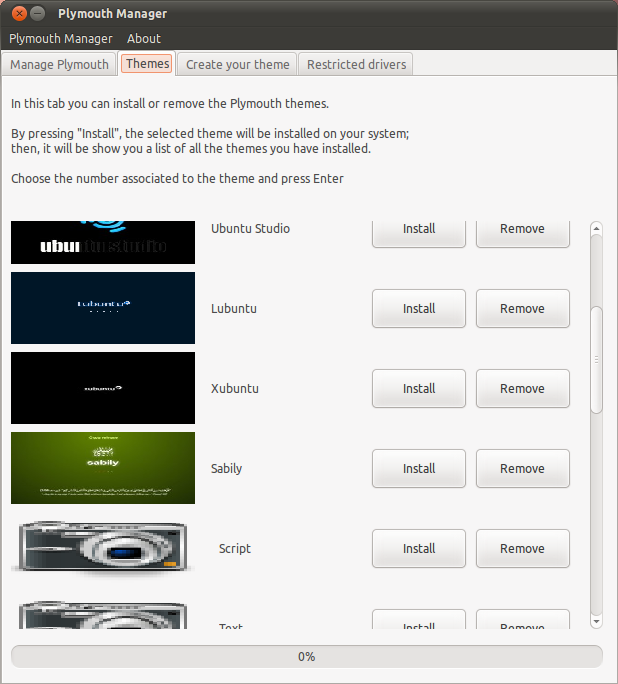
Features include: -

  • Enable/disable Plymouth
  • Set splash resolution
  • Fixing errant errors
  • Choosing/creating new themes

Find most recent download @ sourceforge.net/projects/plymouthmanager

If the app floats your boat why not help translate it to your language? http://plymouthmanager.wordpress.com/about/

Related posts:

  1. ‘Ubuntu sunrise’ plymouth theme adds awe to boot time
  2. Stunning user-created Plymouth boot Splash
  3. icoGen lets you change the colours of the most popular icon sets
Post a comment or leave a trackback: Trackback URL.
  • Anonymous

    Finally……..

  • Anonymous

    With my ATI graphics card i don’t even have anything else besides an ugly monospace text that says “Ubuntu” with a purple background and four dots.

    • Anonymous

      Here dud, this should fix it:

      http://news.softpedia.com/news/How-to-Fix-the-Big-and-Ugly-Plymouth-Logo-in-Ubuntu-10-04-140810.shtml

      Ubuntu has the worst plymouth ever! It has a bug which they have never fixed. That link will help you fix it.

      • Anonymous

        I remember a fix like that destroying my installation :S

        • http://twitter.com/om26er omer akram

          dont think so

        • Anonymous

          I agree, I’ve had terrible problems with manual fixes like that. Ubuntu should officially fix it.

          • http://www.expatsinksa.com/ Bilal Akhtar

            Ubuntu cannot do anything when proprietary hardware drivers don’t support high resolutions.

            Solution: Stick to open-source drivers.

          • Anonymous

            I get the ugly text-only splash with both the Nouveau and Nvidia drivers.

          • dRewsus

            Not much of a solution to me. Nvidia open source drivers are 2D (so no compiz, etc). But I have used documented fixes and they work wonderfully.

          • http://twitter.com/chuche17 Jesus Galvan

            At this point this is not a solution for most people, more like a workaround if the boot screen is all that matters to you. I was very happy using XSplash on Karmic WITH, I daresay, the proprietary drivers and nothing went wrong. Why make the switch when most Ubuntu users use the proprietary driver? Just look at Phoronix and their yearly “Most used Linux Drivers” polls.

          • http://www.expatsinksa.com/ Bilal Akhtar

            (in response to all of the above comments)

            As for Nouveau, it is still very much in development, and is not as matured as the ATI/Intel open-source drivers.

            Also bear in mind that the open-source drivers support only a small selection of hardware, and in most cases ubuntu runs it forcibly on an unsupported graphic chip, hence forcing it to fall back to the ‘generic’ mode, with lesser features.

          • http://www.expatsinksa.com/ Bilal Akhtar

            Ubuntu cannot do anything when proprietary hardware drivers don’t support high resolutions.

            Solution: Stick to open-source drivers.

        • Anonymous

          Change the resolution of the fix to the native resolution of your screen, it should do it.

          Maybe you made a mistake and didn’t paste all the commands well. I don’t use Alt+F2 I do it on the terminal.

          • Anonymous

            I used to tool from the article, and not your link. I did check the settings, and they’re all at 1680×1050. But I’m going to leave it as it is. When you start mixing several fixes for the same thing it can only start to go wrong.

      • http://twitter.com/om26er omer akram

        plymouth requires Kernel Mode-Setting when your video card dont support it ubuntu cant do anything. get your facts right

        • http://twitter.com/Tahakki Joel Auterson

          Barely ANY cards support KMS. Right across the board. I have an nVidia card that doesn’t either. XSplash was, dare I say it, prettier.

          • http://twitter.com/om26er omer akram

            cant agree on that really. most intel, many nvidia and ati support KMS. dont use obsolete cards. (binary drivers dont support KMS)

          • http://pulse.yahoo.com/_LOR655GR4ZFHCMSV7FW5ROPSAA Cliff W

            My Intel U5400 with integrated Intel HD graphics is less than 3 months old and KMS doesn’t work with it. Are you telling me it’s already obsolete?

          • http://www.expatsinksa.com/ Bilal Akhtar

            All open-source video drivers have been patched by Ubuntu to support KMS. The problem is with non-free graphic drivers.

          • http://twitter.com/om26er omer akram

            not by ubuntu. they are supported upstream

          • http://pulse.yahoo.com/_LOR655GR4ZFHCMSV7FW5ROPSAA Cliff W

            Intel drivers don’t work reliably either, and they are open source.

          • Anonymous

            Which are the only drivers you should use if you spent the money on a powerful graphics card.

            Canonical can choose between being “kosher” or being reasonable. It has done this in the past, it can (and should) do it now.

          • Anonymous

            Which are the only drivers you should use if you spent the money on a powerful graphics card.

            Canonical can choose between being “kosher” or being reasonable. It has done this in the past, it can (and should) do it now.

          • http://www.expatsinksa.com/ Bilal Akhtar

            All open-source video drivers have been patched by Ubuntu to support KMS. The problem is with non-free graphic drivers.

          • Anonymous

            maybe ubuntu should just forget about splash screens for now.
            It should just Boot up fast and have a black screen that at least hides that ugly terminal error text.

        • Anonymous

          No dude, plymouth requires a framebuffer, that’s all. KMS is just a fancy way of setting the resolution of that framebuffer. Even the framebuffers that are made by adding vga=791 or something like that to the grub line works just fine. You just won’t get a flicker-free boot that way.

          • http://twitter.com/om26er omer akram

            you are right. ubuntu aims for a close-to-flicker-free boot experience by using a framebuffer in natty (from grub to gdm).

          • Anonymous

            Eh? Is that supposed to be sarcasm? Because unless you have KMS, there’s
            no way to do a flicker free transition between a framebuffer and X.

          • http://twitter.com/om26er omer akram

            there is no reply button down there.
            >Eh? Is that supposed to be sarcasm? Because unless you have KMS, there’s
            >no way to do a flicker free transition between a framebuffer and X.

            https://blueprints.launchpad.net/ubuntu/+spec/packageselection-foundations-n-grub2-boot-framebuffer

        • Anonymous

          My card does have KMS but normally Plymouth appears at the last second of boot. That tweak actually fixes that bug and you can get the right splash screen even on cards that don’t support KMS.I’ve installed Ubuntu on very old computers with S3 GPUs and Intel GPUs that displays the crappy splash screen and fixed it with the tweak.So I think I have my facts right.

        • Anonymous

          I confess I don’t understand exactly what the problem is here (and I haven’t the time to research it right now), but I can say that on a vanilla Ubuntu system, plymouth breaks if I enable the binary ATI drivers. However, the steps in the page linked by vs8 solve the problem, so it’s clearly not a limitation of my hardware or the drivers, since they’re fully capable. Neither would it appear to be an issue with Plymouth itself. Rather, it seems to be a problem with the interaction between the drivers, grub and plymouth, which I would say is a distro issue, no?

          (edit: sorry, this was supposed to be a reply to Bilal, but I guess it kinda works here too)

      • http://www.expatsinksa.com/ Bilal Akhtar

        > Ubuntu has the worst plymouth ever!

        That is a problem with upstream Plymouth and you cannot blame Ubuntu for the mess.

  • Anonymous

    very cool!

  • http://www.twm-kd.com/ BigWhale

    I still remember DOS an VESA extensions and how I hated them. Nowadays, I would be happy to have that back. Enforced video modes that would be good only for boot splash. :)

  • http://www.google.com/profiles/Yogotiss Yogotiss

    Finally sheesh!

  • http://www.google.com/profiles/Yogotiss Yogotiss

    Finally sheesh!

  • http://www.khattam.info _khAttAm_

    I was trying to develop something like this, but I recently moved to debian and there are differences between debian’s plymouth and ubuntu’s. So, I abandoned the idea. Great to see this one, I’ll try it on debian and see how it works.

  • http://twitter.com/Rebastion Sebastian Haselbeck

    Something needs to happen so everyone has pretty boot. Period the “human being” that Ubuntu is propagated to be for, does not give a rat’s ass if it is because of KMS, frame buffers, plymouth, x-splash or whatever. That is completely irrelevant. The only thing relevant is, that it needs to work for everyone, flicker-less, pretty, fluid and fast. Period. Nerds of this world, make it work! Canonical, make some calls, noone cares who’s at fault (insiders will know) what matters is a result!

    • Anonymous

      I totally agree. The technical reason doesn’t matter to average people. All they can see is the ugly result. I would love to see Ubuntu implement some way to use the desktop resolution to set the boot splash during future startups. There are many tutorials out there on how to set this, but it is too much to ask an average user to even think about changing on their own.

      Hopefully this will only be a stop gap measure and NVIDIA and ATI will eventually support KMS when Wayland matures and starts getting used in the coming years.

    • Anonymous

      some say, that canonical should fork the kernel and allow for Hardware ABIs.

      I wonder if there is a much less complex solution :o

      • Anonymous

        Linus and Co. don’t care about the desktop, so Canonical definitively should fork the kernel and have different kernels for the server and desktop edition of Ubuntu.

    • http://pulse.yahoo.com/_FX5ITOLLHVNOY673XBRGCKF3DI Freddi

      Booting is (for me) inconsistent and not yet that what was promissed. It takes longer than XP and it looks different every time I boot:
      - sometimes black for the complete boot
      - sometimes plymouth but flickering or frozen progress bar
      - sometimes the panels and icons come over plymouth and the wallpaper comes at last, sometimes vice versa
      - most times the panels are not animated

      I like Ubuntu but maybe that inconsistency doesn’t look professional for people that are used to commercial OS.

      • https://www.google.com/accounts/o8/id?id=AItOawkUZV8SCQhCyLolvjf_Bj0TmIrnqaJM4YQ iCalPer

        Comparing boot times between an 8 years old OS and a recent one is just silly.

        • Anonymous

          Not when the recent OS is slower than a 9 year old OS.

          I know XP, run it for a couple of years, install a few programs, and forget to clear your cache now and then, it can take ages just to get to the welcome screen. The fact that a brand new operating system, released just one month ago, cannot compete with this because glitches in it’s boot setup, just shouldn’t happen. I know this is open source software, and we shouldn’t expect too much, but what happened to standards?

          I think Ubuntu needs to stop focusing on SSD optimization, multi-core setups, etc., and focus on getting it to work with older computers. We’re not all super rich people who can afford the gear to take advantage of all these little tweaks. I run Maverick on my four year old laptop, and it takes around ten seconds to start Firefox.

          This shouldn’t happen.

          • http://www.manishsinha.net Manish Sinha

            “”Firefox: 10 (sometimes 15) seconds on Ubuntu”"

            Probably we need PGO builds for Linux. Windows builds are PGO ones.

            “”and almost instant on Fedora”"
            Cant believe!! I never had instant firefox on Fedora. Plus right now windows version is more optimized than Linux by Mozilla devs themselves. Windows ones will start faster unless there is some magic.

          • Anonymous

            I said almost instant, there was some delay, seemed faster than 7, but I never actually timed it for sure.

            Then again, I forgot to factor in that this was a fresh installation, so that probably had a lot to do with it.

            Then again, again, this laptop is only four years old, so it’s pretty fast.

            Meh, I don’t know the answer, I’m just telling my experiences.

          • Anonymous

            I said almost instant, there was some delay, seemed faster than 7, but I never actually timed it for sure.

            Then again, I forgot to factor in that this was a fresh installation, so that probably had a lot to do with it.

            Then again, again, this laptop is only four years old, so it’s pretty fast.

            Meh, I don’t know the answer, I’m just telling my experiences.

      • http://twitter.com/Nyamiou Alexis NICOLAS

        I’ve got a fix for you : Don’t install proprietary drivers, stick to the open-source ones. NVidia and AMD are just making shitty drivers that’s why you have all these problems.

        • Anonymous

          NVIDIA’s proprietary drivers are so much better than Nouveau I don’t know where to start describing it. They have professional customers who use these drivers, they care about them, not about you, Stallman or the FSF. They won’t open their drivers. Period. Get over it.

          So Canonical better finds a way to deal with it or force their users to have a worse experience.

          • Anonymous

            Or Nvidia could just do like Intel: OPEN THEIR STUFF! It has caused no problems for Intel, I don’t see why it would for the others :S Really…

          • Anonymous

            Or Nvidia could just do like Intel: OPEN THEIR STUFF! It has caused no problems for Intel, I don’t see why it would for the others :S Really…

        • Anonymous

          NVIDIA’s proprietary drivers are so much better than Nouveau I don’t know where to start describing it. They have professional customers who use these drivers, they care about them, not about you, Stallman or the FSF. They won’t open their drivers. Period. Get over it.

          So Canonical better finds a way to deal with it or force their users to have a worse experience.

        • Anonymous

          NVIDIA’s proprietary drivers are so much better than Nouveau I don’t know where to start describing it. They have professional customers who use these drivers, they care about them, not about you, Stallman or the FSF. They won’t open their drivers. Period. Get over it.

          So Canonical better finds a way to deal with it or force their users to have a worse experience.

        • Anonymous

          NVIDIA’s proprietary drivers are so much better than Nouveau I don’t know where to start describing it. They have professional customers who use these drivers, they care about them, not about you, Stallman or the FSF. They won’t open their drivers. Period. Get over it.

          So Canonical better finds a way to deal with it or force their users to have a worse experience.

      • Anonymous

        Exactly this happened to me on 10.10 with Nvidia ION! Now that I am on Intel hardware, all I did was the initramfs thing, and it worked like a charm, although I would really like the boot animation to start _right_ after the Lenovo screen, not with a flashing cursor for several seconds.. It ruins the prettiness! :P

    • http://thealphanerd.wordpress.com/ Calvin

      usplash worked for everyone, I got more than 16 colours on my SiS card

      • http://www.manishsinha.net Manish Sinha

        Straight out of mouth of Scott James Remnant about xsplash
        ———————————————————————————–ISN’T THIS JUST RHGB?rhgb was the “RedHat Graphical Boot” system they used in RedHat and Fedora until the most recent Fedora releases. It worked by starting an X Window System server and running the splash screen inside that.This sounds very similar to xsplash, but with one key difference: the X server used by rhgb was shut down when boot finished, and a new X server started for the user to login with.Instead, xsplash uses the same X server as the login window, and the same X server as your desktop. In fact, it’s started by the GNOME Display Manager while it starts the greeter or auto-logins your desktop alongside.WHY DON’T YOU USE PLYMOUTH?Plymouth is RedHat’s replacement for rhgb, instead of using an X server it relies on Kernel Mode Setting to provide a framebuffer in the panel’s native resolution and colour depth and draws directly to that. When the X server starts, the X server takes over the framebuffer without requiring a mode switch or a screen clear.In many ways, Plymouth is simply a reimplementation of our original usplash. Indeed, I found it quite ironic that some people have accused us of “NIH”ing xsplash instead of adopting Plymouth, when technically Plymouth is an “NIH”d usplash.So really the question as to why we don’t use Plymouth is the same as to why we don’t use usplash. We did actually consider replacing usplash with Plymouth since the implementation is rather cleaner, but Plymouth only supports Kernel Mode Setting drivers whereas usplash has a fall-back SVGA mode (it always had framebuffer support, thus KMS support, due to the Ubuntu PowerPC port).

    • Anonymous

      TOTALLY agreed!! It’s not user-friendly for users having to fiddle to make the boot animation appear right! It looks so damn good when it _does_ work, so they reeeally need to fix it, so it’s not an issue anymore.. I’m really counting on Natty, so let’s see :)

  • http://twitter.com/elrond_smith Шаповалов Анатолий

    Do nothing on Ubuntu 10.10 with Nvidia on my Lenovo laptop. Resolution still 1024×768 instead native 1366×768.

  • Anonymous

    wowoot :-) works very well with (ATI hd 5770)-(ubuntu 10.10 64 bits) and (monitor 22″ 1680×1050) thanks !! :-)) great app !!!

  • http://soee.openid.pl/ soee

    Doesn’t work here (Ubuntu 10.10). I cun run application but i can’t change resolution or do anything with the Resitricted drivers tab – new window freezes all the time.

  • Anonymous

    “If you don”t know what are you doing, it’s carefully recommended to pass away!” – that’s just brilliant… :D

  • Bart

    I can’t boot linux ofter that. there is only recovery moge. how can i fix that? please help. I use ubuntu 10.10 and did special settings for proprietary drivers. I’ve changed resolution and restarted. after that my grub look has changed and there is no option to boot linux normaly, only in recovery

  • Holger Seelig

    I don’t look at my monitor while my computer is booting :)

    • http://pulse.yahoo.com/_LOR655GR4ZFHCMSV7FW5ROPSAA Cliff W

      I like to look at my display while it’s booting. Sometimes there’s errors and I like to see them.

      Pretty boot screens are neat, but they are actually much less useful than the good old text scrolling by. Plus, last time I had a serious issue, I had to find another computer to google how to get to the grub menu (hold down shift).

      Pretty doesn’t always enhance usability.

  • Anonymous

    After reading all the comments, I felt like putting in my voice here. Some will blame Canonical, others will blame the video card drivers, others Plymouth. When it comes down to it, it is Canonical’s problem. They choose to use certain technology. They choose to use this program over that program. I have been using Ubuntu and Linux Mint for the last 5 years, and I must say it has grown exponentially. I used to have to do this and that to make wireless work, add this program, make this upgrade, hunt down the answer to this problem, and then start all over because I had no clue what went wrong and why it was acting like that. I have to say, I still don’t understand why it does things. I was just tired of other OS’s crashing all the time. I still don’t have the set it and forget it mentality to be able to use my computer to only do real people work. I have enjoyed messing with it and learning how things work and how to make it more appealing to others, and have got a few adventurous friends to make the plunge into Ubuntu. But my parents are a prime example of how it has shortcomings. My folks computer crashed, so I took an old laptop loaded it fresh, and installed 10.04 on it. They have been able to do a few things like surf the Internet, load some pictures, and look at a few documents. My Dad made some documents on Open Office and brought them to work, they were formatted all crazy because Open Office and MS Office are not completely compatible. Mum has her money type programs, these are programs that she had from 3rd party applications that she bought at the store, and they don’t load in Wine, and there is nothing to replace these. Mum and Dad both have complained that it does not look as nice as Windows. The photo programs are just not comparable to Photoshop, Gimp is not a replacement to a $800 program that they use. In order to get the nice graphics, they must enable them only to find out, it screws up a major part of seeing the OS for the first time, and they don’t have the time to go learn how to fix something as simple as the boot screen and they are left feeling like they are using something cut rate. I must admit there are times after being Windows free for 5 years, that I feel the same as when I first left Windows, it just doesn’t work. Recently, I had an opportunity to try using Windows 7 for an afternoon, and the beautiful eyecandy is amazing. It all just works. Then my folks finally broke down to go buy a new computer and asked me to set it up with all their files and programs on it. WOW! I must say, I am looking forward to purchasing my next computer and using it myself.
    Now, don’t think I am leaving Ubuntu, simply making observations. Ubuntu needs to step it up. They seem to be in the process of doing that with the Unity, though I have not checked it out yet. They need to go to longer release cycles to have more time to clear the bugs out. They need to ditch programs that are emulating other top notch programs. They should go about making widely accepted programs running Adobe products just work, no loading in Wine, no second rate graphics. Stop making every application look like a painted brother of the last program. People don’t want to look at their Photo program and feel like they are looking at their email client. Why is Firefox 4 not looking the same as in Mac or Windows? They need to approach the most widely used programmers who have developed amazing products and have them implemented into their system. I mean, even Mac can use MS Office if you so desire, and it works quite well.
    If Ubuntu is going to reach the masses they need to start acting like the masses. Make their OS individual, but don’t reinvent the wheel. Don’t implement a feature part of the OS that does not play nice with everyones computer. Make it easy to use, offer up help to the major companies to implement Linux variations in easy to download and install formats. Some people are doing it, some are trying to make it happen. How about not focusing in so much on theming, and worry more about functionality.

    By the way, this is not directed at anyone at OMG, it is directed at Ubuntu.

    • http://thealphanerd.wordpress.com/ Calvin

      textwall ahoy and friends

    • http://www.manishsinha.net Manish Sinha

      Too long didn’t read. How many hours were spent writing this? Even though you spent so much time, it’s near to useless. Do you think it is by any chance legible?

    • http://twitter.com/om26er omer akram

      i took a glimpse. are you talking about OSX here?

      • Anonymous

        Translation into legible english, in two acts in case you get bored ;)Act 1: – OP wants to add 2c, read comments. – People blame various things. In the end it’s Canonical’s fault. – OP used Ubuntu/Mint for 5 years. – Back in the day, wireless sucked. He fixed it, thanks Google. – Ubuntu > Parents. Parents sad. – “Firefox and photos is awesome” says parents. – “Work not OpenOffice compatible, formating bad, me sad” says dad. – “Quicken no work in Wine, Wine bad, me sad” says mom. – “Ubuntu looks bad. Aero > Ambiance FTW” says parents.Act 2: – GIMP sucks. Photoshop > GIMP. $800 purchase is happy purchase. – OP agrees that Aero is quite awesome FTW. – OP says bye Ubuntu, but not really. – Windows 7 is good because it Just Works®. – Ubuntu needs to step up, because Windows 7 > Ubuntu. – Why Firefox 4 not look same as Windows or Mac? – Ubuntu needs to act like the masses to reach the masses. – Make Ubuntu easy. – Stop focusing theming, make it easier. Now dammit.My translation took ten minutes to put together after fifteen minutes of reading. That’s right gentlemen, I waste my life, so you don’t have to. :p

        • Anonymous

          If it took 15 minutes for you to read such a short piece of writing, you must go back to school NOW.

        • Anonymous

          If it took 15 minutes for you to read such a short piece of writing, you must go back to school NOW.

          • Anonymous

            I don’t feel I have to. I sat through five years of high school, and another four of college. I’ve done my time.

            It took me fifteen minutes to read this text wall due to the poor formatting of everything.

            As for your remark about a “short piece” of writing, true, perhaps in the literary world this is a “short piece” of writing, but this is the Internet, and comments that go on for ages are just so exhausting to read (I know mine go on for ages, but I don’t expect many to read them).

            I also had to re-read many parts of the text for proper fact checking, before I could break it down into simple bullet points for regular people to understand, therefore adding to the time it took to read this.

            Please excuse me for not beating the clock when it came to reading such a short piece of literary excellence, but if it’s any consolation I have recommended this novel to all my friends. I guess you really are a higher being when it comes to the extreme sport of reading. Well done.

            Have a wonderful day.

    • http://twitter.com/AwesomeOnsum Scott Onsum

      Honestly, the only way to make everything work on EVERYONE’S computer is to use insanely old programs.

      Try running Snow Leopard on a Mac with a powerpc processor. That doesn’t work. Try running Windows 7 on a laptop made for Windows 95. (Both are legit examples because I own the laptop and my friend owns the PPC).

      Innovation requires outdating old technology. Imagine how clunky our Blueray players would be if they kept VHS compatibility.

      You sadly sadly sadly have absolutely NO IDEA how Ubuntu works. They do not make firefox, nor wine. Just to use your own example, MS Office on Mac does not work because Apple made it that way but because…

      Microsoft made their product for Mac too.

    • http://twitter.com/bonzi200x sajith kalathingal

      Anyone read this completely?? Raise your hands. No offence too long makes me too lazy :)

      • Anonymous

        I guess reading a novel is just too uphill for you, right?

        Don’t expose yourself so easily.

      • Anonymous

        I guess reading a novel is just too uphill for you, right?

        Don’t expose yourself so easily.

    • Anonymous

      Tip: think in paragraphs split up what you want to say in blocks of 5-8 lines each. It’s easier to read and keeps people focused.

    • Anonymous

      I read all the text and I think you missed the point for MS Office since it DOES work with wine and for me it does work perfectly.

      Eye-candy is a little lacking in gnome by default even with Ubuntu themes, how about KDE? It is much more eye candy than windows 7, I think. Plymouth has problems but that’s no show stopper, I never heard anyone that can’t login because of that.

      There are some money programs in linux, may be they should try those. What does your parents do with photoshop? Gimp is really comparable to it for regular users.

      For hardware problems, it is again wrong to blame linux. Blame those suckers who don’t write drivers for their products or open their specifications…

      • Anonymous

        That is very true.

        I love Intel + Ubuntu. It just works :) And nice, too :)

  • Anonymous

    The boot splash is the first thing to go! If I’m even looking at the computer while it boots I’d rather see the system messages. Cool tool, but how often do you really boot your computer?

  • http://profiles.yahoo.com/u/B7YZZ26ISQONDZNPHW4VH6WXGM Boteeka

    I installed it and although I have intel graphics I hit the button on the restricted drivers tab just to see what it does. It installed some packages and asked about my resolution where I had to enter 1280×800-24. I rebooted the laptop and since then no graphical interface at all, gdm can not be started not even manually. Please, help me how to restore to the original state.

    • Bart

      It’s the same with me. I have nvidia restricted. I somehow managed to start system under recovery mode and it works good but when i reboot there is no entry for normal kernel boot. I have also found that my /boot/grub/menu.lst file is empty.

      • http://profiles.yahoo.com/u/B7YZZ26ISQONDZNPHW4VH6WXGM Boteeka

        I managed to restore it. The problem is that it modifies /etc/default/grub and adds some parameters to the kernel boot options, something “nomodeset …”. When your computer starts you hold down SHIFT so the boot menu comes up. There you select the first entry and hit “e” to edit the kernel options. Once there you just delete any options besides the first two which are “quiet” and “nosplash”, then you hit CTRL-X to boot. Once the computer started normally you need to edit /etc/default/grub and remove those options from there too. After you save that file you need to run “sudo update-grub” and you should be good.

        • Bart

          I don’t even have those options there. I had only something like that: linux16 , beside the options above. in revovery i tried update-grub and update-grub2 which added lines with my linux version to the grub menu. But still there is no line which represent normal boot. I have only recovery, memtest, memtest (console) [?], windows and there is no wersion of normal kernel boot. update-grub detects kernel properly but there is no entry in grub to select it. I have no idea what to do now :(

    • http://twitter.com/sylvainsjc Sylvain ZUCCA

      Same for me with Nvidia 9600 GT

      Be careful with this option because for some configuration, the result is that the system is blocked and can not boot up

      You must remove manually all the modifications made by plymout manager

  • http://twitter.com/vol4ikman Alex Volkov

    how to uninstall this manager via terminal?
    I have a big problem!
    After installing this manager I choose some theme (plymouth orange), and after rebooting I have a black screen with Login and pass

    how can I fix it?

    • http://thealphanerd.wordpress.com/ Calvin

      sudo apt-get remove packagenamehere

      You can look up this package name via apt-cache search

      If you want to try spawning the graphics system, type startx and you might get a GUI.

  • http://profiles.yahoo.com/u/KME6NDF3KTWK6NNPG5SF36PLBI Ambleston

    I’m going to throw my hat in the ring here and stamp my foot damn well loudly. If Plymouth is to be used, then either the Ubuntu devs make sure that everyone has a sweet boot experience or the Plymouth devs need to have a poke very hard and add support for more cards.Ubuntu is aimed at the average Joe user, so if they have a card that is not supported by Plymouth they have to endure a crappy (and lets be honest here, I could have chosen a lot, and I mean lots of swear words here) boot experience.At least with 10.04 I had a decent Plymouth boot experience, with 10.10 I get whats akin to a ZX81 kinda display. Mr Shuttleworth, your idea of Ubuntu outshining my Mac just got shot down with my boot experience from 2 decades ago.I’ll now go and have a lie down and when the rest of you have finished trampling my hat, I’ll go and pick it up, dust it off and skulk away :)

    • Anonymous

      This is what I was trying to say in my last, and very long post. Just shorter and more to the point! LOL!

  • http://twitter.com/brandenmikal branni.

    this is random but has anyone else notices that 10.10 uses more resources?

    when i used to have 10.04.1 and 9.10; my computer never overheated. ever.

    • Anonymous

      Yeah. I rue the day I installed Maverick over Lucid. Never had I thought that both would live up to their names so well.

    • http://profiles.yahoo.com/u/7GXJ4CL5A6A5YPPUO47UQXGP5Y Johan

      For me it’s the opposite. My laptop overheats less often on 10.10.

  • Anonymous

    It worked like a charm for me :) Hehehe cheers ;)

  • http://twitter.com/mshenrick Mark Henrick

    unfortunantly using whole disk lvm encryption replaced GRUB and plymouth (and i got a really nice theme from gnome-look :( )

  • http://twitter.com/TheWitchdoktor Damián Muzzio

    It worked for me, I have a Nvidia card

  • Anonymous

    Okay, I tried this…and it crashed my whole thing. Bunch of boot script, and them nothing, it just froze. What a garbage program. This is what I was talking about before. Just another cardboard cut that has not been attended to. I should not have to install a program hoping it won’t crash, just to fix a jacked up part of the OS that got jacked up just by enabling a part of the computer that I paid to use by buying it. Hope people at Ubuntu are watching this blog to see how we respond.

  • Anonymous

    Okay, I tried this…and it crashed my whole thing. Bunch of boot script, and them nothing, it just froze. What a garbage program. This is what I was talking about before. Just another cardboard cut that has not been attended to. I should not have to install a program hoping it won’t crash, just to fix a jacked up part of the OS that got jacked up just by enabling a part of the computer that I paid to use by buying it. Hope people at Ubuntu are watching this blog to see how we respond.

  • daas88

    It doesn’t fix that plymouth only shows when shutting down, and it shows the text theme at boot up…

  • http://www.darkredman.fr/ DarkRedman

    That’s a great idea to make this GUI interface to manager plymouth because it’s boring to have a tiny resolution on a large screen !

  • http://www.joesteiger.com Joe Steiger
  • http://www.joesteiger.com Joe Steiger
  • Pingback: Install / Ganti Plymouth Theme di Ubuntu | Musa Amin