

Ubuntu is adding AI features this year, and founder Mark Shuttleworth hopes to position the Linux distribution as the OS for the ‘agentic’ era. But big ambitions start from small seeds, and the first to be planted is a speech-to-text tool named Myna.
Name: Myna.
Age: 0 (it’ll debut in Ubuntu 26.10, out in October).
Appearance. Indicator, since it’s a keyboard shortcut you press (to avoid using your keyboard).
What’s this about? A “lightweight speech-to-text application” powered by AI. You press a hotkey, talk at your computer and, like magic, your words get typed out for you. Canonical’s VP of Engineering Jon Seager has said any text field you can type in, you can talk into (or, in my case, talk down to).
Oh, typing is uncool now? Seager, speaking at the Ubuntu Summit in May, positioned it thus: “Why type like an animal to your agent when you can just talk to it?”.
I type very gracefully, thank you! Good, cos you’ll likely still need fingers to backspace through what the audio transcription model decides you said when you were dictating an e-mail with a mouth full of doughnut. Hopefully, you won’t be able to dictate into password fields though. That’d be dumb.
But everyone hates AI, though… Myna is not a conversational chatbot, nor a creepy “copilot” there to hassle you while doom scrolling OMG! It is just for voice dictation, albeit powered by an “AI” speech recognition model. Reliable dictation on Linux has been a weak point for decades. Here, Canonical is set to fix it.
Will Sam Altman use my voice to train Cylons or whatever? Myna uses an open weight AI model that runs locally, on your device. No cloud AI services or companies are involved. Your mic will only wake to listen if you press the relevant hotkey. An indicator is shown on screen so you can know when Myna is active. And all audio is processed in memory, before being junked.
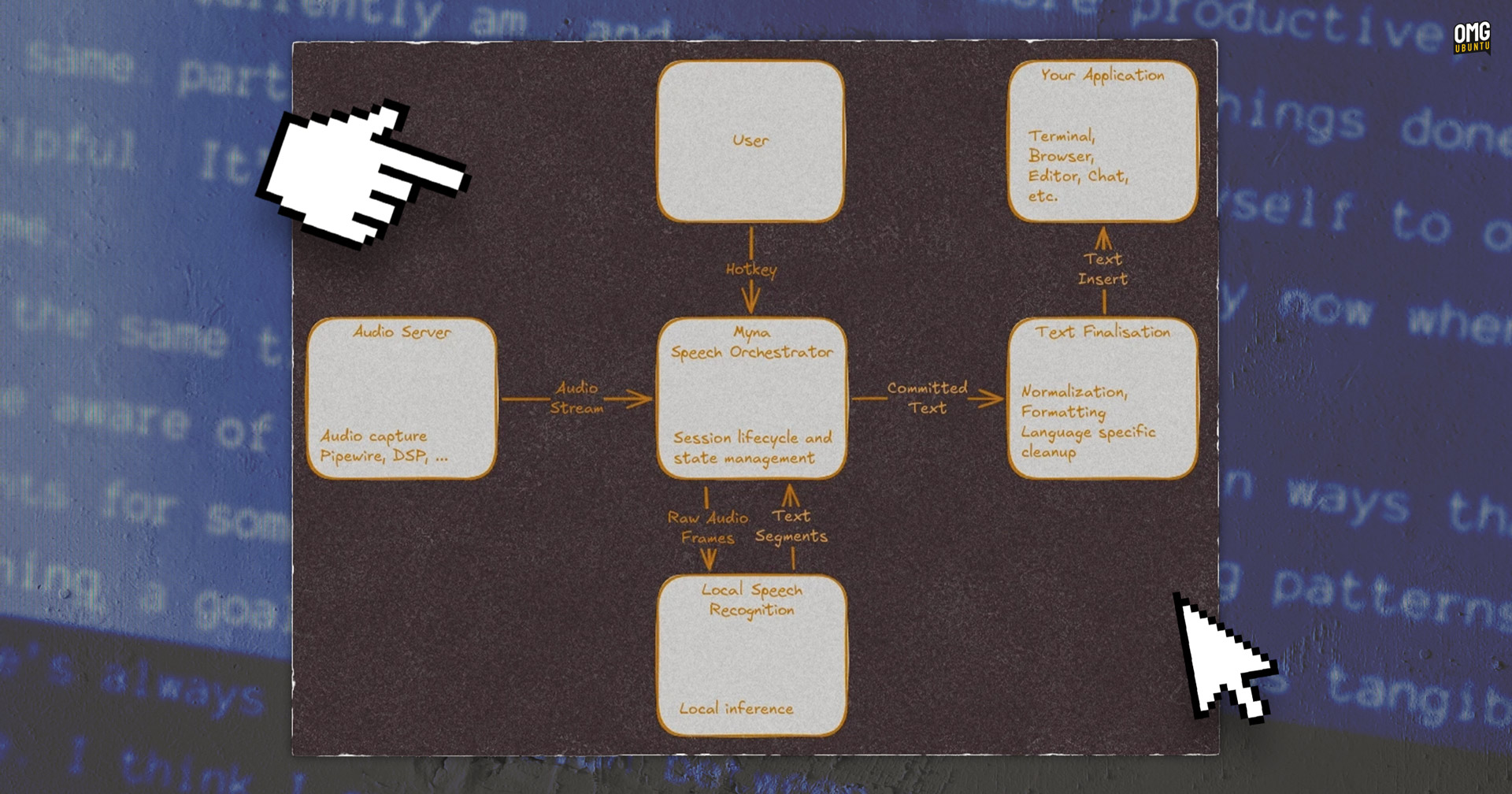
So how does it work? The Myna GitHub details the spec. A sandboxed Inference Snap (AI model) processes audio; Myna, a speech orchestrator, manages the rest: when to listen, passing audio to the model to be transcribed, passing text back to an input field, and keeping track of the app the text is going in. A GNOME Shell extension shows an indicator when Myna is listening to and processing audio.
Is this something people will actually use? Well, it depends. No-one is going to want dictate shell commands and file paths to their terminal for fun (the novelty of that lasts 1m 10s exactly). For long-form spiel, speech-to-text is used by people who love the sound of their own voice talk faster than they type.
Still sounds niche. Put aside productivitymaxxing scenes that tech bros tout in VC pitches, mid-bicep curl, as real day-to-day benefit is for accessibility. Text-to-speech tools on Ubuntu aren’t renowned for being great. If the AI boom means they improve, that’s a good thing.
This will work in languages other than English, right? Language coverage will depend on which AI model Myna uses (they can be swapped out based on hardware capabilities). Canonical’s looking at Whisper, Nvidia’s Nemotron, Parakeet and Qwen3-ASR. Many do offer multilingual variants.
I’m gonna need a big GPU to transcribe “lol”, aren’t I… It’ll help! Nemotron is NVIDIA-GPU only, Qwen3-ASR is CPU only, Whisper can run on both (and has the widest language coverage), some can use NPUs where available. It’ll depend on model and hardware, and the Myna setup will select accordingly.
But Myna isn’t a voice assistant, right? Not yet. Voice commands, desktop control, wake words and continuous listening are out of scope – for now. Canonical says it wants to focus on getting the basics right first.
That’ll be a first. Woah now, r/linux! ;)
Why’s it called myna? The myna bird is known for mimicking human speech (eerily well) so the name is a nod to that. Though here, Myna doesn’t mimic you, it just puts your words in the right box, which is a division of labour the name doesn’t capture, but hey: that’s only a myna quibble1.
My-nah; Ubuntu will let me opt-out, right? Mercifully, yes. AI features in Ubuntu rely on inference snaps, i.e., AI models that could be too big to fit in the OS image. You’ll be able to remove them. AI weariness and workslop fatigue is real thing, so it might be cathartic to type sudo snap remove all-the-ai.
Type? Surely you mean speak? Droll.
Do say: “Better dictation on Linux, at last!”.
Don’t say: “Hey Myna…” *pause* “…reorder loo roll”.
This is part of our Explainer format, where we chat through the Why, How and, more often, the Whatever without without the hype and jargon.
- Myna/minor, get it? No? Tough crowd. ↩︎