


April 2026 has been and gone, but not before delivering an array of Linux software updates, including new versions of popular FOSS video editor Kdenlive and Oracle’s virtualisation offering VirtualBox.
We also got Firefox 150 with GTK emoji picker support and split tab improvements, and a modest bug fix update to the GIMP image editor, albeit resolving an annoying on-canvas text tool quirk.
Below, I list other notable Linux app releases to arrive in April. While these didn’t merit a dedicated article (hey, it was a busy month with the release of Ubuntu 26.04 LTS), they still brought nifty new features and welcome improvements that are worth hearing about.
Zed text editor reaches 1.0
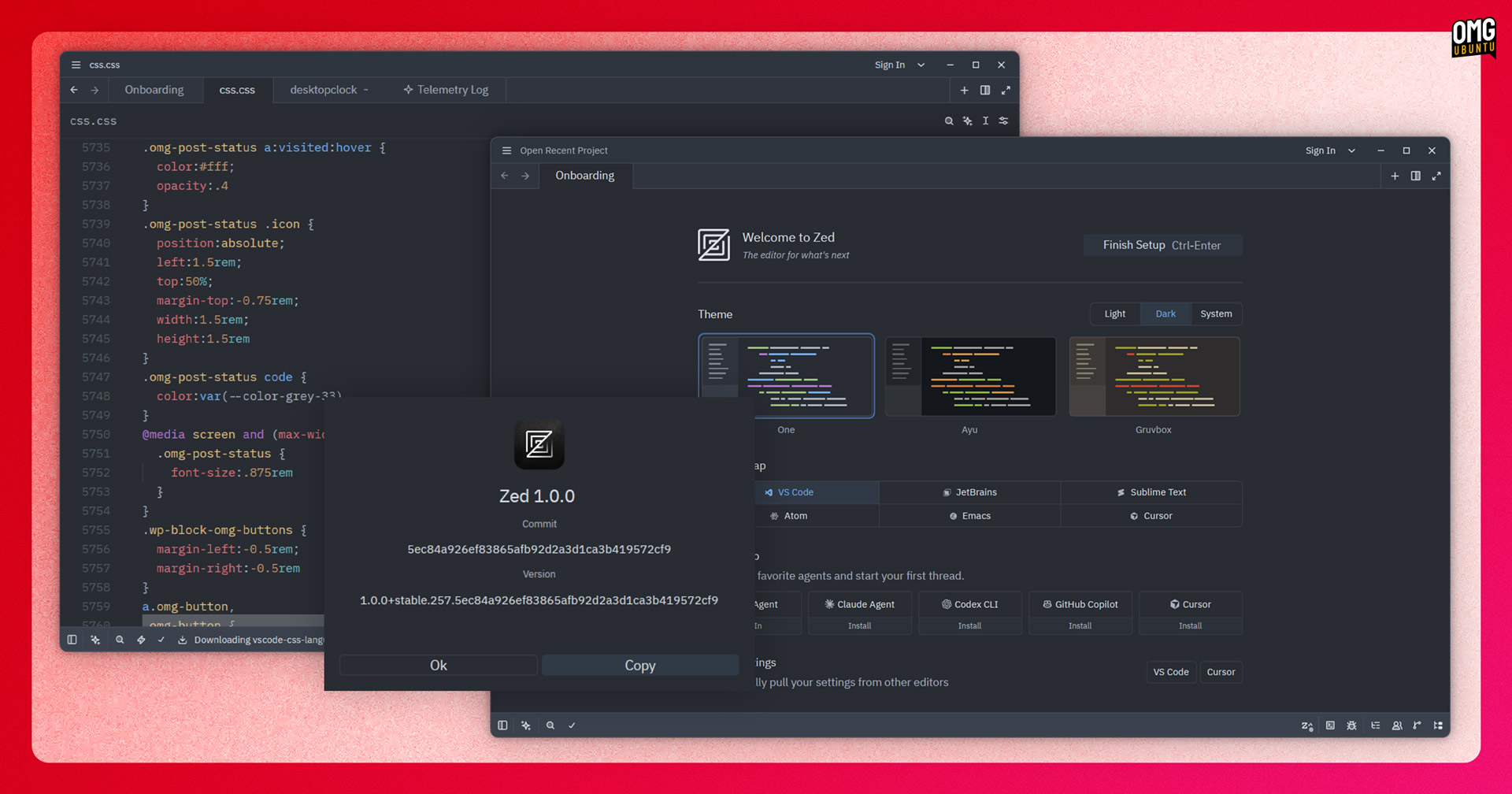
Zed, the open-source IDE written in Rust, issued its 1.0 release. It’s built up a notable following since I last featured it on on the blog, having kept pace with development changes by adding AI and agentic features (some paid), but not neglecting its core: text.
Not that the rounded v1.0 version number means that the text editor is now perfect. More that its makers feel it’s good enough for developers to rely on day-to-day.. If you’ve tried Zed in the past and found it lacking, it may be worth checking out the new update.
What’s new? On the AI side, Zed 1.0 adds support for China’s impressive DeepSeek-V4-Pro and DeepSeek-V4-Flash models. It also gains session-persistent bookmarking, improved Git CLI integration and some Linux-specific fixes, like finicky spacebar behaviour.
One removal of note: preferred_line_length, which is gone in favour of bounded soft wrapping. Some developers may consider that a hindrance rather than a help, so being aware of it before upgrading is permanent (assuming you care about it).
Head to the Zed website to download the editor and try it out. The core editor is free and open source software, and AI features can be used via Zed’s hosted models (free tier available, Pro plan at $20/m), your own API keys or local models.
Shotcut’s speech to text goes Vulkan
The Qt-based Shotcut video editor has a fast development cadence, and the latest update, Shotcut 26.4, holds to it with a bevvy of timeline buffs, including ‘symmetric’ resizing of transitions layered over clips in the timeline when using the trim handles.
Dragging and dropping clips from the Recent view and on to the timeline is supported; timeline zoom made less erratic; and the amount of memory used for timeline audio waveforms has been reduced.
The “big” new feature is Vulkan GPU support in Shotcut’s Speech to Text module, allowing for hardware accelerated processing of subtitles on Windows and Linux. There’s a new ‘use GPU’ checkbox in the speech to text dialog you’ll need to check to make use of this.
A new list of aspect ratio grid options can be accessed from the player grid button. This includes a 1:1 frame to help frame square content, regular 16:9 for widescreen clips and 9:16 for TikTok, YouTube shorts and other ‘vertical’ video needs.
Also of note is export/rendering progress and status on taskbar/dock icons (where supported) and the addition of new 10-bit VP9 MP4 and WebM export presets and other smaller fixes and tuneups.
Shotcut is free, open source software. Links to download the latest release can be found on the project website, with various options for Windows, macOS and Linux systems.
PeaZip gets faster (kinda)
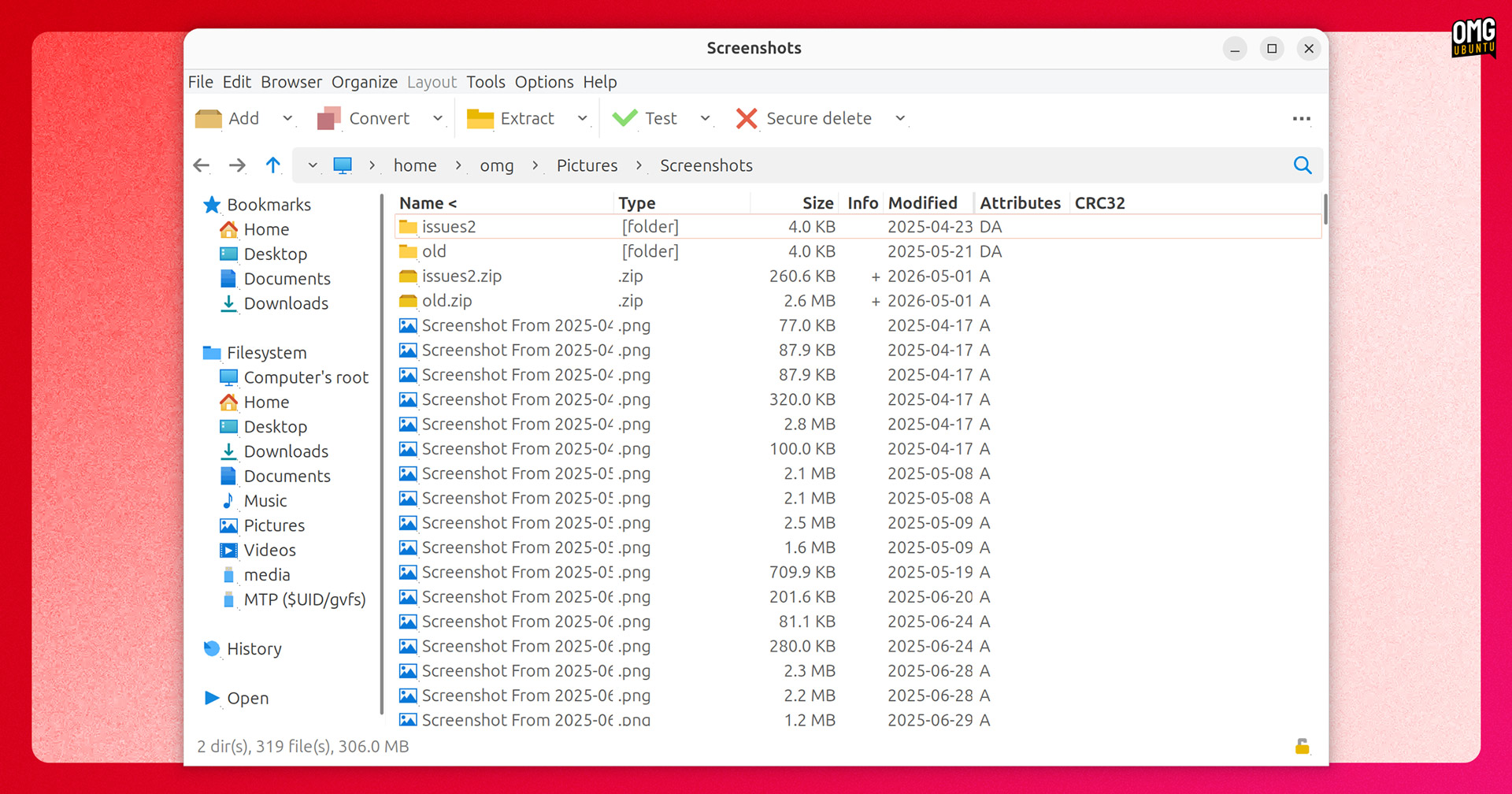
PeaZip 11.0 offers notable performance gains in large archive handling. Opening and navigating very large archives is now faster, with pre-parsing up to 94% faster in large collections (100K+), while tree view rendering is up to 30% quicker.
In the PeaZip GTK2 build, ‘virtual mode’ is now on by default for archives over 16K items so that the file list only renders what’s visible on screen rather than loading everything in the archive into memory.
Batch archive testing has also been added. This lets you select multiple archives to run integrity checks in one pass, with a pass/fail shown in the CRC column. Drag-and-drop now works on the path bar itself, popping up a small menu to copy, move or extract to that location.
The backend has been updated to 7-Zip/p7zip 26.00, the Password Manager now shows an entropy rating for passwords you enter and on Linux, dark mode UI scaling on HiDPI displays is improved, having previously looked pixelated under fractional scaling.
Download PeaZip from the official website, which has installers and builds for Windows, macOS and Linux, including Deb installers for Ubuntu with a choice of GTK2 or Qt6 UI.
Scribus scores real-time spell check
Scribus 1.7.3 is the latest unstable release of the open source desktop publishing (DTP) app. The stable branch remains 1.6.x., but the exciting changes are happening in the unstable series – a preview of the direction Scribus is heading.
The biggest addition is (for some of us, heh) live spell checking, which now runs in a separate thread as you edit so it doesn’t stall the UI. It handles soft hyphens, supports undo and automatically pauses during Search & Replace operations so it doesn’t get confused.
Speaking of which, Search & Replace has been rebuilt with a new UI, making advanced criteria collapsible, supporting search across all text frames in a document and letting you prefill the search field from whatever text you have selected.
On the typography side, a new Change Case function can transform text to lowercase, uppercase, sentence case, title case, toggle. Page and list numbering supports 15 additional scripts (including Devanagari, Thai, Greek, and Tibetan).
And the Barcode Generator plugin was rewritten (by its original author, no less) to sport a data-driven UI, re-editable barcode objects, a new scripting function and a variety of other buffs.
Download Scribus 1.7.3 for Windows, macOS or Linux from the project SourceForge.
BleachBit’s big update
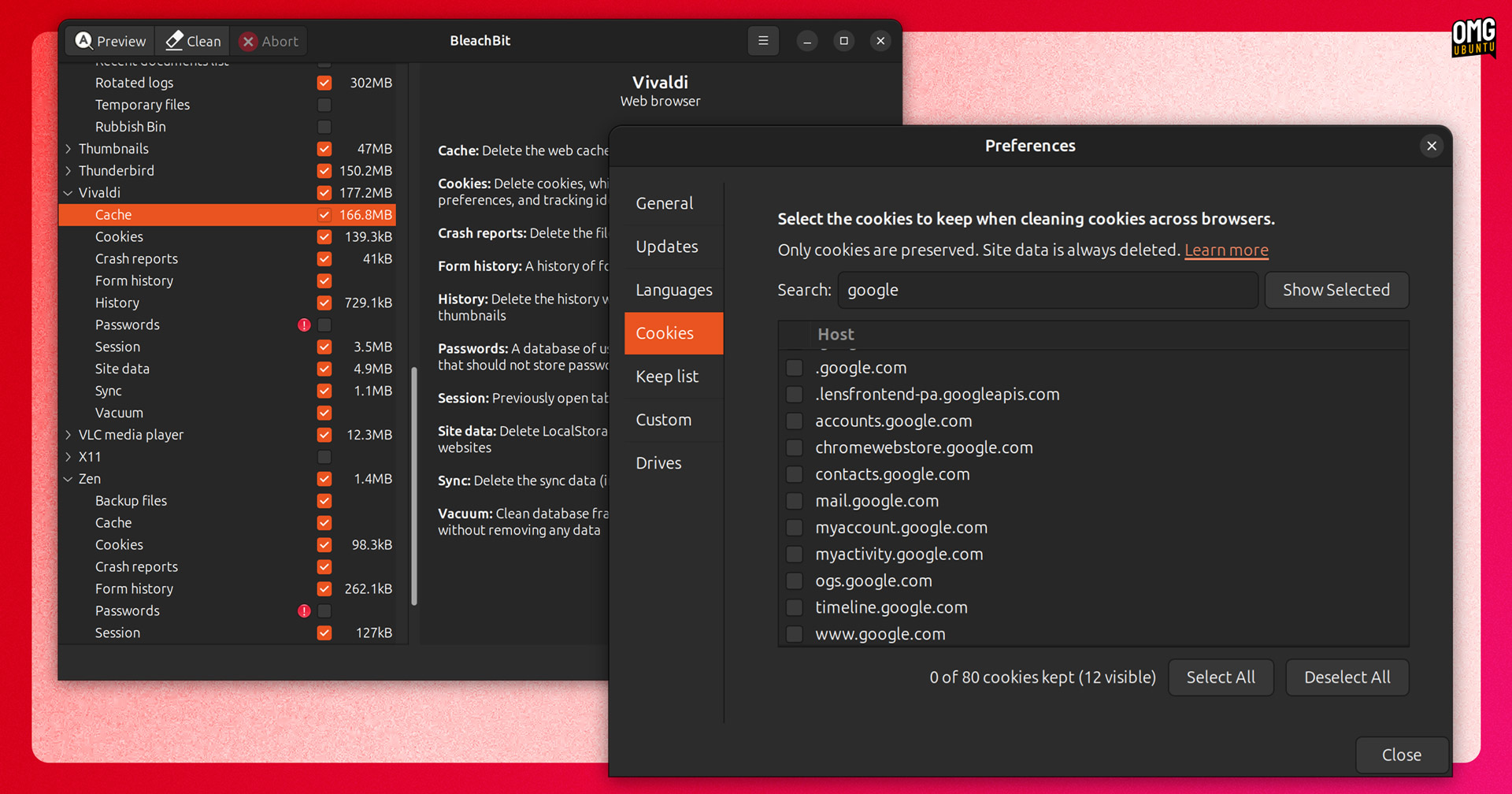
BleachBit, the open-source system cleaning tool, saw its big 6.0 release this month, meaning that new cookie manager previewed in its beta earlier this year is now ready for prime-time.
Rather than deleting all cookies during a cleaning run, you can now choose sites to keep cookies for. if you’re fed of up getting logged out of your email or social media accounts once a system clean is done then this is worth checking out.
Browser cleaning is also extended, with more kinds of cruft accumulated by Chromium-based browsers (shader cache, IndexedDB, network state and crash reports) available to clear out. You can also clean Vivaldi and Zen for the first time.
On Linux, BleachBit 6.0 extends its scrubbing to cover Flatpak installations of Chromium or ungoogled Chromium, can expunge LibreOffice’s recent documents list and uses fstrim during partition wiping on SSDs.
DEB and RPM packages are now signed directly with the maintainer’s key, though Arch Linux users may wish to note there’s a new dependency on python-requests which the package metadata doesn’t mention, so if the app fails to launch after installing, check that’s installed.
Download BleachBit 6.0 from the official website; DEB and RPM packages are available for Ubuntu 25.10, Ubuntu 26.04 LTS and Linux Mint 22.3. As ever: use this tool carefully as it can do more damage or slow your device down if used without due attention.
VirtualBox supports Linux 7.0
A new maintenance update to Oracle’s open-source virtualisation app VirtualBox arrived in April, with v7.2.8 adding support for the Linux 7.0 kernel release on Linux hosts.
Linux hosts also pick up support for guest time accounting in VirtualBox 7.2.8. This sees CPU time VirtualBox spends running a guest OS properly reported, rather than it being bundled in with ordinary application usage.
Red Hat Enterprise Linux (RHEL) 10.1 and 10.2 kernels and the UEK9 kernel on Oracle Linux 9 see fixes, as is a graphics issue on Ubuntu 25.10 guests that meant the cursor was permanently an arrow shape, never changing to context-specific icons (e.g., grab hand).
Linux Guest Additions drops the built-in vboxvideo kernel module on Linux 7.0 and up as the kernel includes it (or you can switch to VMSVGA). Two clipboard fixes land for Wayland guests on Windows hosts, including one that saw the last character silently dropped on paste.
See the changelog for details on these and some other fixes, including some that had been affecting Windows guests.
Download VirtualBox from the official website for Windows, macOS, Linux and Solaris. Ubuntu users who don’t need the latest features can install an older version from the Ubuntu archives.
Other apps of note
Kdenlive gets collab-edit friendly

Monitor mirroring and animated transition previews are among new features in Kdenlive 26.04, which released (as the version number will tell you) in April.
During major edits or working with other editors in the room, monitor mirroring is a boon as it lets you punt any monitor in your Kdenlive workspace (such as your main project preview) to a connected display, without losing it from your workspace – all with a click.
Tradition previews will help speed up editing decisions, as no more ‘trial and error’ is required to find the perfect clip segue. When you mouse over a transition in the picker an animated preview plays on loop – a feature most closed-source video editors offer.
Sticking with transition-related workflow speedups, transitions will automatically adjust to the length of the clips it’s sandwiched between, which helps gets you from A-B faster since you don’t need to manually dial in a length (you can, of course, manually tweak once in position).
You can also adjust the playback speed of multiple clips at once, import clips from the timeline context menu (with the imported clip inserted at the scrubber point) and an option to lock the playhead in the centre of the timeline during playback, scrubbing or seeking.
The release announcement mentions these and a slew of other, smaller changes if you’re interested.
Download Kdenlive from the official website for Windows, macOS or Linux – latter available as an AppImage or install it from Flathub. If you don’t need the very latest features, Kdenlive is in the Ubuntu archives too.
LibreOffice 26.2.3 brought further fixes to its current stable release series; OpenShot put out a point release to its recent ‘biggest release ever’ with a ‘proxy workflow’ feature that uses lower-resolution footage to improve performance.
Bazaar, the GTK4/libadwaita client for installing and managing Flatpaks, reworked its add-ons dialog, added a filter to its search page and now shows a button for the EULA proprietary apps may link to on Flathub (‘cos do release those EULAs, right?).
Finally Rio, the cross-platform terminal app with GPU accelerated features, hit v0.4.0. It’s undergone a major rewrite and code cleanup, reducing the app size by ~50% on macOS. Rio’s dev cautions that because of this it may no longer work on older Linux and Windows releases.
Hear app news? Let me know
That’s the bow tightly tied on April’s roundup but, as ever, if you learn of a software update you think others will want to know about, do get in touch via the contact form – your article tips, corrections and content suggestions are super appreciated.