

A redesigned and retooled Raspberry Pi Imager app is available for early-bird testing.
Raspberry Pi Imager 2.0 sees “nearly every aspect of the UI has been changed, with a view toward improving accessibility and making the tool easier to understand”, say its makers.
It also adds opt-out anonymous telemetry to “understand usage of the application (e.g. uptake of Raspberry Pi Imager versions and which images and operating systems are most popular)”.
The look and the flow of the new version is improved compared to the current stable 1.9.x release (which isn’t bad by any stretch). The three button with modal sheet model is replaced by a cohesive and streamlined step-by-step wizard instead:

For less tech-savvy users—not that they’d be using a Pi, tbh—the “hand holding”, clearer visuals (no more red background) and use of different font sizes in the UI to differentiate titles and labels, etc, are sure to be a major boon.
There are other changes that long-time users may need to get used to.
The “Customisation” step now only appears when flashing Raspberry Pi OS images, not any kind of image. Data entered in to the ‘customisation’ fields, things like pre-defining network passwords and SSH keys aren’t reliably supported by most.
And there are reports from some early testers that SD card writing speeds are significantly slower in the new version — but as it is in beta, feedback on issues/bugs like that are important to flag up.
Still useful for non-Pi users
You do not need to own a Raspberry Pi to use this open-source and cross-platform tool, either.
The core feature set is tailored towards Pi owners: pick a Pi model, chose an OS , select an SD card/USB device, and the system gets downloaded and flashed directly.
But many people use the Pi Imager as a Balena Etcher alternative to flash any .iso, .img (including img.gz), or .raw1 to an SD card or USB device. I use it when covering the KDE Linux Alpha last month, provided as .raw image, as Balena Etcher doesn’t support them2.
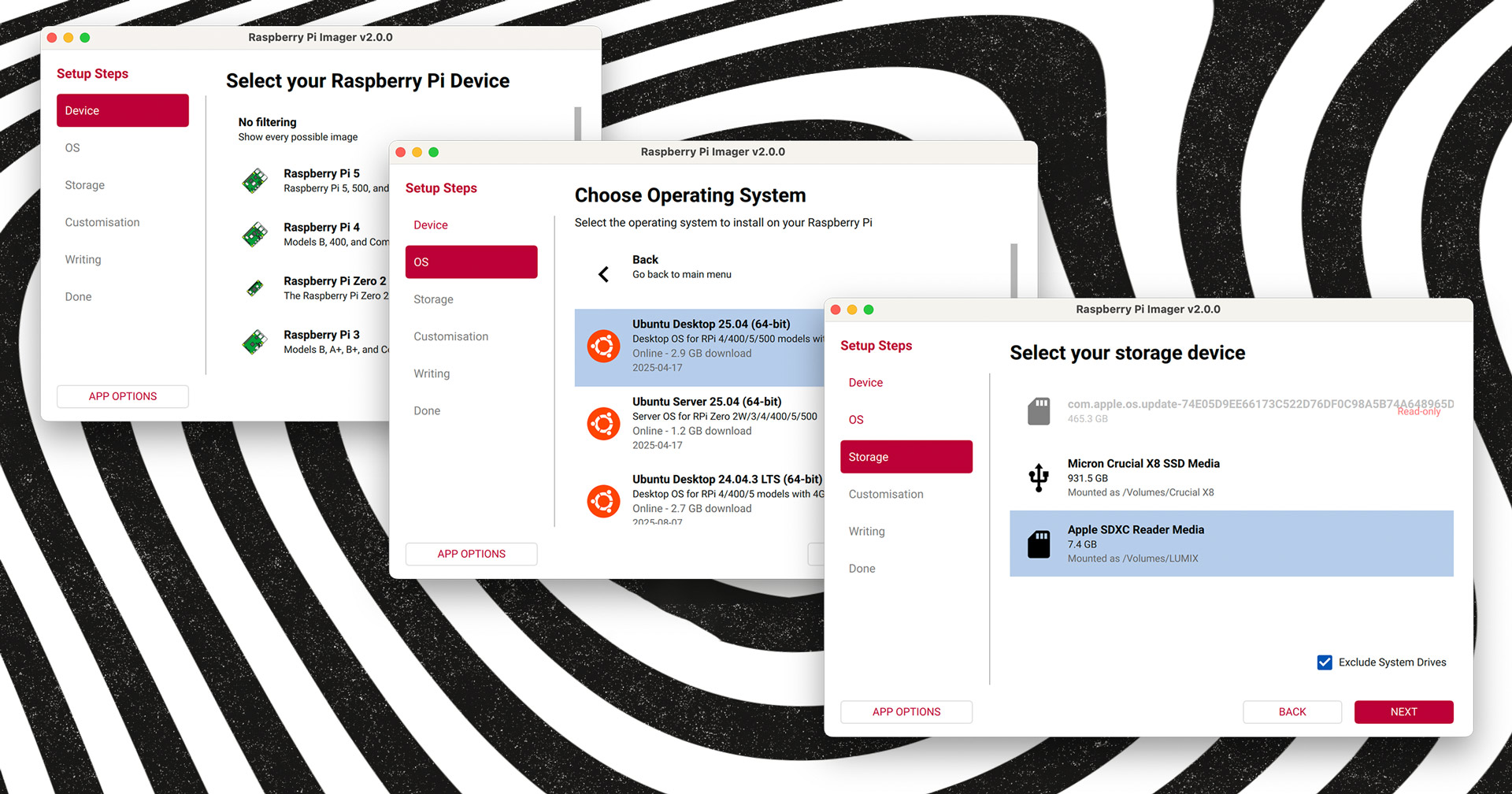
Raspberry Pi Imager 2.0 is currently in pre-release, with further pre-releases planned in the near-future to ensure the new version is as reliable as the old one.
Want to try it?
The first beta is only available on macOS and Windows (which is why my screenshots are from macOS), but Linux (including Raspberry Pi OS) builds are due to follow shortly — keep an eye on the GitHub project page.
Download Raspberry Pi Imager 2.0 (Testing)
- But it seems not in v2.0 as the file chooser only looks for disk images. If there is an option to show all file types, you may be able to select a
.rawsystem image. ↩︎ - I could, ofc, use the command-line
ddto do it, but call me new-fashioned: I like a GUI so I can be sure I picked the right device to flash to! ↩︎