


A big Vivaldi web browser update is rolling out with a set of appreciable improvements long-time users will like, and would-be users may be tempted to try.
Vivaldi 7.2 amps up its address bar logic to proffer1 more relevant results, faster. Search suggestions and search accuracy have been tweaked so that “finding what you need feels seamless”, according to Vivaldi Technologies’ CEO Jon von Tetzchner.
Sticking with the speed theme, Vivaldi 7.2 is said to load pages faster—up to 2x as fast for some—thanks to some nifty optimised connection handling work on the backend that reduces latency on domain lookup.
Fans of the Vivaldi New Tab ‘Dashboard’ can track currency fluctuations in real-time by adding a new Currency widget; browser workspaces surface in Quick Commands; and Vivaldi’s built-in mail client lets you reorder mail accounts using buttons to keep things organised.
Vivaldi 7.2 its already engorged set of customisation controls with a new Browser Priority Shortcuts list. This does what you think it does: it lets you list keyboard shortcuts which should always activate a feature(s) in the browser before/as well as a web page.
As you should be aware of by now, Vivaldi is More Than Just Another Web Browser®. It offers scores of small, niche, thoughtful features that other browsers makers would scoff at the idea of natively supporting—I could write a top 20 list of ’em and only scratch the surface.
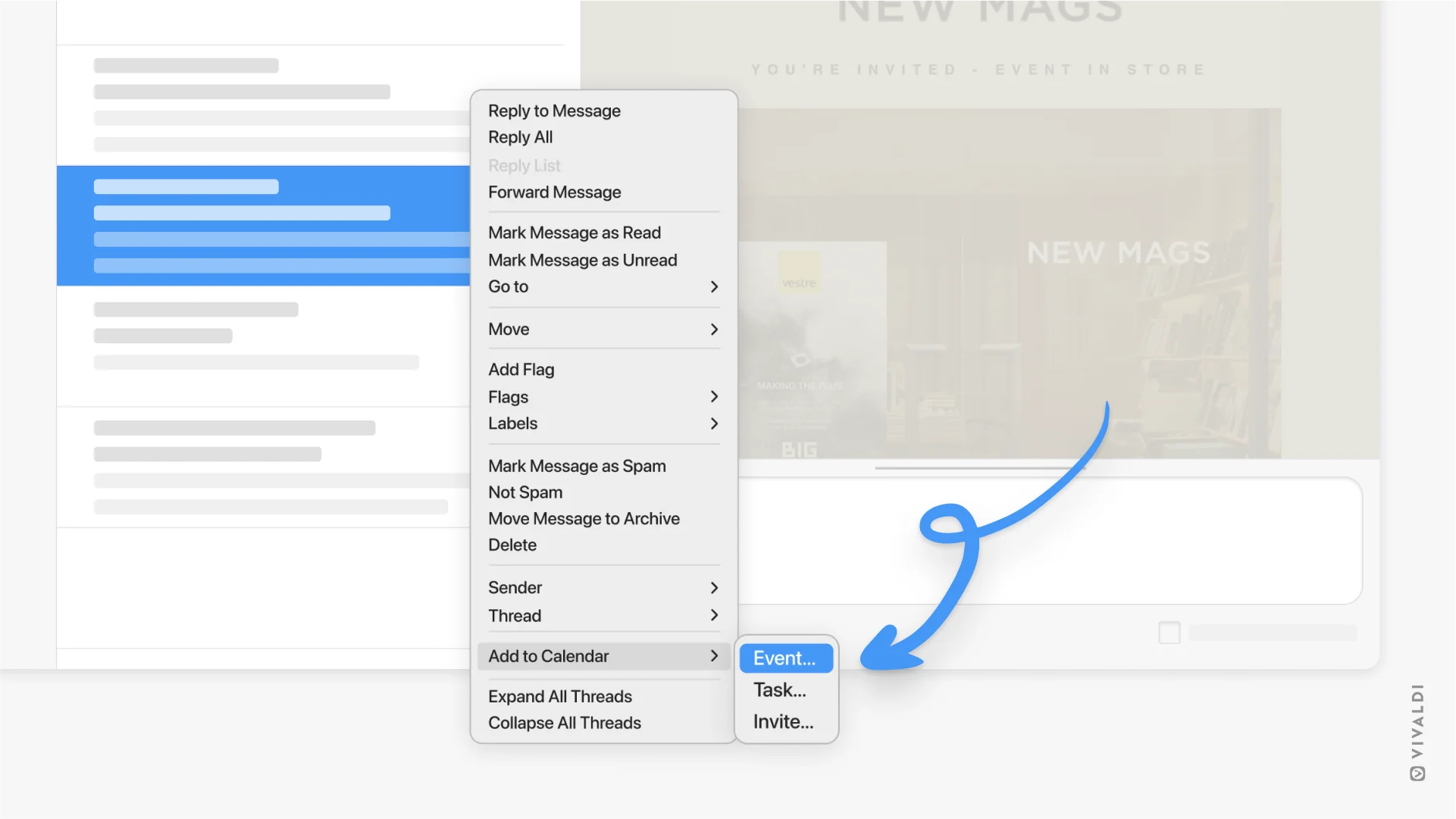
In Vivaldi 7.2, another ‘neat’ one is added to the mix: creating a new Calendar event from an e-mail in Vivaldi Mail (or a website they say, but I can’t get that to work). Just right-click, mouse to add “Add to Calendar” and pick from event, task, or invite.
Other changes in Vivaldi 7.2:
- You can now use the Feeds feature without Mail & Calendar
- Feeds now supports OPML folder structure for feed import
- Sharper favicons under fractional scaling resolutions
- Picture-in-picture mode fix for Prime video
- Bookmarklets can now be drag n’ dropped to the bookmarks bar
- The Weather widget now detects a location to use as default
- “Share Vivaldi” entry added to the Help menu
- Active Tab minimum width now set to 60 (pixels, presumably)
- Chromium updated to v134.0.6998.94
- Onboarding now asks for email to help setup sync
In all, another solid update for this free (but not open-source) Chromium-based web browser. If you’re looking for a solid, stable web browser that embraces letting you use, tweak and tailor it the way you want, Vivaldi is arguable the one.
Get Vivaldi 7.2
Existing Vivaldi user? You will get the Vivaldi 7.2 update the same way you got the previous ones: in-app (Windows, macOS) or through some sort of software distribution method (e.g., snap, Flathub, apt, etc).
Not an existing Vivaldi user?
Vivaldi’s desktop browser is available to download for Windows, macOS, and Linux (including ARM64) from the browser’s official website (where a DEB for Ubuntu/Linux Mint users is offered, installing which sets up the Vivaldi APT repo to deliver future updates).
Ubuntu users may prefer to install the official Vivaldi snap app through App Center or run sudo snap install vivaldi from the command-line to get it. Future updates will then automatically download and install in the background as/when released.
A quasi-official Vivaldi Flatpak build is also available on Flathub, for those favouring that packaging format.
- I get more ‘you made a typo’ nudges about this word than anything else. ↩︎