

Last year saw the Cinnamon desktop receive a much-needed modern makeover, but it seems the visual revamp effort isn’t over yet.
Work is underway on a design update for the Cinnamon app menu (applet).
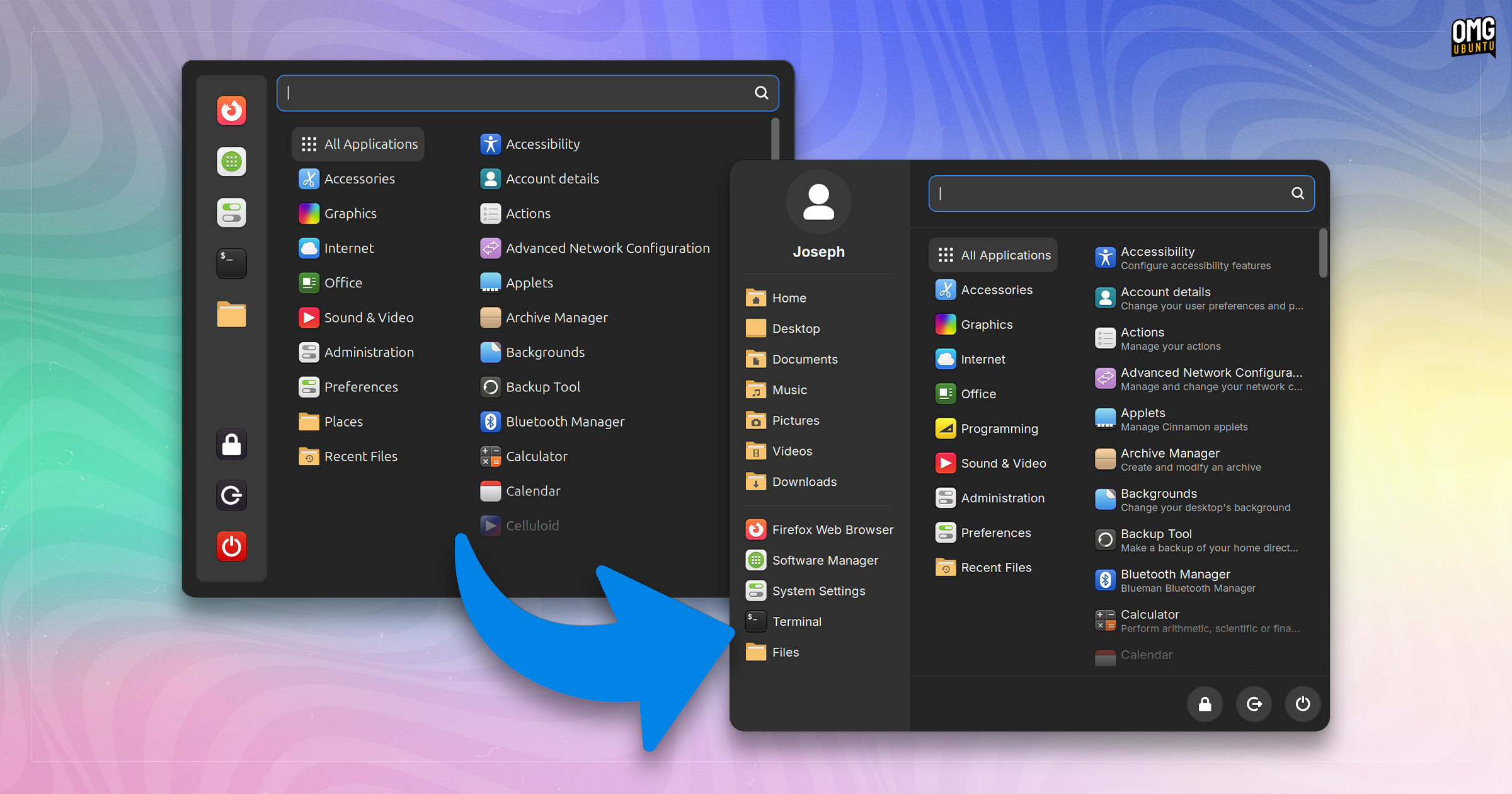
Compared to the current Cinnamon Menu, the proposed redesign sticks to a three pane layout but opts to put more information on show, make common folders more immediately accessible, and relocate and restyle session controls.
A new user-profile header is also added to the top of the menu to add a lick of personalisation (and, one would imagine, act as shortcut to the users panel in the Settings app.
Since the existing Cinnamon Menu applet is backed by a robust configuration panel allowing elements to be hidden/shown/customised I’d expect elements within the proposed new layout to follow suit.
Here’s how the two approaches compare:
Nothing you see above is finished, signed-off on, or completed.
Linux Mint has not said much on the plans for the menu, i.e., whether it will be the default in Linux Mint 22.2 or merely there as an alternative available for its users to add to their panel if they wish.
As I tried to reiterate during my coverage of Cinnamon 6.4, although Linux Mint develops the Cinnamon desktop, the Cinnamon desktop defaults are not (always) the same as Linux Mint defaults – Linux Mint is a distro; Cinnamon is a DE designed to be used on other distros.
Anyhow, even if this menu makeover is made default in Linux Mint 22.2 later this year—which again, is not known—anyone who doesn’t like it won’t be forced to use it since plenty of alternative app menu applets are available to install from Cinnamon Spices.
Aside from an app menu, other changes are likely to land in both Cinnamon and Linux Mint ahead of its next major release, Linux Mint 22.2, scheduled for release in late summer.
Which menu design do you prefer, or is there a different, community-made Cinnamon app menu applet that is your go-to? Share your thoughts in the comments.