

It’s been a while since the gorgeous (if admittedly gimmicky) Burn My Windows GNOME Shell extension added a new effect to appease fans of over-the-top window closing and opening animations.
I.e., folks like moi ;3
But the latest release, Burn My Windows v44, now rolling out through the GNOME Extensions website, dutifully delivers one – and a rather dreamy one at that!
Called Focus, the new effect is a subtle, more considered offering compared to other animations available in the app. It combines a blur and fade effect on close (or open), as you may glimpse in the GIF embedded below:

Options to control the animation time, the blur amount, and the blur quality are provided. The lower the blur quality the faster the overall effect will be. I don’t imagine most systems will have much issue handling this compared to others.
I tried it in a VM and it ran smooth.
Other changes
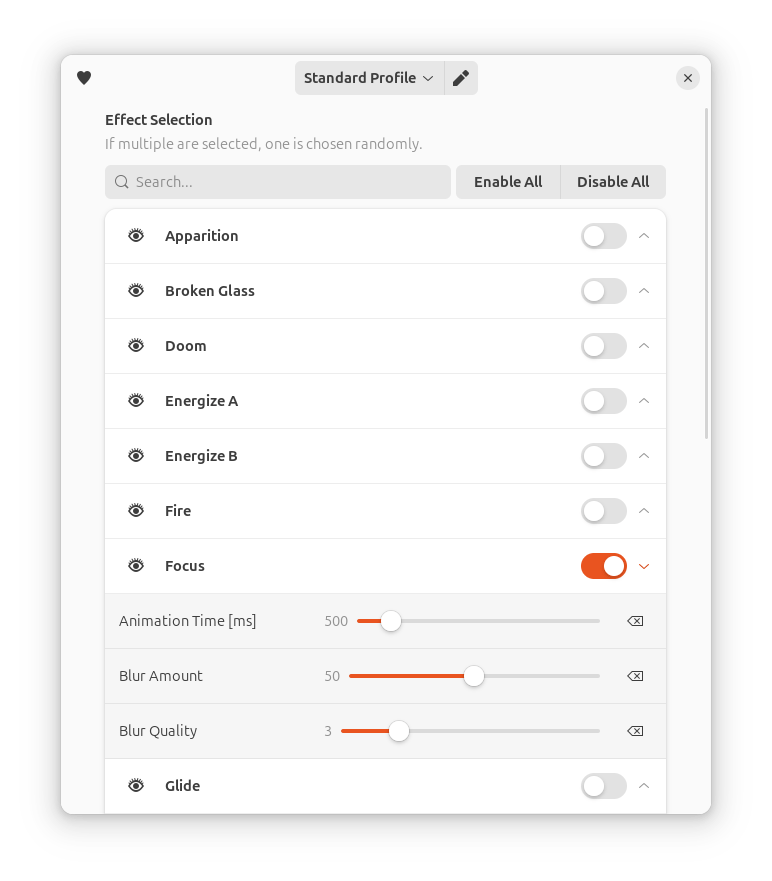
Now offering 20+ effects to choose from – which include the original flame/fire effect as well as newer offerings like painted brush stroke – it requires scanning the list of animations to find the one you want.
To help, a new effect search bar has been added to the extension’s Preferences dialog, making it much faster easier to zone in on the zany effect you wish to enable, configure, or turn off after it induces a headache!
Other changes are said to include support for more precise animation duration adjustments, with available ranges for all effects now accessible between 0.1s and 3s, plus updated translations, and a handful of fixes for KDE users.
“KDE?! – I thought this was a GNOME extension!”
Yup, Burn My Windows isn’t only available for GNOME Shell users to enjoy. The majority of its effects are compatible with KDE Plasma too (KWin 5.25.0 or later) and available to install from the KDE Store directly within KDE Plasma itself – which is cool.
With this release, Burn My Windows offers separate packages for KDE Plasma 5 and 6 for each effect, so those installing the effects from the KDE Store should be sure to install the version that matches their release.
Otherwise, skip over the GNOME Extensions website (or use the Extension Manager app) to get this extension. The latest version supports GNOME 45+ (i.e., Ubuntu 24.04 LTS and up).
Running Ubuntu 22.04 LTS? You don’t need to miss out on the fun as older versions of this extension (albeit with some effects/features missing) remain available to install.