

Nautilus is a powerful file manager, and by using its built-in shell scripting feature you can level it up further.
A quick Google for “nautilus scripts” will surface hundreds of nautilus scripts, from basic file management, e.g., ‘create folder with selected files’, to more advanced tasks, e.g., ‘merge all selected jpegs into mp4 video’.
Many of the scripts you find will, likely, still work. But many, sadly, won’t.
To save you having to sift through the abandoned and broken we’re going to highlight some of our favourite scripts.
Using Nautilus Scripts
To use any of the scripts mentioned below you will need to download and move the scripts into the ~/.local/share/nautilus/scripts folder.
If you can’t see this folder press CTRL+H to reveal hidden files. If you still can’t see it you should go ahead and create it.
Note that many of the scripts featured below make use of dependencies including avconv, zenity and imagemagick — be sure to check you have these dependencies installed before continuing.
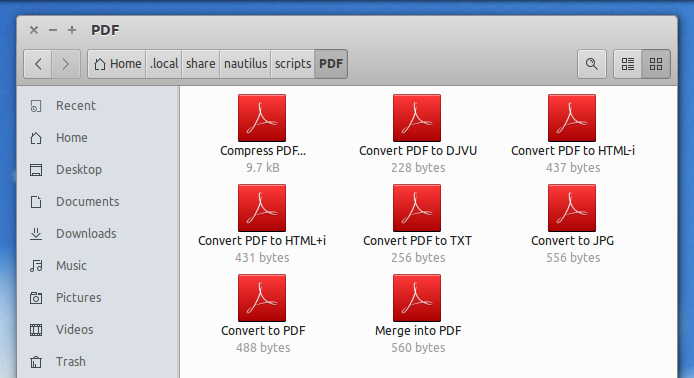
Nautilus Scripts for PDF Management
This pack of PDF management scripts covers virtually every need you may, well, need! From converting PDFs to JPEGs, TXTs and HTML, to compressing an existing PDF or converting a bunch of JPEG files into a new PDF.
Subtitle Downloader
If you watch a lot of foreign-language TV shows and movies you’ll know how much hassle it can be to go out and track down a corresponding subtitle file for your language.
Websites and projects like OpenSubtitles make it much simpler, and the Nautilus script below makes it even easier still. Just select a video file, then right-click on it to instantly download matching subtitles for it in your chosen language.
The script may require a little bit of manual editing to suit your needs (e.g., set your language) but it’s otherwise simple enough to use.
Git Scripts
Big user of GitHub? This collection of Git shell scripts by ~tapio offer “point-and-click manipulation of a Git repository”, i.e. no need to open a Terminal.
You can Commit, Pull, and Diff with a right-click from any cloned Git repo folder — check it out!
Photo Scripts
Another GitHub user, Bernhard Tittelbach, shares his sprawling collection of scripts he’s made over the years. I’d definitely suggest a poke around the full collection but, for this post, we’re going to recommend his image manipulation scripts.
Using these you’ll never be more than a right-click away from:
Convert Video to GIF
There are various GUI apps that let you convert a video file to a GIF on Ubuntu. While the following Nautilus script may lack the granularity and advanced features of the aforementioned apps it does give you a fast way to turn short video clips into a gif ready for sharing.
Convert Folder of JPEGs to GIF
Along the same lines as the script above but this time designed to batch process a directory full of JPEG images into an animated gif.
What Scripts Are Your Faves?
Do feel free to share your most-used or must-have Nautilus scripts in the comments section below.