
Ubuntu 11.10 Says Goodbye to the ‘Me Menu’

The ‘Me Menu’ will no longer be installed by default in Ubuntu 11.10.

An update to the indicator menus this weekend saw the ‘Me Menu’ (‘indicator-me‘) removed and replaced with an ‘IM Status’ section in the Messaging Menu.
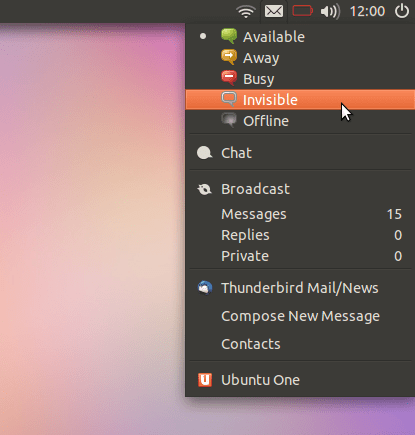
Messaging Menu in Ubuntu 11.10

Why has it gone?

Due to changes elsewhere in Ubuntu the Me Menu had become largely redundant, not least of which is the ‘System Settings’ panel now housing user account settings.

Moving the ‘Status Session’ to the Messaging Menu is also a logical move. Writing on the Messaging Menu wiki page Ubuntu’s Matthew Paul Thomas explains the rationale: -

“The messaging menu aims to make communication easier with other people. It does this first by letting you set IM status quickly and across messaging applications; and secondly by providing quick access to messages, concerning you, that you may not have seen.”

The Messaging Menu is structured to have ‘Status’ section at the top, following by ‘Application’ sections (Empathy, Gwibber, Thunderbird, etc.) followed by two new menu entries: -

  • ‘Clear Items’ – This option removes ‘attention’ from the Messaging Menu by resetting the Messaging Menu panel icons to the default look. Message counts, times, etc. remain visible in the Menu.
  • ‘Hide This Menu’ – clicking this launches an alert box “explaining the purpose of the menu, and how you can get it back if you change your mind.”
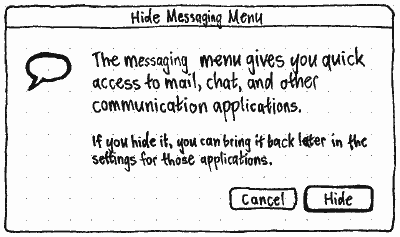
hide.png

The ‘Broadcast’ field previously present in the Me Menu has been retired completely. To Tweet, dent or check Facebook the “new and improved” Gwibber is available.

And for people who think they’re going to miss seeing their name on the desktop I say relax: the Session Menu will display it. (Cheers Bilal)

Related posts:

  1. Remove unused entries from the Ubuntu Messaging Menu
  2. How to add more apps to the Ubuntu Messaging Menu
  3. How to add Thunderbird to the Ubuntu messaging menu
Post a comment or leave a trackback: Trackback URL.
  • http://pulse.yahoo.com/_YI6YF5MODP2ZBSHKHC6PJ4GQJM DexterP17

    Oh well, the only thing I liked about the me menu was that it showed my name.

    • http://pulse.yahoo.com/_GE4EYP3QOQ246PLG2Y2DOD2NIQ Dr. Fly

      I hope the Messaging Menu will be revamped to show our name beside it instead.

      • Anonymous

        and the online status should be on a side menu popup or drop down like gnome shell.

        as you can see it takes up lots of vertical space.

    • Bilal Akhtar

      The name will be added to the Session menu

    • House Of Pleasure

      I know my name so I don’t need a reminder on my desktop.

      • Anonymous

        But what about those times I can’t remember my name? Like when Ninjas sneak up from behind and knock me unconscious and I get amnesia?….. OR… Anytime before I’ve had my morning coffee? 

  • Anas El Abboud

    Noooooooo please no!! i love it my name with a tiny icon beside  :( why UBUNTU why ??

    • http://twitter.com/icyeh Shelby

      Why did you enjoy staring at your own name so much?

      • Parry

        No idea. But I loved it too. Vanity in the smallest forms? :D

        • Anonymous

          This name is very important if many users are working on the same PC. In my home computer 4 users are using the PC and info like this is important to know which user is logged into the system, to have his own files/mail/etc.

          I hope this info will be easily accessed.

        • Anonymous

          This name is very important if many users are working on the same PC. In my home computer 4 users are using the PC and info like this is important to know which user is logged into the system, to have his own files/mail/etc.

          I hope this info will be easily accessed.

      • Anonymous

        I have no idea either, but having the name there made it all better and more personal. It sounds stupid, i know, but i always felt like that

        • http://www.rangithalive.com Rangitha Kuruppu

          me too, I want my name up there for no reason…

        • Bilal Akhtar

          Don’tcha worry, we’ll add the name to the Session menu instead.

          • http://www.facebook.com/people/Ray-Whatman/100002092851335 Ray Whatman

            You know when I first had this change happen on my Oneiric alpha test I thought exactly that!, maybe someone {I would if I knew how or was shown how}  could take a look at it and change it from the “power button” icon to the username.

          • Anonymous

            yes, that logical , since your “name” actually refers to your “session”.

            so if i change user session, the name should change so you know in which session/user you are in.

      • Anonymous

        Yes it was a feeling of belonging or ownership. No especially when you have just installed Ubuntu for the very first time and gotten rid of Windows. It made you computer finally feel YOUR’S instead of on loan or lease from WIndows. And that being coupled with how quickly and easily I adapted to how Ubuntu’s graphical menus and settings worked made me feel very liberated.

        I WILL NOT install any release that does not have this small touch. And since I really very much DO NOT like unity, and 10.04 and earlier did not have the good mutli-touch track pad support. I guess 10.10 will have to be the only release I will ever install. ( with the exception of distro spin off’s like Pinguy OS and others )

        • Anonymous

          You can install any new distro while using gnome2. Thats the point of that liberation you were talking about.

        • Jonathan

          GNOME3 has this.

        • Anonymous

          Get over yourself.  I’m sure a dozen indicator applets will show up to let you re-add your name and let the narcissism continue to flow.

          • Anonymous

            You all are talking about installing other applets, or installing Gnome 3. I specifically mentioned about how I recently just came from WINDOWS ( being a computer illiterate type person not knowing much of anything ) to Linux, and how Ubuntu was my very first taste of it before I even knew what Linux was. And the look and feel of how Ubuntu was layed out at the time was what gave me the feeling of “liberation” and true ownership of my computer.  Now I have learned a heck of a lot and could install almost any applet or program if needed ( unless needed compiling, won’t touch those ) But most Windows users barely know how to install and uninstall programs, much less after having moved over to Linux. Shouldn’t the look and feel of a distro that is directed and advertised at being Newbie friendly, actually be made and developed with the New user in mind??? This is not narcissism, this is plain common sense.

            So DO NOT go getting self righteous on me!!!

          • http://profiles.google.com/patrickscott52 Patrick Scott

            Ah, but new users won’t know what they’re missing (assuming 11.10 is their first experience with Linux)

          • http://www.facebook.com/profile.php?id=590518155 Christopher Lee

            The only one being self-righteous here is you.  I was unaware that a new user would expect their name to be anywhere on the initial screen.  This not the case in:

            + Windows All)+ OS X (All)+ Linux (KDE, GNOME 2.x [Except Ubuntu], Mint, Fedora (1 – 14), Red Hat, SuSE, CentOS, Enlightenment, Fluxbox, IceWM, etc.)
            +iOS
            +Android
            +Symbian

            Ubuntu was the one that offered it simply because it was a convenient means of managing messaging information at the time.  If you are really so insecure about losing it, you are free to tape your name to your computer– something a “new user” is more likely to do than pine for a note with their name.

            I think you are confusing “new user” with “me.”  Not to pop your bubble, but you’re not exactly a “new user” anymore.  The last three people I introduced to Ubuntu didn’t really notice whether their name was there or not and happily upgraded to Unity (though one continued GNOME because she had customized it a lot).

          • Anonymous

            oh shut-up! I am a full time windows 7 user, I used ubuntu for long time, but Windows 7 just works much better for me… Also having your name there is pointless if only one person is using the PC. The only “bar”/”taskbar”/”panel” I find the best is mac’s. The windows 7 superbar is of the hook, and you know it, the unity bar sucks. also Gnome 2′s, two panels made no sense! Gnome 3, on the other hand is way more polished than Unity. I see my old Lady using gnome 3, rather than unity. Also having to put terminal codes in the terminal the whole time is so not user friendly. So stop complaining about YOUR NAME ON THE FREAKING PANEL. A noob user, don’t want their name there, they want an OS that works, without having to write stuff in the terminal,  like: Sudo apt-get vlc… No a user wants to open firefox, google VLC, download and install. Also windows 7 has the users own folder with an address book, download folder, videos folder etc. I don’t see Ubuntu apps using this function of Ubuntu ”home folder”. Ah, there is so much trouble with Ubuntu and linux…. 

          • Anonymous

            You all are talking about installing other applets, or installing Gnome 3. I specifically mentioned about how I recently just came from WINDOWS ( being a computer illiterate type person not knowing much of anything ) to Linux, and how Ubuntu was my very first taste of it before I even knew what Linux was. And the look and feel of how Ubuntu was layed out at the time was what gave me the feeling of “liberation” and true ownership of my computer.  Now I have learned a heck of a lot and could install almost any applet or program if needed ( unless needed compiling, won’t touch those ) But most Windows users barely know how to install and uninstall programs, much less after having moved over to Linux. Shouldn’t the look and feel of a distro that is directed and advertised at being Newbie friendly, actually be made and developed with the New user in mind??? This is not narcissism, this is plain common sense.

            So DO NOT go getting self righteous on me!!!

        • Bilal Akhtar

          THE NAME WILL BE ADDED TO THE SESSION MENU, LIKE IN GNOME3

      • http://twitter.com/howythegeek Howard Birch

        If you like something, put your name on it? :P

        It’s the only way I know which user I’m logged in as. I’m dealing with both virtual machines and this, and sometimes, it gets confusing. The name clears it all up.

        • Anonymous

          you can always paint your very own user-specific desktop wallpaper that says your name, big with pink and purple letters? =)

          • http://twitter.com/the_madman Marcus Harrison

            And also, ponies. Ponies are cute.

          • http://twitter.com/the_madman Marcus Harrison

            And also, ponies. Ponies are cute.

          • http://twitter.com/rhenden Robert Henden

            I just legally changed my name to the envelope symbol. Problem solved.

      • http://hector-macias.blogspot.com Hector Macias Ayala

        It was kind of practical to know if it was me logged in or somebody else.

        • Anonymous

          oh please, you know how your wallpaper looks, and how other users wallpaper looks, you will notice the difference 

        • Anonymous

          oh please, you know how your wallpaper looks, and how other users wallpaper looks, you will notice the difference 

    • Anonymous

      You can always install Gnome-Shell, it displays your name :D

      • Anonymous

        why are so many people talking about installing things? Installing a simple applet would be too much for a completely green computer user. Much less installing an entirely different desktop environment.

        Is not Ubuntu meant for people that not only don’t know anything about Linux, but nothing about computers in general??

    • Anonymous

      I LOVE MY NAME! P.E.R.I.O.D!

      • Bilal Akhtar

        THE SESSION MENU WILL DISPLAY THE NAME!

    • http://www.facebook.com/jordan.badangayon Jordan M. Badangayon

      i like my name to be on top too… can’t they just use the icon for the me menu instead of the folder icon… lols

    • Wayne

      Me too… I want it there. That was a good feature of Ubuntu, plz don’t switch.

      Btw, what about Gnome3 (gnomeshell)? If it still has the name, I might switch to it.

      • Bilal Akhtar

        THE SESSION MENU WILL DISPLAY THE NAME!

        • http://profiles.yahoo.com/u/KME6NDF3KTWK6NNPG5SF36PLBI Ambleston

          Whoa Bilal, what’s with all the shouting!

    • Wayne

      Me too… I want it there. That was a good feature of Ubuntu, plz don’t switch.

      Btw, what about Gnome3 (gnomeshell)? If it still has the name, I might switch to it.

    • Bilal Akhtar

      THE NAME WILL BE ADDED TO THE SESSION MENU INSTEAD, LIKE GNOME3

  • Anonymous

    Wait, what? The only reason I really liked the indicators was the embedded functionality for immediately setting my status. Now I have to click a few times again and open up a freaking application?

    I think it’d be more logical to extend that idea (take a look at GNOME’s notifications- integrating this stuff makes things so much simpler).

    Of course, you could say it’s just my opinion, but eheheheh, this just seems to be reducing complexity where there is none. I guess Unity still has a long way to go before it’s fully actualized. It’s not really a big deal, but my Mom uses this all the time, so it’s gonna’ make her sad when it’s vanished. :

    • http://profiles.google.com/3vi1jl Jesse Litton

      I think you missed the picture of the new messaging menu.  It has your status right there.

      • Anonymous

        Oh, didn’t the user/MeMenu have that before, just in a different menu from the messaging menu? Or am I just remembering Ayatana being better than it was? XD

        All I’m really seeing here is stuff moved around menus, and certain functionality from one of those menus absolutely disappearing (the broadcast field).

        I agree that organization and logical cohesion in a user interface is important, but I didn’t really feel like the indicators were doing so bad in the first place. Either way, I’m sure the implementation they’ve decided on will be polished and renovated continually, so in the future it might not really be such a big deal. Maybe they just didn’t think people were using the broadcast portion very often?

    • http://profiles.google.com/patrickscott52 Patrick Scott

      There is no loss in functionality from what I can see….

      • http://twitter.com/marioaieie Mario Bonamigo

        It will not have the broadcast field

        • http://profiles.google.com/patrickscott52 Patrick Scott

          “We have no specific recommendations for whether, or how, Twitter/Identica/Facebook/etc clients should use the messaging menu. Application developers should experiment with different approaches.”

          The broadcast field was not mentioned (correct me if I am wrong)

  • Anonymous

    This is a smart decision, but the narcissistic side of me will miss my name. Will it be possible to install it again manually?

    • http://pulse.yahoo.com/_FX5ITOLLHVNOY673XBRGCKF3DI Freddi

      If you look closely, you see the Messaging menu left of the Energy menu.   M + E ?    me !
      ;-)

      • http://profiles.google.com/nathanlee2 nathan lee

        wow, that is a stretch. I like it though.

  • Anonymous

    No – you can set the status with the indicator shown on the top of this page – it is just that the option to change the status is integrated in the messaging menu, making it easier to change the status, not more difficult

    (meh, that was supposed to be a replay to ScionicSpectre’s post)

  • http://aethralis.myopenid.com/ Aeth

    I have a machine accessed by several people in my family and the “Me Menu” has always been a good way to check whose account is currently used. When I don’t have the name up in the corner I have to do an extra click with the mouse. The idea of grouping is good but the missing name is bad.

  • http://twitter.com/EuropaCar EuropaCar

    Hurry, I think you need to plug in your laptop!

    • http://www.martinsmucker.com Michael Martin-Smucker

      Just looking at that screenshot makes me feel anxious.  Joey, please make my OMG! reading less stressful! :-p

  • http://pulse.yahoo.com/_FX6IAZBOA3ZQZJZ7ZHNIPUYM34 Darcy Casselman

    Glad to see them iterating the design based on usability testing and feedback.

  • http://pulse.yahoo.com/_FX6IAZBOA3ZQZJZ7ZHNIPUYM34 Darcy Casselman

    Glad to see them iterating the design based on usability testing and feedback.

  • Anonymous

    i love to see name there! so i can switch to gnome

    • Bilal Akhtar

      The session menu will display the name

    • Bilal Akhtar

      The session menu will display the name

  • http://yourethemannowdog.com Shasta McShasta

    No biggie for me.  It’s been removed from day 1

  • http://yourethemannowdog.com Shasta McShasta

    No biggie for me.  It’s been removed from day 1

  • Søren Aagaard Mikkelsen

    I liked the idea with the login name in the indicator bar, but I have never used it. Maybe the login name can represent something else… mail? 

    • https://launchpad.net/~cscarney ~cscarney

      It seems like the logged-in user name makes the most sense on the session menu, since that’s where you go to change users.

      • http://pulse.yahoo.com/_FX5ITOLLHVNOY673XBRGCKF3DI Freddi

        I completely agree (and see Gnome3).

        Just out of interest, do you change users?

        • https://launchpad.net/~cscarney ~cscarney

          Only on multi-user computers ;)

  • http://twitter.com/DrDeeps Mike Waller

    God, first Unity became default, now they’re removing things I use daily. Debian is looking better and better…

    • https://launchpad.net/~cscarney ~cscarney

      indicator-me is not installed by default in Debian either.  I would expect it to remain available in Ubuntu as well unless Debian removes it.

    • http://profiles.google.com/patrickscott52 Patrick Scott

      No features are being removed from what I can tell.. They’re just merging two menus.. In fact, those menu’s being separated was causing big usability issues, it’s come up in several bug reports

      • Anonymous

        Care to point to those usability issues? Or how the solution was merging two conceptually different indicators?

        I can envision a few usability issues here myself: clutter, menu sections belonging to different concepts crammed together, too long a menu…

      • https://launchpad.net/~shnatsel Shnatsel

        I can’t see the migroblog posting box anymore, the one widely advertised in Lucid.

        I’m not sure if it could change my IM status from there, but even if I couldn’t, this cuts off the possibility of implementing this in the future. Now my IM status icon and detailed IM status are completely separate.

  • Anonymous

    maaan that was one of my favorite ubuntu features -.- 

    ubuntu’s changing too much im not liking it ubuntu… not liking it at all

  • http://twitter.com/iPoesc Franz Pös…

    What about not having the mail icon as a symbol for this menu but just the user name? The menu appearing after clicking it can be the new one anyway.
    In this manner, the problems could be solved…

    • http://profiles.google.com/nathanlee2 nathan lee

      Seems almost logical, except it would become even more cluttered than what they’re propsing, while also making even less sense. 

      “click on your name in order to open a menu listing all 10-ish options that have to do with chat, email (but not web email), or our special app (ambiguously named broadcast) to access facebook and such. Oh, and Ubuntu one, our special backup service.”

      The Me menu never did fully flesh out into something horribly useful. Personally I think it should house all the chat functions, and then I could hide the stupid broadcast app and mail app launcher. Oh, and add the picture back, that was nice. 

  • http://www.facebook.com/blazej.wdowikowski Błażej Wdowikowski

    Nooo NOOO!!

  • http://pulse.yahoo.com/_Z4ZPFYUCXMJKI6KIE3EBVZJWTQ Merle Torres

    I paid $32.67 for a XBOX 360 and my mom got a 17 inch Toshiba laptop for $94.83 being delivered to our house tomorrow by FedEX. I will never again pay expensive retail prices at stores. I even sold a 46 inch HDTV to my boss for $650 and it only cost me $52.78 to get. Here is the website we using to get all this stuff, LiveCent.com

  • http://www.facebook.com/people/Amartya-Datta-Gupta/100000014681982 Amartya Datta Gupta

    Increases a little space in the global menubar, (not that its a big deal). I didnt like the me menu too much from 10.10 onwards since they removed the little avatar of mine from the me menu !!! 

    • http://pulse.yahoo.com/_YI6YF5MODP2ZBSHKHC6PJ4GQJM DexterP17

      Oh yeah I forgot about that. I missed that too.

      • http://pulse.yahoo.com/_FX5ITOLLHVNOY673XBRGCKF3DI Freddi

        That was my favorit feature (I mean not my image, but the fact that the menus do not only contain lines of text but some variety)

        Can I replace the Ubuntu me-menu by the Google me-menu?

  • http://www.facebook.com/people/Amartya-Datta-Gupta/100000014681982 Amartya Datta Gupta

    Increases a little space in the global menubar, (not that its a big deal). I didnt like the me menu too much from 10.10 onwards since they removed the little avatar of mine from the me menu !!! 

  • http://www.facebook.com/people/Amartya-Datta-Gupta/100000014681982 Amartya Datta Gupta

    Maybe Mr.  Taumata­whakatangihanga­koauau­o­tamatea­turi­pukakapiki­maunga­horo­nuku­pokai­whenua­kitanatahu uses Ubuntu. Thats why !! :-)

    • http://twitter.com/KyleClarkeNZ Kyle Clarke

      You know that that is a place, not a person’s name? It’s a hill in NZ. The Taumata part actually means “Top of the hill”

  • https://launchpad.net/~afccarl1994 afccarl1994

    Me menu + envelope = perfect. You would easily be able to see your status and check any emails/messages you have by looking at the menu.

    Even better if it removed icons that are not needed, for example removing the envelope if you do not use messaging accounts.

    I can’t see what was wrong with using this layout under the me menu tbh.

  • http://profiles.google.com/l33ts0n Arron Washington

    Excellent.

    Let’s continue to cram every even tangentially related item into one Indicator. What could possibly go wrong? WHAT. COULD. GO. WRONG?

    • http://profiles.google.com/patrickscott52 Patrick Scott

      The separation of the chat statuses from the actual chat option in the messaging menu made very little sense. There were a few bug reports regarding this…

      • http://www.martinsmucker.com Michael Martin-Smucker

        I agree that putting the status selection along with the chat indicator makes sense.

        I’m less excited about having email and social media and Ubuntu One all thrown in there, too.  Those are definitely different activities with different notifications and different levels of importance.  Adding chat status makes sense, but it makes an already-cluttered indicator even more so.

        • http://profiles.google.com/patrickscott52 Patrick Scott

          Agreed, it may look too cluttered. A better solution may have been to move chat under the me menu. That being said, for those of us who only use 1 or 2 out of the 3 services it shouldn’t be a problem since the wiki states that the menu will be dynamically filled only with the services that have been setup/activated

        • Omer Akram

          ubuntu one and broadcast will be removed from this menu

      • Anonymous

        Cluttered as hell. More change for the sake of change. What exactly was wrong with the MeMenu?

        Let alone the fact that online presence availability is conceptually different from checking your messages. Keeping both things separate made sense. This doesn’t.

      • Alexander Wainwright

        Yeah, i always found that confusing.  Frequently opened the wrong menu. 

  • http://profiles.google.com/vascofalves Vasco Alves

    That’s it, I’m switching to Arch!

    • Anonymous

      It’s all in the timing. But points for trying to keep up the tradition of at least one “That’s it, I’m moving to Arch!” in every article.

  • Anonymous

    That whole area needs it’s metaphors rethought. None of it makes any sense.

    • daas88

      got any suggestions? I’m not being sarcastic, I’d really like to hear your opinion.

      • Anonymous

        Not off the top of my head. It just seems disingenuous to put everything in one drop down. Status, new mails, composing, contacts, both informal chats and emails… It’s just cluttered.

        • Anonymous

          I am using my laptop for home puposes only so incoming chat / mail has the same “just for fun” priority and therefore sits best in one menu, imo.

          Maybe you are using this for work also but i still cannot see why it is cluttered then. 
          Every social communication is in one menu. 

          I really like this. In fact it was the reason for me to switch from KDE to Gnome.

          Cheers

          • Anonymous

            it’s mostly that, I suppose. Emails don’t have the same priority as im’s, nor do twitter mentions. To me, email is not social by nature, because it is for me primarily school related, or business related, or something of that nature.

            I don’t think it’s bad, just not perfect. I find myself using it less and less in favor of, for instance, pinned tabs in the browser.

  • Daryl O.

    I’m disappointed, too, about losing my name.  They really ought to restore that … it definitely adds a level of personalisation that is quite desirable.

    • Bilal Akhtar

      The session menu will display the name

  • Daryl O.

    I’m disappointed, too, about losing my name.  They really ought to restore that … it definitely adds a level of personalisation that is quite desirable.

  • http://twitter.com/Webchuzz Daniel Nepomuceno

    I didn´t like it anyway, neither found it useful. That’s just my opinion, I am a minimalist desktop user: there’s only the AWN showing on my screen after startup.

    • http://profiles.google.com/nathanlee2 nathan lee

      I think it had opportunity, but the features it had were kind’ve buggy and less than useful.

       It would let you setup chat, broadcast accounts, or even ubuntu one accounts, but wouldn’t let you launch any of those. It would let you change your status (for the most part), but didn’t work if you were logged out of any service for any reason. It would let you add tons of information about you (including email address’s, IM login’s, telephone, etc), but wouldn’t actually let you do anything with that information. 

      If they added some of those features in smoothly, I think it’d replace the stupid chat/broadcast/email app thing they are currently using.

    • http://profiles.google.com/nathanlee2 nathan lee

      I think it had opportunity, but the features it had were kind’ve buggy and less than useful.

       It would let you setup chat, broadcast accounts, or even ubuntu one accounts, but wouldn’t let you launch any of those. It would let you change your status (for the most part), but didn’t work if you were logged out of any service for any reason. It would let you add tons of information about you (including email address’s, IM login’s, telephone, etc), but wouldn’t actually let you do anything with that information. 

      If they added some of those features in smoothly, I think it’d replace the stupid chat/broadcast/email app thing they are currently using.

      • http://profiles.google.com/patrickscott52 Patrick Scott

        Regarding the me menu letting you setup but not launch broadcast/chat, both of these issues will be fixed now that they’ll be merged into the messaging menu (which does let you launch those services)… As for the statuses not working when you are logged out of all services, I think that issue may be fixed as well.

        This change should resolve all of your noted concerns about the me menu (I’ve also seen and participated in several bug reports which discuss the same issues)

  • http://profiles.google.com/patrickscott52 Patrick Scott

    11.10 is going to be so much better!!! Can’t wait!! :D

  • Pavel Ralovets

    stupid idea

  • http://twitter.com/randomgc Giulio

    The only thing I don’t like of this choice is now the panel looks really empty on the right side..:/

  • http://twitter.com/randomgc Giulio

    The only thing I don’t like of this choice is now the panel looks really empty on the right side..:/

  • http://twitter.com/randomgc Giulio

    The only thing I don’t like of this choice is now the panel looks really empty on the right side..:/

  • Anonymous

    It’s great that they combined them – but like many, I too am missing my name in the corner of the screen.
    —Perhaps they should make the session switcher default. It has both the account name and icon. It also has a menu containing the lock screen, shut down and log off buttons; a link to account settings; and a link to system settings.—Making it default would we could also remove the power menu, we could still have our names on the desktop and we’d gain a faster way to personalise the system by having a quick link to account settings and system preferences!

  • Anonymous

    It’s great that they combined them – but like many, I too am missing my name in the corner of the screen.
    —Perhaps they should make the session switcher default. It has both the account name and icon. It also has a menu containing the lock screen, shut down and log off buttons; a link to account settings; and a link to system settings.—Making it default would we could also remove the power menu, we could still have our names on the desktop and we’d gain a faster way to personalise the system by having a quick link to account settings and system preferences!

  • Anonymous

    It’s great that they combined them – but like many, I too am missing my name in the corner of the screen.
    —Perhaps they should make the session switcher default. It has both the account name and icon. It also has a menu containing the lock screen, shut down and log off buttons; a link to account settings; and a link to system settings.—Making it default would we could also remove the power menu, we could still have our names on the desktop and we’d gain a faster way to personalise the system by having a quick link to account settings and system preferences!

  • Anonymous

    It’s great that they combined them – but like many, I too am missing my name in the corner of the screen.
    —Perhaps they should make the session switcher default. It has both the account name and icon. It also has a menu containing the lock screen, shut down and log off buttons; a link to account settings; and a link to system settings.—Making it default would we could also remove the power menu, we could still have our names on the desktop and we’d gain a faster way to personalise the system by having a quick link to account settings and system preferences!

  • http://www.facebook.com/m.owner Алексей Мартяшев

    How will we know current user by GUI?

    • Bilal Akhtar

      The session menu will display the name

    • Bilal Akhtar

      The session menu will display the name

  • http://www.facebook.com/m.owner Алексей Мартяшев

    How will we know current user by GUI?

  • http://pulse.yahoo.com/_DID3BVH23GHHZDFQITQDT7EPZY Sean

    Kind of going to miss it, although I’ll admit it was a bit of a weird menu . . .

    biggest complaint has to be how this has made the already unbelievably long messaging menu EVEN longer.

    • nrundy

      Yeah. It’d be nice to be able to HIDE the IM stuff at the beginning (Available, Away, Busy, etc). Especially if you don’t use any of that stuff at all.

  • http://www.dylanmccall.com/ dylan-m

    I totally agree with merging these two menus. Some other bits of the design worry me.

    That status selector is gigantic, and I question the value of having all these statuses available at a glance, particularly taking up so much space before the stuff one would normally be using the messaging menu for. If this is actually applying to everything now, how about a simple Do Not Disturb switch? Gnome is doing the same thing this cycle, so it would save some trouble.

    If this isn’t applying to everything, why isn’t it in the Chat section? Are different apps sectioned off or not?

    Makes no sense to me that this one menu would have Hide This Menu, and I can see myself getting very tired of it very quickly since it takes up a pretty significant bit of space. Can we have another item, please? “Hide the menu item that says Hide This Menu.” In addition, I don’t understand why we are customizing the availability of a system-level thing through the clients that feed it.
    People can customize the menu, in a sense, by changing their default messaging apps. Maybe put the toggle for the messaging menu in that system settings panel?

    That badge when I have an IM status had better not be coloured, or particularly large. It’s hard enough to see the menu asking for attention as it is.

    On the other hand, I am REALLY happy about the note on Ubuntu One at the bottom of the specification. Here’s hoping the problem it used the messaging menu to solve can be solved better in Oneiric.

    I also really like how message counts are just plain text right now. Looks tidy.

    • http://mohoho.de Kai Mast

      Yeah I agree with you a simple do not disturb woudl be better. I never change my status anyways so the best for me would be if they would remove the status selection completely from the indicators or moved it into a submenu of the messaging indicator…

    • Anonymous

      How about a row of indicators in the first line? Clicking on one selects the appropriate status.

    • Anonymous

      How about a row of indicators in the first line? Clicking on one selects the appropriate status.

  • http://www.facebook.com/profile.php?id=100001651774725 Bruno Gin

    ubuntu 10.04 for ever !!!!

    • http://twitter.com/pablocampis Pablo Abraham Campis

      No, just up to april 2013. Well, you can use it later, but without updates

      • http://www.corbindavenport.com/ Corbin Davenport

        Right around the time when Firefox 37 comes out :D

      • http://www.corbindavenport.com/ Corbin Davenport

        Right around the time when Firefox 37 comes out :D

    • http://www.facebook.com/kumar.aatish Kumar Aatish

      Why hello there fellow LTSer!

  • daas88

    I’m eager to know what else is canonical going to do to make ubuntu fit in gnome 3. Mostly about workspaces, window controls, menus, etc

  • http://twitter.com/thomas_vandeven Thomas Vandeven

    good riddance, i never used it. looked nice tho.

  • http://twitter.com/pablocampis Pablo Abraham Campis

    The change is great for me… the only thing I would change is that instead using the envelope icon I would use the user name.

  • http://www.rangithalive.com Rangitha Kuruppu

    It’s not about what other OSs and user interfaces don’t have, but about what Ubuntu had which others didn’t.

  • http://www.rangithalive.com Rangitha Kuruppu

    It’s not about what other OSs and user interfaces don’t have, but about what Ubuntu had which others didn’t.

  • http://www.rangithalive.com Rangitha Kuruppu

    It’s not about what other OSs and user interfaces don’t have, but about what Ubuntu had which others didn’t.

  • http://www.facebook.com/kumar.aatish Kumar Aatish

    The thing about messaging menu is that I used it to quickly view the incoming messages. Sup+M, then arrow key towards the latest incoming message. This was the closest Unity/Gnome2 got to Gnome3′s feature of persistent chat in terms of usability, in the sense of least distraction to communicate.
    Given that the distance to the incoming messages would be increased further, I do not really see this as a positive change for the way I use it. But I guess it would remove clutter further from the indicators area.

  • Anonymous

    some people and haters just can’t accept everything ubuntu has to offer…pity

  • Anonymous

    or yet to offer

  • Anonymous

    u can run unity 2d in gnome3 or rather the launcher 

  • Anonymous

    u can run unity 2d in gnome3 or rather the launcher 

  • http://eriksteinmann.wordpress.com/ Erik

    Bad news for narcissists :P

  • fatriff

    most people don’t care what status a contact has, they still go ahead anyway. I’ve tried them all, Busy, Away, Invisible.. People still keep on typing things to me!

  • Anonymous

    I like this better. Colours and Thunderbird too.

  • http://tsnieman.net/ Tyler Nieman

    Oh, cool — This is from a bug report I filed with the suggestion after I put it on Ubuntu Brainstorm. Sad to see so many people frustrated with the loss of their name. It wasn’t even something I had considered as a “feature”.

  • nrundy

    I always uninstalled the Me-Menu because I hated always seeing my name in the panel =)

    I guess I’ll be stuck with it now if my name has to appear in the session menu :(

  • http://profiles.google.com/francisco.pgv FV .

    I always end up uninstalling the me and the messaging menus. So it’s nice that in the future I will only have to remove one indicator. :)

  • http://tomslominski.net/ Tom Slominski

    I liked being able to tweet from the indicator. I’d rather see a revamped version of the posting thing to be shown in the IM indicator, rather than it being completely removed.

    • http://twitter.com/KyleClarkeNZ Kyle Clarke

      Agreed. This was always on the top 10 things i have to show any new person to Ubuntu. The sound indicator is right up there too.

    • http://www.corbindavenport.com/ Corbin Davenport

      Yes, I post to Twitter (@corbindavenport:twitter) and Identica (@corbindavenport) a lot, and I hate launching that awful Gwibber client. Can’t wait for Ubuntu 11.10 and the revamped Gwibber.

    • http://www.corbindavenport.com/ Corbin Davenport

      Yes, I post to Twitter (@corbindavenport:twitter) and Identica (@corbindavenport) a lot, and I hate launching that awful Gwibber client. Can’t wait for Ubuntu 11.10 and the revamped Gwibber.

  • http://tomslominski.net/ Tom Slominski

    I liked being able to tweet from the indicator. I’d rather see a revamped version of the posting thing to be shown in the IM indicator, rather than it being completely removed.

  • http://profiles.yahoo.com/u/KME6NDF3KTWK6NNPG5SF36PLBI Ambleston

    Something tells me that they will add this to the sessions menu ;P

  • http://mark-y-a.myopenid.com/ Mark

    +1000 to username up top!  ok throw in my picture to somewhere in that menu. can they do that? hehehe :D

  • Anonymous

    Not a big IM user myself so this change doesn’t affect me very much. I am more looking forward to the updated Gwibber client.

  • Robert Adonias Costa Gomes

    didn’t like… now i’m gonna think that my status is only for the messaging programs…

    I really take my status seriously on my Ubuntu (like using “Busy” and “Away” only when i’m “Busy” or “Away”) because the MeMenu makes it feels like i’m updating my status to the computer, and not to a bunch a of messaging programs…

    sorry up, but this is really into making me become a type of person I don’t like: those that set the status to “Away” just not to be disturbed…

  • Nirmalya Chakraborty

    I have a USB wireless modem working perfectly under windows. I installed it in network manager and it only works when I boot to Ubuntu11.04.
    Once it is disconnected during the session I cannot reconnect to the net without rebooting.

    I am new to Ubuntu. Any idea?

    • http://www.corbindavenport.com/ Corbin Davenport

      You should try putting it up on Ask Ubuntu. I’m pretty sure you don’t need an account to post a question.

      http://askubuntu.com/questions/ask

  • http://twitter.com/JackWilkins0n Jack Wilkinson

    will empathy messenger still go up there?

  • http://twitter.com/JackWilkins0n Jack Wilkinson

    will empathy messenger still go up there?

  • Brian Oswald

    A much-needed change in my opinion. I often wondered why there is so many redundant entries spread across the menus. 

  • Brian Oswald

    A much-needed change in my opinion. I often wondered why there is so many redundant entries spread across the menus. 

  • http://twitter.com/brightside_87 brightside

    Indeed the right decision.

  • http://twitter.com/brightside_87 brightside

    Indeed the right decision.

  • http://twitter.com/brightside_87 brightside

    Status icons so magnificent.

  • Pingback: Ubuntu 11.10 Review | Techrevel.com