

Mozilla has released Firefox 154 with some small AI-related changes, an ‘improved’ full-page translations and faster video seeking on “all operating systems”.
Firefox 154 serves as the final monthly release of Firefox before browser switches to a faster, twice-monthly release schedule early September. That means you’ll be back here, reading “Firefox 155 released” in a couple weeks, rather than the usual four weeks.
But enough what’s coming; what’s new now?
Firefox 154’s main changes
Firefox’s been expanding its range of address bar actions in recent releases. We got tab muting action in v152 and an colour picker in v153.
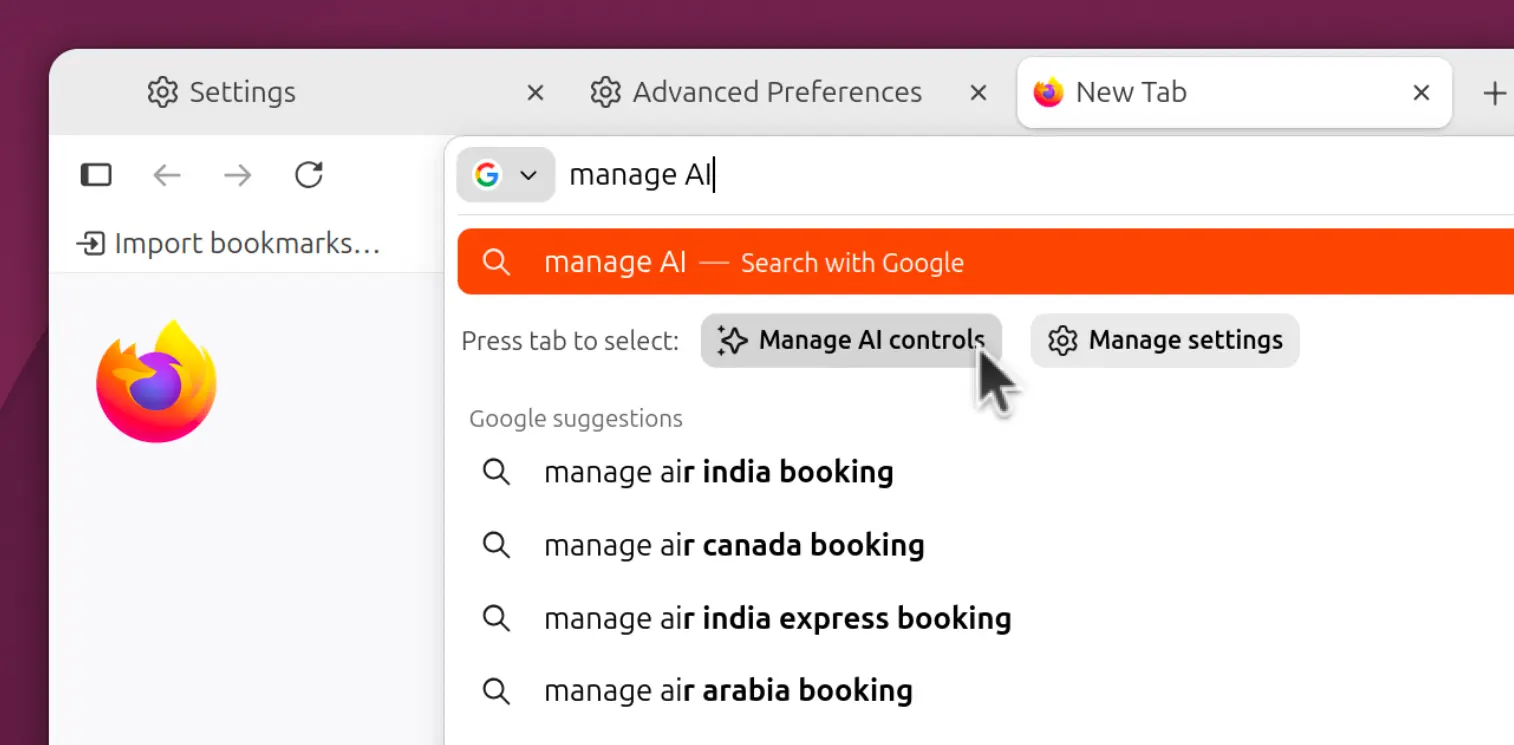
Firefox 154 adds a quick link to the browser’s AI controls. Type “Manage AI” in the address bar to spot a Manage AI quick action (if mousing to Settings > AI Controls feels effort):
On the AI-feature front, if you have access to Smart Window, Firefox’s AI-powered browsing mode, you gain LLM-backed tab groups.
Unlike the ‘smart tab groups’ in classic mode, which uses a local model to do matching, this version uses a cloud LLM to analyse your tabs, group related ones and suggest a relevant name.
When using the full-page Translations feature, it now translates <iframe> content. It also runs language detection on all page loads, which Mozilla say offer “an improved experience for offering translations to users”.
Ever used Firefox View? If not, you’ll find it harder too. Firefox 154 retires the View icon from the toolbar on new profiles and profiles that haven’t interacted with the feature in a while. Users can add it back manually, or get the same benefit via List all tabs > View all tabs.
Other changes in Firefox 154
Selecting text inside of PDFs (inside of Firefox’s built-in PDF viewer and editor) uses the correct text selection highlight colour, and follows any OS high-contrast setting the browser detects (those may vary based on Linux desktop environment, of course).
On Windows and Linux, the vertical tab sidebar now correctly hides when Firefox goes fullscreen, alongside the main browser toolbar. A cursor nudge to the top of the screen brings everything back into view.
Firefox profile backups are now available on macOS. Backups can be restored across all three platforms, e.g., a backup from Linux can be imported into Windows, etc.
If you exclude sites from having their cookies and site data cleared on close, those sites can now be set without exempting the site from tracking protection and other cookie restrictions.
Elsewhere:
- Local Network Access protections now include WebSocket connections
- Startpage search option (Germany, France, Austria, Switzerland, Netherlands)
- Hard reload (Ctrl + F5) now clears/updates cached site favicons
- JSON Viewer gains a breadcrumb path for a selected entry
- Supports
text-box-trimandtext-box-edgeCSS properties - Supports
sibling-index()andsibling-count()CSS functions
Finally, Firefox users on Windows can choose a different browser app icon in Settings. However, they must complete steps, like making Firefox their default, to ‘unlock’ extra icons. Mozilla say customisable app icons will ‘soon’ come to Linux and macOS.
‘Significantly faster’ video seeking – or not?
To loop (heh) back to the video seeking fix mentioned in the lead. The Firefox 154.0 release notes say: “video seeking is now significantly faster on all operating systems”, making it easier to jump to specific part of a video being streamed in the browser.
But the bug report the feature references is specifically a fix for video seeking on macOS when hardware decoding is enabled.
Prior, the decoder was idling frames during seek and generating frame images for those it was about to discard. With this change, seek latency falls from ~260ms to ~30ms per Mozilla testing. That puts it on par with Google Chrome in tests on the same hardware.
Why mention “on all operating systems” then?
Perhaps it’s because of a meta bug tracking a bunch of ‘video decoding and seeking performance’ fixes for Firefox.
Not all of of those have landed, a few have, but they sort out audio dropouts and sync issues when video or audio content is being played in Firefox, piped to nearby Bluetooth audio devices and a seek action is triggered – more ‘fixed’ than ‘faster’.
How to get the Firefox 154 update
Firefox 154 is available to download from the Firefox website. Existing users will be notified of the update in-app on Windows and macOS, as well as Linux users running the binary build.
If you’re on Ubuntu and using the Firefox snap, this update will arrive in the background without any input needed. You can open App Center – assuming it doesn’t throw a shrug error – to check and install updates at any time.
Got it from Flathub, the Mozilla APT repo, AUR, etc? Check for the update and install it using the relevant tools.