


December’s here (“December’s here, December’s here…“ as the festive ear worm from New Found Glory goes) which means November is no longer here — ergo, it’s time for a Linux App Release Roundup!
November was host to a number of big software updates, a few of which I did plan to cover properly but, for one reason or another, got away from me.
I did cover Firefox 145 and Thunderbird 145 (out like clockwork), the Raspberry Pi Imager 2 released (redesigned), Mission Center 1.1 (better filtering), Fish 4.2 (multi-line suggests) and the GIMP 3.2 Release Candidate (improved text tool).
Read on for a recap of what else last month delivered…
Bazaar 0.5.10
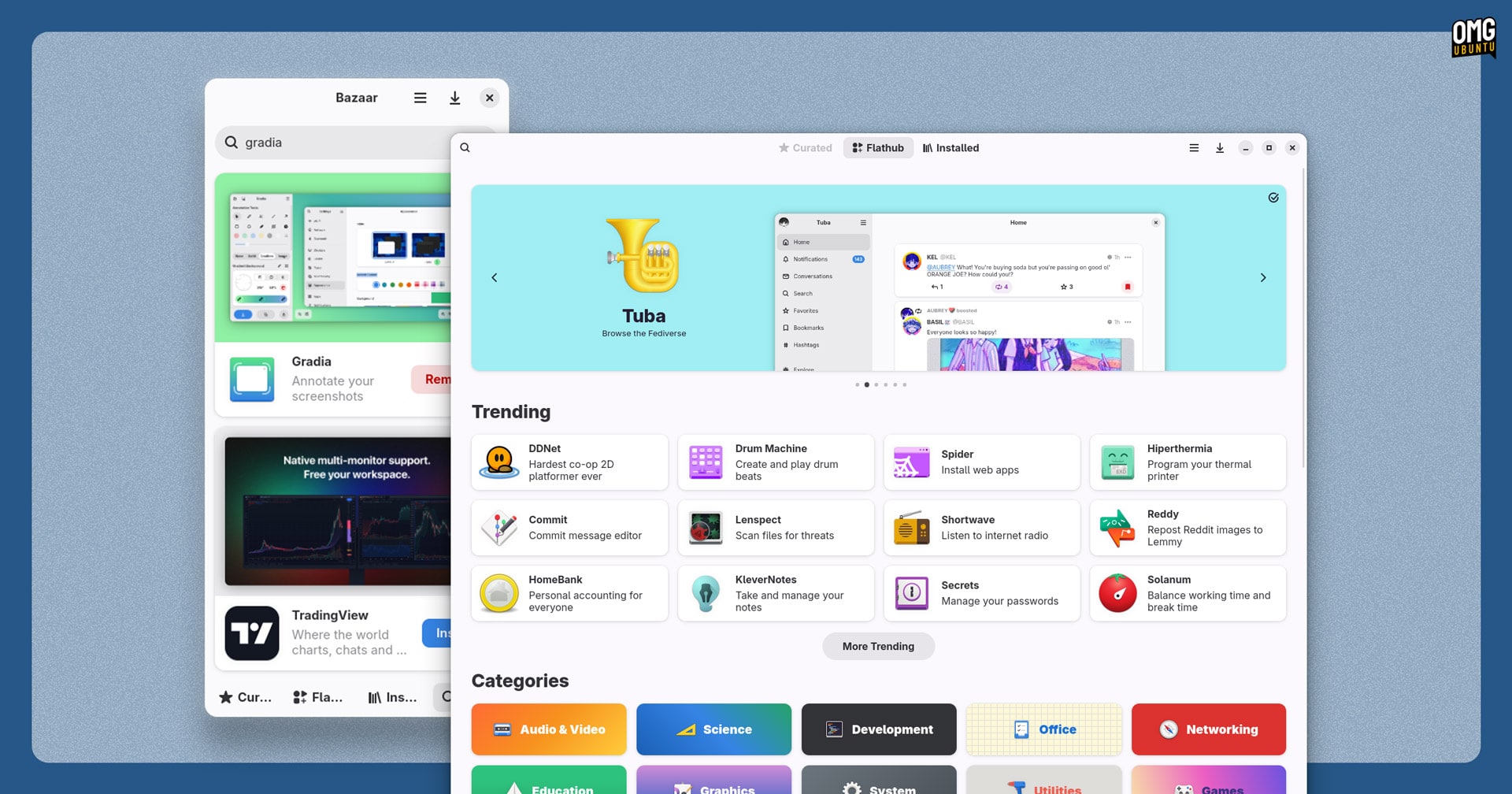
Slick desktop Flathub frontend Bazaar saw two updates last month, one medium and one “smol” (to quote its developer).
Search was overhauled with a ‘rich card’ format that shows important info about apps, saving the need to page through to the full listing to see if it’s the one you want. Nifty.
Elsewhere, a new ‘hide-eol’ preference was added. When enabled this stops Bazaar from returning any end-of-life applications or applications that rely on on end-of-life runtimes. Notices on app tiles and in listing signpost apps that use end-of-life runtimes.
Beyond that, lots of smaller tweaks, bug fixes, visual finesse and the addition of a few smaller niceties (a ‘what’s new’ page in the About dialog and new ‘On the Go’ category among them) to round things out.
Ubuntu users can install Bazaar from Flathub.
Euphonica 0.98.0

Euphonica, the unapologetically bliny MPD client, issued a new beta build in November adding a major new feature: Dynamic Playlists.
Rather create a static playlist containing a specific set of tracks you can create playlists that generate contents based on filter/ordering rules you define. Rules can be dynamic too, e.g., ‘limit to songs played in the last 30 days’, which is neat.
As such, if you’d love to have ‘personalised’ playlists similar to those offered on music streaming services, but with local files, you can e.g., “Monthly Most Played”, “Songs I Always Skip”, etc.
And dynamic playlists in Euphonica can be made to refresh at a set schedule (e.g., “1st of the month”, “every time I open the app”); you can set custom artwork for them, and import & export dynamic playlists in JSON for backup (or sharing).
All of that sounds hella cool to me — if I was talking like someone hip in 1999.
Euphonica is an MPD client (GUI front-end) and not a standalone music player you will need to connect to an MPD server to get to play anything (you can run one locally, which is what I do). Also keep in mind it’s “beta” software – bugs, quirks, etc.
Ubuntu users can install Euphonica from Flathub.
Blender 5.0
Blender 5.0 was released in November and, like every release, the amount of improvements across the software’s many tools, views and functionality is vast – much of it hard to appreciate if you’re not an existing user.
For creative pros, the biggest change in Blender 5.0 support for ACES (Academy Colour Encoding System) and HDR colour pipelines, which means content has predictable production-grade wide-gamut colour, exposure and HDR data from creation through render and final export.
The version improves the way ‘large-scale geometry’ is handled, so working with .blend files which contain millions of vertices is stable. Cycles, Blender’s renderer, adds adds a new default volume rendering algorithm (‘null scattering’).
There’s a new storyboarding template which, with Grease Pencil (which a new “Pen” tool in Edit mode), make it easy to create looped animations, while general workflow has been tightened with drag-and-drop buffs, a more predictable Outliner, and unified widget styles.
And that’s but scratching the service. More details on everything new, improved and retired (Intel macOS support) can be found in the official Blender 5.0 release notes.
Blender is free, open-source software for Windows, macOS and Linux. Ubuntu users can install Blender from the Snap Store, Flathub or download an installer from the official website. Older versions of Blender are available in the Ubuntu repos.
Vivaldi 7.7

Vivaldi 7.7 slipped out last month, the latest stable release of the Chromium-based browser that serves power users as much as those who can’t tell their address bar from their elbow.
It ships a clutch of updates, mainly focused on streamlining workflows. There’s now cross-desktop tab sync, making it easy to find and open tabs from other devices via the Windows Panel or Tab Button within the browser.
The browser now features a Unified Start Page putting both dashboard widgets and the traditional Speed Dials one the same page. Cognitively, this is tidier (and like most changes in Vivaldi, those who prefer other approaches can dial around in settings to achieve it).
Finally, Vivaldi 7.7 cleans up its Privacy Dashboard to provide clearer insight into blocked content, adds new performance controls (e.g., configure tabs to be excluded from resource management), and tweaks a few bits of its UI here and there.
Vivaldi is free, but not open-source software available for Windows, macOS and Linux. Ubuntu users can install Vivaldi as a Snap, fetch it from Flathub or download a DEB package from the browser’s website (which is also available ARM64 devices).
Shotcut 25.10

A new version of the Qt-based and cross-platform open-source video editor Shotcut was released with a clutch of interesting changes.
Shotcut 25.10 lets you generate ‘Image/Video from HTML’, so you can use CSS, JavaScript, etc to create text-based content on a transparent background. The feature is limited to 15fps, requires Google Chrome or Chromium, and won’t work in Flatpak builds.
Other updates include new Screen Snapshot and Screen Recording options (which do what you think they do); Text to Speech support extends to Notes and Subtitles; a new Typewriter text generator, and some small UI changes.
Shotcut 25.10 includes FFmpeg 8.0 and the minimum glibc requirement is bumped to v2.35 meaning that it’ll only run on Ubuntu 22.04 or later.
Ubuntu users can install Shotcut from the Snap Store, Flathub, or download an AppImage from the official website (where macOS and Windows installers can also be found).
VLC Components
VLC 3.0.22 hit release candidate in September but it’s yet to be officially released, although source code tarballs are up on the official server.
VideoLan, makers of VLC, released new versions of libdvdread, libdvdnav and libdvdcss – 3 critical components that allow VLC to play DVD and Blu-ray Discs.
“The biggest features of those releases (libdvdread/nav 7 and libdvdcss 1.5) are related to DVD-Audio support, including DRM decryption,” the team say.
If you use VLC to play optical media and you aren’t having any issues playing content you don’t need to go out of you way to download and compile these libraries, but if you are experiencing quirks with newer discs, you may wish to.
Kdenlive 25.12 RC

The Kdenlive 25.12 Release Candidate is out for testing ahead of it’s (presumable, given the version number) stable release in December.
The team say the update brings UI changes “to improve your workflow”, including a new widget docking system, and an “enhanced audio display” in the clip monitor with a waveform, and menus have been reordered to be more “logical” – all good stuff.
Do you make vertical videos for social media? If so, the upcoming version caters for you.
A revamped Welcome Screen revamp lets you pick a vertical orientation for new projects from the get-go, and the non-linear editor’s developers have added editing layout and safe areas to make framing vertical content less pernickety.
Download the RC from the link above if you’re eager to try things out, otherwise wait until the formal stable release sometime in December.
Until next month!
That’s a wrap on November’s highlights. While those updates did not get their own headline (from me), they’re solid updates and, on the off chance you hadn’t heard about them, now you have.
Got a tip about an app update I should cover? The contact form is always open!