

Zorin OS 17.2 is available to download, bringing users a welcome set of enhancements.
The latest release in the Zorin OS 17 series, still based on Ubuntu 22.04 LTS, is described by the team as the “most capable, customisable, and compatible version yet”.
Exciting – what’s changed?
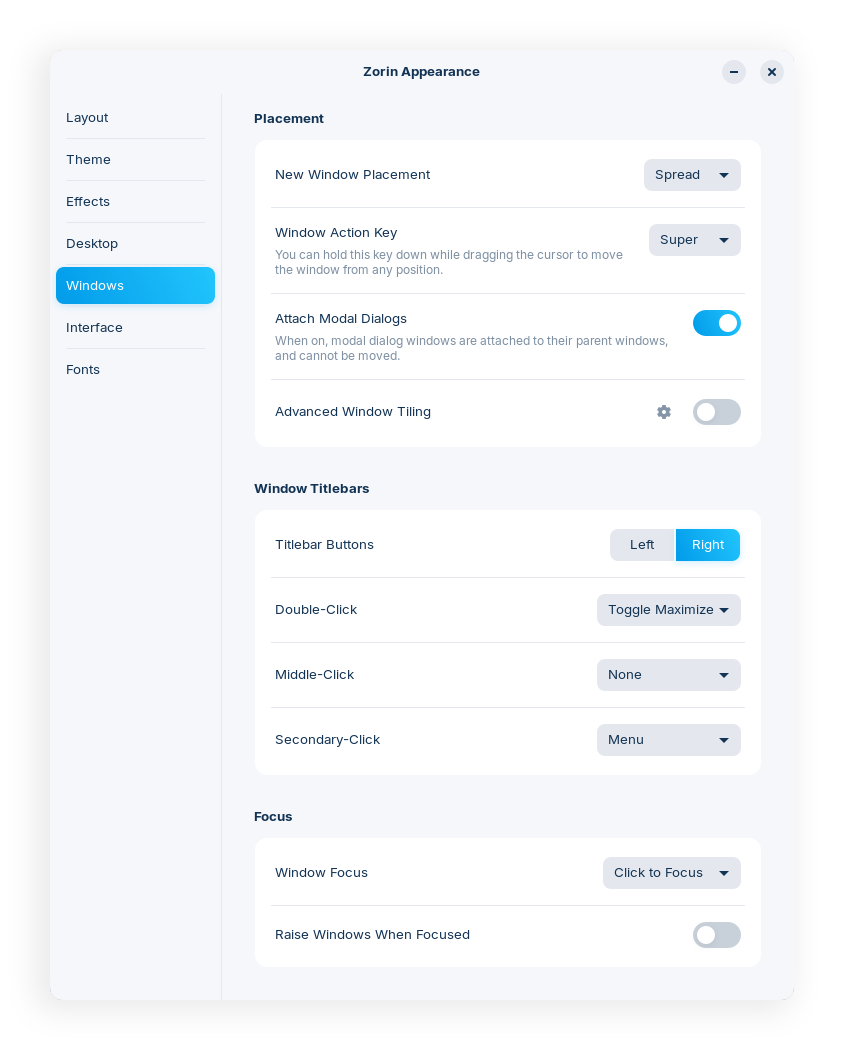
Well, Zorin OS 17.2 adds new options to its bespoke Zorin Appearance application.
Users can now change cursor theme in this one-stop personalisation tool, and now install third-party themes they download from elsewhere.
Additionally, the theme section links to a guide that details how to restyle apps which uses libadwaita thanks to “an exclusive patch to the interface library in Zorin OS 17.”
Interesting.
Sticking with Zorin Appearance, there is a new Windows section surfacing controls to set how application windows behave, e.g., default placement, titlebars, moving focus, etc; and an option to disable/enable Overlay Scrollbars was added to the Interface panel.
Zorin OS 17.2 also offers:
- LibreOffice 24.8
- Assorted app updates
- Ubuntu 24.04 HWE (Linux kernel 6.8)
More options in Zorin Appearance, updated software (including the latest LibreOffice for productivity needs), and a newer Linux kernel and graphics drivers stack make Zorin OS 17.2 an enticing upgrade for fans of the distro.
Download Zorin OS 17.2
Existing users of Zorin OS 17 or 17.1 can upgrade to Zorin OS 17.2 using the Software Updater. Those not yet using Zorin OS can download Zorin OS from the distribution’s official website.
Zorin OS comes in two editions:
- Zorin OS Pro is a paid download (around £47/$50) that includes more preinstalled software, additional eye candy features, a set of 6 ‘premium’ desktop layouts, access to support, and the a fuzzy feeling from supporting the distribution.
- Zorin OS Core is a free download with a streamlined set of default apps, fewer bundled GNOME extensions for eye candy features like wobbly windows, and no access to support. Zorin devs say Core is best “for basic use”.
The choice is yours.