





Firefox 159 is out, with a fresh set of improvements and some Linux-specific fixes.
Now that Mozilla’s browser hews to a faster release cadence, with two releases a month rather than one, some changelogs may look minor on their own, as they’re smaller, if more frequent slices.
So what’s changed?
The Passwords tool in the browser sidebar (added as an option in Firefox 145) is now shown by default. This lets you find credentials in the same window as a web page, no mousing through menus or juggling with floating dialogs.
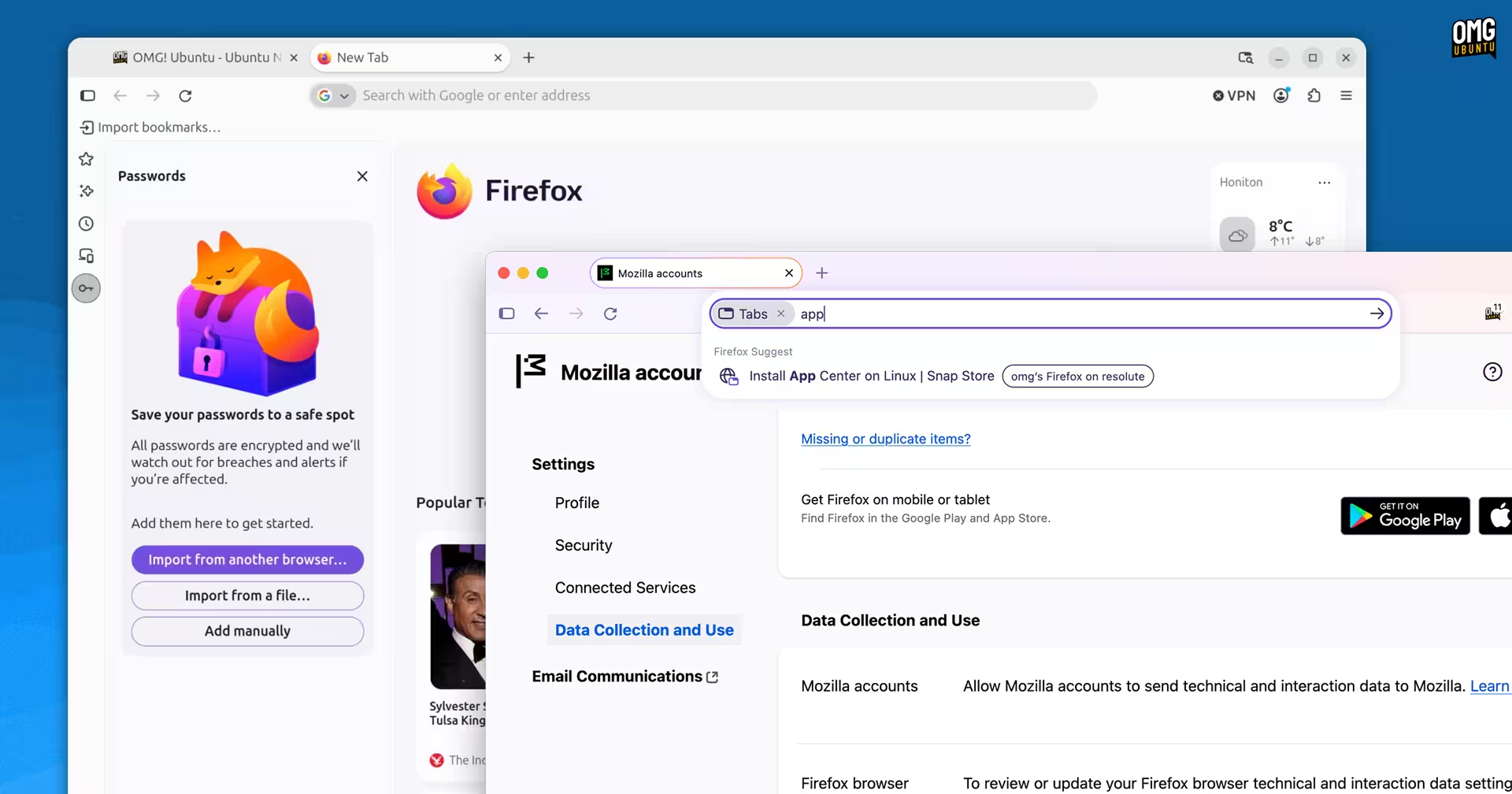
It’s also a smidgen easier to search your open tabs. A new keyboard shortcut has been added to activate the tab search filter. The feature isn’t new (it could be triggered using the ‘List all tabs’ button), but a memorable shortcut aids discoverability.
On Windows or Linux, press ctrl + shift + a1 to trigger the tab search. It focuses the address bar and you type some words to return any matches from open tabs on your device or open on your synced devices (if signed in to your Mozilla account).
Wayland Linux tab terrors
On Linux, Firefox 159 resolves a couple of Wayland issues that were affecting tab behaviour.
In some situations, click on a tab could make it detach into a standalone window (which isn’t super helpful if you were just trying to select or move it). Conversely, dragging a tab upward on Linux desktops using Wayland wouldn’t detach the tab.
And Linux system with AMD GPUs who noticed Firefox consuming excessive memory on sites like ChatGPT when Mapbox GL JS maps were displayed, will be pleased to hear that issue is now resolved.
AI & Smart Window tweaks
Smart Window testers can use a new /watch command to get their AI backend of choice to monitor a web page for any changes, like a price drop or new post. Check interval and notification method are configurable.
Safari in macOS and iOS 27 debuted a similar feature backed by Siri AI. Like Apple’s offering, Mozilla’s version lets you easily manage, edit, pause, force check and, of course, delete watches.
When using an AI chatbot in the sidebar, the “summarise” page now shares the website address with the AI provider, rather than the page’s text. Firefox 160, out 10 November, will include a new AI chatbot provider: Yahoo! Scout.
Other changes
On the web compatibility side, Firefox 159 adds support for scroll-driven animations, a CSS feature that lets web developers tie an animation’s progress to, well, scrolling or a specific on-page element being moved through the viewport.
Bug fixes include:
- Bookmarks not being imported from signed-in Google Chrome profiles
- File upload dialog opening in the last folder a file was saved to
- Cherry picked patches for better Vulkan ffvpx handling on Linux
- Browser UI animations are turned off if OS Reduce Motion setting is on
- Sites (including Slack) often failed to load instead of using HTTP/2
Plus, security patches and plenty of other, smaller fixes. Firefox 160 is due for release in 2 weeks time, on 10 November 2026.
Auto-PiP when switching window
If you use picture-in-picture mode often, you may be interested in testing a new behaviour that’s coming. It triggers picture-in-picture mode when a page playing video is obscured by another window or the browser is minimised.

To try it out, go to about:config and find the enable-when-occluded setting. Double-click to set the value to true. If the ‘keep playing in picture-in-picture mode’ setting is enabled, videos will pop-out when switching window too.
Get Firefox 159
Firefox 159 is free, open-source software. You can download the new release from the Mozilla FTP server or wait for the links to the same builds to appear on the Firefox website from 27 October.
Existing users get updated to the new version in-app on Windows, macOS and Linux (binary builds), or through the app store or package repository it was installed from.
On Ubuntu? This update arrives like the rest, i.e., an automatic, background update from the Snap Store.
- This shortcut previously opened the Add-ons and Themes page. To get to that in v159, press Ctrl + Shift + F. ↩︎