



Your mouth can (probably) say things quicker than your hands can type them, yet voice typing is rarely used as a primary input method on desktop, despite most of us thinking nothing of using it on mobile.
That’s despite speech-to-text being available on desktop OSes for decades, natively and through dedicated apps. It never caught on because it was inaccurate and slow and typically hidden away as an assistive feature.
(And because a lot of what you do at a keyboard is navigation and that is less efficient to speak, unless ‘arrow down, arrow down, arrow down’ is some trendy new Gen Z slang I don’t know of).
Then came Whisper, the speech recognition model released by OpenAI in 2022 and built solely to convert audio to text. It’s proven hugely popular because of its accurate-enough multi-lingual transcription, as important, speed in doing it.
Entire class of audio-to-text tools have sprung up, from podcast transcribers to auto-subtitles (VLC was working on a real-time subtitles plugin using it1 too).
Now, a new desktop Linux app uses Whisper to let you type in apps using your voice.
Speed of sound is a speech-to-text tool
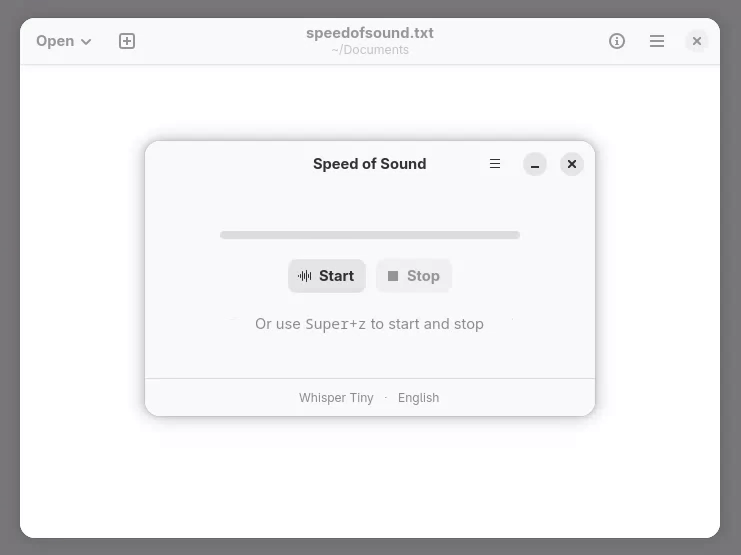
Speed of Sound is a new app for Linux that uses a small version of the Whisper model to let you type in any focused text field by speaking to your computer (if it has a microphone). It’s also multilingual, so you can set a primary and secondary language, and switch between.
When the app is running, you click the button inside the app (or press super + z) to initiate listening, speak your mind, then you stop recording. The model converts your speech to text and enters it into the open app or search box.
It’s able to simulate type via the XDG Desktop Portal. Per the project docs, this works with all major desktop environments including GNOME and KDE as well as on both X11 and Wayland. The app nudges you to give it relevant permissions when you run it.
Providing details on your writing style along with defining any custom vocabulary or acronyms you use will help ‘personalise’ the model when it’s (trying) to recognise what you’re saying.

Voice-to-text processing happens locally and offline, so no recordings leave your device to go fatten the golden mecha-geese laying the embryonic seeds of tech bros’ despotic dark fantasies. Ahem.
However, this is not real time transcription2 in the truest sense as you need to remember to press the right key/button at the right time, or your elucidations may end up lost to the ether – rather like posting anything on modern social media these days.
So far, so… not bad.
If accuracy is off, more models can be downloaded in-app or you can connect to a cloud or self-hosted LLM. The app also offers to help apply ‘text polishing with LLMs’ – presumably spelling and autocorrect, but most LLMs can’t resist a full rewrite full of its tics and tell-tale constructions3.
Like all “AI” tasks, it’s not perfect. For matters-of-record, a human ear is needed. But for casual needs, like getting notes down on paper, composing an e-mail using a stream of consciousness, it’s far better than tasking an LLM to write something for you.
Has its uses, if you want to try it
Writing with your mouth (as it were) is, at minimum, faster than staring at a blinking cursor on an empty page (even if, in practice, the endless stop/starts do end as tedious once the novelty of feeling like a one-person podcast/therapy chat wears off).
Worth a try if your hands would rather be doing something else while you write that essay or dictate a follow up e-mail. It’ll never be a full-time replacement for typing (your hands have to go back on the keyboard to hit enter), but in the right context, it has its uses.
Speed of Sound is free, open source software available to install from Flathub and the Snap Store, with AppImage, Deb, and RPM packages available from the GitHub releases page.
- As an aside, it’s one instance of modern “AI” delivering on those sci-fi promises of the old, whereby super-smart computers free us from tedious and menial tasks so we can focus on creativity, the arts and higher learning. Like saying “make me a photo realistic man cabbage”. ↩︎
- Thankfully. ↩︎
- “It’s not changing what you said, it’s helping you say something different” – the “it’s not X, it’s Y” copywriting cliche is everywhere thanks to LLMs. ↩︎