



GNOME’s window snapping is pretty basic, which is why extensions like Tiling Shell exist to fill the gap for Linux users managing multiple windows on their screens.
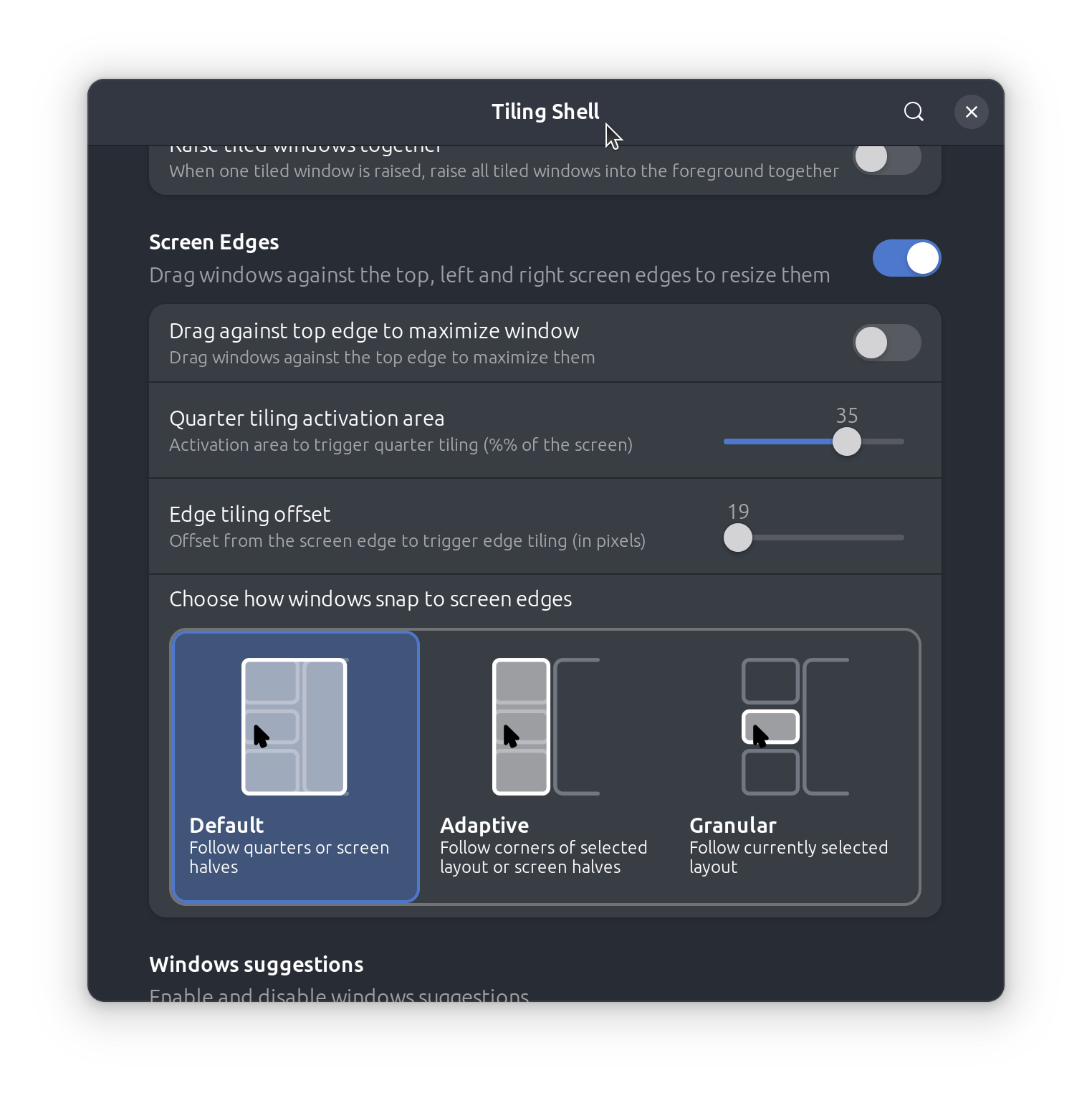
The v17.3 update arrived this weekend with a focus on improving edge-tiling behaviour with a set of new edge tiling modes to control what happens when dragging windows to the side of your screen.
Of these, ‘Adaptive’ is the most flexible. It continue to allow half-screen snapping whilst also supporting the extension’s custom tiling zones. ‘Granular’ mode ignores underlying snapping options to only snap to the zones in the active layout, while ‘Default’ is the inverse.
Essentially, if you want windows to always snap to your custom layout when you drag them to the edge of the screen, choose ‘Granular’.
If you want to keep the standard GNOME snapping options, but have the option to use your custom zones too, use ‘Adaptive’.
Improved layout management

A (welcome) new setting lets you ‘Sync layout when tiling with Snap Assistant’. This means if you pick up a window and drop it onto a layout using the slide-in Snap Assistant, that layout is then made the active one – no need to switch manually.
Keyboard-led layout switching gets a modest boost as it is now possible to cycle through layouts in reverse by holding the shift key at the same time as a custom keybinding.
Does more than you think
Tiling Shell does more than quarter tiling – it can get real fancy!
It offers custom tiling grids, an on-screen slide-in drop zone, and can surface snapping options in window controls.
Plus, configurable keyboard shortcuts and mouse options, and toggles to enable/disable what you don’t need.
There’s a new (optional) toggle to have all windows in a tiled set raised at the same time, and you can finally reorder layouts from the edit dialog directly, meaning it easier to put the layouts you use most in easier reach.
Finally, if you’ve been trying to use a Wacom stylus or a finger to interact with window suggestions, it should now work correctly.
Window borders also now scale properly, and a bug that caused borders to overlap context menus in tiled windows is resolved – hurrah!
Getting the update
Tiling Shell v17.3 is out now for GNOME 42 through 49, available from the GNOME Extensions site.
If you have an older version installed this update is downloaded and applied the next time you log out.
When Tiling Shell on Ubuntu, turn off the default Tiling Assistant extension to avoid conflicts by going to Settings > Ubuntu Desktop > Enhanced Tiling and sliding the toggle off.
Download Tiling Shell on GNOME Extensions