



VirtualBox 7.2.0 has landed with hardware-accelerated video decoding in Linux hosts, UI changes designed to make the app less confusing to use, and support for the latest Linux kernel.
This update kickstarts a new stable series, and sees VirtualBox 7.2 continue the UI changes the VirtualBox 7.1.x series delivered, whilst continuing to expand support for working with newer technologies and running on newer devices (like ARM).
If you’re familiar with the app you’ll instantly notice that VirtualBox’s UI is different in this update.
On Linux, a new global vertical taskbar on the left-hand gives quick access to various features previously accessed through hamburger menus. From top, these are:
- Home – links to documentation, getting started guides, etc
- Machines – where you create, launch, configure VMs
- Extensions – install/remove and view extensions
- Media – manage hard disks, optical disks, and floppy disks
- Network -create, manage and monitor host, NAT and cloud
- Cloud – add/setup/connect to Oracle cloud
- Resources – shows host and VM resource usage
In the Machines view, VM tools are now integrated as horizontal tabs directly above the right-hand panel, again making them easier to reach.
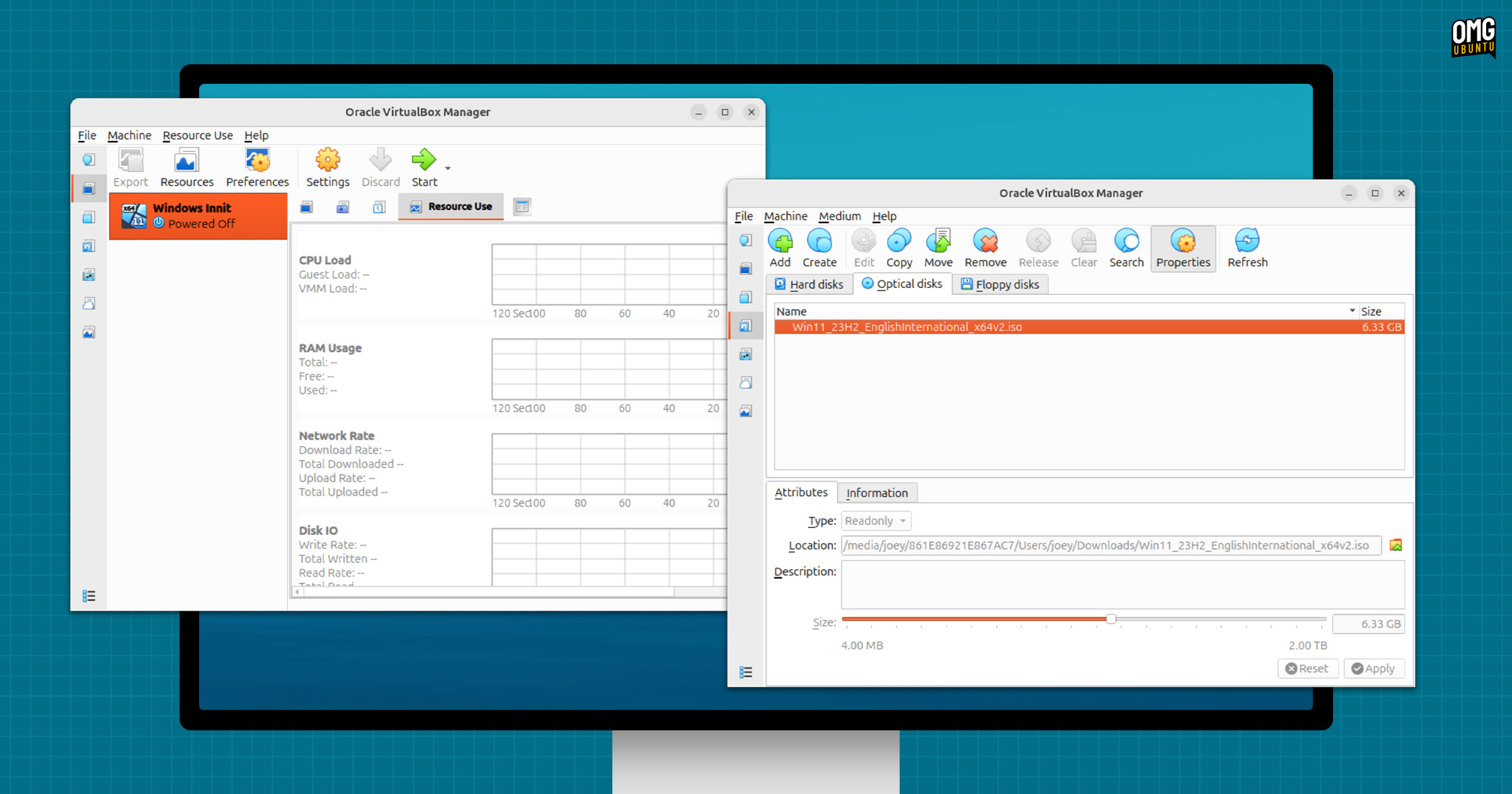
While I am far any kind of design guru, I’ve often found VirtualBox’s UI haphazard and confused – anachronistic even. The latest attempts to refine its GUI don’t improve the flow of the app as well as it could, but it’s a step in the right direction.
For those who can’t quite “see” the difference”, drag the slider on this — VirtualBox 7.1.x on the left, and the new VirtualBox 7.2.0 release on the right:
Other buffs to the GUI in this update include improved Preferences and Settings page (if they say so), a checkbox to make a Shared Folder available in all VMs (handy), and better handling of keyboard LEDs in the Soft Keyboard (no idea what they is, tbh).
Linux Improvements
Here’s a big one: Linux hosts get hardware-accelerated video decoding in VMs (when 3D acceleration is turned on). This will make video playback smoother, reduce CPU load if running media-heavy apps, and buff any in-desktop animations in VMs.
Initial support for the recent Linux kernel 6.16 release, as well as the upcoming Linux 6.17 kernel that Ubuntu 25.10 will ship with, has been added. Unattended installation support for Oracle Linux 10 is also now available (which you’d expect: Oracle make VirtualBox).
ARM full of changes
Beyond GUI adjustments, there’s a bunch of ARM-related changes.
VirtualBox 7.2.0 adds support for running Windows on ARM virtual machines on Windows on ARM hosts, as well as on Linux and macOS ARM hosts (much-needed). A WDDM Graphics driver with 2D and 3D modes has been added, and you can use shared folders in ARM VMs.
For users running VirtualBox on macOS with Apple Silicon (i.e., M-series chips, though a low-cost MacBook using an iPhone A-series processor in rumoured to be launching soon), this release adds experimental 3D acceleration support using DXMT.
Notable, 3D acceleration is no longer supported on macOS hosts using Intel CPUs beginning with this release. If you sometimes use VirtualBox on an Intel Mac, stick with v7.1.x builds or setup a Linux dual-boot – Ubuntu runs great on Intel Macs.
If you do upgrade on an ARM device, be aware that saved states and snapshots made in VirtualBox 7.1 are incompatible with VirtualBox 7.2. Shut down your ARM VMs before upgrading or you won’t be able to use them.
Other changes
Bug fixes aplenty arrive in VirtualBox 7.2, including a fix for Nested Virtualisation on Intel CPUs, better DNS server handling in NAT, resolves frame sync issues when using the video recording feature, and
There’s support for xsave/xrestor instruction handling on Windows with Hyper-V as the virtualisation engine, ensuring x86-64-v3 instruction set extensions (including AVX and AVX2) included on recent CPUs are passed through to guests.
- NVMe storage controller emulation is part of the open-source base package
- Fixed corruption of VMDK images when resizing
- Save state load failures with TPM resolved
- ACPI now available to ARM VMs
- vboxwebsrv is now included in Arm host packages
- libIDL and IASL dependencies dropped
See the official changelog for more details on the makeup of this release.
Download VirtualBox 7.2.0
Of course, VirtualBox is not the only virtualisation solution round, open-source or otherwise, so if you find it a bit old-fashioned, be sure to look into GNOME Boxes, VMWare Workstation Pro or, for more fine-tuned needs, Proxmox (which saw a new release this month)
You can download VirtualBox 7.2.0 from the official website, where installers for all major desktop operating systems are provided (DEBs for Ubuntu). You can also get the source code on GitHub, or install an older build from your distro’s archives.