



Mozilla’s latest effort to shoehorn AI features into the Firefox browser isn’t going well, with users complaining of performance issues caused by the additions.
The AI-powered tab groups in Firefox 141 is supposed to help users organise their sprawling collection of open tabs into thematic groups based on the page topic, and suggest relevant names for each tab group.
Only, the feature isn’t proving to be the handy aid to tab-hoarders Mozilla hope, rather something of a hinderance, according to an article on Neowin.
Scores of users on the Firefox subreddit blame the feature for increasing CPU usage (thus running down battery life) whilst using the browser, thus outweighing any potential benefit to productivity these so-called “smart” features offer.
User u/st8ic88 noticed their “CPU going nuts” after updating to the latest release. Opening the task manager to locate the cause, they found the “Inference” process — this is what Firefox uses to run on-device AI tasks — chewing through CPU cycles.
They weren’t exactly thrilled:
I don’t want this garbage bloating my browser, blowing up my CPU, and killing my battery life. There is absolutely no reason for it, it’s not a good feature, and it’s absolutely humiliating for Firefox to be jumping on this bandwagon.
u/st8ic88
Other users also noticed issues with the same process, with one saying it makes their “fans spin like crazy”, and another noticing it was intermittently ballooning in memory usage before scaling back – resources to power a feature pre-emptively.
The cause of the egregious performance?
Some on Reddit speculate it’s due to Mozilla’s decision to opt for Microsoft’s Open Neural Network Exchange (ONNX) format in its local AI models, rather than make use of other, reportedly ‘more efficient’ formats that are available.
Not everyone has noticed performance quirks, which makes it hard to pinpoint an exact cause. As on-device AI tasks can be computationally taxing, it may be that those with powerful machines don’t “notice” an impact to go check.
“After receiving reports of issues that hadn’t come up in our testing [of the new semantic Url matching feature], we reversed the rollout and the performance issues should be resolved. We are working on a fix.”
Disable Smart Tab Grouping in Firefox
If you’re also experiencing issues on your device after you opt-in to try the feature, you can disable smart tab groups in Firefox using a hidden preference:
- Type
about:configinto the address bar and hit Enter - Accept the risk warning that appears
- Search for
browser.tabs.groups.smart.enabled - Set it to
false(double-click thetruevalue)
After doing this, restart Firefox to ensure your changes click into place. All being well, the “Inference” process will no longer run in the background, analysing your tabs as you open and close them.
You can make use of manual tab grouping, using your own brain to work out relevance based on what your eyes gather from the text that appears on the web pages.
Also, you can delete AI models Firefox downloads to your device from the about:addons page.
Is it even smart anyway?

Firefox’s smart tab grouping feature is open source and designed with privacy in mind. It uses an on-device model, rather than shipping your browsing data off to a remote data centre for analysis (and who knows what else).
To group tabs, Firefox runs an AI model that analyses the content of each open tab to ‘cluster’ them based on semantic relationship. Then, to generate a name for the group, it uses a c-tf-idf algorithm to pull out unique keywords in page titles and descriptions.
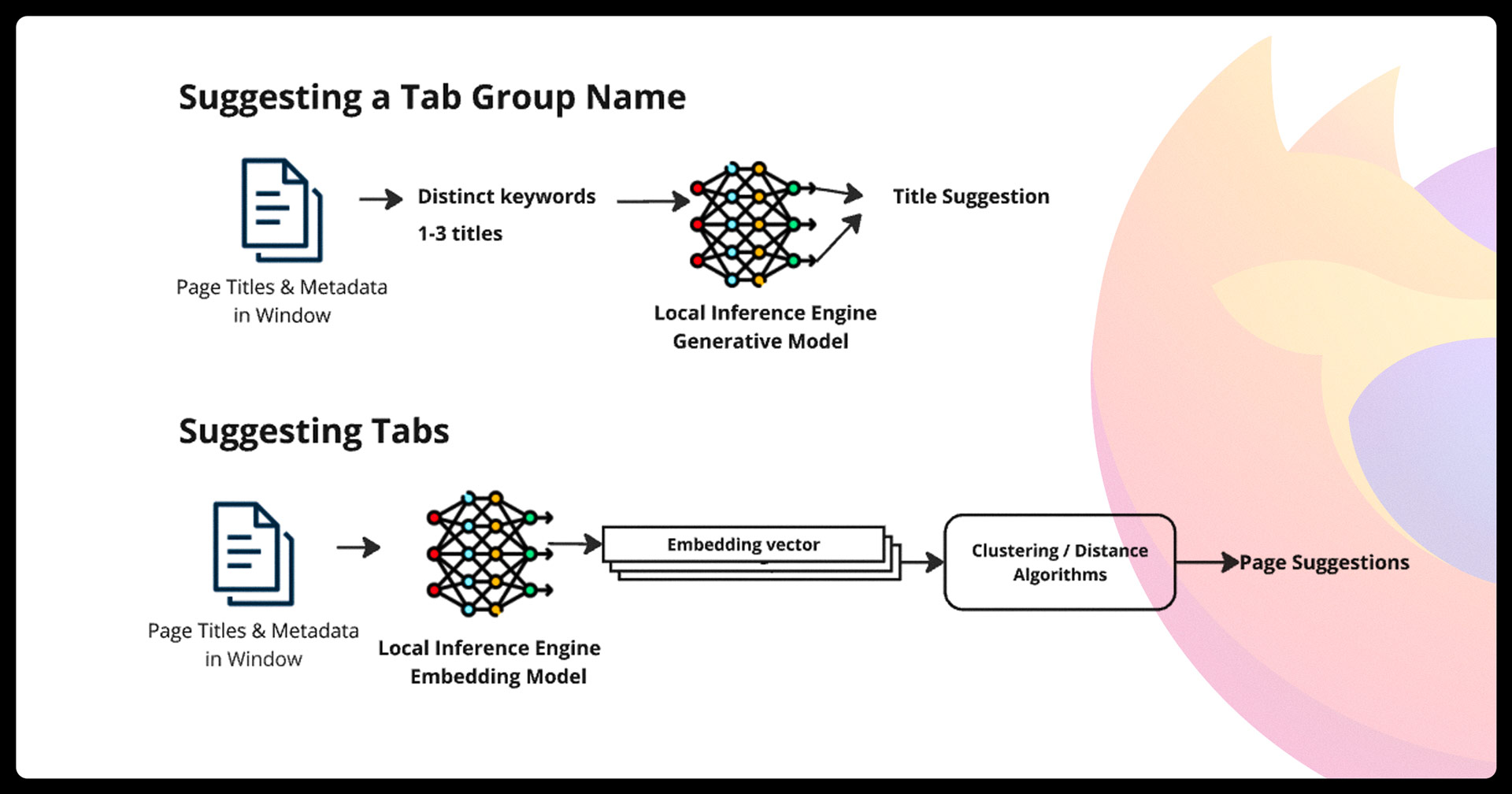
However, I don’t find it’s that smart in practice.
I tried it with a bunch of Linux-related tabs open and it couldn’t find any related tabs. Later, it did notice I had shopping tabs open. Sadly, the suggested title of “Outdoor Cooking” made no sense — the tabs were for tech items and skate t-shirts!
Whether the “AI” powering this feature is causing performance issues or not, the “AI” powering this feature is causing issues with me understanding the point of it.
More AI features coming to Firefox
The relentless push to cram AI into every corner of every corner, even when it adds more problems than it solves, is how issues with hasty rollouts arise. Hype says AI makes everything better, even if it actually doesn’t, so add it, and add it now!!1
Mozilla’s leadership is ebullient on the benefits of AI and say more AI features will come to Firefox this year. There’s no switch to turn off all AI features in Firefox, and the likelihood of getting a global off-switch-cum-escape-from-hypeville-hatch seems unlikely.
In this instance, will users whose machines groan under the strain of hundreds of open tabs appreciate seeing more resources peeled away for assistive features that try to help, but often don’t?
And for machines unaffected by any CPU, battery or memory issues, if Firefox’s AI-powered tab grouping is so semantically sloppy that using it still requires manual intervention to group things properly, one has to ask: is there any point?
AI is a hammer, but not everything is a nail.