


Looking for an easier way to check the battery levels of connected Bluetooth devices in Ubuntu?
Emphasis falls on easier there since you can see Bluetooth battery status for paired peripherals in the Settings > Power panel, no additional extensions required.
But having to dig for for power details in the Settings app isn’t as convenient as seeing it in the panel menu where you connect/disconnect to your Bluetooth devices, is it?
Which is what the Bluetooth Battery Meter GNOME Shell extension can do.
See Bluetooth Battery Levels in Ubuntu

The Bluetooth Battery Meter GNOME extension has two main ways to show current power levels:
- Icon(s) in the top panel
- Quick Settings > Bluetooth menu
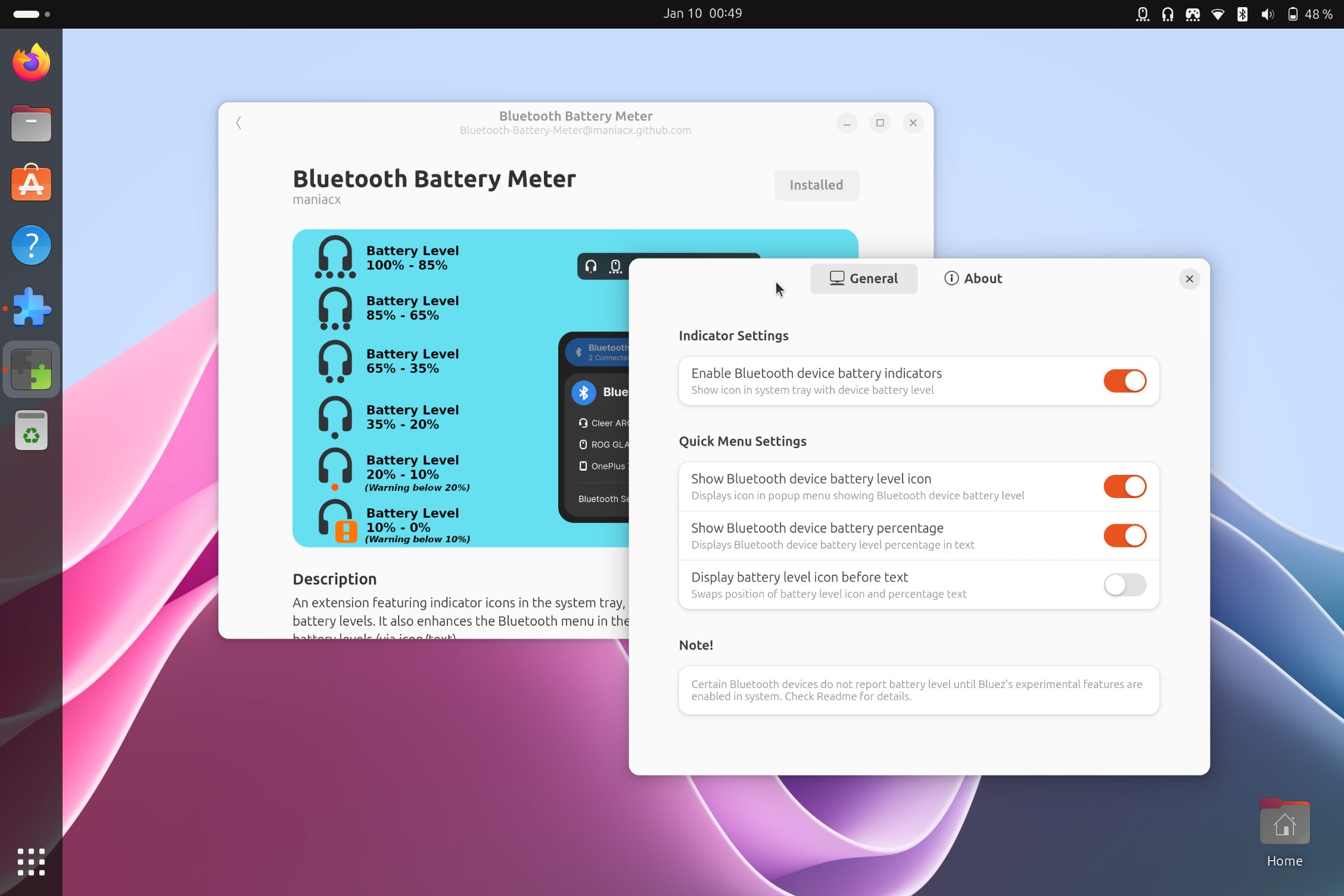
For the first of these, you see icons in the top bar for all (compatible) Bluetooth devices currently connected. Beneath each icon is a subtle indicator of current power level: 4 dots is 100-85%, 3 dots ~75%, 2 dots ~50%, 1 dot ~26%, 1 red dot <20%, a red exclamation mark <10%.
For the second, Bluetooth Battery Meter extension integrates with the Quick Settings > Bluetooth pod. It shows a battery level icon(s) next to (compatible) connected devices. An option (off by default) will show battery percentage as a text label too:

You can choose which of these modes to use, or opt to use both (which is the default behaviour). Plus, both modes offer an plenty of customisation options to let you fine-tune how they look and behave.
You can disable the indicators that appear in the panel from the extension’s preferences too:
GNOME’s Quick Settings menu makes connecting to previously-paired Bluetooth devices fast, but it doesn’t show battery levels for connected devices, like mice, keyboards, headphones, game controllers, etc.
If you want to see battery levels in the Bluetooth menu (which is where you connect/disconnect to devices) this extension is ideal.
However, there are a few things to keep in mind whilst using it.
Firstly, not all Bluetooth devices with a battery report battery levels to host devices, i.e., the operating system it’s connected to, in this case Ubuntu.
The older your device is, the less likely it will.
If you own Bluetooth device which does report/show a battery level when paired in Windows, macOS, Android, or iOS it will also show in Linux — if it doesn’t you may have to enable experimental features in BlueZ, the Bluetooth stack Ubuntu uses.
Secondly, different Bluetooth devices report charge status differently. Some provide continuous reporting (e.g, 100%, 99%, 98%, down to 0%), others in specific increments, e.g., 5%, 10%, or even 20% blocks.
Still, those of you looking for an easier way to check the battery levels for Bluetooth devices in Ubuntu ought to give this extension a try. It’s well made, highly configurable, and does a simple thing well. Better yet, it works with Ubuntu 24.04 LTS and above.