



Docky gained a sleek new panel mode and a network manager docklet in an update to users of the Docky PPA yesterday. For those wondering why Docky is not longer part of GNOME Do see here for our interview with Docky creator Jason Smith.
Some of the updates may or may not have arrived in the most recent update, so i’ll mention the features i didn’t notice before today.
Although the panel mode may not quite be how everybody would want it to be (Items centered; AWN 0.4 has something similar but left-centers icons) it is sure taking Docky in a new and feature-filled direction by enabling it.

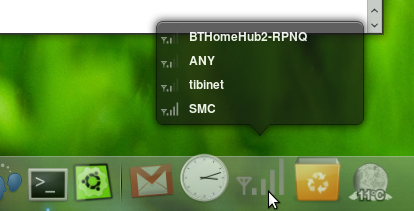
The new network docklet was a long lusted-after one for me, and moves Docky one step closer to allowing user to have a panel-free desktop.

A few other new odds n’ sods landed in this update including a ‘Recent Documents’ docklet; the (awesomely named) dis…win.. something or other is now called ‘Window Dodge’ and, this may not be new but it’s the first time I’ve noticed it, the Weather Docklet is now working totally as it does in GNOME Do – you can click it to see weekly forecast and scroll/click your way to a temperature graph, etc


If you want to try Docky out please bear in mind that this is app is still under heavy development. It’s certainly usable, but don’t complain if it crashes!
Karmic users can install the PPA and GPG key in one fell swoopby letting their terminal eat the following command: –
- sudo add-apt-repository ppa:docky-core/ppa
Run an update and then simply: –
- sudo apt-get install docky