
Easily Change The Ubuntu 11.10 Login Background With This Small App

Easily change your login background with ‘Simple LightDM Manager’.

The default login background image matches the default Ubuntu wallpaper. Chances are you’ve changed the latter, so why not the former?

This is easy to do by installing ‘Simple LightDM Manager’ – a small app that lets you choose and set a different image as the login window background.

The app is pretty straightforward to use. Click the button next to ‘Location’ for a file prompt.
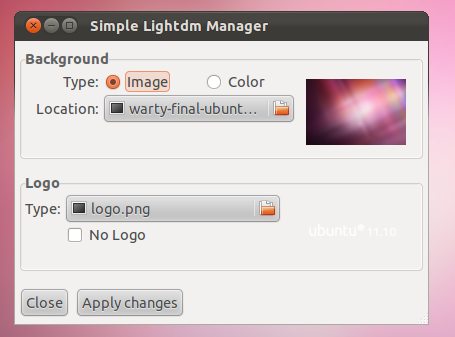
The app lets you specify and image file or colour for the background, as well as tweaking the logo that is displayed to the bottom of the login screen. If like me you’re only interested in changing the background you can ignore the bottom option entirely.
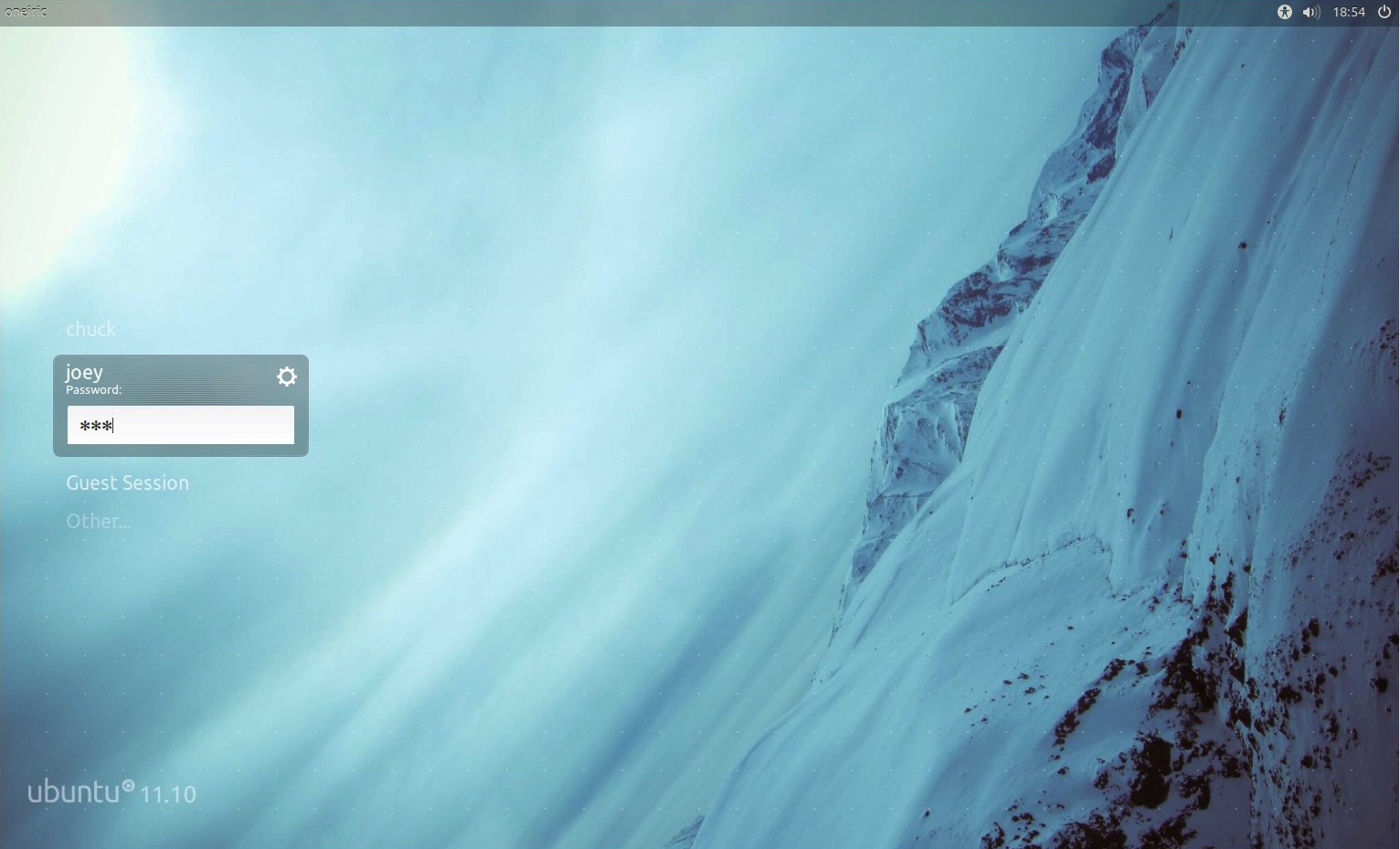
To create the illusion of a seamless login set the Login background to the same image as your desktop wallpaper.

Download Simple LightDM Manager

LightDM can be downloaded in .Deb format by hitting the button below. Once the package has downloaded just double click on it to begin installation.

Click to download Simple LightDM Manager

Once installed, Simple LightDM Manager can be launched from the Dash by typing ‘simple’ into the search bar.

via ubuntued.info/ (Portuguese)

Related posts:

  1. [How To] Change LightDM Background in Ubuntu 11.10
  2. LightDM Rocks: 3D Animated Login Screen… With Imps
  3. ‘LightDM’ to replace GDM login screen in Ubuntu 11.10
Post a comment or leave a trackback: Trackback URL.
  • Anonymous

    Great app! Thanks!

  • https://launchpad.net/~chrisccoulson Chris Coulson

     It would be perfect if this was uploaded to extras.ubuntu.com to make it available in the Software Center

  • http://twitter.com/chaeMil Michal Mlejnek

    I think that the newest Ubuntu Tweak can do it too..

    • Matt Eastwood

      Yeah – in fact, Ubuntu Tweak has been able to do this for a long time. Any good reason to use this tool here instead? Has anybody tried to do it with Ubuntu Tweak in 11.10?

      • https://launchpad.net/~caswiddershoven Cas Widdershoven

        I don’t think Ubuntu Tweak has been able to change a LightDM background; in Ubuntu 11.10, there is a completely ‘new’ login system, LightDM, instead of GDM in the older versions, for which Ubuntu Tweak was built.

        • Matt Eastwood

          Good point. Looking forward to the new Ubuntu Tweak!

        • Anonymous

          i have changed background with newest ubuntu-tweak, maybe its still a beta ;)

      • http://profiles.google.com/h.venhorst hugo venhorst

        What Cas said :) but there is hope:

        lookin at their main site, they offer Tweak for 10.10 and older… no unity love, and certainly no LightDM and Gnome3 love…

        however, on their blog he shows a lot of work going on to make it soar in Oneiric and beyond:
        http://blog.ubuntu-tweak.com/2011/09/18/ubuntu-tweak-0-6-beta-is-ready-for-testers-and-developers.html#more-1077

        hang tight for Ubuntu Tweak 0.6!

  • http://www.clapico.com/ Clapico

    Instead of .deb, you can use PPA :
    sudo apt-add-repository ppa:claudiocn/slm && sudo apt-get update && sudo apt-get install simple-lightdm-manager

    • Anonymous

      Will this work for Mint? I hate everything about Ubuntu now except the Lightdm login screen.

      • Anonymous

        Mint is built off of Ubuntu (and in turn Debian) If Mint uses LightDM instead of another Desktop Manager then yes it should work.

        • conor rynne

          At the time of writing it is still on GDM so no it wont

      • http://jeremy.bicha.net/ Jeremy Bicha

        Well obviously you don’t hate everything about Ubuntu since most of Mint is Ubuntu… :)

        • Anonymous

          I hate Unity to be precise. Too much eye candy, big blocks and sparkly colors. Makes me feel like I’m back in kindergarten.

  • Anonymous

    These amazing applications MUST make it into the USC. It’s severely limited if it doesn’t accept useful tweaking applications.

    • http://facebook.com/domcan2 1roxtar

      I agree…useful applications like Simple LightDM Manager and Ubuntu Tweak would both be great tools to include into the Ubuntu Software Center. 

  • Michele Herbstritt

    lightdm is claimed to be highly customizable and easily themeable, so i’m wondering: is there a way to change the ightdm theme? 

    • http://blitz-bomb.deviantart.com/ BlitzBomb

      Might need to give it some time yes you can theme it but at the moment their is no themes and no application to change themes for the time being.

      once some themes get created then im sure you will be flooded with apps to change between them im already looking into making a theme for it

    • Bilal Akhtar

      Yes, its themable, but there’s a very small selection of themes right now. And changing themes requires the user to edit a line in /etc/lightdm/lightdm.conf (the “greeter-session” line). Hopefully someone will make an app for it :)

  • Stef Oostveen

    This application should be integrated in the system settings window and should als be installed by default.

  • http://photo.katzmatt.com Matt Katzenberger

    I couldn’t get it to work. When I changed the background with that I got a black background on my login screen.

    Instead I’m using this script ( http://pastebin.com/yTZXEHLZ ) and a cron job every ten minutes to use whatever my current wallpaper is as my lightdm background.

    • Carlos Morales

      Me neither, I tried various alternatives to no avail.

      • Jeison Cleiton Pandini

        To fix and new changes go directly to file, run this command:

        Alt+F2 >  gksu gedit /etc/lightdm/unity-greeter.conf

        Find this lines:

        [greeter]
        background=/home/yourlogin/.simpleLigtDMManager/file.png
        logo=/home/yourlogin/.simpleLigtDMManager/logo.png

        Replace with this:

        [greeter]
        background=/usr/share/backgrounds/warty-final-ubuntu.png
        logo=/usr/share/unity-greeter/logo.png

        Or go to /usr/share/backgrounds/ e choose another photo!

        :D

    • Jeison Cleiton Pandini

      To fix and new changes go directly to file, run this command:

      Alt+F2 >  gksu gedit /etc/lightdm/unity-greeter.conf

      Find this lines:

      [greeter]
      background=/home/yourlogin/.simpleLigtDMManager/file.png
      logo=/home/yourlogin/.simpleLigtDMManager/logo.png

      Replace with this:

      [greeter]
      background=/usr/share/backgrounds/warty-final-ubuntu.png
      logo=/usr/share/unity-greeter/logo.png

      Or go to /usr/share/backgrounds/ e choose another photo!

      :D

  • http://twitter.com/sajithdilshan sajith dilshan

    how did you take that screenshot of the login screen?

    • http://blitz-bomb.deviantart.com/ BlitzBomb

      Im guessing hes running it in virtual box

  • http://twitter.com/ubuntued Cláudio Novais

    well, I liked very much what I saw here about this simple program I made. The only think I didn’t like was the fact of the original author and site (ubuntued) weren’t mentioned on the post.

    Best regards for all people that did this comments,
    Claudio Novais.

    • Anonymous

      olá, excelente app,cláudio !

      funciona a 100% no ubuntu 11.10 64 bits ! 
      saúde ! :-)  

      • http://twitter.com/ubuntued Cláudio Novais

        Obrigado Echo0!

    • http://twitter.com/FermatB javaparanulos.com

      Perfecto, Claudio.    
         Saludos. ;)

      • http://twitter.com/ubuntued Cláudio Novais

        Gracias! ;)

    • http://omgubuntu.co.uk/ Joey-Elijah Sneddon

      Oh that’s my mistake; I thought the app came from ‘ubuntips’ (as credited.) 

      Apologies, I’ll correct that.

      • http://twitter.com/ubuntued Cláudio Novais

        Accepted! ;)

        Eduardo, the Ubuntips editor, did, yes, the first reaction about my original post! ;)

    • Anonymous

      For some reason Ubuntu 11.10 does not recognize my windows partition. I have a sandy bridge machine with a sata III hdd. I dont why but it is recognizing the drive but it doesn’t recognize any of my partitions. It simply recognizes the drive as if it was entirely unallocated space. I hope someone here can help, sorry for posting an irrelevant comment.

      • Jesse Matties

        I recently bought a new HP laptop, and annoyingly, it already had the maximum number of primary partitions (4).  Thus, the only option Ubuntu has is to erase everything and start again.

        Check if this is the case for you with GParted from LiveCD. I had to delete my least favourite partition (HP_TOOLS), create an extended partition in it’s place, and put a logical partition inside that. After this, Ubuntu will recognize Windows and ask if you want to “install alongside Windows” (filling the empty partition you just created).
        Check ubuntuforums: http://bit.ly/p8iYm6

    • http://twitter.com/Mozart321 Simon King

      ClaudioMuito obrigado para este programma.  E muito simples.  Mas eu tenho uma pergunta.  O que e a mais bonita wallpapers?  obrigado.

  • Lïpe Gutiérrez Cotapos

    I want that wallpaper!

    • David Castro

      In Ubuntu 11.10, you have it :)

    • Bilal Akhtar

      Its preinstalled in Oneiric, just not set as default.

  • http://pulse.yahoo.com/_TOAP2YXEUL6HBNSCRICYVVMKSY Teg

    There are already two basic things that were left out in this release and should have been in there:

    1. Able to change system fonts without installing gnome-tweak-tool or manually editing. Should be in Appearance.

    2. Changing the LightDM background in Appearance. Why they want us to manually edit config files is beyond me and should be standard. They should allow a background per user instead of system wide that auto changes when you scroll in the login list. Also, the option to have the login background the same as the desktop one would be a plus.

    • http://www.dylanmccall.com/ dylan-m

      #2 is in the target render, and there’s a bug report tracking that task. It just didn’t get done for this release. Look forward to the LightDM background reflecting the selected user in the future :)

  • http://gkn.me.uk/ Greg K Nicholson

    I don’t suppose lightdm is capable of using a slideshow for its login background?

    Gnome has supported using slideshow xml files as a background image for several releases, and this would be necessary for me for a properly seamless login.

  • http://pulse.yahoo.com/_5KG7JAE7WPBQI2PCQL4HYPAKPI Bassboy Anon

    Dat wallpaper.

  • Anonymous

    Anyone have any luck with this on Lubuntu?  I installed it and it runs fine, but the wallpaper never changes.  

  • Rev. Shawn McDaniel, KSC

    Now if we could just get an update for Desktopnova to work in 11.10/Unity.  Anybody know of a better wallpaper changer than wallch that works with Oeniric?

    • Nithin V.Raman

      You could check out this wallpaper changer called ‘wally’. Came across this a year or so ago (2009 makeuseofdotcom article). I haven’t used it since 10.04, but at that time it was the best wallpaper changer I could find for Ubuntu.

      You could try it out for 11.10.

      Link: http://www.becrux.com/index.php?page=projects&name=wally

  • Jan Tenenbaum

    I’m sorry but this simply doesn’t work. The only thing I get is a black screen. For a tool that aims to provide only one function, this sadly means complete failure.

    • Walter Garcia

      if your home folder is encrypted, then it won’t work.

      • http://pulse.yahoo.com/_WKXGRZGSBPZLOJHRZGZSOO4FGA Adrian Narciso

        i’ve got the same problem like Jan Tenenbaum. the only pictures that work were the pictures inside usr/share/background default images, what about custom or downloaded images? what should be the solution to this?

        • conor rynne

          1) dont encrypt your home space; since the OS does not have the key this early into the login stage, it cannot get to the keys.

          2) sudo cp /home/username/pic.jpg /usr/share/background/picture.jpg

          • Colin McQueen

            3) Find the picture you want in any directory and apply. Now go to your home folder and go to .simpleLightDM and change file.jpg’s permission for other to read only.

            That’s how I fixed my problem.

  • Walter Garcia

    This application will not work if you have your home folder encrypted.  It places whatever file that you select into a hidden folder in your home directory. 

  • Walter Garcia

    For most of these people, the solutions don’t work because your home folder is probably encrypted.  If the solution about changing the unity-reader.conf doesn’t work at first, try making a directory in your root.  I made one called /simple.  Then change the permissions using chmod.  For example, I did “chmod 777 /simple”. 

    This solves the problem of it being an encrypted directory, and inside anything vital. 

    This actually solves the problem of lightdm not working either. 

  • Joel Pickett

    should be core functionality

  • Anonymous

    how do i install themes on 11.10?

  • conor rynne

    I think that the background should be able to take input from a webcam. Appearance-wise you could make it a background, functionality-wise you could allow facial recognition for those that want it

  • John Peschken

    Nice little program.  I have wanted to banish the Ubuntu technicolor barf wallpaper from my system for a long time.  I just did not know how to get rid of it on the login screen.

  • jdege

    Worked great, except that it only displayed the backdrop image on one of my monitors.  The backdrop on the second monitor was unchanged.

  • Anonymous

    I’m having issues with LightDM. I can get the background as a single solid color, but when I try an image, it instead turns black with a bunch of tiny white dots all over the damn place.

    Help!

    • http://twitter.com/icalper Ivan Calderon Perez

      Check the file permissions on the image. It should look something like this:

      English:
      Owner: Read & Write
      Group: Read Only
      Other: Read Only

  • Pingback: bannkreis.de: So what's "oneiric" anyway?

  • Pingback: bannkreis.de: So what's "oneiric" anyway?

  • Pingback: My Bookmarks » Changes to Ubuntu’s Login Screen for 12.04 Get Discussed

  • Anonymous

    What worked for me:
    Picked up a random picture from /usr/share/backgrounds/ for the program, click Apply but *do not type your password*, press Ctrl+Alt+F1, type in your login and passwd to get a terminal. Inside the terminal type:
    sudo cp /path/to/the/image/you/want.jpg ~/.simpleLigtDMManager/file.jpg For example: sudo cp ~/Pictures/1.jpg ~/.simpleLigtDMManager/file.jpg  Then, press Ctrl+Alt+F7 to return back and then type in your passwd, hehehe, it’ll work :D

  • http://twitter.com/Zta77 Stephan Henningsen

    This setup option ought to be integrated into the general systems settings dialog.  Having to first get to know about, then find, install and finally run a separate application just isn’t user-friendly enough.  Thanks for the post, though, I’ll do it as soon as I get home; the meaningless dots on the default image annoy me =)

  • http://twitter.com/NZDiaz زيد علي غفران

    thanks!

  • Kenton Jahnke

    Thanks, folks, my login screen is now a beautiful sunset on a beach.  However, I seem to still have the white dots on a grid with my sunset which takes away from the picture.  How do you kill the dots without killing the picture?

  • Yash Pal

    It is a useless piece of software. The background image is magnified so much (maybe 400%) that only part of it

    I have looked for support on the web to resolve this problem, but in vain.

    I will never again download any  application not in official ubuntu repositories.

  • http://www.facebook.com/Alamudi.rahat.ab Alamudi Ab

    just use ubuntu tweak new release, its work in login-screen. just log out n login again. no need restart

  • Pingback: Mengganti Background Login Ubuntu 11.10 | My Web Blog

  • Bryant Eadon

    great background in the sample image!  Is the background available somewhere ?

  • lorenz wouters

    thanks, 

    a great and simply program who gives a better look to 
    the desktop.