
Busyhot panel applet monitors CPU load, temperature

Busyhot is a small Gnome panel applet which displays CPU load and temperatures in real time – direct on your panel.

The applet has support for up to 8 cores with a simply click on the applet revealing per-CPU percentages.
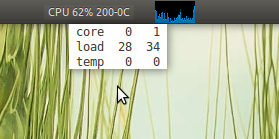
Busyhot gnome panel applet

Busyhot on the left Vs. default CPU monitor applet for GNOME

It’s a useful tool in particular for overclockers who need to keep an eye on processor temperature.

Download

Download .debs for for busyhot @ http://kornelix.squarespace.com/packages/

Once installed right click on your panel, select ‘Add to panel...’ and choose ‘Busyhot’.

Related posts:

  1. Cardapio – alternative Gnome panel menu, launcher & so much more
  2. GNOME Music Applet dead, long live PanFlute
Post a comment or leave a trackback: Trackback URL.
  • ninjapirate89

    OMG! It’s not an indicator!! :P

    • Anonymous

      an applet and an indicator is about same :o

      • http://www.google.com/profiles/harveycabaguio Harvey

        Except applets are more customizable.

  • http://anxiousnut.wordprss.com Anxious Nut

    Yeah i think im gonna need this since my processor overheated several times in the past week!!

  • http://twitter.com/shishimaru1000 Salvatore Cresce

    Temperature is always on 0°C or…?

    • Kornelix

      Usually adding “coretemp” to the file /etc/modules will get the temperatures.

    • Kornelix

      Usually adding “coretemp” to the file /etc/modules will get the temperatures.

  • Anonymous

    Is there anyway to stop to percentage load values adding up? With 2 cores I get over 100% load if both are over 50.

  • http://pulse.yahoo.com/_FZLZLJDCIHH5VCORAUS36TIKG4 Mas

    I’m using Docky Docklets for CPU monitoring.

  • Alastair

    This is nice but why have the grey background at all and not transparent? Is it designed to match a particular distribution? I had it in my top and bottom panel without it matching. My temperature is stuck at “200-0C” too – yay, broken computer.

    • daas88

      do you have lmsensors installed and configured?

      • Alastair

        … =P That certainly was the problem. Thanks!

  • http://omgubuntu.co.uk/ d0od

    You would be a god if you continued working on that/started a LP page for it ;)

  • http://www.facebook.com/profile.php?id=675353869 Omar WeedWall

    Use Conky these applets take too much resources, Conky is light and works just fine for it.

  • Anonymous

    When I saw that page, I thought: “is that theme supposed to be Elementary or Radiance?”