
Crebs wallpaper slideshow generator gets a PPA, new features

CreBs – the curiously named* but totally awesome slideshow wallpaper generator for Ubuntu – has gotten itself a PPA, making installation of this must-have app a breeze.
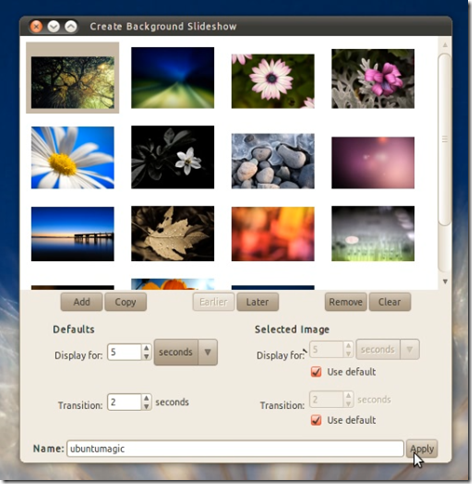
Crebs has also undergone a few fixes and tweaks since we last waxed lyrical about it, improving various UI elements, adding some icons to buttons & showing some desktop sexy via notify-osd upon successful creation of a new background set.

Crebs also allows for the re-importing of saved slideshows, meaning you can add, edit or revamps any existing ones you have created.

Install Crebs in Ubuntu

  • sudo add-apt-repository ppa:crebs/ppa
  • sudo apt-get update && sudo apt-get install crebs
You can proceed to run Crebs from via System > Preferences > ‘Create Background Slideshow’

* I know that Crebs is short for ‘Create a background slideshow’ but still… 

Related posts:

  1. Crebs: The ULTIMATE Wallpaper Slideshow application
  2. How to easily create slideshow wallpapers in Ubuntu
  3. Banshee Playlist Generator ‘Mirage’
Post a comment or leave a trackback: Trackback URL.
  • carlf

    Not a must have app for me.

    You must be up really early over there. It’s 10:20 pm here.

    • daas88

      Geeks don’t sleep :P

  • http://geekninja.blogspot.com/ AW

    Is there no way to create one-click PPA links?

    • Sebas310

      Not really. Disappointing, eh?

  • https://launchpad.net/~rugby471 Andrew

    Great idea, but I have some comments about the app:

    1) I’m sorry but the application just looks ugly. By this I mean the padding & layout is just all over the place. This is easy to fix, it just replies on the dev(s) using glade/pygtk properly. Also looking at the screenshot, I wouldn’t know how to use this at first glance, don’t know how easy to use it is in practice.

    2) “showing some desktop sexy via notify-osd upon successful creation of a new background set” – why is this a good thing? In my opinion, this is abuse of the notification system. Why wouldn’t a dialog suffice?

    3) Whilst this is sorely needed, this type of app should be integrated into the Gnome appearance properties dialog, not a separate app.

    Sorry to be a hater :-(

  • linuxhater

    So, as it seems that back on the last omg blog entry my answer was not read by anyone, I’ll post it here again.

    —————————————————————–
    So, I’m back: http://img101.imageshack.us/img101/1838/screens...

    It’s not perfect but better than before. It would be better to use a HBox in “selected image” gtkframe – description lef, controls right.

    Btw, I had to disable two labels I removed (lblspecifics?) to make the code work again.

    Guys, I now fully understand why most GUIs on Linux look so ugly! It’s simply impossible to make decent guis with such tools like Glade. I now use Windows Forms designer for a decade. And even in VB4 the gui designer was a lot easier to use and much much more powerful than Glade.
    How can anyone work with this? Realy, I don’t get it.

    But back to topic. You can download the sources from: http://rapidshare.com/files/392602502/CreBS_bet...

    So, I’ll get back to my Visual Studio/WinForms Designer and C# ;-)

  • linuxhater

    Working screenshot of the improved layout: http://yfrog.com/2rscreenshot1whp

  • http://www.obfuscatepenguin.net/ Marc

    @Andrew: Thank you for your comments. Detailed criticisms are useful for catching any problems I may have overlooked.

    1) The screenshot is outdated so shouldn’t be used to fully judge the current state. The new UI has better alignment.
    http://img.obfuscatepenguin.net/crebs/crebs__640x560.jpg
    If you can use GNOME’s Background preferences window, you should be able to figure this out. For example, before you add any images, there is only one active button: Add. But try it for yourself and see. If installed, use System>Preferences>Create Background Slideshow

    2) Originally there was no notification: seeing the wallpaper change should have been all the feedback required. But I realised that there was a possibility that the current wallpaper was also in the slideshow, which could mask the change and make it appear not to have worked.
    A nagging dialog, which then must be dismissed, seemed like a very invasive way to cover that base. Far from being an abuse, I believe that a notification is far more appropriate (and it certainly wasn’t added for its own sake, to be “sexy”). It might be handy to be told, but it certainly isn’t essential information. Think “By the way, I’ve changed your wallpaper”, rather than “Hey! Hey, you! Pay attention! I’ve changed your wallpaper. Aren’t you going to tell me that’s OK?”
    To quote sabdfl:
    If you are at your desktop when a notification comes by, you will sense it, and if you want you can LOOK at it, and it will be beautiful and clear and easy to parse. If you want to ignore it, you can safely do that and it will always go away without you having to dismiss it. If you miss it, that’s OK.

    3) I agree. This kind of functionality should already exist in GNOME. But it doesn’t, and I don’t know how to patch that. I can do this though until someone else does sort GNOME out.